
1. Introducció
Gràcies per la compraasing the ELECOM Open-Ear Wireless Headphones (Model: LBT-OWS02ECMWH). These headphones are designed to provide a unique audio experience by allowing you to enjoy music and calls while remaining aware of your surroundings. Featuring Bluetooth 5.4 connectivity, IPX5 water resistance, and comfortable ear-hook design, they are suitable for various activities, including sports and daily use.
2. Informació de seguretat
Si us plau, llegiu atentament totes les instruccions de seguretat abans d'utilitzar aquest producte. Conserveu aquest manual per a futures consultes.
- No desmunteu, repareu o modifiqueu el producte.
- Avoid exposing the product to extreme temperatures, direct sunlight, or high humidity.
- Mantenir fora de l'abast dels nens i mascotes.
- Do not use the product while driving or cycling in situations where awareness of surroundings is critical.
- Prolonged listening at high volume may cause hearing damage.
- Dispose of the product and its battery according to local regulations.
3. Contingut del paquet
Assegureu-vos que tots els elements siguin presents al paquet:
- Open-Ear Wireless Headphones (Left and Right)
- Estoig de càrrega
- USB Charging Cable (USB-A to USB Type-C)
- Guia d'inici ràpid
4. Diagrama del producte
Familiarize yourself with the components of your headphones and charging case.

Image: The ELECOM Open-Ear Wireless Headphones (white) and their charging case, showcasing the ear-hook design.

Imatge: Un primer pla view of a single ELECOM Open-Ear Wireless Headphone, highlighting its compact design and touch sensor area.
5. Configuració
5.1 Càrrega dels auriculars i l'estoig
Abans del primer ús, carregueu completament els auriculars i l'estoig de càrrega.
- Col·loqueu els auriculars a la caixa de càrrega.
- Connect the supplied USB Type-C cable to the charging port on the case and to a USB power adapter (not included) or a computer's USB port.
- Els indicadors lluminosos de la caixa mostraran l'estat de càrrega.
Temps de càrrega:
- Auriculars: aproximadament 1.5 hores
- Caixa de càrrega: aproximadament 1.5 hores

Image: The ELECOM charging case connected to a USB-C charging cable.
5.2 Vinculació Bluetooth
To connect your headphones to a device for the first time:
- Obre l'estoig de càrrega. Els auriculars entraran automàticament en mode d'emparellament.
- Al dispositiu (telèfon intel·ligent, tauleta, PC), activeu el Bluetooth i cerqueu els dispositius disponibles.
- Select "LBT-OWS02ECMWH" from the list of found devices.
- Once connected, the headphones will automatically pair with your device when taken out of the case.
The headphones support multi-point connection and can register up to 8 devices.

Image: A person holding the charging case with headphones, next to a smartphone displaying Bluetooth settings, indicating the pairing process.
6. Instruccions de funcionament
The headphones feature touch sensors for various controls.
6.1 Encès/Apagat
- Encès: Open the charging case or take out the headphones. They will power on automatically.
- Apagar: Place the headphones back into the charging case and close the lid. They will power off automatically.
6.2 Reproducció de música
- Reproduir/pausa: Tap the touch sensor on either headphone once.
- Pista següent: Double-tap the touch sensor on the right headphone.
- Pista anterior: Double-tap the touch sensor on the left headphone.
6.3 Control de volum
- Pujar el volum: Triple-tap the touch sensor on the right headphone.
- Baixar el volum: Triple-tap the touch sensor on the left headphone.
6.4 Gestió de trucades
The headphones have a built-in microphone for calls.
- Respondre/Finalitzar la trucada: Tap the touch sensor on either headphone once.
- Rebutja la trucada: Press and hold the touch sensor on either headphone for 2 seconds.
6.5 Assistent de veu
The headphones support voice assistants like Siri and Google Assistant.
- Activa l'Assistent de veu: Press and hold the touch sensor on either headphone for 2 seconds (when not on a call).
6.6 Ús d'un sol auricular
You can use either the left or right headphone independently. If one headphone is not in use, ensure it is powered off or stored in the charging case.
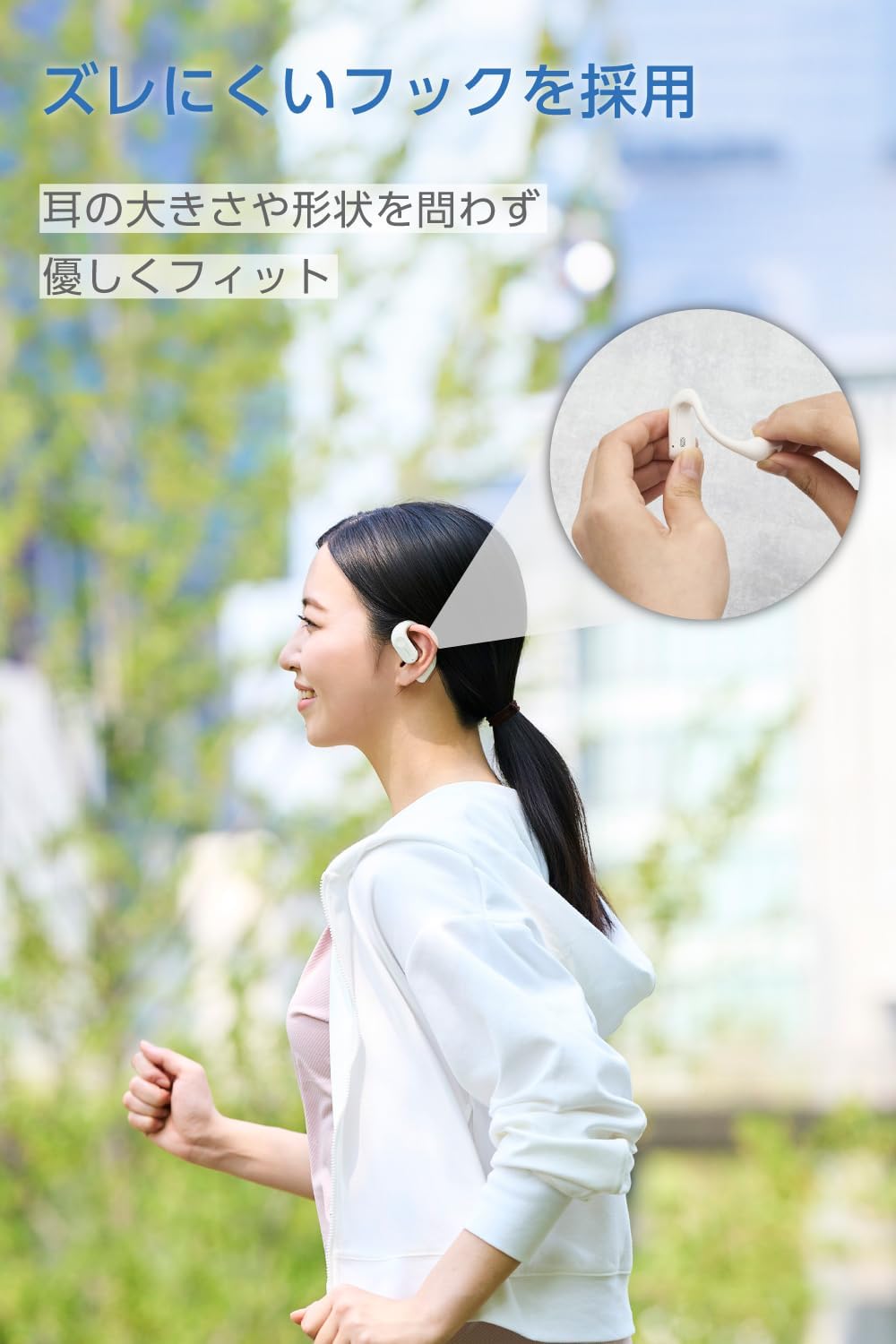
Image: A woman wearing the ELECOM Open-Ear Wireless Headphones, demonstrating the secure and comfortable fit during activity.
7. Manteniment
Per garantir la longevitat i el rendiment òptim dels vostres auriculars:
- Wipe the headphones and charging case with a soft, dry cloth.
- No utilitzeu netejadors abrasius ni dissolvents.
- The headphones are IPX5 water-resistant, meaning they can withstand sweat and splashes. Do not submerge them in water. The charging case is not water-resistant.
- Guarda els auriculars a la seva funda de càrrega quan no els facis servir per protegir-los i mantenir-los carregats.

Image: The ELECOM Open-Ear Wireless Headphones with water droplets, illustrating their IPX5 water resistance.
8. Solució De Problemes
Si trobeu problemes, proveu les solucions següents:
- Sense so: Ensure the headphones are charged, paired correctly, and the volume on both the headphones and your device is turned up.
- No es pot emparellar: Make sure Bluetooth is enabled on your device and the headphones are in pairing mode. Try turning Bluetooth off and on again on your device.
- Problemes de càrrega: Check if the charging cable is securely connected and the power source is working. Ensure the headphones are correctly seated in the charging case.
- Connexió intermitent: Ensure your device is within the 10m Bluetooth range and there are no significant obstacles between the headphones and your device.
If the problem persists, refer to the Quick Start Guide or contact customer support.
9. Especificacions
| Mètode de comunicació | Bluetooth® Standard Version 5.4 |
| Sortida | Bluetooth Power Class 2 |
| Distància màxima de comunicació | Aprox. 10 m (sense obstacles) |
| Banda de freqüència | Banda de 2.4 GHz |
| Mètode de modulació | FHSS (espectre de propagació de salt de freqüència) |
| Bluetooth Pro compatiblefiles | A2DP, AVRCP, HFP |
| Còdecs compatibles amb A2DP | AAC, SBC |
| Protecció de contingut A2DP | SCMS-T |
| Max Registered Devices | 8 unitats |
| Multipunt (mode de espera simultani) | Admet |
| Rang de freqüència de reproducció (A2DP) | 20-20,000 Hz |
| Temps de reproducció contínua | Approx. 7 hours (up to 22 hours with charging case) |
| Font d'alimentació | Bateria recarregable d'ions de liti |
| Voltage | DC5V |
| Temps de càrrega | Auriculars: aproximadament 1.5 hores, funda de càrrega: aproximadament 1.5 hores |
| Tipus de micròfon | tipus MEMS |
| Tipus d’auriculars | Orella oberta |
| Unitat de Conductor | Aprox. 12 mm × 17 mm |
| Temperatura de funcionament | 5 °C a 35 °C |
| Humitat de funcionament | 20% a 80% (sense condensació) |
| Resistència a l'aigua | IPX5 (headphones only) |
| Dimensions (Headphone per ear) | Aprox. 53 mm × 37.8 mm × 17.3 mm |
| Dimensions (estoig de càrrega) | Aprox. 83 mm × 66.4 mm × 28.3 mm |
| Weight (Headphone per ear) | Aprox. 9.0 g |
| Pes (cas de càrrega) | 61.0 g |
| Color | Lluna Blanca |
10. Informació de la garantia
Aquest producte ve amb un 1 any de garantia des de la data de compra. Conserveu el comprovant de compra per a reclamacions de garantia. La garantia cobreix els defectes de fabricació, però no cobreix els danys causats per un mal ús, accidents, modificacions no autoritzades o desgast normal.
11. Suport
For further assistance, product information, or troubleshooting not covered in this manual, please visit the official ELECOM product support weblloc:
ELECOM Product Support: 8056.jp
També podeu visitar el Botiga de la marca ELECOM a Amazon per a més productes i informació.