
1. Introducció
This manual provides detailed instructions for the installation, operation, and maintenance of your Blackspider BSM1190BT Media Player. Please read this manual thoroughly before using the product to ensure proper function and to prevent damage.
2. Contingut del paquet
Verifiqueu que tots els elements que s'enumeren a continuació s'inclouen al vostre paquet:
- Blackspider BSM1190BT Media Player
- Control remot
- Micròfon extern
- Arnès de cablejat
- Manual d'usuari

Image: Contents of the Blackspider BSM1190BT package, showing the media player, remote, external microphone, wiring harness, and user manual.
3. Producte acabatview
3.1 Tauler frontal
The front panel features the display, control buttons, USB port, Type-C charging port, and AUX input.
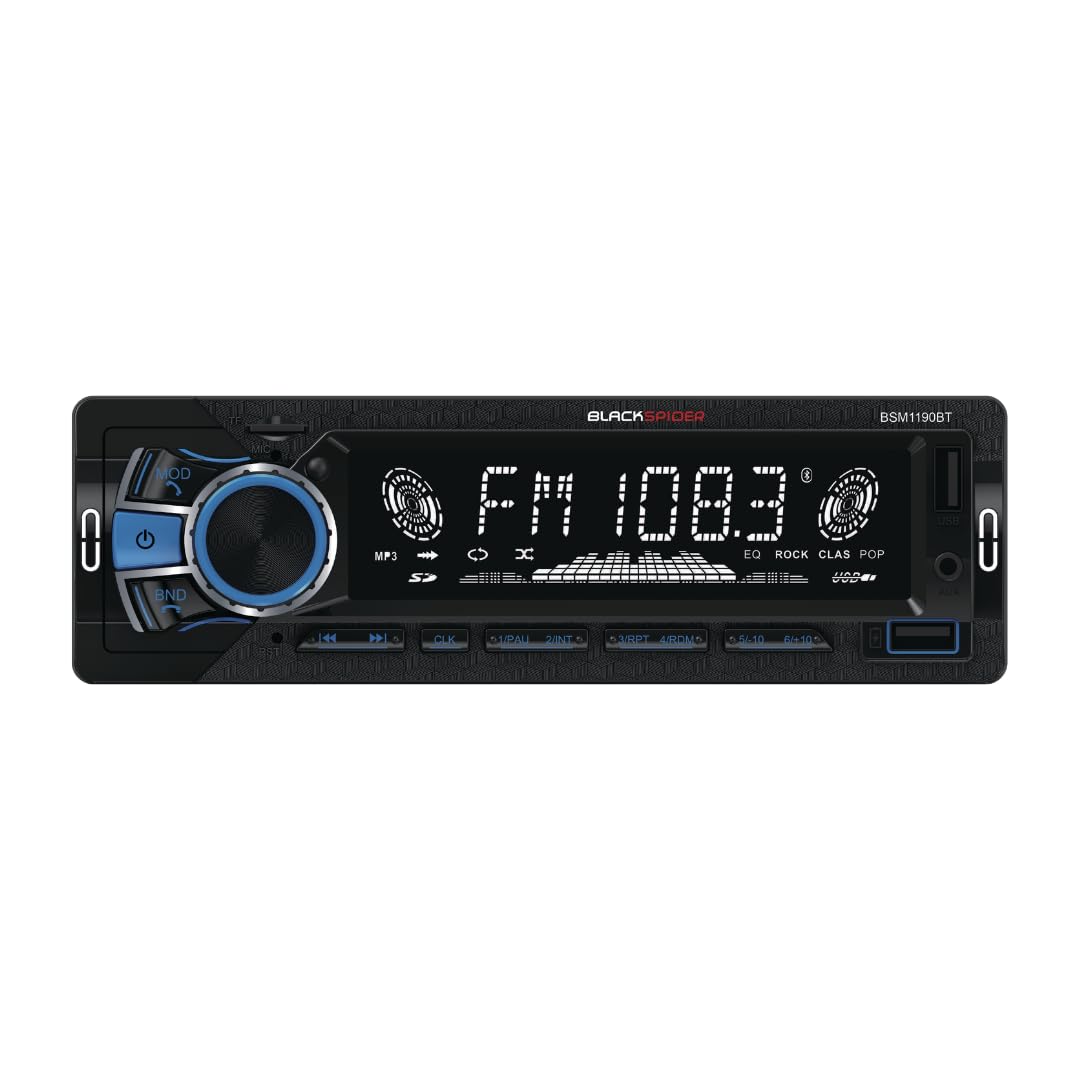
Imatge: Frontal view of the BSM1190BT media player, highlighting the illuminated display and various controls.
3.2 Panell posterior
The rear panel includes the wiring harness connector, antenna input, and audio preouts.

Imatge: Part posterior view of the BSM1190BT media player, detailing the connection ports and heat sink.
4. Configuració i instal·lació
The Blackspider BSM1190BT is a single DIN fixed face unit. Professional installation is recommended.
4.1 Connexions de cablejat
Connect the included wiring harness to your vehicle's power, ground, and speaker wires. Ensure correct polarity to prevent damage. The unit features 2 preouts for connecting external ampaixecadors.
4.2 External Microphone
Connect the external microphone to the designated input on the rear of the unit or as indicated in the wiring diagram. Position the microphone in a location that allows for clear voice pickup, such as near the sun visor or steering column.
4.3 Muntatge
Secure the single DIN chassis into your vehicle's dashboard opening. Ensure the unit is firmly mounted to prevent vibrations and ensure stable operation.
5. Instruccions de funcionament
5.1 Operacions bàsiques
- Encès/apagat: Press the power button (usually the volume knob) to turn the unit on or off.
- Control de volum: Gireu el botó de volum per ajustar el nivell d'àudio.
- Selecció del mode: Press the MODE button to cycle through available sources: FM, Bluetooth, USB, AUX.
5.2 Connectivitat Bluetooth
The BSM1190BT supports wireless music streaming and hands-free calling.
- Assegureu-vos que el Bluetooth estigui habilitat al vostre dispositiu mòbil.
- Select Bluetooth mode on the media player. The display will show "BT PAIRING" or similar.
- Cerca "BSM1190BT" in your device's Bluetooth settings and select it to pair.
- Once paired, you can stream audio or make/receive calls. Use the front panel buttons or remote control to manage calls.
5.3 USB Music Playback and Type-C Charging
- Reproducció USB: Inseriu una unitat USB que contingui àudio files into the USB port. The unit will automatically switch to USB mode and begin playback.
- Càrrega tipus C: Connect your compatible smartphone or device to the Type-C port for charging.
5.4 Entrada AUX
Connect external audio devices (e.g., MP3 players) to the 3.5mm AUX input jack on the front panel using a standard 3.5mm audio cable. Select AUX mode on the media player to listen to audio from the connected device.
5.5 Ràdio FM
- Escaneig automàtic: In FM mode, press and hold the BAND button to automatically scan and store strong stations.
- Sintonització manual: Use the seek buttons (◀◀/▶▶) to manually tune to desired frequencies.
- Presets: Store your favorite stations using the numbered preset buttons (1-6).
5.6 Equalitzador (EQ)
The unit features preset EQ settings. Press the EQ button (if available on the remote or front panel) to cycle through options like POP, ROCK, CLASS, JAZZ, etc., or to select a custom setting if applicable.
6. Manteniment
- Neteja: Feu servir un drap suau i sec per netejar el panell frontal de la unitat. No utilitzeu productes de neteja abrasius ni dissolvents.
- Substitució de fusibles: If the unit does not power on, check the fuse located on the rear panel. Replace it with a fuse of the same rating (e.g., 10A).
7. Solució De Problemes
| Problema | Causa possible | Solució |
|---|---|---|
| Sense poder | Fusible fundit; cablejat incorrecte; bateria del vehicle baixa | Check/replace fuse; verify wiring connections; check vehicle battery |
| Sense so | Volume too low; incorrect source selected; speaker wiring issue | Increase volume; select correct source; check speaker connections |
| Bluetooth no connectat | Bluetooth not enabled on device; unit not in pairing mode; interference | Enable Bluetooth on device; put unit in pairing mode; move closer to unit |
| No es reprodueix l'USB | Sense suport file format; damaged USB drive; USB not inserted correctly | Ensure supported file types; try another USB drive; re-insert USB |
8. Especificacions
- Número de model: BSM1190BT
- Marca: Blackspider
- Tecnologia de connectivitat: Bluetooth, USB
- Característica especial: Bluetooth integrat
- Dispositius compatibles: Smartphone
- Color: Negre
- Dimensions del producte (P x A x A): 21D x 18W x 8H centímetres
- Pes de l'article: 0.55 quilos
- Mètode de control: Pulsador
- Potència de sortida: 4 x 80 watts (màx.)
- Sortida d'àudio: 2 Preouts
- Entrada: Jack AUX de 3.5 mm
- Port de càrrega: Tipus-C
- Ràdio: FM Radio with Preset EQ
- País d'origen: Xina
9. Garantia i Suport
This Blackspider BSM1190BT Media Player comes with a 1 anys de garantia des de la data de compra. Si us plau, conserveu el comprovant de compra per a reclamacions de garantia.
For technical support or warranty inquiries, please contact your retailer or the Blackspider customer service department.