
1. Introducció
The Retevis RB666S is a user-friendly, rechargeable two-way radio designed for clear and reliable communication. It is ideal for family activities, hiking, camping, and other outdoor adventures. This manual provides detailed instructions on how to set up, operate, and maintain your RB666S walkie talkie.

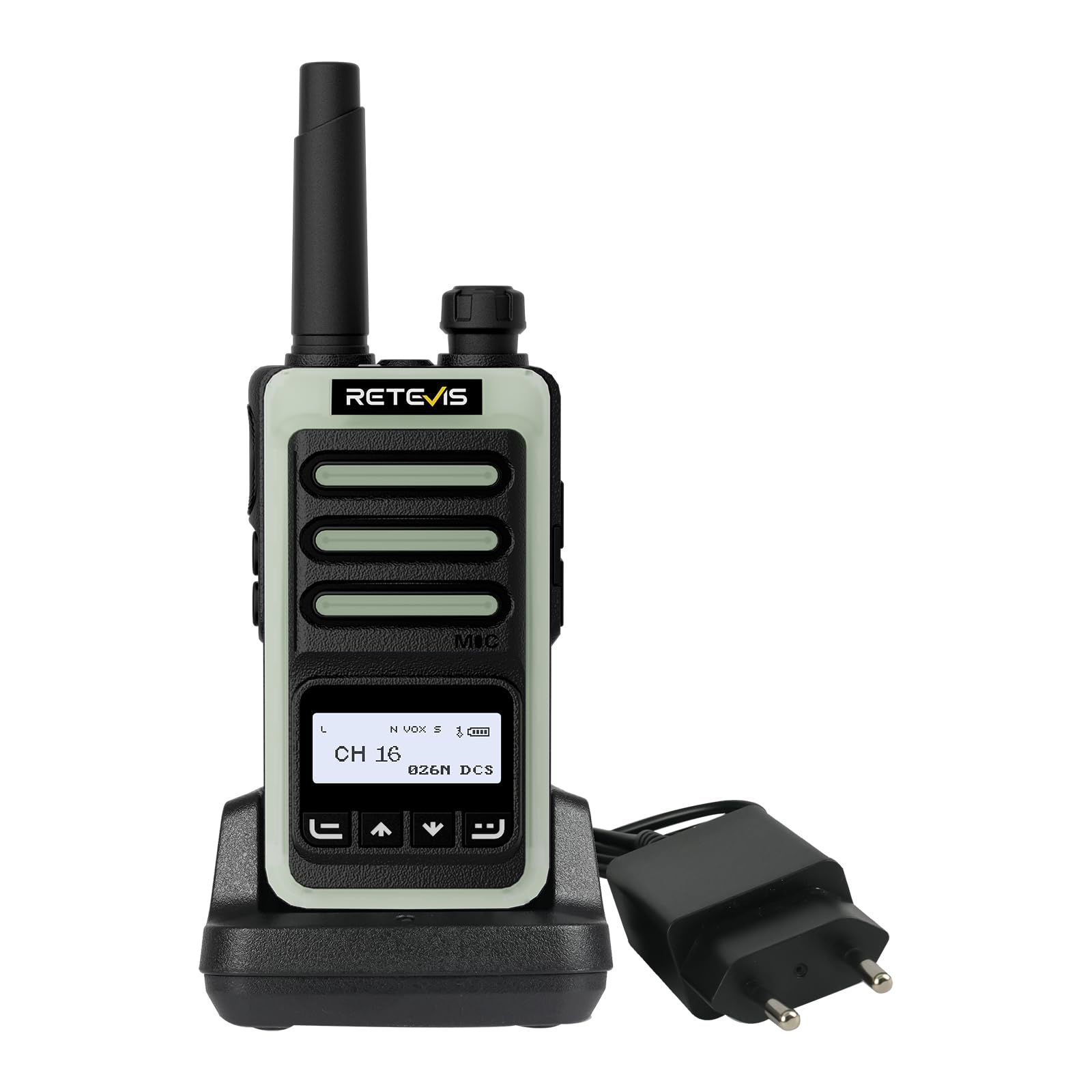
The Retevis RB666S walkie talkie is designed for easy communication during outdoor activities.
2. Contingut del paquet
Si us plau, reviseu el paquet amb cura per assegurar-vos que hi hagi tots els elements:
- 1 x RB666S Walkie Talkie
- 1 x bateria
- 1 x Base de càrrega
- 1 x cable de càrrega tipus C
- 1 x adaptador
- 1 x Clip de cinturó
- 1 x cordó
- 1 x Manual d'usuari

All components included in the RB666S package.
3. Producte acabatview
3.1 Components
Familiarize yourself with the main components of your RB666S walkie talkie:

Detallada view of the RB666S walkie talkie components.
- Botó d'encesa/apagada/volum: Gireu per encendre/apagar i ajustar el volum.
- Llanterna: Llum LED integrada.
- Port de càrrega: Type-C port for direct charging.
- Llum indicadora: Mostra l'estat (per exemple, transmetent, rebent, carregant).
- Botó PTT (Prem per parlar): Mantingueu premut per transmetre la vostra veu.
- Botó lateral 1: Multi-function button, typically for emergency alarm.
- Botó lateral 2: Multi-function button, typically for flashlight activation.
- MIC: Micròfon per a entrada de veu.
- Pantalla de visualització: 1.3-inch LCD for channel, battery, and signal information.
- Botó de menú: Accedeix a les opcions del menú.
- Up/Channel+ Button: Navigates up or changes channel.
- Down/Channel- Button: Navigates down or changes channel.
- Botó enrere: Returns to previous screen or exits menu.
4. Configuració
4.1 Instal·lació de la bateria
- Assegureu-vos que el walkie-talkie estigui apagat.
- Localitzeu la tapa del compartiment de la bateria a la part posterior de la unitat.
- Feu lliscar la coberta cap avall i retireu-la.
- Insert the battery, aligning the contacts correctly.
- Torneu a col·locar la tapa del compartiment de la bateria i feu-la lliscar cap amunt fins que encaixi al seu lloc.
4.2 Fixació del clip de cinturó i del cordó
- Fixeu el clip del cinturó a la ranura designada a la part posterior de la ràdio per a un transport còmode.
- Thread the lanyard through the loop on the top or side of the radio for added security.
5. Càrrega del dispositiu
Before first use, fully charge the battery. The RB666S offers two convenient charging methods:
5.1 Ús de la base de càrrega
- Connect the adapter to the charging cradle and plug it into a power outlet.
- Place the walkie talkie into the charging cradle. Ensure the charging contacts align.
- The indicator light on the radio or cradle will show the charging status (e.g., red for charging, green for fully charged).
5.2 Using the Type-C Cable
- Connect the Type-C charging cable to the charging port on the side of the walkie talkie.
- Plug the other end of the cable into a compatible USB power source (e.g., wall adapter, car charger, power bank, PC).
- La llum indicadora mostrarà l'estat de càrrega.
Una càrrega completa triga aproximadament 1 hores, proporcionant més 14 hours of autonomy i més 46 hours of standby time.
Fast charging in 1 hour using the cradle.

Versatile Type-C charging options.
6. Funcionament bàsic
6.1 Engegada/Apagada i Ajust de Volum
- Per engegar-lo, gireu el botó d'encesa/apagada/volum en sentit horari fins que sentiu un clic.
- Per apagar-lo, gireu el botó en sentit antihorari fins que sentiu un clic.
- Ajusteu el volum girant el mateix botó.
6.2 Pantalla LCD
The 1.3-inch LCD screen provides essential information at a glance:
- Número de canal: Indicates the current communication channel.
- Nivell de bateria: Mostra la càrrega restant de la bateria.
- Intensitat del senyal: Displays the strength of the received signal.

Clear 1.3-inch LCD screen for essential information.
6.3 Selecció d'un canal
Use the Up/Channel+ and Down/Channel- buttons to select your desired communication channel. Ensure all radios in your group are on the same channel.
6.4 Transmissió i recepció
- A transmetre, press and hold the PTT (Push-to-Talk) button. Speak clearly into the microphone. The indicator light will typically glow red.
- A rebre, release the PTT button. The indicator light will typically glow green when a signal is received.

Intuitive 4-button layout for easy control.
7. Funcions avançades
7.1 Clear Sound Quality
The RB666S is engineered to provide clear audio, ensuring every word is heard distinctly, even in noisy outdoor environments like windy trails or busy campllocs.

Enjoy clear sound quality for effective communication.
7.2 Funció VOX (centraleta operada per veu)
La funció VOX permet la transmissió amb mans lliures. Quan s'activa, la ràdio transmetrà automàticament quan detecti la teva veu, eliminant la necessitat de prémer el botó PTT.

Hands-free communication with VOX function.
7.3 One-Touch Pairing
Simplify connecting with other compatible radios using the one-touch pairing feature. Refer to the specific instructions for pairing in the full manual if available.

Effortless connection with one-touch pairing.
7.4 CTCSS/DCS (Continuous Tone-Coded Squelch System / Digital Coded Squelch)
Utilize CTCSS/DCS codes to filter out unwanted signals and ensure more private communication within your group. This feature helps to reduce interference from other users on the same channel.

Enhanced privacy with CTCSS/DCS codes.
7.5 Llanterna LED
The integrated LED flashlight provides illumination for navigating in low-light conditions. Briefly press Side Button 2 to activate or deactivate the flashlight.

Illuminate your path with the built-in LED flashlight.
7.6 Fluorescent Design
The RB666S features a fluorescent design, making it highly visible and easy to locate in low-light outdoor environments, enhancing safety during nighttime activities.

High visibility in low light with fluorescent design.
7.7 Alarma d'emergència
For added safety, the RB666S includes an emergency alarm function. Long-press Side Button 1 to activate the alarm, alerting others to your situation.

Activate the emergency alarm for enhanced safety.
7.8 Channel Lock / Keypad Lock
To prevent accidental channel changes or button presses, you can activate the channel lock or keypad lock feature. This ensures stable communication, especially during active use like climbing or cycling.

Maintain stable communication with channel lock.
8. Manteniment
- Neteja: Utilitzeu un suau, damp drap per netejar l'exterior de la ràdio. No utilitzeu productes químics agressius ni netejadors abrasius.
- Emmagatzematge: Store the walkie talkie in a cool, dry place away from direct sunlight and extreme temperatures. Remove the battery if storing for extended periods.
- Cura de la bateria: Avoid fully discharging the battery frequently. Recharge regularly to prolong battery life.
- Eviteu l'aigua: While designed for outdoor use, avoid submerging the radio in water unless specified as waterproof.
9. Solució De Problemes
| Problema | Causa possible | Solució |
|---|---|---|
| La ràdio no s'encén | La bateria està baixa o no està instal·lada correctament. | Carregueu la bateria o torneu-la a instal·lar correctament. |
| No es pot transmetre ni rebre | Canal incorrecte seleccionat; fora de l'abast; bateria baixa. | Ensure correct channel; move closer to other radios; charge battery. |
| Mala qualitat d'àudio | Volume too low; interference; microphone/speaker obstructed. | Adjust volume; move away from interference sources; check microphone/speaker. |
| El teclat no respon | El bloqueig del teclat està activat. | Deactivate keypad lock (refer to specific instructions in the full manual). |
10. Especificacions
- Marca: Retevis
- Número de model: RB666S
- Nombre de canals: 16
- Bateria: 1 x 12V (inclòs)
- Voltage: 7.4 Volts
- Dimensions del producte (P x A x A): 2.5 x 5.3 x 9.5 cm (0.98 x 2.09 x 3.74 polzades)
- Visualització: Pantalla LCD de 1.3 polzades
- Càrrega: Type-C Fast Charging, Charging Cradle
- Característiques especials: LED Flashlight, Fluorescent Design, Emergency Alarm, VOX, CTCSS/DCS, Channel Lock
11. Garantia i Suport
11.1 Informació de la garantia
Retevis offers a 2 any de garantia per al cos de la ràdio i un 1 any de garantia for accessories. We also provide a Política de devolució sense motiu de 30 dies. Beyond the warranty period, maintenance services are available, with buyers responsible for associated costs.
11.2 Atenció al client
For any questions, issues, or support needs, please contact us through Amazon. We are committed to responding to your inquiries within 12 hours.
11.3 Informació de seguretat
For important safety guidelines, please refer to the official safety information document: Informació de seguretat (PDF)