
1. Introducció
Thank you for choosing the FIREBAT Ryzen7-5060-16GB/512GB Gaming Laptop. This manual provides essential information for setting up, operating, maintaining, and troubleshooting your new device. Please read this manual thoroughly before using the laptop to ensure optimal performance and longevity.
2. Contingut del paquet
Verifiqueu que tots els elements siguin presents al vostre paquet:
- FIREBAT Ryzen7-5060-16GB/512GB Gaming Laptop
- Adaptador de corrent (210 W)
- Cable d'alimentació
- Altaveus (integrats)
- Manual d'usuari (aquest document)
3. Producte acabatview
The FIREBAT Gaming Laptop is designed for high-performance computing, featuring a 16-inch 2.5K QHD 240Hz display, AMD Ryzen 7 H255 CPU, and NVIDIA RTX 5060 GPU.
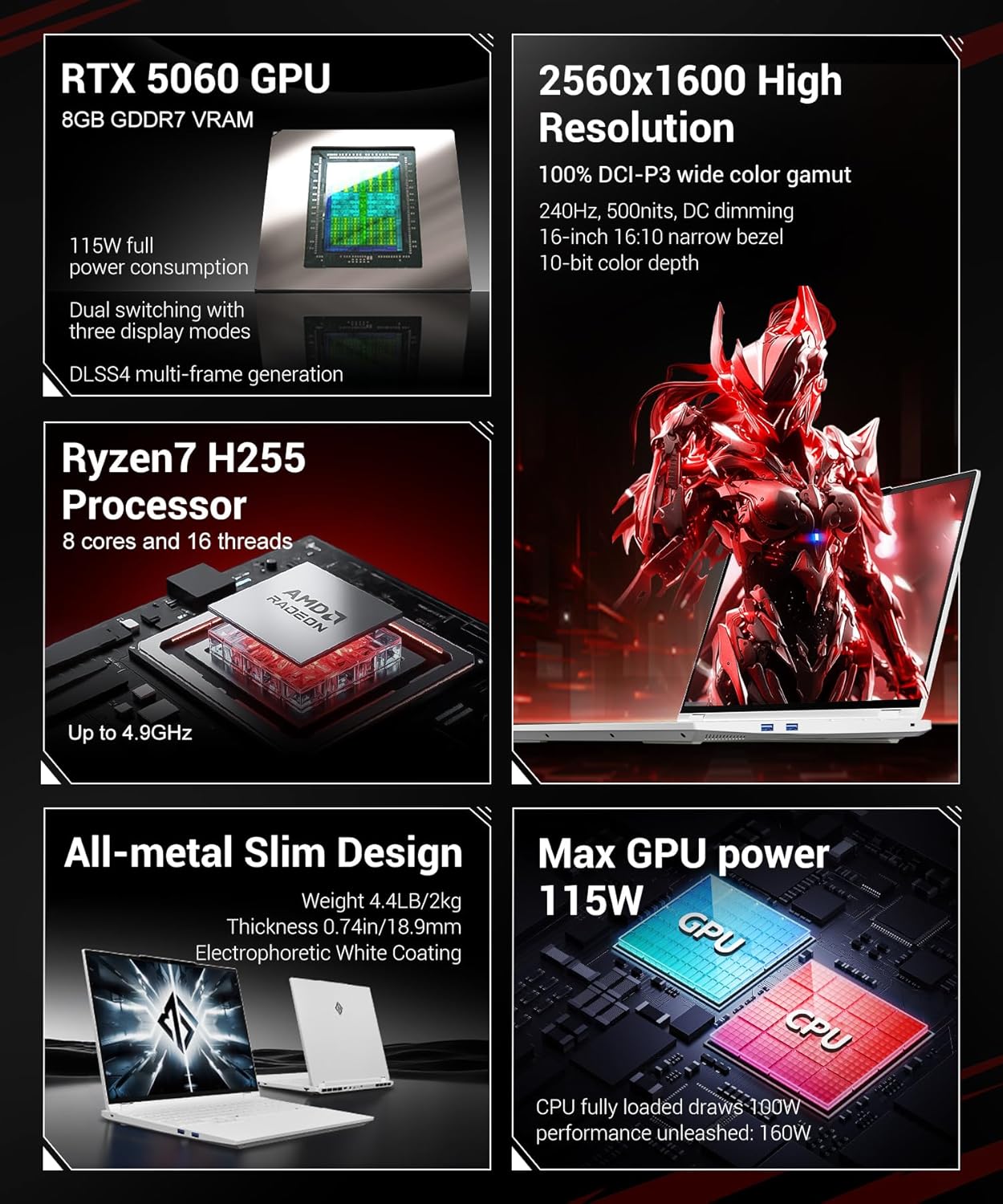
Figure 3.1: FIREBAT Gaming Laptop - Front View
3.1 Característiques clau
- Processador: AMD Ryzen 7 H255 (8 Cores, 16 Threads, up to 4.9GHz)
- Gràfics: NVIDIA RTX 5060 GPU (8GB GDDR7 VRAM, 115W TGP)
- Visualització: 16-inch 2.5K QHD (2560x1600) IPS, 240Hz, 500nits, 100% DCI-P3, 10-bit color depth
- Memòria: 16GB DDR5 5600MHz RAM (expandable up to 96GB)
- Emmagatzematge: 512GB PCIe3.0 M.2 2280 SSD (dual PCIe4.0 hard drive interface)
- Refrigeració: Dual fans, three heat pipes, dual air outlets
- Connectivitat: Wi-Fi AX (6E), Bluetooth 5.3, 2.5Gbps LAN
- Seguretat: IR Facial Recognition Camera
- Disseny: All-metal chassis, RGB Backlit Keyboard

Figure 3.2: Laptop Design and Dimensions
3.2 Ports i connectors
Familiarize yourself with the available ports on your laptop:

Figure 3.3: Laptop Ports and Connectors
- 3 USB-A 3.2 Gen1 (5 Gbps)
- 1x USB-C 4.0 Gen2 (rear, 10Gbps/DP 1.4a for integrated graphics output/PD 140W)
- 1x USB-C 3.2 Gen2 (left, 10Gbps/DP 1.4 for integrated graphics output/PD 100W)
- 1x mini DP 2.1a 40Gbps (for discrete graphics output)
- 1x HDMI 2.1 48Gbps (for discrete graphics output)
- 1x RJ45 LAN (1000Mbps)
- 1x 20V 10.5A 210W Power Input
- 1x 3.5mm 2-in-1 Audio Jack
- 1 ranura per a cadenat Kensington
4. Configuració
4.1 Connexió de l'adaptador de corrent
Before initial use, connect the power adapter to the laptop and a power outlet. This ensures the battery is charged and provides stable power for setup.
- Plug the DC output connector of the 210W power adapter into the power input port (7) on the laptop.
- Connecteu el cable d'alimentació a l'adaptador d'alimentació.
- Connecteu l'altre extrem del cable d'alimentació a una presa de corrent.
4.2 Engegada inicial i configuració del sistema operatiu
Once the power adapter is connected, you can power on your laptop.
- Obriu la tapa de l'ordinador portàtil.
- Premeu el botó d'engegada que es troba a la plataforma del teclat.
- Follow the on-screen instructions to complete the initial setup of the operating system. This typically involves selecting language, region, and setting up user accounts.
5. Instruccions de funcionament
5.1 Engegada/Apagada i Mode de repòs
- Encès: Premeu el botó d'encesa.
- Apagar: Access the operating system's power options to shut down.
- Mode de repòs: Close the laptop lid or select 'Sleep' from the operating system's power options.
5.2 Display Modes (Dual Graphics Switching)
Your laptop supports three display modes, allowing you to optimize for battery life or performance. These modes can be switched via the FIREBAT Control Center software.

Figure 5.1: Dual Graphics Switching Modes
- Integrated Graphics Output: Ideal for travel and office use, maximizing battery life.
- Direct Independent Graphics Connection: Gaming-focused, maximizing performance by directly utilizing the discrete GPU.
- Sortida híbrida: For everyday use, offering flexible switching between battery life and performance.
5.3 Modes de rendiment
The laptop features one-click switching between four performance modes to adapt to different usage scenarios.

Figure 5.2: One-Click Performance Mode Switching
- Mode de rendiment: Pursue powerful performance for demanding tasks.
- Mode de joc: Balanced performance and experience optimized for gaming.
- Customized Mode: Unleash maximum performance potential with user-defined settings.
- Mode de treball: Quiet experience with long battery life for productivity tasks.
5.4 Reconeixement facial
The integrated IR facial recognition camera allows for quick and secure login.

Figure 5.3: HD Facial Recognition Camera
- Configuració: Configure facial recognition through your operating system's security settings.
- Ús: Look at the camera to unlock the system.
- Privadesa: The camera includes a physical shielding function for privacy protection.
5.5 RGB Backlit Keyboard and Touchpad
The laptop features an RGB backlit keyboard and a glass-feel touchpad.

Figure 5.4: RGB Backlit Keyboard and Touchpad
- Il·luminació del teclat: Adjust RGB backlight settings through the system's control software.
- Touchpad: The glass-feel touchpad provides smooth and precise navigation.
5.6 Nahimic Audio Software
Enhance your audio experience with Nahimic Audio Software, providing customizable sound effects.
Figure 5.5: Nahimic Audio Software
- Instal·lació: The audio software driver must be downloaded and installed from the official FIREBAT weblloc.
- Característiques: Includes Visual Audio Radar and professional acoustic tuning by SteelSeries for different environments and games.
5.7 Vídeo oficial del producte
Video 5.1: Official FIREBAT Gaming Laptop Overview. This video demonstrates the laptop's features, including facial recognition, gaming performance, and performance mode switching.
6. Manteniment
6.1 Neteja
- Pantalla: Utilitzeu un drap suau i sense pelusa dampNetegeu amb aigua o un netejador de pantalles. Eviteu productes químics agressius.
- Teclat i xassís: Feu servir un drap suau per netejar les superfícies. Per a la pols a les esquerdes, feu servir aire comprimit.
- Ports: Gently remove dust from ports using compressed air.
6.2 Cura de la bateria
The laptop is equipped with a 5200mAh 80Wh battery.

Figure 6.1: Internal Battery Capacity
- Eviteu descarregar completament la bateria amb freqüència.
- Store the laptop in a cool, dry place if not used for extended periods, with the battery charged to around 50-70%.
- Use only the original FIREBAT power adapter.
6.3 Sistema de refrigeració
The laptop features an efficient cooling system to maintain performance.

Figure 6.2: Cooling System Design
- Assegureu-vos que les obertures de ventilació no estiguin bloquejades durant l'ús.
- Regularly clean dust from the fan vents using compressed air.
7. Solució De Problemes
Aquesta secció tracta problemes comuns que podeu trobar.
7.1 Problemes d'energia
- El portàtil no s'encén: Ensure the power adapter is securely connected and the outlet is functional. Check if the battery is completely drained.
- La bateria no es carrega: Verifiqueu que l'adaptador de corrent i el cable no estiguin danyats. Proveu una altra presa de corrent.
7.2 Problemes de visualització
- Sense pantalla: Connect an external monitor to check if the laptop is outputting video. Ensure the display mode is correctly set.
- Pantalla parpellejant: Actualitza els controladors gràfics. Comprova les connexions del cable de la pantalla si fas servir un monitor extern.
7.3 Problemes de rendiment
- Rendiment lent: Check for background applications consuming resources. Ensure cooling vents are clear. Switch to a higher performance mode if necessary.
- Sobreescalfament: Ensure proper ventilation. Clean fan vents. Consider reducing workload or adjusting performance settings.
7.4 Problemes de connectivitat
- El Wi-Fi no es connecta: Check if Wi-Fi is enabled. Restart your router and laptop. Update wireless drivers.
- El dispositiu Bluetooth no s'emparella: Assegureu-vos que el Bluetooth estigui habilitat en tots dos dispositius. Comproveu la compatibilitat i els controladors del dispositiu.
8. Especificacions
Detailed technical specifications for your FIREBAT Gaming Laptop.
| Característica | Especificació |
|---|---|
| Nom del model | Ryzen7-5060-16GB/512GB |
| Processador | AMD Ryzen 7 H255 (8 Cores, 16 Threads, up to 4.9 GHz) |
| Coprocessador gràfic | NVIDIA RTX 5060 GPU |
| Mida de la RAM de la targeta gràfica | 8 GB GDDR7 |
| Mida de la pantalla | 16 polzades |
| Resolució de pantalla màxima | 2560 x 1600 pixels (2.5K QHD) |
| Freqüència d'actualització | 240 Hz |
| RAM | 16GB DDR5 5600MHz (8GBx2) |
| Disc dur | 512GB NVMe SSD (PCIe3.0 M.2 2280) |
| Tipus sense fil | 802.11ax (Wi-Fi 6E), Bluetooth 5.3 |
| LAN | Ethernet d'2.5 Gbps |
| Ports USB | 3x USB-A 3.2 Gen1, 1x USB-C 4.0 Gen2, 1x USB-C 3.2 Gen2 |
| Sortida de vídeo | 1x mini DP 2.1a, 1x HDMI 2.1, 2x USB-C with DP 1.4/1.4a |
| Bateria | 5200 mAh 80 Wh |
| Sistema operatiu | Default (as shipped) |
| Pes de l'article | 4.6 lliures (2.09 kg) |
| Dimensions del producte | 14 x 9.7 x 0.9 polzades (35.56 x 24.64 x 2.29 cm) |
| Color | Blanc |
9. Garantia i Suport
For warranty information and technical support, please refer to the documentation included with your purchase or visit the official FIREBAT weblloc web. Conserveu el comprovant de compra per a reclamacions de garantia.
- Assistència en línia: Visit the FIREBAT official website for FAQs, driver downloads, and support contact information.
- Atenció al client: Contact FIREBAT customer service for assistance with product issues or warranty claims.