
1. Producte acabatview
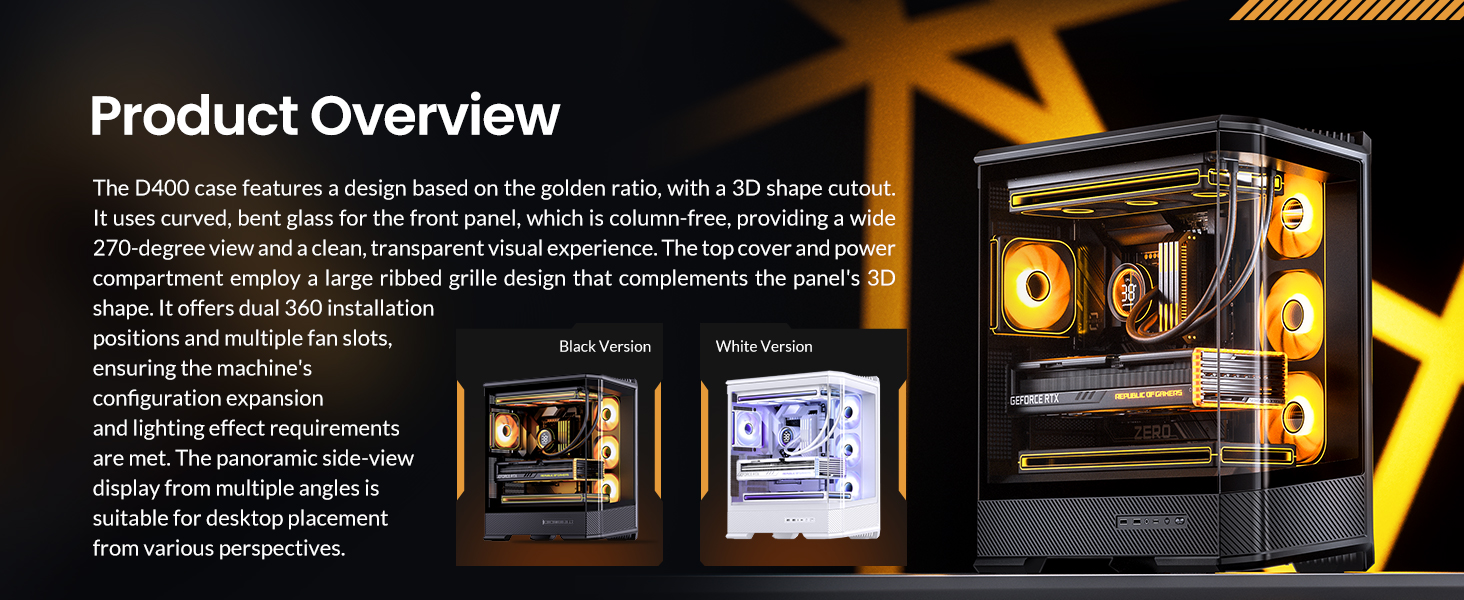
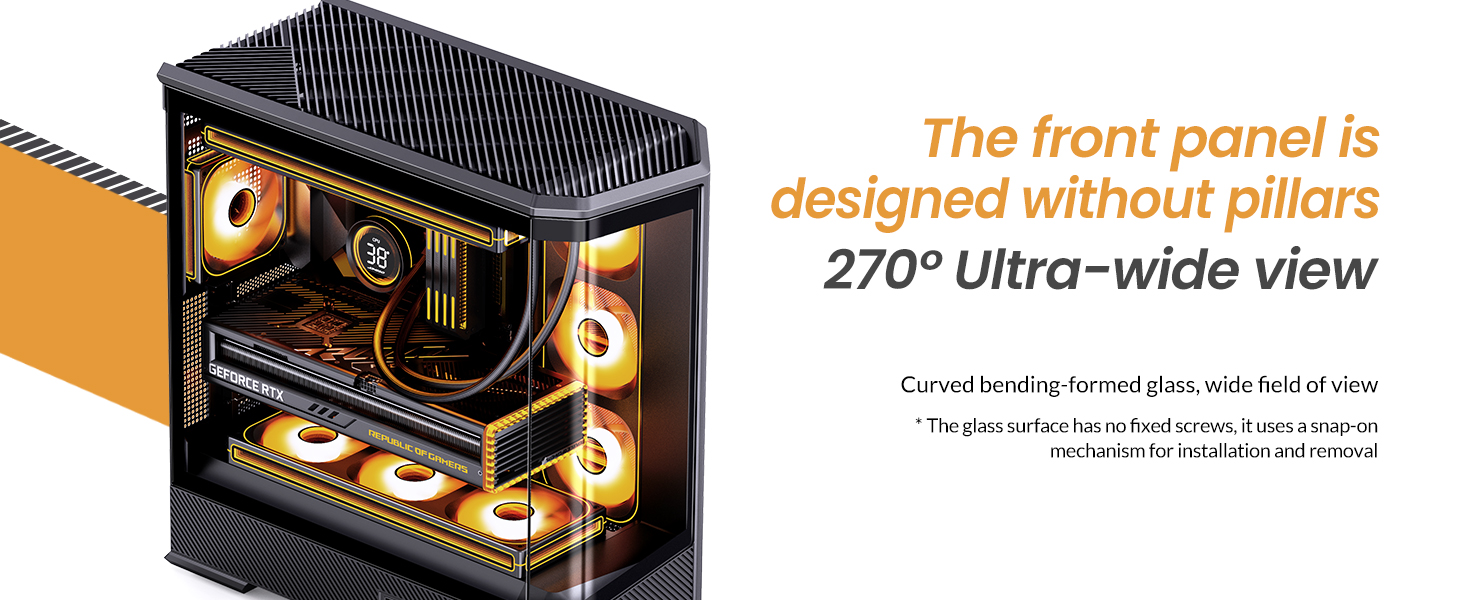
The JONSBO D400 is a white ATX Mid-Tower PC case featuring a three-dimensional beveled curved glass design, allowing for clear visibility of internal hardware. It supports BTF motherboards, ATX power supplies, and dual 360mm AIO liquid coolers, offering extensive cooling and component compatibility.
Característiques principals:
- Dimensions: 488mm (L) x 239mm (W) x 514mm (H) (including feet).
- Disseny: Three-dimensional beveled curved glass for enhanced aesthetics and hardware visibility.
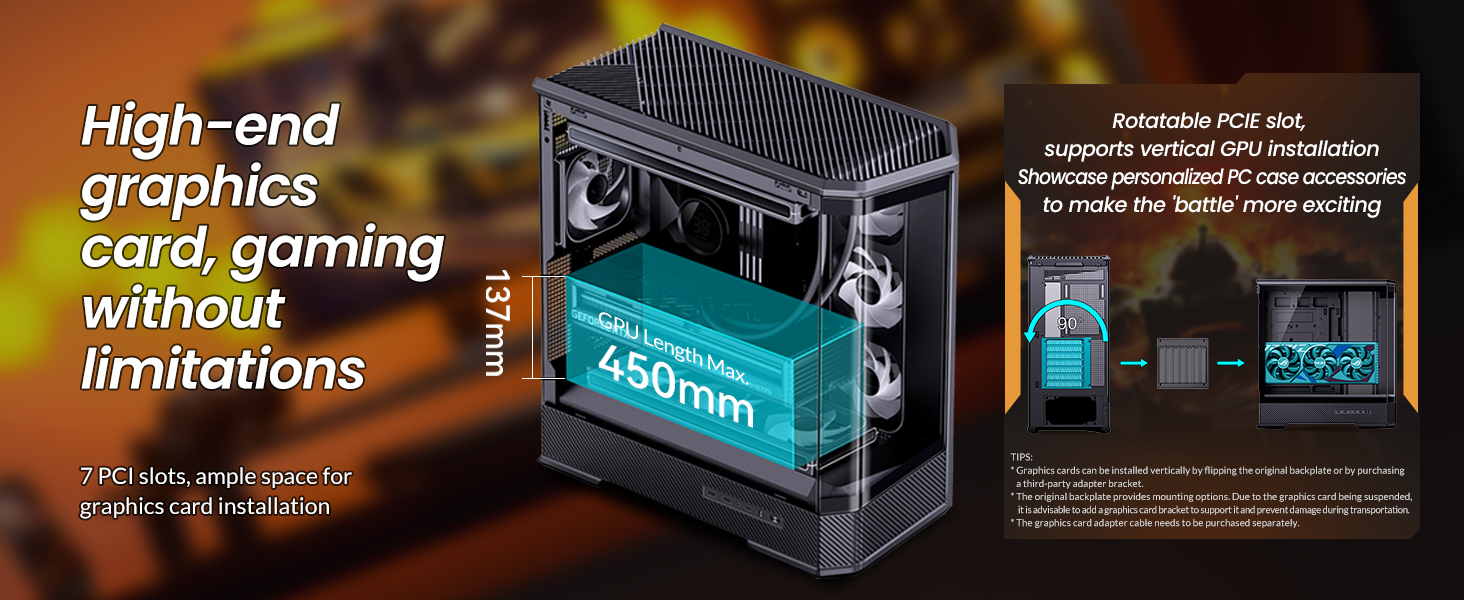
- GPU Support: Graphics cards up to 450mm in length.
- Suport PSU: ATX PS2 power supplies.
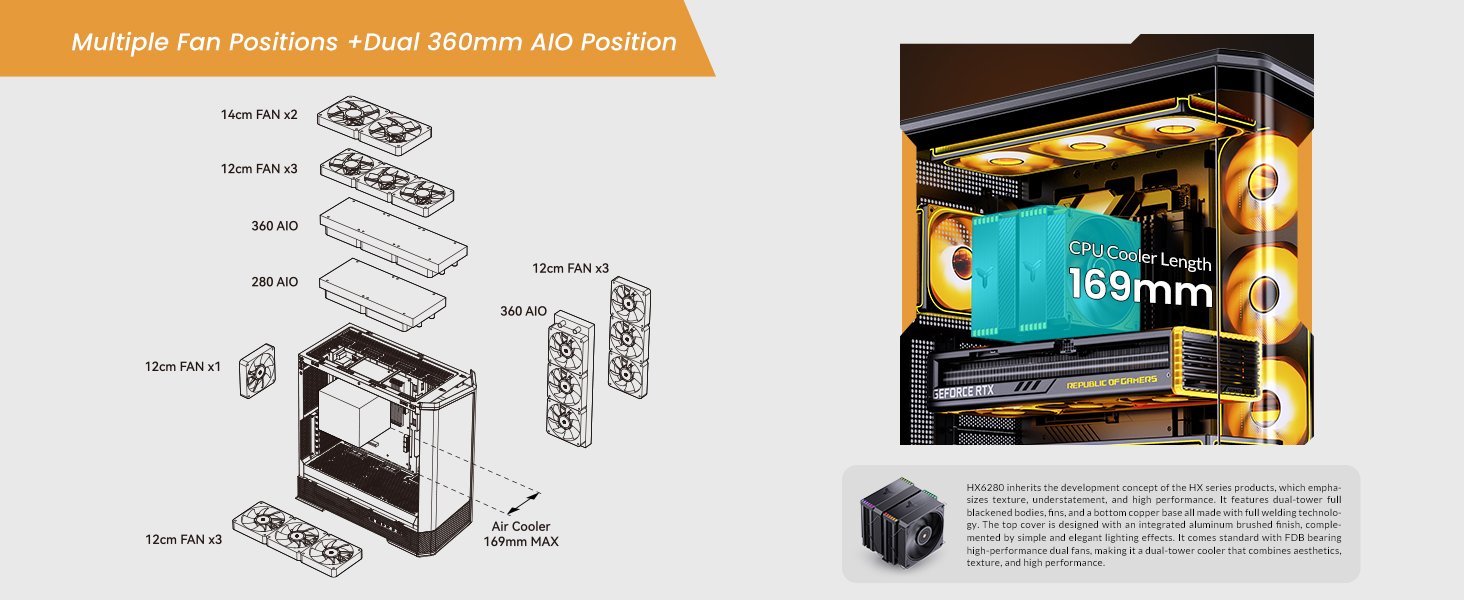
- Air Cooling: CPU coolers up to 169mm in height.
- Liquid Cooling (AIO): Supports top-mounted 240mm, 280mm, or 360mm AIOs, and side-mounted 360mm AIOs.
- Fan Positions: Up to 10 fan positions for optimal airflow (Top: 3x120mm/2x140mm; Side: 3x120mm; Rear: 1x120mm; Power Compartment: 3x120mm).
- Baies en cotxe: Flexible storage options including 2x 2.5" SSDs, or 1x 3.5" HDD + 1x 2.5" SSD (back side), and 1x 2.5" SSD or 1x 3.5" HDD (PSU compartment).
- E / S davantera: 1x USB3.2 Gen2 Type-C, 2x USB3.0, 1x AUDIO + 1x MIC (2-in-1).
- Ranures d'expansió: 7.

2. Especificacions
| Característica | Detall |
|---|---|
| Marca | Jonsbo |
| Nom del model | D400 |
| Tipus de cas | Torre mitja |
| Color | Blanc |
| Material | Metall |
| Dimensions del producte (LxWxH) | 19.21 x 9.21 x 20.43 polzades (488 x 239 x 514 mm) |
| Pes de l'article | 23.6 lliures |
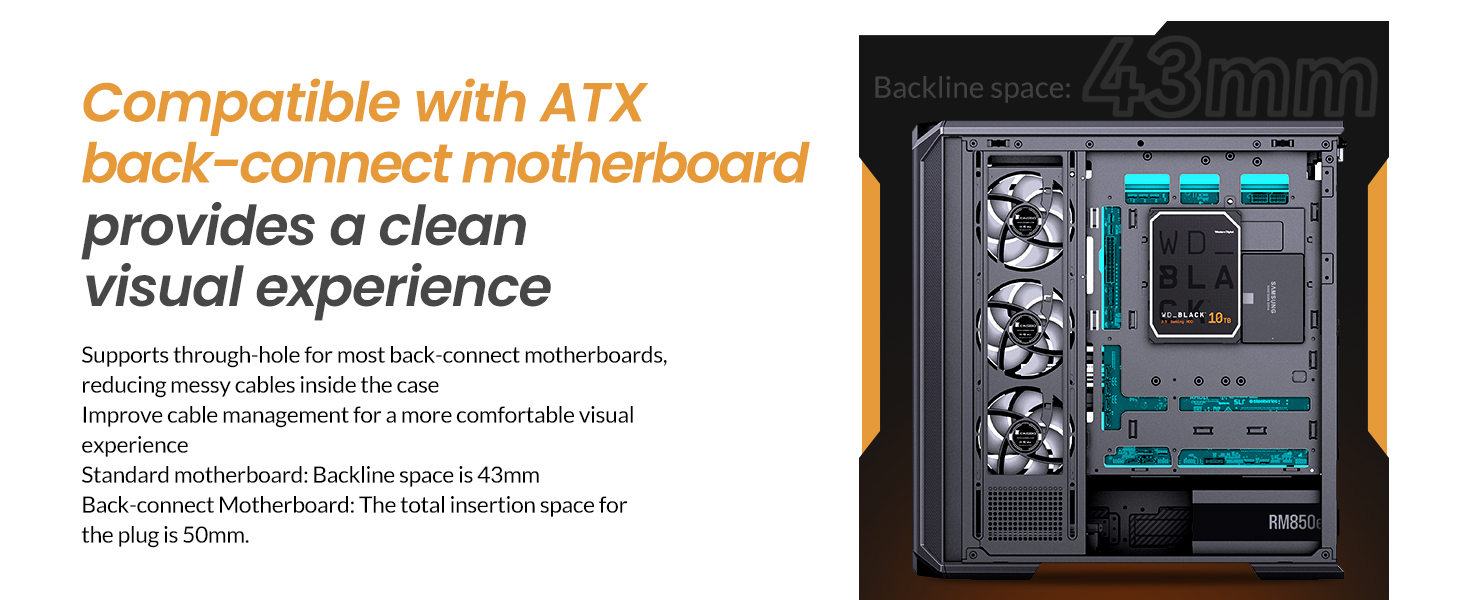
| Compatibilitat amb la placa base | ATX, Micro ATX, Mini ITX, BTF Motherboard |
| Longitud de la GPU (màx.) | ≤450 mm |
| Alçada del refrigerador de CPU (màx.) | 169 mm |
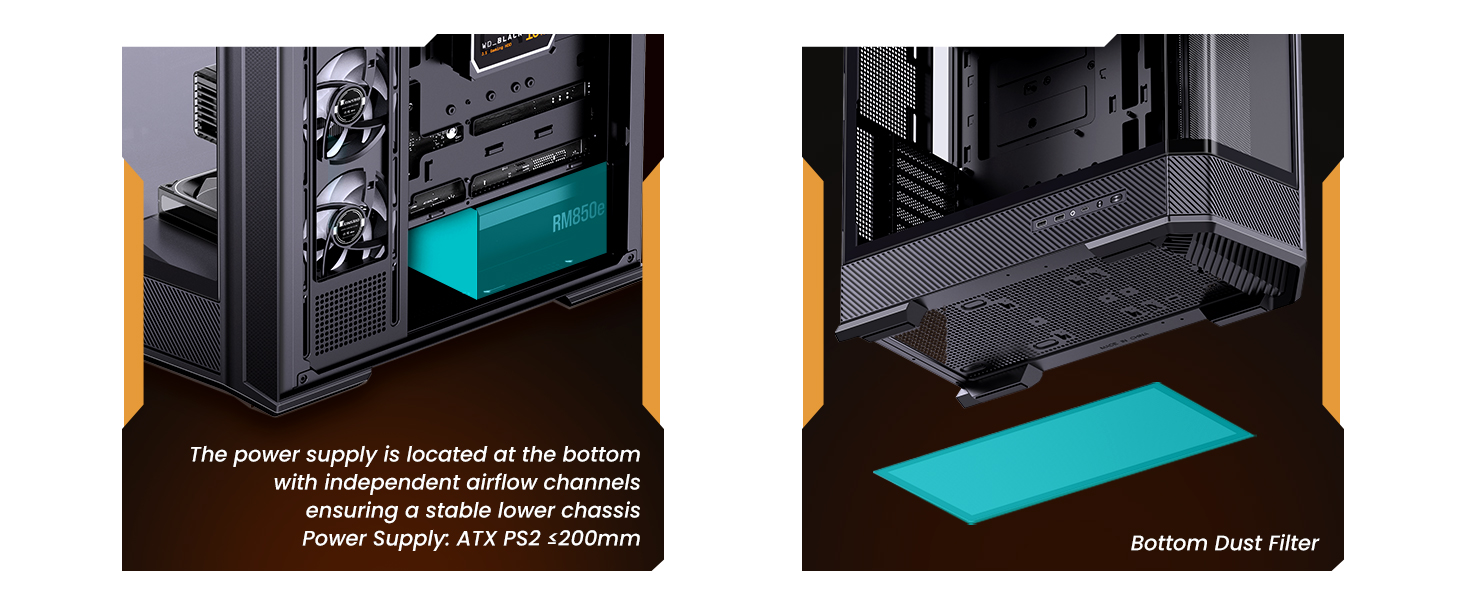
| Suport PSU | ATX PS2 (≤200mm), Bottom Mount |
| AIO Support | Top: 240mm/280mm/360mm (optional); Side: 360mm (optional) |
| Fan Positions | Top: 3x120mm/2x140mm; Side: 3x120mm; Rear: 1x120mm; Power Compartment: 3x120mm |
| Drive Bays | Back Side: 2x 2.5" SSD or 1x 3.5" HDD + 1x 2.5" SSD; PSU Compartment: 1x 2.5" SSD or 1x 3.5" HDD |
| Ports d'E / S frontals | 1x USB3.2 Gen2 Type-C, 2x USB3.0, 1x AUDIO + 1x MIC (2-in-1) |
| Ranures d'expansió | 7 |
3. Configuració i instal·lació
This section provides general guidelines for installing components into your JONSBO D400 PC case. Always refer to the specific manuals for your individual components (motherboard, GPU, PSU, etc.) for detailed instructions.
3.1 Preparació del cas
- Carefully remove the side glass panels. The beveled curved glass design allows for easy access.
- Identify the motherboard standoffs. Ensure they match your motherboard's form factor (ATX, Micro ATX, Mini ITX, or BTF).

3.2 Instal·lació de la placa base
- Align your motherboard with the standoffs in the case.
- Fixeu la placa base amb els cargols proporcionats.
- Connect the front I/O cables (USB 3.0, USB Type-C, Audio, Power/Reset switches, LED indicators) to the appropriate headers on your motherboard.
3.3 Instal·lació de la unitat d'alimentació (PSU).
- The JONSBO D400 supports ATX PS2 power supplies and features a bottom-mount design.
- Install the PSU into its designated compartment at the bottom rear of the case.
- Fixeu la font d'alimentació amb cargols.
- Route the necessary power cables through the cable management cutouts.
3.4 Instal·lació de la targeta gràfica (GPU)
- The case supports GPUs up to 450mm in length.
- Traieu les cobertes de les ranures d'expansió necessàries a la part posterior de la carcassa.
- Insert your GPU into the primary PCIe slot on your motherboard and secure it with screws.
- Connect the required PCIe power cables from your PSU to the GPU.
3.5 Cooling System Installation (Fans & AIO)
- The D400 offers 10 fan positions: Top (3x120mm/2x140mm), Side (3x120mm), Rear (1x120mm), and Power Compartment (3x120mm).
- For AIO liquid coolers, the case supports up to 360mm radiators on the top and side.
- Install fans or radiators into your desired positions, ensuring proper airflow direction (intake/exhaust).
- Connect fan and AIO pump cables to your motherboard headers or a fan controller.
3.6 Instal·lació de la unitat d'emmagatzematge
- The case provides mounting options for 2.5" SSDs and 3.5" HDDs.
- Install your drives into the designated drive bays (back side of motherboard tray or PSU compartment).
- Secure the drives with screws and connect SATA data and power cables.

4. Instruccions de funcionament
Once all components are installed and secured, and the side panels are reattached, your JONSBO D400 PC is ready for operation.
4.1 Encès
- Assegureu-vos que tots els cables externs (alimentació, monitor, perifèrics) estiguin connectats correctament.
- Flip the power switch on your PSU to the 'On' position.
- Press the power button on the front I/O panel of your case to start your system.
4.2 Using Front I/O Ports
The front I/O panel provides convenient access to various ports:
- USB3.2 Gen2 Type-C: Per a la transferència de dades d'alta velocitat amb dispositius compatibles.
- USB3.0: Per connectar dispositius USB com ara unitats externes, teclats i ratolins.
- AUDIO (2-in-1): For connecting headphones or headsets with a combined audio/microphone jack.
5. Manteniment
Un manteniment regular ajuda a garantir un rendiment òptim i una llarga vida útil dels components del teu PC.
5.1 Neteja dels filtres de pols
- The JONSBO D400 features a removable bottom dust filter.
- Periodically remove and clean the dust filter to prevent dust buildup and maintain good airflow.
- Use compressed air or a soft brush to remove dust.
5.2 Cleaning Exterior Surfaces
- Wipe the exterior surfaces, including the glass panels, with a soft, lint-free cloth.
- For stubborn smudges on glass, use a mild glass cleaner applied to the cloth (not directly to the glass).
6. Solució De Problemes
If you encounter issues with your JONSBO D400 PC case or its installed components, consider the following common troubleshooting steps:
6.1 Sense poder
- Ensure the PSU is switched on and the power cable is securely connected to both the PSU and the wall outlet.
- Verifiqueu que el cable del botó d'engegada del panell frontal estigui connectat correctament a la placa base.
6.2 Problemes de sobreescalfament
- Check that all installed fans are spinning and oriented correctly for optimal airflow (e.g., front/side intake, rear/top exhaust).
- Ensure CPU cooler and AIO radiators are properly seated and fans are functioning.
- Clean any dust filters and internal components to improve heat dissipation.
6.3 Component Fit Issues
- If a component does not fit, double-check its dimensions against the case specifications (GPU length ≤450mm, CPU cooler height ≤169mm, PSU length ≤200mm).
- Ensure proper alignment and removal of any necessary modular parts of the case during installation.
6.4 Front I/O Not Functioning
- Verify that all front I/O cables (USB, Audio) are correctly connected to their respective headers on the motherboard.
- Check your motherboard's manual for correct pin assignments.
7. Garantia i Suport
7.1 Política de devolució
This product is subject to a 30-day return/replacement policy from the date of purchase. Please refer to your retailer's specific return terms and conditions.
7.2 Suport tècnic
For technical assistance or further inquiries, please visit the official JONSBO website or contact their customer support. Keep your proof of purchase handy when seeking support.
8. Video Demonstrations
JONSBO D400 ATX PC Case Overview
Aquest vídeo ofereix una descripció completaview of the JONSBO D400 ATX PC case, showcasing its design, features, and internal layout. It highlights the aesthetic appeal and functional aspects of the case.