
1. Introducció
El Pard USA Ocelot 256 és un telescopi tèrmic compacte dissenyat per a una visió tèrmica fiable. Aquest manual proporciona informació essencial per a la configuració, el funcionament, el manteniment i la resolució de problemes adequats del dispositiu.
Les característiques principals de l'Ocelot 256 inclouen:
- Objectiu de la lent: 19 mm
- Augment òptic: 3.2x
- Zoom digital: Fins a 8x
- Sensor: 256x192 VOx amb píxels de 12µm
- NETD: ≤25mK per a un alt contrast tèrmic
- Interval de detecció: Fins a 900 m (984 iardes)
- Freqüència d'actualització: 50 Hz
- Visualització: OLED de 1024 x 768
- Camp de View (Horitzontal): 9.2° (11.5° diagonal)
- Construcció: Carcassa d'aliatge d'alumini lleuger

Figura 1: Frontal view del visor tèrmic Ocelot 256 de Pard USA.
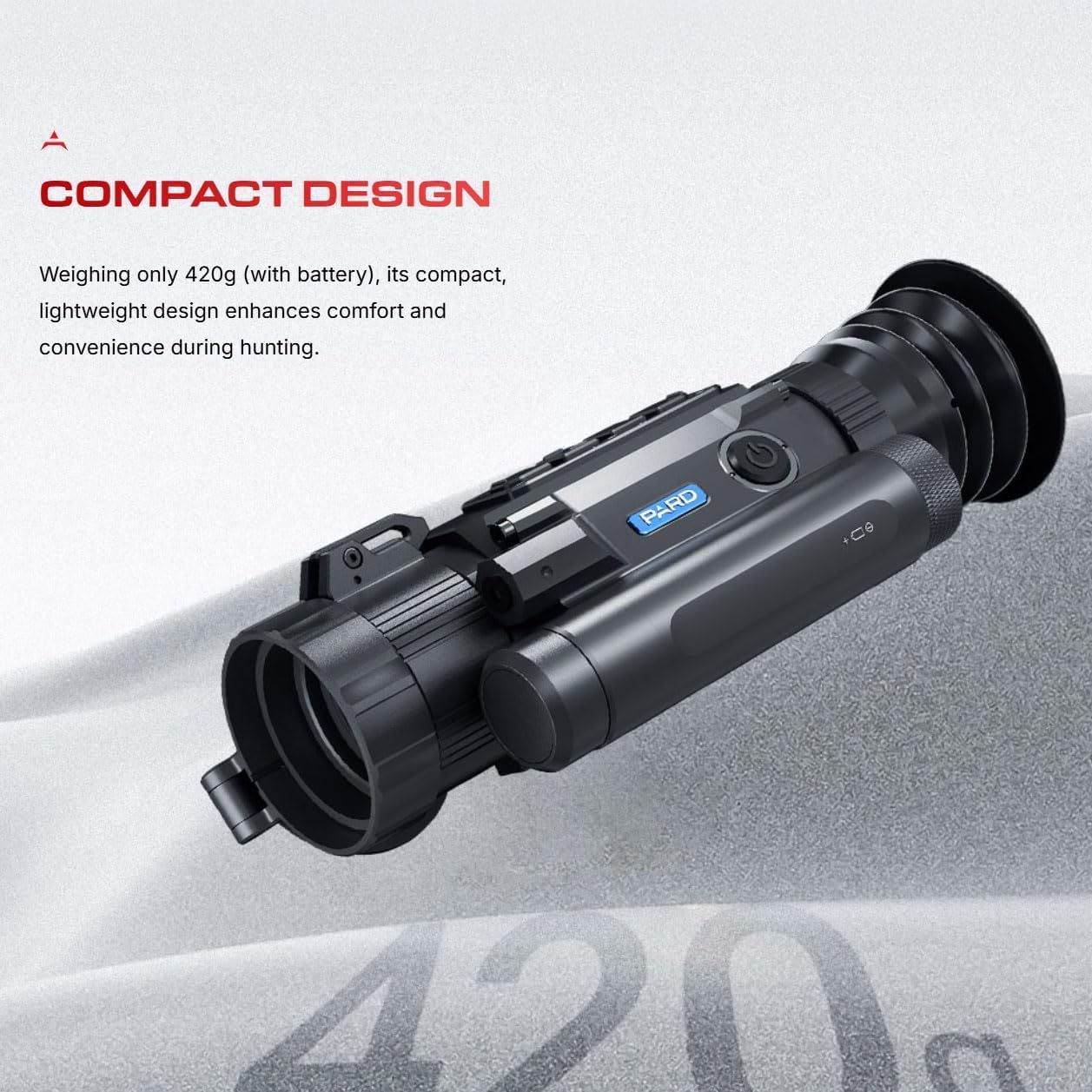
Figura 2: Il·lustració que destaca el disseny compacte de l'Ocelot 256, amb un pes aproximat de 420 g amb bateria.
2. Configuració
Abans d'utilitzar el vostre visor tèrmic Ocelot 256, assegureu-vos que estigui configurat correctament.
2.1 Desembalatge i inspecció inicial
- Traieu amb cura l'endoscopi d'imatges tèrmiques del seu embalatge.
- Inspeccioneu el dispositiu per detectar qualsevol dany visible.
- Confirmeu que tots els components inclosos, com ara l'endoscopi d'imatges tèrmiques, siguin presents.
2.2 Instal·lació de la bateria
L'Ocelot 256 requereix una bateria per funcionar. Consulteu el compartiment específic de la bateria i les marques de polaritat del dispositiu per a una instal·lació correcta. Assegureu-vos que la bateria estigui completament carregada abans del primer ús.
2.3 Muntatge (si escau)
Si munteu el visor, seguiu les instruccions que s'inclouen amb el sistema de muntatge. Assegureu-vos que el visor estigui ben fixat i correctament alineat.
2.4 Actualització del microprogramari
Per garantir un rendiment òptim, es recomana mantenir el firmware del dispositiu actualitzat. Copieu el programari més recent a la targeta MultiMediaCard integrada (eMMC) segons les instruccions del fabricant per a les actualitzacions de firmware.
2.5 Connexió Wi-Fi
L'Ocelot 256 té Wi-Fi integrat, que permet la connexió a un telèfon intel·ligent o un altre dispositiu compatible per utilitzar-lo com a dispositiu extern. viewcercador o per compartir contingut. Consulteu el menú en pantalla del dispositiu o una guia detallada del fabricant per conèixer els procediments específics de connexió Wi-Fi.

Figura 3: lateral view de l'Ocelot 256, que mostra l'ocular i els botons de control.
3. Instruccions de funcionament
Aquesta secció descriu el funcionament bàsic de la termografia Ocelot 256 de Pard USA.
3.1 Engegada/Apagada i espera
- Encès: Premeu i manteniu premut el botó d'engegada (normalment situat a la part superior o lateral del dispositiu) fins que la pantalla s'activi.
- Mode d'espera: Amb una sola pulsació de la tecla d'engegada, el dispositiu es pot apagar o activar ràpidament, cosa que redueix el consum d'energia durant els períodes d'inactivitat.
- Apagar: Premeu i manteniu premut el botó d'engegada de nou fins que el dispositiu s'apagui completament.
3.2 Ajust d'ampliació
L'Ocelot 256 ofereix capacitats de zoom òptic i digital:
- Augment òptic: L'augment òptic base és de 3.2x.
- Zoom digital: Utilitzeu la funció de zoom digital per augmentar l'ampliació fins a 8x, proporcionant una ampliació variable de fins a 25.6x. Consulteu els controls del dispositiu per activar el zoom digital.
3.3 modes d'escena
El dispositiu inclou tres modes d'escena diferents (Ciutat, Pluja, Bosc) per optimitzar les imatges tèrmiques per a diferents entorns. Seleccioneu el mode adequat a través del menú del dispositiu per millorar l'adaptabilitat i la claredat de la imatge.
3.4 Funció Hot Track
La funció "Hot Track" ajuda a la detecció i el seguiment ràpids de les signatures de calor, garantint que els objectius romanguin visibles. Activeu aquesta funció a través del sistema de menús del dispositiu.
3.5 Configuració de la pantalla i del reticle
La pantalla OLED de 1024 x 768 ofereix una imatge clara view de signatures de calor. Els usuaris poden ajustar els colors del reticle i altres paràmetres de la pantalla a través del menú del dispositiu per adaptar-los a les seves preferències personals i a les condicions ambientals.

Figura 4: Mésview de funcions de caça eficients, com ara modes d'escena, seguiment en directe, mode d'espera, Wi-Fi, classificació IP67 i actualitzacions de firmware.
4. Manteniment
Un manteniment adequat garanteix la longevitat i el rendiment òptim del vostre visor tèrmic Ocelot 256.
4.1 Neteja
- Lents: Feu servir un drap suau i sense borrissol dissenyat específicament per a lents òptiques. Netegeu suaument les lents de l'objectiu i de l'ocular. Eviteu materials abrasius o productes químics agressius.
- Cos: Netegeu el cos d'aliatge d'alumini amb un drap net, damp drap. No submergiu el dispositiu.
4.2 Emmagatzematge
Guardeu el dispositiu en un lloc fresc i sec, allunyat de la llum solar directa i de temperatures extremes. Si l'emmagatzemeu durant períodes prolongats, traieu la bateria.
4.3 Protecció del medi ambient
L'Ocelot 256 té una classificació IP67, la qual cosa indica un rendiment fiable fins i tot en condicions meteorològiques adverses. Tanmateix, s'ha d'evitar l'exposició prolongada a elements extrems i s'ha d'assecar bé el dispositiu si es mulla.
4.4 actualitzacions de microprogramari
Comproveu i instal·leu regularment si hi ha actualitzacions de firmware tal com es descriu a la secció 2.4 per aprofitar les millores de rendiment i les noves funcions.
5. Solució De Problemes
Aquesta secció tracta els problemes habituals que podeu trobar amb el vostre visor tèrmic Ocelot 256.
5.1 Sense poder
- Assegureu-vos que la bateria estigui instal·lada correctament i completament carregada.
- Comproveu la neteja i la connexió correcta dels contactes de la bateria.
5.2 Mala qualitat d'imatge
- Netegeu la lent de l'objectiu i l'ocular.
- Ajusta l'enfocament i les diòptries.
- Assegureu-vos que s'ha seleccionat el mode d'escena correcte per a l'entorn.
- Feu una calibració manual si està disponible (consulteu la guia completa del fabricant).
5.3 Problemes de connexió Wi-Fi
- Assegureu-vos que el Wi-Fi estigui habilitat tant a l'oscil·loscopi com al dispositiu que es connecta.
- Verifiqueu que el dispositiu que es connecta estigui dins del rang.
- Reinicieu tant l'oscil·loscopi com el dispositiu de connexió.
Per a una resolució de problemes més detallada o per a problemes que no figuren aquí, consulteu el manual complet del fabricant o poseu-vos en contacte amb el servei d'atenció al client.
6. Especificacions
Especificacions tècniques detallades per a la mira tèrmica Ocelot 256 de Pard USA.
| Característica | Especificació |
|---|---|
| Nom del model | Ocelot 256 |
| Lent Objectiu | 19 mm |
| Ampliació òptica | 3.2x |
| Zoom digital | Fins a 8x (augment variable fins a 25.6x) |
| Resolució del sensor tèrmic | 256x192 VOx |
| Pixel Pitch | 12 µm |
| NETD | ≤25mK |
| Interval de detecció | Fins a 900 m (984 iardes) |
| Freqüència d'actualització | 50 Hz |
| Tipus de visualització | OLED |
| Resolució de visualització | 1024 x 768 |
| FOV horitzontal | 9.2° (11.5° diagonal) |
| Dimensions (L x A x A) | 7.2 x 2.7 x 3.1 polzades (aprox.) |
| Pes | Aprox. 420 g (amb bateria) |
| Material | Aliatge d'alumini |
| Classificació IP | IP67 |
| Components inclosos | Àmbit d'imatge tèrmica |

Figura 5: Gràfic que il·lustra l'excepcional sensibilitat NETD ≤25mK del sensor Ocelot 256.
7. Informació de la garantia
El visor tèrmic Pard USA Ocelot 256 normalment inclou una garantia del fabricant. Per obtenir detalls específics sobre la cobertura, la durada i els termes de la garantia, consulteu la documentació de la garantia inclosa amb el producte o poseu-vos en contacte directament amb Pard USA. La fitxa del producte indica una descripció de la garantia "Amazon", que generalment fa referència a la política de devolucions d'Amazon o als plans de protecció ampliada disponibles en el moment de la compra.
8. Suport
Per a assistència tècnica, consultes sobre productes o reclamacions de garantia, poseu-vos en contacte amb Pard USA LLC, el fabricant i venedor d'aquest producte. També podeu visitar la botiga oficial de Pard a Amazon per obtenir recursos addicionals i informació de contacte.
Pard EUA LLC
Fabricant i venedor
Per a més ajuda, visiteu el Botiga Pard a Amazon.