
1. Producte acabatview
The Sunster TB10 Diesel Air Heater is a versatile and efficient heating solution designed for various applications including vehicles (cars, RVs, campers, trucks), tents, and homes. This model features advanced Wi-Fi and Bluetooth connectivity for smart control via a dedicated mobile application, alongside a user-friendly LCD control panel. Its integrated toolbox design ensures portability and ease of installation, while optimized combustion technology provides rapid heating and energy efficiency.
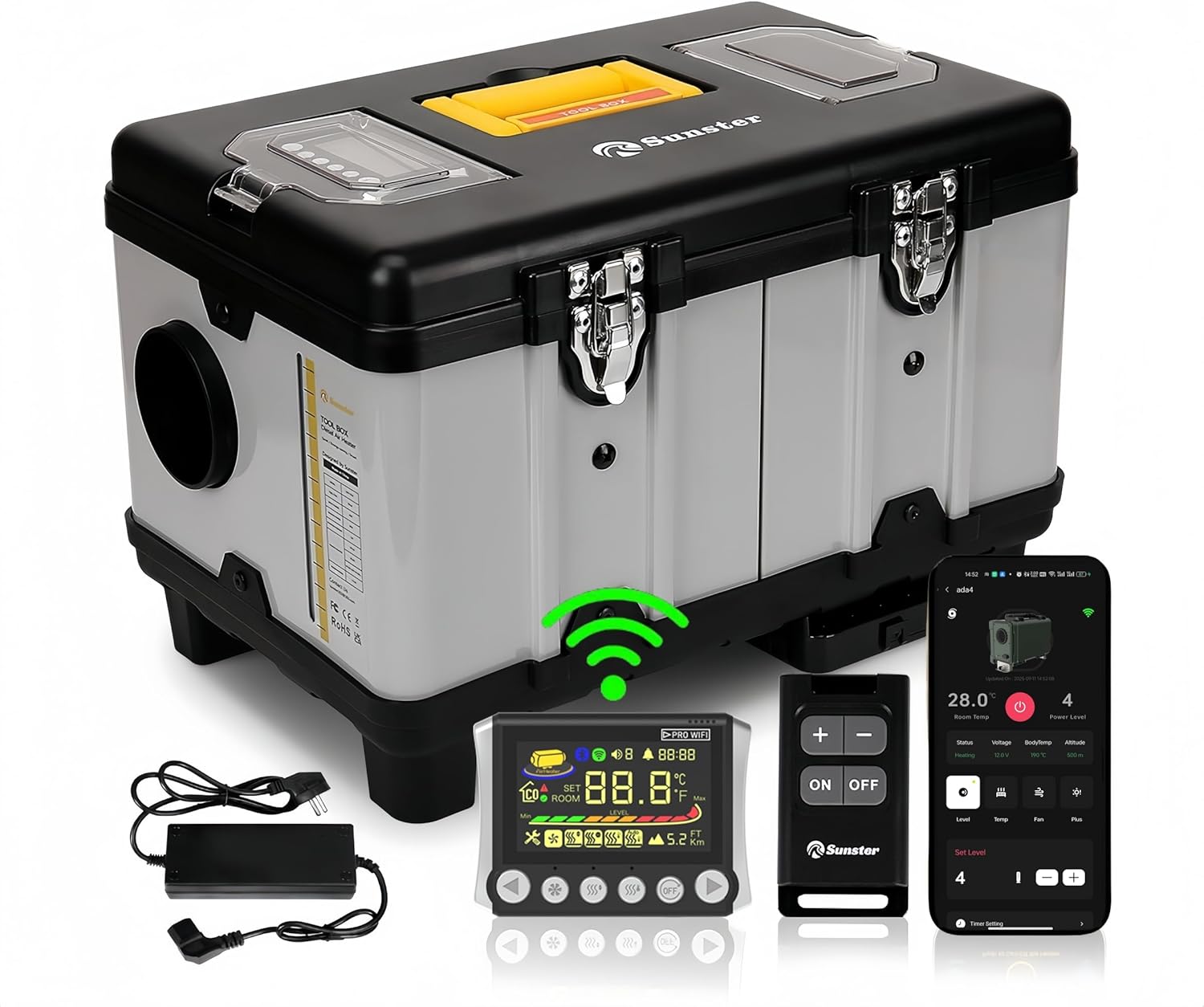
Imatge 1.1: Sunster TB10 Diesel Air Heater and its control accessories.
2. Informació de seguretat
Please read and understand all safety warnings and instructions before operating this product. Failure to follow these instructions may result in electric shock, fire, explosion, or serious injury.
- Assegureu-vos que hi hagi una ventilació adequada quan feu servir l'escalfador per evitar l'acumulació de monòxid de carboni.
- No bloquegeu les sortides d'entrada ni d'escapament d'aire.
- Mantingueu els materials inflamables a una distància segura de l'escalfador.
- Always use the correct fuel type (diesel) and power supply (12V, 24V, or 110-240V via transformer).
- The heater is equipped with overheat protection (≥ 518 °F/270 °C). Do not bypass or modify safety features.
- Mantenir fora de l'abast dels nens i mascotes.
- Desconnecteu l'alimentació abans de realitzar qualsevol manteniment o neteja.

Imatge 2.1: Integrated safety features of the heater.
3. Product Components & Specifications
3.1 Què hi ha a la caixa
- Diesel heater (with LCD control panel)
- Interruptor a distància
- AC power supply (110-240V transformer)
- Installation Accessories (including 4-meter switch extension cable, heat protection sleeve, battery power cord, exhaust pipe, fixture accessories set, 6.9ft air outlet pipe, silencer)

Imatge 3.1: Tots els components inclosos en el paquet del producte.
3.2 Diagrama d’estructures

Imatge 3.2: Detailed structure diagram of the heater.
3.3 Especificacions del producte
| Especificació | Detall |
|---|---|
| Marca | Solster |
| Model | TB10 Diesel Air Heater WiFi Version (WIFI-TB10) |
| Potència de sortida | 8KW |
| Voltage Compatibilitat | 12V/24V/110V-240V |
| Tipus de combustible | Dièsel |
| Capacitat del dipòsit de combustible | 6 Liters (Built-in) |
| Consum de combustible | 0.16-0.45 liters/hour |
| Cobertura de la zona de calefacció | 20-25 square meters (approx. 215-270 sq ft) |
| Protecció contra el sobreescalfament | ≥ 518 °F/270 °C |
| Mètodes de control | LCD Panel, Remote Control, Wi-Fi Smart App, Bluetooth |
| Pes de l'article | 22 lliures |
| Dimensions del paquet | 18.5 x 14.96 x 12.6 polzades |
4. Configuració i instal·lació
The Sunster TB10 Diesel Air Heater is designed for rapid assembly and portability. Follow these guidelines for safe and effective setup.
4.1 Connexió d'alimentació
- Per DC 12V/24V operation: Connect directly to a vehicle battery (motorhomes, automobiles, boats, trucks, tractors) using the provided battery power cord.
- Per AC 110-240V operation: Use the included AC power supply transformer to plug the heater into a standard power outlet (professional workshop, garage, home).
- Ensure all connections are secure and correct voltage es subministra.

Imatge 4.1: Multiple power options for the Sunster TB10 heater.
4.2 Exhaust and Air Duct Installation
- The intake pipe has a fixed air filter at the bottom, requiring no additional installation.
- Install exhaust pipes on the side of the unit to prevent blockage.
- Utilize the exhaust pipe protective cover for safety.
- Connect the air outlet pipe to direct heated air.

Imatge 4.2: Rapid assembly for exhaust and intake components.
4.3 Control Panel Placement
The included 4-meter extension cable allows for mounting the LCD control panel indoors, providing easier access and operation, especially when the main heater unit is placed outside.
5. Instruccions de funcionament
The Sunster TB10 Diesel Air Heater offers multiple control methods: LCD panel, remote control, Wi-Fi smart app, and Bluetooth. This section details their operation.
5.1 LCD Control Panel Overview

Imatge 5.1: LCD Monitor with button functions.
5.2 Coincidència de control remot
To match the remote control with the heater:
- On the LCD panel, long press the [DESACTIVAT] i [Right button] simultaneously to enter match mode. The screen will display "Add".
- On the remote control, long press the [Plus button] to enter matching mode.
- The LCD screen will display "Suc" upon successful matching.
- You can now check the switch status and adjust settings (temperature, gear, mode) via the remote.
5.3 Wi-Fi App Connection & Functions
The Sunster app allows remote control of your heater via Wi-Fi. Ensure your phone is connected to a 2.4GHz Wi-Fi network.
- Afegeix un dispositiu: In the app, click "Add Device", then select "Wi-Fi" to add. Choose your Wi-Fi network, enter the password, and follow the app's guidelines to put the device into network configuration mode (long press the add button on the LCD panel after power on).
- Modes de control: Once connected, you can control various modes:
- Mode d'engranatge: Adjust the power level using plus/minus buttons.
- Mode de temperatura: Estableix la temperatura desitjada.
- Mode de ventilació: Control fan speed.
- Configuració del temporitzador: Set timed hours and minutes for automatic turn on/off.
- Configuració dels paràmetres: Access "More Settings" in the app to modify:
- Temperature Unit (Fahrenheit/Celsius)
- Altitude Unit (meters/feet)
- Voice Languages (English, Russian, German)
- Zona horària
- Desplaçament de temperatura
- Nivell de llum de fons
- Start/Stop Temperature Offset
- Wi-Fi activat/desactivat
- Restableix la configuració
- Compartició de dispositius: Share control of the device with others using a share code.
- Ensure Wi-Fi is turned off on the heater (via parameter settings or by switching it on/off on the LCD panel).
- In the app, click "Add Device", then select "Bluetooth" connection.
- Select the Bluetooth name corresponding to your device (e.g., BYD-0509).
- Confirm binding. You can now control the heater via Bluetooth.
- Activació/desactivació: In shutdown state, press the desired mode button to turn it on. In operation state, press the [DESACTIVAT] button to turn off the heater.
- Ajust de la configuració: In operation state, press the [Decrease/Increase] buttons to adjust the setting gear or temperature.
- Canvi de modes: Premeu el botó [Mode] button to cycle through different modes (Gear, Temperature, Ventilation).
- Entrant al mode de configuració: In operation state, long press the [DESACTIVAT] button for 3 seconds to enter setting mode. Use [Decrease/Increase] buttons to navigate through settings (F0-FF).
- F0: Current Time Setting (Press Ventilation button to set hours, then minutes. Press Ventilation again to confirm.)
- F1: Timing Start Time Setting (Press Ventilation button to set hours, then minutes. Press Ventilation again to confirm.)
- F2: Set the Running Time After Timing Start (Range 00:00-10:00, 30 minutes is 1 unit. 00:00 is unlimited time. Press Ventilation again to confirm.)
- F3: Timing Function On or Off (ON indicates turn-on timing, OF indicates shutdown timing. Press Ventilation again to confirm.)
- F4: Voice Broadcast Language Setting (E=English, G=German, R=Russian, --=Mute. Press Ventilation again to confirm.)
- F5: Ambient Temperature Compensation Setting (Adjustment range: -27°F to +27°F. Press Ventilation again to confirm.)
- F6: Constant Temperature Mode Function Setting (ON=turned on, OF=turned off. Press Ventilation again to confirm.)
- F7: Temperature Unit Switch Setting (Cycle between Fahrenheit and Celsius. Press Ventilation again to confirm.)
- F8: Altitude Unit Switch Setting (Switch between kilometers and thousand feet. Press Ventilation again to confirm.)
- F9: Screen Brightness Adjustment (Adjustment range 0-10. Press Ventilation again to confirm.)
- FA: Network Configuration with Sub Devices
- FB: Ambient Temperature Reading (ON represents sub-device ambient temp, OF represents control panel ambient temp.)
- FC: Temperature Difference for Automatic Startup in Constant Temperature Mode
- FD: Temperature Difference for Automatic Shutdown in Constant Temperature Mode
- FE: Wi-Fi Function On/Off (ON=turn on, OF=turn off. Press Ventilation again to confirm.)
- FF: Wi-Fi Configuration (View Wi-Fi connection, OTA upgrade, unbind from APP, pre-registration, connection status.)
5.4 Bluetooth Operation (without Wi-Fi)
If Wi-Fi is not available, you can operate the heater via Bluetooth:
5.5 Manual Control Panel Functions (2409PW)
The LCD control panel allows direct operation and setting adjustments.
Setting Mode Items (F0-FF):
Vídeo 5.1: Detailed operation guide for the 2409PW control panel, including remote matching, app connectivity, and function settings.
6. Manteniment
Regular maintenance ensures optimal performance and longevity of your Sunster TB10 Diesel Air Heater.
- Neteja: Netegeu periòdicament l'exterior de l'escalfador amb un drap suau i sec.amp tela. No utilitzeu netejadors abrasius ni dissolvents.
- Filtre d'aire: The fixed air filter at the bottom should be checked and cleaned regularly to ensure proper airflow.
- Sistema d'escapament: Inspect the exhaust pipes and protective cover for any damage or blockages. Ensure exhaust gases are safely directed away from enclosed spaces.
- Dipòsit de combustible: Keep the fuel tank clean and free of contaminants. Use only clean diesel fuel.
- Emmagatzematge: When not in use for extended periods, ensure the heater is clean, dry, and stored in a safe location.
7. Solució De Problemes
Si teniu problemes amb el vostre escalfador, consulteu els passos habituals següents per a la resolució de problemes:
- L'escalfador no s'engega: Check power connections, fuel level, and ensure the control panel is properly connected and powered.
- Sense producció de calor: Verify the selected mode (e.g., not in ventilation mode), check temperature settings, and ensure fuel is flowing.
- Error codes on LCD: Refer to the detailed error code list in the full user manual (accessible via the app under "User Manual" or included physical manual) for specific diagnostics.
- Problemes de connectivitat de l'aplicació: Ensure your phone's Wi-Fi is 2.4GHz, the heater's Wi-Fi is enabled, and the device is within range. Try re-adding the device or resetting Wi-Fi settings.
- El comandament a distància no respon: Check remote battery, ensure it's matched correctly (refer to section 5.2).
8. Firmware Upgrade (OTA)
To ensure your heater has the latest features and improvements, perform Over-The-Air (OTA) firmware upgrades via the mobile app.
- Prepare for Upgrade: First, switch the heater power off. Then, hold down the left and right buttons on the LCD panel simultaneously and connect the power supply. The screen will show "otA". Keep pressing until the last four IDs of the machine appear.
- Initiate Upgrade via App: In the app, navigate to the "Personal Center" interface, then select "Firmware Upgrade".
- Select Version: Find the ID corresponding to your local machine. Select the desired version number to upgrade.
- Inicia l'actualització: Click "Update Now". The app will show the update progress. Keep the device close to the phone and avoid operation during the transfer.
- Finalització: The screen will show "Suc" and the app will indicate "Update complete" upon successful upgrade.
9. Garantia i Suport
For warranty information, technical support, or service inquiries, please refer to the contact details provided with your purchase or visit the official Sunster weblloc web. Conserveu el rebut de compra com a comprovant de compra per a reclamacions de garantia.