
1. Introducció
Gràcies per la compraasing the VIFLYKOO Bluetooth 5.4 Turntable. This device combines classic vinyl playback with modern connectivity, featuring integrated stereo speakers, Bluetooth 5.4 for both receiving and transmitting audio, USB recording, and multiple audio outputs. This manual provides essential information for safe operation, setup, and maintenance of your turntable.

Image: The VIFLYKOO Bluetooth 5.4 Turntable, showcasing its mahogany finish and classic design.
2. Instruccions de seguretat
Please read these safety instructions carefully before using the product and retain them for future reference. Incorrect use may result in electric shock, fire, or other hazards.
- No exposeu la unitat a la pluja, la humitat o les temperatures extremes.
- Assegureu-vos que l'adaptador de corrent sigui compatible amb la vostra font d'alimentació local.
- No obriu la c.asing; demaneu totes les tasques de manteniment a personal qualificat.
- Mantingueu la unitat allunyada de fonts de calor, llum solar directa i camps magnètics forts.
- Netegeu només amb un drap sec. No utilitzeu netejadors líquids ni aerosols.
- Place the turntable on a stable, level surface to prevent vibrations and ensure proper playback.
3. Contingut del paquet
Verifiqueu que tots els elements siguin presents al paquet:
- VIFLYKOO Bluetooth 5.4 Turntable
- Adaptador d'alimentació
- Manual d'instruccions
- 45 RPM Adapter (for 7-inch records)
4. Producte acabatview
Familiarize yourself with the main components and features of your turntable.
4.1 Característiques clau
- Connectivitat Bluetooth 5.4: Supports both receiving audio from external devices and transmitting audio to Bluetooth speakers or headphones.
- Altaveus estèreo integrats: Two 5W speakers provide clear and authentic sound directly from the unit.
- Tocadiscos de 3 velocitats: Reprodueix discos de 33 1/3, 45 i 78 RPM.
- Funcionalitat USB: Allows recording vinyl to MP3/WAV files and playing digital audio from a USB drive.
- Multiple Audio Connections: RCA output for external amplifiers, 3.5mm AUX input for external audio sources, and a headphone output for private listening.
- Funció d'aturada automàtica: Automatically lifts the tonearm at the end of a record to protect the stylus and vinyl.
- Removable Dust Cover: Protects the platter and stylus from dust accumulation.
- Anti-Resonance Belt Drive: Minimitza les vibracions per millorar la qualitat del so.
4.2 Components
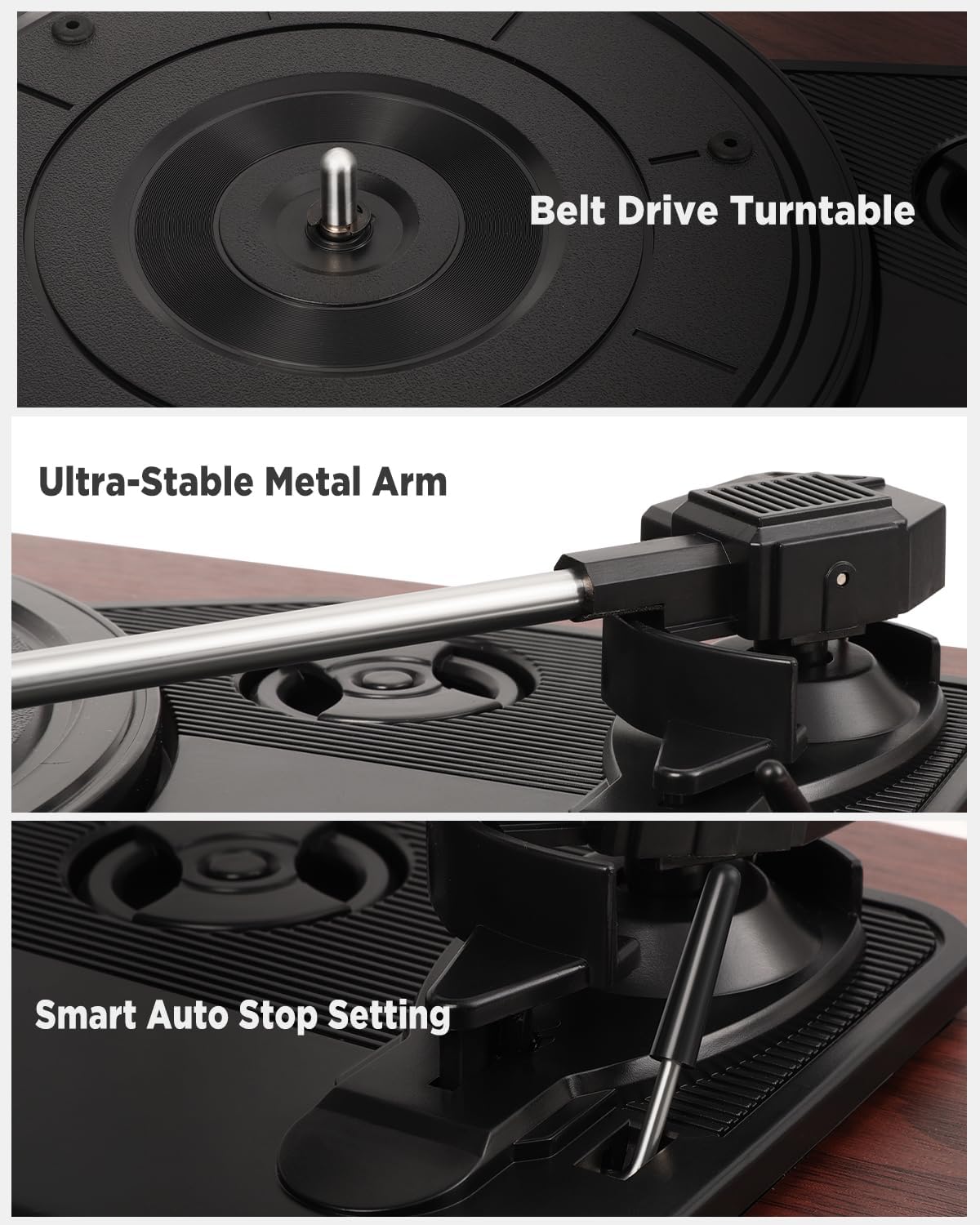
Imatge: Detallada views of the belt drive system, the ultra-stable metal tonearm, and the smart auto-stop setting.

Image: An exploded diagram illustrating the internal structure of the integrated stereo speakers, highlighting the HiFi sound components.

Image: The rear panel of the turntable, showing the RCA output, AUX-in port, USB port, and headphone port, along with their respective functions.
5. Configuració
Follow these steps to set up your turntable for the first time.
- Desempaquetar el tocadiscos: Traieu amb cura tots els components de l'embalatge.
- Position the Turntable: Place the unit on a flat, stable, and vibration-free surface. Ensure there is adequate ventilation around the unit.
- Instal·leu la coberta antipols: If not already installed, carefully attach the removable dust cover to the hinges at the back of the unit.
- Treure el protector del llapis òptic: Gently remove the protective cap from the stylus (needle). Be careful not to touch the stylus itself.
- Connectar l'alimentació: Insert the DC plug of the power adapter into the DC IN port on the back of the turntable, then plug the adapter into a wall outlet.
- Encesa inicial: Turn the volume knob to power on the unit.
6. Instruccions de funcionament
6.1 Reproducció de discos de vinil
- Obriu la coberta antipols.
- Place a vinyl record on the platter. If playing a 7-inch record, use the included 45 RPM adapter.
- Seleccioneu la velocitat adequada (33, 45 o 78 RPM) amb el selector de velocitat.
- Aixequeu suaument el braç amb la palanca de cueing.
- Moveu el braç sobre el solc inicial desitjat del disc.
- Slowly lower the tonearm using the cueing lever. The record will begin to play.
- Ajusteu el volum amb el botó de volum.
- At the end of the record, the auto-stop function will automatically lift the tonearm and stop the platter rotation. Manually return the tonearm to its rest.
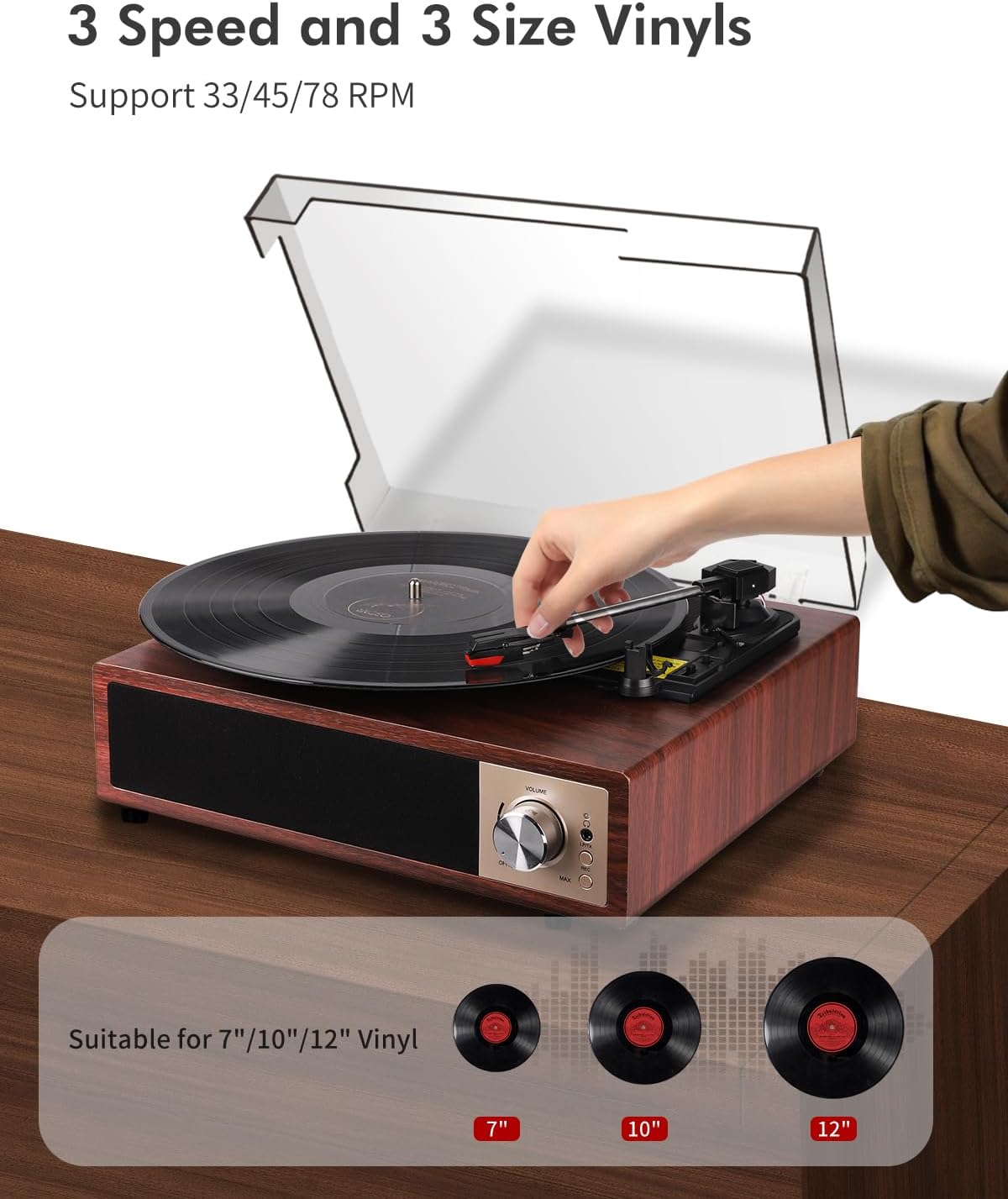
Image: A hand placing a record on the turntable, with visual representations of 7-inch, 10-inch, and 12-inch vinyl records, indicating support for all three sizes and 33/45/78 RPM speeds.
6.2 Funcionament Bluetooth
The turntable supports Bluetooth 5.4 for both receiving and transmitting audio.
6.2.1 Bluetooth Receiving (Playing music from your phone)
- Enceneu el plat giratori.
- Switch the function mode to Bluetooth (BT). The Bluetooth indicator light will flash.
- Activeu el Bluetooth al vostre telèfon intel·ligent, tauleta o altre dispositiu Bluetooth.
- Cerca "VIFLYKOO" in the list of available devices and select it to pair.
- Once paired, the indicator light will stop flashing. You can now play music from your device through the turntable's speakers.
6.2.2 Bluetooth Transmitting (Playing vinyl through external Bluetooth speakers/headphones)
- Assegureu-vos que l'altaveu o els auriculars Bluetooth externs estiguin en mode d'emparellament.
- Turn on the turntable and select the desired input source (e.g., Phono for vinyl).
- Press and hold the Bluetooth button on the turntable to activate transmitting mode. The Bluetooth indicator will flash rapidly.
- The turntable will automatically search for and connect to nearby Bluetooth audio devices.
- Once connected, the indicator light will stop flashing, and audio from the turntable will play through your external Bluetooth device.

Image: Two scenarios demonstrating Bluetooth 5.4 functionality: a user receiving music from a smartphone to the turntable, and the turntable transmitting vinyl audio to external Bluetooth speakers and headphones.
6.3 USB Function (Recording & Playback)
The USB port allows you to convert your vinyl records to digital files or play audio files d'una unitat USB.
6.3.1 Recording Vinyl to USB
- Insert a USB drive into the USB port on the back of the turntable.
- Select the Phono input mode.
- Start playing your vinyl record.
- Press the 'REC' button (usually near the USB port or control panel) to start recording. The indicator light will confirm recording is active.
- Press the 'REC' button again to stop recording. The recorded audio will be saved as an MP3 or WAV file a la unitat USB.
6.3.2 Playing Audio from USB
- Insert a USB drive containing MP3 or WAV audio files al port USB.
- Switch the function mode to USB.
- The turntable will automatically detect and begin playing the audio files. Use the control buttons (if available) to skip tracks or pause playback.

Image: The turntable with a USB drive inserted, illustrating the process of recording vinyl to digital files (MP3 or WAV) and playing music files de la unitat USB.
6.4 Entrada AUX
Connect external audio devices like MP3 players or smartphones via the 3.5mm AUX IN port.
- Connect one end of a 3.5mm audio cable (not included) to the AUX IN port on the turntable.
- Connecteu l'altre extrem a la presa d'auriculars o a la sortida d'àudio del dispositiu extern.
- Switch the function mode to AUX.
- Play audio from your external device, and it will be output through the turntable's speakers.
6.5 Sortida RCA
Connect your turntable to an external amplifier or powered speakers for enhanced sound.
- Connect an RCA cable (not included) to the RCA OUT ports (Red for Right, White for Left) on the back of the turntable.
- Connecteu l'altre extrem del cable RCA a l'entrada d'àudio corresponent del vostre amplifier o altaveus alimentats.
- Assegureu-vos el amplifier/speakers are powered on and set to the correct input.
- Play your vinyl record, and the audio will be routed through the external system.
6.6 Sortida d'auriculars
Per escoltar música en privat, connecteu els auriculars a la presa d'auriculars dedicada.
- Plug your headphones into the 3.5mm headphone jack on the front or side of the turntable.
- The integrated speakers will typically mute when headphones are connected.
- Ajusteu el volum a un nivell d'escolta còmode.
7. Manteniment
Proper maintenance ensures the longevity and optimal performance of your turntable.
- Neteja de la unitat: Wipe the turntable's surface with a soft, dry, lint-free cloth. Avoid using abrasive cleaners, waxes, or solvents.
- Neteja del llapis: Use a soft brush designed for stylus cleaning, brushing gently from back to front. Avoid touching the stylus with your fingers.
- Dust Cover Care: The removable acrylic dust cover can be cleaned with a soft, damp cloth. Avoid harsh chemicals that may scratch or cloud the acrylic.
- Cura de registres: Keep your vinyl records clean and free of dust to prevent damage to both the records and the stylus. Store them vertically in their sleeves.
- Substitució del llapis: The stylus has a limited lifespan. If you notice a decrease in sound quality or increased skipping, consider replacing the stylus. Consult VIFLYKOO support for compatible replacement styli.
8. Solució De Problemes
If you encounter any issues, refer to the following troubleshooting guide.
| Problema | Causa possible | Solució |
|---|---|---|
| Sense poder | L'adaptador de corrent no està connectat o la presa de corrent està defectuosa. | Assegureu-vos que l'adaptador de corrent estigui connectat correctament i que la presa de corrent funcioni. |
| No hi ha so dels altaveus | Volume too low; headphones connected; incorrect input mode. | Increase volume; disconnect headphones; select correct input mode (Phono, BT, AUX, USB). |
| Record skips or sound distortion | Dirty record; dirty or worn stylus; turntable not level. | Clean record; clean or replace stylus; ensure turntable is on a level surface. |
| L'aparellament de Bluetooth falla | Device too far; incorrect mode; device not in pairing mode. | Ensure devices are close; select correct Bluetooth mode (receiving/transmitting); put external device in pairing mode. |
| La gravació per USB no funciona | USB drive full or incompatible format; incorrect recording procedure. | Use a formatted USB drive (FAT32); ensure enough space; follow recording steps carefully. |
9. Especificacions
Technical details of the VIFLYKOO Bluetooth 5.4 Turntable.
- Marca: VIFLYKOO
- Número de model: 3388651
- ASIN: B0FP57JZHX
- GTIN/UPC: 774882248156
- Velocitats de rotació: 33 1/3, 45 i 78 RPM
- Tipus de motor: Impulsat per corretja
- Tecnologia de connectivitat: Bluetooth 5.4 (Receive & Transmit), Auxiliary (3.5mm), USB, RCA
- Altaveus integrats: Yes, 2 x 5W Stereo
- Sortides d'àudio: RCA, 3.5mm Headphone Jack
- Entrades d'àudio: 3.5mm AUX-in, Bluetooth
- Funció USB: MP3/WAV Recording, MP3/WAV Playback
- Característiques especials: Anti-resonance design, Automatic belt drive, Auto-stop function, Removable dust cover
- Material: Fusta dissenyada, Metall
- Pes de l'article: 2.15 quilos
- Dimensions de l'article (L x A x A): 35 cm x 29 cm x 12 cm
- Font d'alimentació: Electric Cable (DC Adapter)
- Format del senyal: Analògic, digital
10. Garantia i Suport
Your VIFLYKOO Turntable is covered by a manufacturer's warranty and dedicated customer support.
- Garantia: This product comes with a 2-year manufacturer's warranty from the date of purchase. Please retain your proof of purchase for warranty claims.
- Atenció al client: For technical assistance, troubleshooting not covered in this manual, or warranty inquiries, please contact VIFLYKOO customer service through the retailer's platform or the official VIFLYKOO weblloc.