
1. Introducció
This manual provides detailed instructions for the proper use and maintenance of your Havit Gamenote Fuxi-H6 Gaming Headset. Please read this manual thoroughly before using the product to ensure optimal performance and longevity. Keep this manual for future reference.
2. Producte acabatview
2.1 Contingut del paquet
- Havit Gamenote Fuxi-H6 Gaming Headset
- Cable de càrrega USB
- Cable d'àudio de 3.5 mm
- Manual d'usuari
2.2 Característiques clau
- Four Connection Modes: Bluetooth, 2.4GHz Wireless, Type-C Wired, and 3.5mm Audio.
- Latència baixa: 28ms delay for competitive gaming.
- Controladors d'àudio: 40mm high magnetic drives for clear sound.
- Bateria: Integrated 600mAh battery for extended use.
- Comoditat: Ergonomic and breathable design with soft ear pads and adjustable headband.
2.3 Headset Diagram
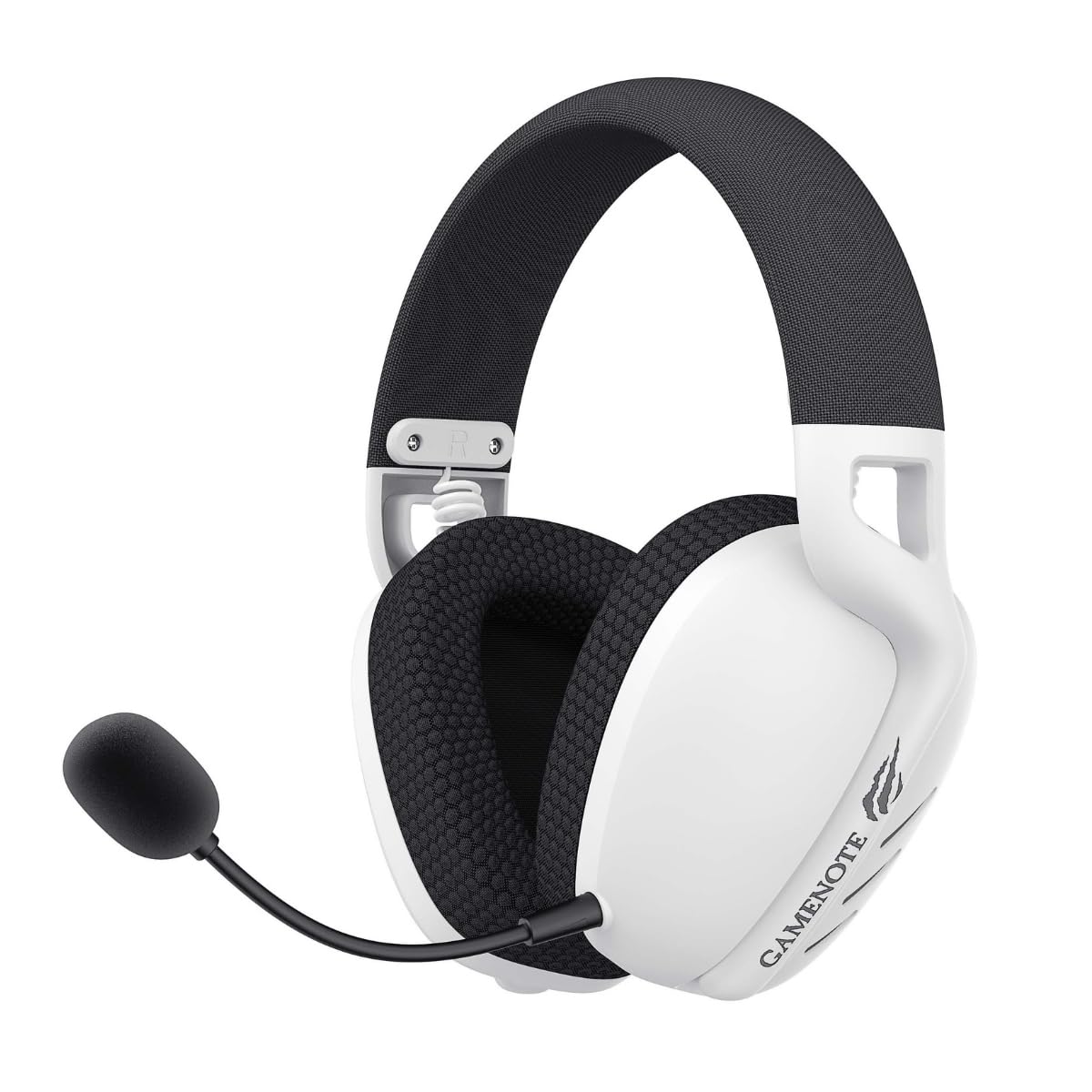
Imatge: Frontal view of the Havit Gamenote Fuxi-H6 Gaming Headset in white, featuring the detachable microphone and 'GAMENOTE' branding on the earcup.

Imatge: Anglesa view of the Havit Gamenote Fuxi-H6 Gaming Headset, highlighting the earcup design, microphone attachment point, and control buttons.
3. Configuració
3.1 Càrrega inicial
Before first use, fully charge the headset. Connect the supplied USB charging cable to the headset's Type-C port and the other end to a USB power source (e.g., computer USB port, wall adapter). The charging indicator light will show charging status and turn off or change color when fully charged.
- Temps de càrrega: aproximadament 2.5 hores.
3.2 2.4GHz Wireless Connection (for PC/Gaming Consoles)
- Insert the 2.4GHz USB dongle into an available USB port on your PC or gaming console.
- Encendre els auriculars.
- Switch the headset to 2.4GHz mode (refer to the headset controls for mode selection).
- The headset will automatically pair with the dongle. A successful connection is indicated by a stable LED light on the headset.
3.3 Bluetooth Connection (for Mobile Devices/Tablets)
- Encendre els auriculars.
- Switch the headset to Bluetooth mode. The LED indicator will flash, indicating pairing mode.
- Al dispositiu, activa el Bluetooth i cerca els dispositius disponibles.
- Select "Havit Fuxi-H6" from the list.
- Once paired, the LED indicator will become stable.
3.4 Connexió amb cable tipus C
Connect the headset directly to your device using a Type-C to Type-C cable (if supported by your device) or the provided USB charging cable to a Type-C port on your device. This mode provides a direct digital audio connection.
3.5 3.5mm Audio Connection
For devices with a 3.5mm audio jack, connect the supplied 3.5mm audio cable to the headset's 3.5mm port and the other end to your device's audio output. This connection is analog and does not require battery power for audio playback.
4. Instruccions de funcionament
4.1 Encès/Apagat
- Encès: Premeu i manteniu premut el botó d'engegada durant aproximadament 3 segons.
- Apagar: Premeu i manteniu premut el botó d'engegada durant aproximadament 3 segons.
4.2 Canvi de mode
Use the dedicated Mode button or switch on the headset to cycle through 2.4GHz, Bluetooth, and wired (Type-C/3.5mm) modes. The headset will indicate the current mode via an LED or voice prompt.
4.3 Control de volum
Adjust the volume using the volume roller or buttons located on the headset earcup.
4.4 Ús del micròfon
- Connecteu el micròfon: Insert the detachable microphone into the designated port on the headset.
- Silencia/Activa el silenci: Use the microphone mute button on the headset to toggle the microphone on or off.
- Posicionament: Adjust the flexible microphone arm for optimal voice pickup.
5. Càrrega
To charge the Havit Gamenote Fuxi-H6 headset, connect the USB charging cable to the headset's Type-C port and a compatible USB power source. The headset features a 600mAh battery.
- Indicador de càrrega: The LED light will typically be red during charging and turn off or blue when fully charged. Refer to the specific LED behavior described in the quick start guide included with your product.
- Avís de bateria baixa: The headset may provide an audible alert or a flashing LED when the battery level is low.
6. Manteniment
- Neteja: Use a soft, dry cloth to clean the headset. Do not use abrasive cleaners or solvents.
- Emmagatzematge: Guardeu els auriculars en un lloc fresc i sec, allunyat de la llum solar directa i de temperatures extremes.
- Cura de la bateria: Per allargar la durada de la bateria, eviteu descarregar completament els auriculars amb freqüència. Carregueu-los regularment, fins i tot si no els feu servir durant períodes prolongats.
- Eviteu la humitat: No exposeu els auriculars a l'aigua ni a una humitat excessiva.
7. Solució De Problemes
| Problema | Possible solució |
|---|---|
| No hi ha so dels auriculars |
|
| El micròfon no funciona |
|
| Headset not pairing (Bluetooth/2.4GHz) |
|
| Durada de la bateria curta |
|
8. Especificacions
| Característica | Detall |
|---|---|
| Model | Fuxi-H6 |
| Marca | Havit |
| Tecnologia de connectivitat | Wireless (Bluetooth, 2.4GHz), Wired (Type-C, 3.5mm) |
| Factor de forma | Sobre l'orella |
| Mida del controlador | 40 mm |
| Capacitat de la bateria | 600 mAh |
| Temps de càrrega | Aproximadament 2.5 hores |
| Pes de l'article | 300 g |
| Dispositius compatibles | Desktops, Gaming Consoles, Mobile Devices |
| Dimensions del paquet | 25 x 10 x 10 cm |
9. Garantia i Suport
9.1 Informació de la garantia
The Havit Gamenote Fuxi-H6 Gaming Headset comes with a 2 Year Distributor Warranty. Please retain your proof of purchase for warranty claims. The warranty covers manufacturing defects and malfunctions under normal use conditions.
9.2 Atenció al client
For technical assistance, troubleshooting beyond this manual, or warranty inquiries, please contact your local distributor or the Havit customer support service. Refer to the product packaging or the official Havit weblloc per obtenir dades de contacte.


