
Philips 55PUG8929/78
Philips Smart TV Ambilight THE ONE 55 inch 4K 144 Hz
Model: 55PUG8929/78 - User Manual
Introducció
This manual provides essential information for the safe and efficient use of your Philips Smart TV Ambilight THE ONE 55 inch 4K 144 Hz, model 55PUG8929/78. Please read these instructions carefully before operating the device and retain them for future reference.
Your Philips TV features Ambilight technology, a P5 processor for enhanced image quality, Dolby Vision and Dolby Atmos for immersive audiovisual experiences, a 144Hz refresh rate with VRR and AMD FreeSync Premium for gaming, and the Titan OS smart TV platform.
Configuració
1. Desembalatge i contingut del paquet
Traieu amb cura tots els components de l'embalatge. Assegureu-vos que hi hagi tots els elements abans de llençar els materials d'embalatge.
- 1 Smart TV Philips 55"
- 1 Control remot
- 2 piles AAA
- 1 cable d'alimentació
- 1 Guia d'inici ràpid
- 1 Legal and safety leaflet
- 1 Suport de taula
Note: The product does not include installation services. For apartment delivery, lifting, or wall mounting, the customer is responsible. Philips is not responsible for installation or assembly.
2. Assembling the Stand or Wall Mounting
If using the included table stand, follow the instructions in the quick start guide to securely attach it to the TV. Ensure all screws are tightened properly. If wall mounting, use a VESA-compatible wall mount (sold separately) and consult a professional for installation to ensure safety and proper alignment. The TV supports VESA 30cm mounting.

Imatge: Frontal view of the Philips 55 inch Smart TV with its table stand assembled.
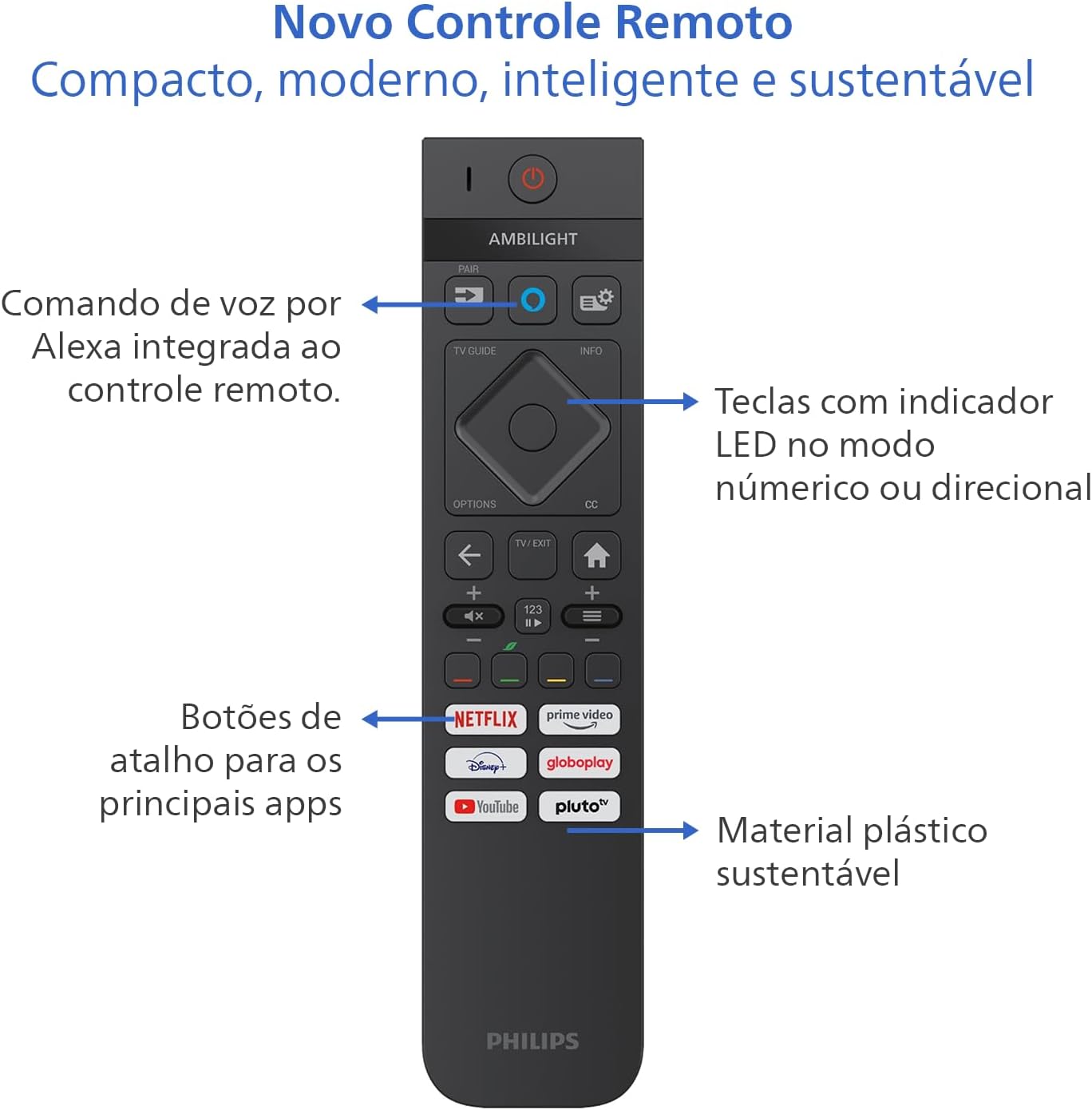
Image: Diagram showing the dimensions of the Philips 55 inch Smart TV with and without the stand, including VESA wall mount specifications (30cm).
3. Connexió de perifèrics
Connect your devices to the TV's ports. Refer to the back and side views for port locations.
- Potència: Connect the power cable to the TV and a suitable electrical outlet (110V/220V compatible).
- HDMI: Use HDMI 2.1 ports for high-definition devices like gaming consoles, Blu-ray players, or set-top boxes. There are 4 HDMI ports available.
- USB: Connect USB drives for media playback or external devices. There are 2 USB ports.
- Antenna/RF: Connect your antenna cable for terrestrial TV reception.
- Ethernet (RJ-45): Per a una connexió a Internet per cable.
- Audio L-R: Entrada d'àudio analògic.
- SPDIF (Optical Audio): Per a la sortida d'àudio digital a barres de so o sistemes de cinema a casa.
- Sortida d'auriculars: Per connectar auriculars.

Imatge: Side profile of the Philips 55 inch Smart TV, highlighting the accessible USB ports and other side connections.

Imatge: Part posterior view of the Philips 55 inch Smart TV, displaying the full array of input and output ports for various connections.
4. Engegada inicial i configuració de la xarxa
After connecting the power cable, press the power button on the remote control. Follow the on-screen instructions to complete the initial setup, including language selection, country, and network connection (Wi-Fi or Ethernet). The TV supports Wi-Fi Dual Band and Bluetooth 5.2 for wireless connectivity.
Instruccions de funcionament
1. Funcions de control remot
The included remote control is designed for intuitive navigation and features voice command with integrated Alexa. Insert the two AAA batteries into the remote control before use.

Imatge: Detallada view of the Philips Smart TV remote control, highlighting the voice command button (Alexa), LED indicator keys, and dedicated shortcut buttons for popular streaming applications.
- Botó d'encesa: Encén o apaga el televisor.
- Voice Command (Alexa): Press and hold to use voice commands for searching content, controlling smart home devices, and more.
- Bloc de navegació: Use the directional buttons to navigate menus and select options.
- Botons de drecera: Direct access to popular streaming apps like Netflix, Prime Video, YouTube, and Pluto TV.
- Volum/Canal: Ajusta el volum i canvia de canal.
- LED Indicator Keys: Keys with LED indicators for numeric or directional mode.
2. Funcions de Smart TV (Titan OS)
Your TV runs on Titan OS, offering a user-friendly interface and quick access to various applications. The home screen is customizable, allowing you to prioritize your favorite apps and content.

Image: The Philips Smart TV's home screen, showing a selection of streaming applications and a personalized content layout.
- Personalized Home Screen: Access your favorite content and applications with recommendations tailored to your preferences.
- Interfície intuïtiva: Organize your home screen by prioritizing frequently used applications for easy daily access.
- Descobriment de contingut: Easily find new content with agile navigation and smart search functions.
3. Ambilight Technology
Ambilight projects colors from the screen onto the surrounding wall, enhancing immersion. Your TV features three-sided Ambilight with 8 illumination modes.

Image: A Philips Ambilight TV displaying dynamic backlighting that extends the on-screen colors onto the wall, creating an immersive viewexperiència.
- natural: Softer colors and brightness for visual comfort.
- Viu: Stronger, more vibrant Ambilight colors to create a sense of expanded imagery.
- Lounge: Can be active even when the TV is off, creating a cozy ambient atmosphere.
- Joc: Adapts lights to dark and dynamic scenes, enhancing gaming immersion.
- Música: Ambilight follows the rhythm of music, ideal for creating a festive home environment.
- AmbiWake Up: Simulates sunrise with soft Ambilight, gentle music, and weather forecast.
- Ambi-sleep: With the screen off, Ambilight emits an orange light and nature sounds to promote sleep.
- Aurora: Transforms the TV into a decorative piece, displaying continuous animations for a pleasant ambiance.

Image: Comparison of Ambilight's Natural mode (soft, comfortable lighting) and Vivid mode (strong, vibrant lighting for expanded imagery).

Image: Comparison of Ambilight's Lounge mode (ambient lighting when TV is off) and Game mode (dynamic lighting for gaming immersion).

Image: Comparison of Ambilight's Music mode (lights synchronize with music) and AmbiWake Up mode (simulates sunrise).

Image: Comparison of Ambilight's Ambi-sleep mode (orange light and nature sounds for sleep) and Aurora mode (decorative animations).
4. Picture and Sound Quality
The TV features a P5 processor, 4K resolution, Dolby Vision, and HDR10+ for exceptional image quality. The audio system includes 40W RMS, Dolby Atmos, and DTS Play-Fi for immersive sound.

Image: Explanation of the Philips P5 Perfect Picture Engine, illustrating how it optimizes colors, contrasts, and movements for realistic images.

Image: Visual comparison demonstrating the enhanced detail and richness of images with Dolby Vision and HDR compared to standard display.
- P5 Processor: Optimizes colors, contrasts, and movements in real-time for vivid and realistic images.
- Dolby Vision i HDR10+: Provides cinematic visual experience with impressive brightness, contrast, and color detail in 4K resolution.
- 40W RMS Audio: Powerful sound output that fills the environment with clarity and intensity.
- Dolby Atmos i DTS:X: Advanced audio technologies creating a three-dimensional sound effect for an immersive experience.
- Intellisound with AI: Automatic audio adjustment based on content, ensuring clear and balanced sound from subtle dialogues to intense soundtracks.
5. Característiques de joc
Designed for gamers, this TV offers a fluid and responsive gaming experience.

Image: The Philips Smart TV's Game Bar interface, showing various settings for optimizing the gaming experience, including VRR, ALLM, and FreeSync Premium.
- 144Hz VRR: Variable Refresh Rate ensures ultra-fast, tear-free, and stutter-free motion.
- AMD FreeSync Premium: Provides stable, fluid, and lag-free gaming.
- Barra de jocs: Access gaming-specific settings quickly.
- ALLM (mode automàtic de baixa latència): Automatically switches to low-latency mode for responsive gaming.
- Jocs al núvol: Compatible with cloud gaming services like Blacknut.
Manteniment
1. Neteja del televisor
- Pantalla: Netegeu suaument la pantalla amb un drap suau i sense borrissol. Per a marques difícils, netegeu lleugerament.ampNetegeu el drap amb aigua o amb un netejador de pantalles especialitzat. No ruixeu mai líquid directament sobre la pantalla.
- Gabinet: Use a soft, dry cloth to clean the TV cabinet. Avoid abrasive cleaners or solvents.
- Comandament a distància: Netegeu amb un drap suau i sec.
2. Actualitzacions de programari
Periodically check for software updates to ensure optimal performance and access to the latest features. You can usually find this option in the TV's settings menu under "System" or "About TV". Ensure your TV is connected to the internet for updates.
Resolució de problemes
Si teniu problemes amb el televisor, consulteu els passos habituals següents per a la resolució de problemes abans de contactar amb el servei d'assistència.
Sense poder
- Ensure the power cable is securely connected to both the TV and the electrical outlet.
- Comproveu si la presa de corrent funciona connectant un altre dispositiu.
- Prova de prémer el botó d'engegada del televisor, no només el comandament a distància.
Sense imatge o mala qualitat d'imatge
- Verifiqueu que s'ha seleccionat la font d'entrada correcta (per exemple, HDMI 1, TV).
- Comproveu si totes les connexions dels cables (HDMI, antena) estan soltes o danyats.
- Ajusteu la configuració de la imatge (brillantor, contrast, color) al menú del televisor.
- If using an external device, try connecting it to a different HDMI port or another TV to rule out device issues.
No hi ha so o qualitat de so deficient
- Assegureu-vos que el volum no estigui silenciat i que estigui pujat.
- Check audio settings in the TV menu, ensuring the correct audio output is selected (e.g., TV speakers, external audio system).
- If using external speakers or a soundbar, check their power and connections.
El control remot no funciona
- Substitueix les piles per piles AAA noves.
- Assegureu-vos que no hi hagi obstacles entre el comandament a distància i el sensor d'infrarojos del televisor.
- If the remote uses Bluetooth, try re-pairing it with the TV (refer to the TV's settings for pairing instructions).
Network/Internet Connection Issues
- Check your router and modem to ensure they are powered on and functioning correctly.
- Reinicieu el router i el mòdem.
- If using Wi-Fi, ensure the TV is within range of your router. Try connecting via Ethernet cable if possible.
- Verify Wi-Fi password if prompted.
Especificacions
| Característica | Detall |
|---|---|
| Marca | Philips |
| Model | 55PUG8929/78 |
| Mida de la pantalla | 55 polzades |
| Tecnologia de visualització | 4K UHD, LED, IPS |
| Resolució | 3840 x 2160 píxels (4K) |
| Freqüència d'actualització | 144 Hz |
| Temps de resposta | 8 mil·lisegons |
| Viewangle ing | 178 graus |
| Relació d'aspecte | 16:9 |
| Relació de contrast | 1:200,000 |
| Sistema operatiu | Titan OS |
| Capacitat d'emmagatzematge de memòria | 8 GB |
| Característiques especials | Dolby Atmos / DTS-X, HDR10+/HLG/HDR10, Titan OS, Ambilight |
| Potència de sortida d'àudio | 40 watts (RMS) |
| Canals de so envoltant | 2.0 |
| Tecnologia de connectivitat | HDMI, USB, Wi-Fi, Bluetooth |
| Ports HDMI | 4 (compatible amb HDMI 2.1) |
| Ports USB | 2 |
| Altres connexions | 1 Audio L-R, 1 RF (Antenna), 1 SPDIF (Optical Audio), 1 Headphone Output, 1 Ethernet RJ-45 |
| Connectivitat sense fil | Bluetooth 5.2, Wi-Fi Dual Band |
| Voltage | 110 volts, 220 volts |
| Etiqueta d'eficiència energètica | A (ENÇA) |
| Dimensions del producte (sense suport) | 123 x 8.1 x 72 cm (A x P x A) |
| Product Weight (without stand) | 14.2 kg |
| Pes del producte (amb suport) | 14.6 kg |
| Color | Negre |
| Certificació | INMETRO |
| Any | 2025 |
Informació de la garantia
Your Philips Smart TV model 55PUG8929/78 comes with a Garantia del fabricant de 1 anys. This warranty covers defects in materials and workmanship under normal use. Please retain your proof of purchase for warranty claims. For detailed terms and conditions, refer to the legal and safety leaflet included in your package.
Atenció al client
For further assistance, technical support, or warranty claims, please contact Philips customer service. You can find contact information on the Philips official weblloc web o a la documentació que s'inclou amb el televisor.
Oficial de Philips Weblloc: www.philips.com
Ask a question about this manual
Ask about setup, troubleshooting, compatibility, parts, safety, or missing instructions. Manuals+ will review the question and use this page’s manual context to help answer it.