
1. Introducció
Thank you for choosing the BOSGAME P3 Mix Mini PC. This manual provides essential information for setting up, operating, maintaining, and troubleshooting your new mini PC. Please read it carefully before use and retain it for future reference.
2. Què hi ha a la caixa
Verifiqueu que tots els elements que s'enumeren a continuació s'inclouen al vostre paquet:
- 1x P3 MIX Mini PC
- 1x cable HDMI
- 1x VESA Mount & Screws
- 1x adaptador de corrent
- 1 x manual d'usuari
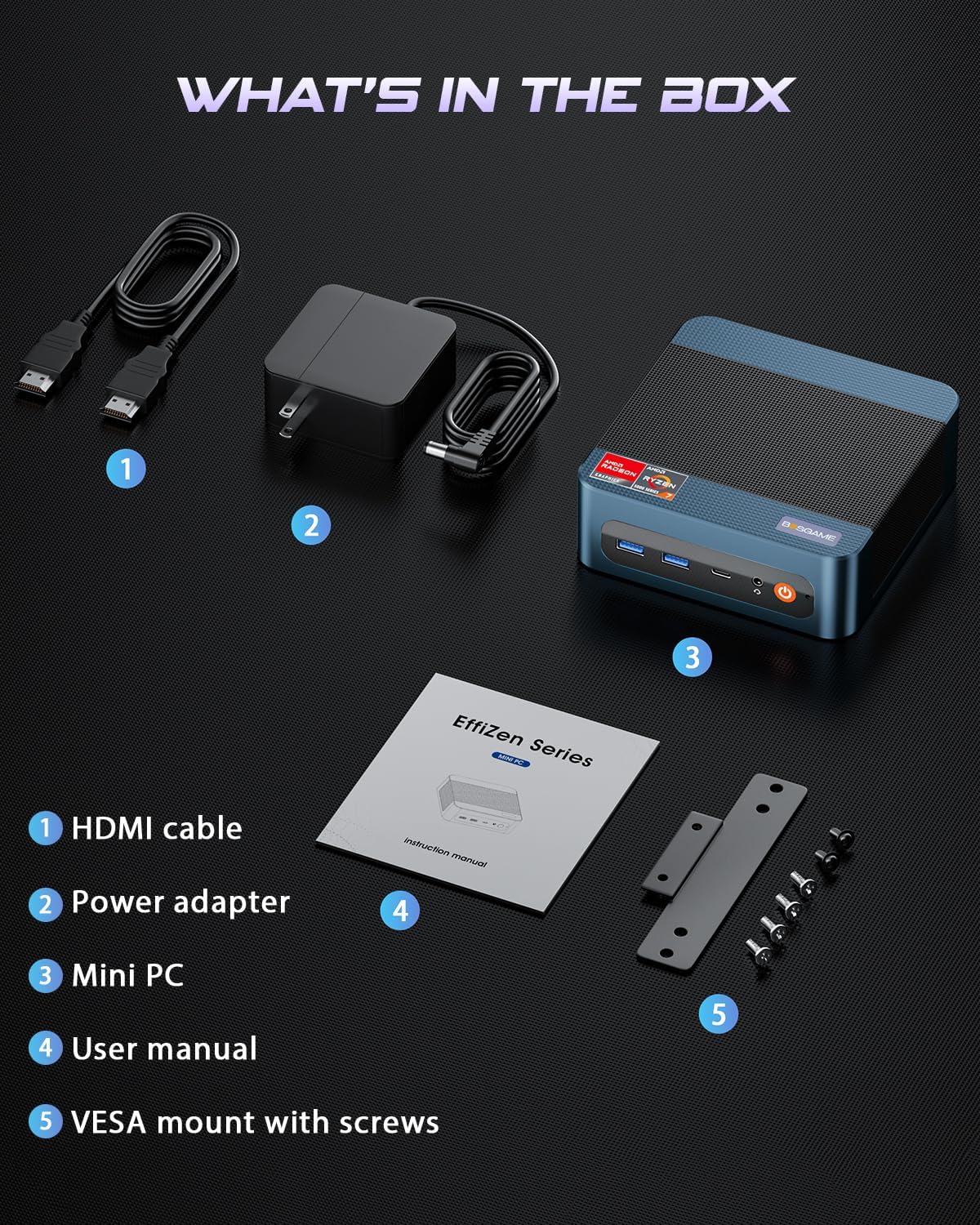
This image displays the BOSGAME P3 Mix Mini PC and its included accessories: an HDMI cable, a power adapter, the mini PC unit, a user manual, and a VESA mount with screws for installation.
3. Producte acabatview
The BOSGAME P3 Mix Mini PC is a compact desktop computer designed for various applications, from home office tasks to gaming and 4K video editing. It features a powerful AMD Ryzen 7640HS processor and Radeon 760M graphics.

This image highlights the core specifications of the mini PC, including its AMD Ryzen 5 7640HS processor, AMD Radeon 760M GPU, 16GB DDR5 RAM, 512GB M.2 PCIe 3.0 x4 SSD, support for 8K 60Hz display, USB-4 (40Gbps) connectivity, Wi-Fi 6E AX210, and Bluetooth 5.2.
This diagram illustrates the various input/output ports available on the mini PC, including power input, dual 2.5G LAN, HDMI, DisplayPort, USB 2.0, USB 4, USB 3.2 ports, and a 3.5mm audio jack.
Video 3.1: BOSGAME Ryzen 5 7640HS MINI PC OverviewAquest vídeo ofereix una visió generalview of the BOSGAME P3 Mix Mini PC, showcasing its compact design, internal components, port layout, and connectivity features.
4. Instruccions de configuració
4.1 Connexió de l'adaptador de corrent
- Connect the power adapter cable to the DC 19V 6.3 port on the rear of the mini PC.
- Connecteu l'adaptador de corrent a una presa de corrent.
4.2 Connexió a una pantalla
The P3 Mix Mini PC supports triple display output via HDMI, DisplayPort, and USB4.
- Connect one end of an HDMI cable to the HDMI port on the mini PC and the other end to your monitor.
- For additional displays, connect a DisplayPort cable to the DP port and/or a USB4 cable to the USB4 port, then connect to your respective monitors.
- Assegureu-vos que els monitors estiguin encesos i configurats a la font d'entrada correcta.

This image demonstrates how to set up a triple display configuration with the mini PC, utilizing the DP 1.4, HDMI 2.0, and USB4 ports to connect to multiple monitors.
4.3 Connexió de perifèrics
- Connect your USB keyboard and mouse to any available USB ports (USB 2.0, USB 3.2).
- For wired network access, connect an Ethernet cable to one of the 2.5G LAN ports.
- For audio output, connect speakers or headphones to the 3.5mm audio jack.
4.4 Encès inicial
- After connecting all necessary cables, press the power button located on the front of the mini PC.
- The system will boot up, and you should see the operating system on your connected display(s).
5. Instruccions de funcionament
5.1 Encès/Apagat
- Per encendre: Premeu el botó d'encesa una vegada.
- Per apagar: From the operating system, select 'Shut Down'. Alternatively, press and hold the power button for 5 seconds to force a shutdown (use only when necessary).
- Per reiniciar: From the operating system, select 'Restart'.
5.2 Connectivitat de xarxa
- Connexió per cable: Connect an Ethernet cable to one of the two 2.5G LAN ports. The system will automatically detect the connection.
- Wireless Connection (Wi-Fi 6E): Navigate to your operating system's network settings, select the desired Wi-Fi network, and enter the password.
5.3 Connectivitat Bluetooth
The mini PC supports Bluetooth 5.2 for connecting wireless peripherals.
- Assegureu-vos que el dispositiu Bluetooth estigui en mode d'emparellament.
- On your mini PC, go to the operating system's Bluetooth settings.
- Cerca and select your device to pair.
6. Manteniment i actualitzacions
6.1 RAM and SSD Upgrades
The BOSGAME P3 Mix Mini PC allows for easy upgrades of its DDR5 RAM and M.2 PCIe SSD. Always power off and unplug the device before performing any internal maintenance.

This image provides a visual guide for upgrading the RAM and SSD. The process involves removing screws, carefully opening the base plate, repositioning the system fan, and then replacing the memory modules and SSD.
- Apagueu i desconnecteu: Ensure the mini PC is completely powered off and disconnected from the power source.
- Traieu els cargols: Locate and remove the screws securing the bottom panel.
- Open Base Plate: Carefully open the base plate to access the internal components.
- Components d'accés: You may need to gently move the system fan or other components to gain full access to the RAM and SSD slots.
- Replace RAM/SSD: Install new DDR5 SO-DIMM RAM modules into the dual channel slots (up to 64GB supported) or a new M.2 2280 NVMe PCIe 3.0 SSD (up to 4TB per slot, 8TB total capacity).
- Torneu a muntar: Carefully reassemble the mini PC, ensuring all connections are secure and screws are tightened.
6.2 Neteja
- Netegeu regularment l'exterior del mini PC amb un drap suau i sec.
- Use compressed air to clear dust from ventilation grilles to ensure optimal airflow and prevent overheating. Do not insert objects into the vents.
7. Solució De Problemes
7.1 Sense poder
- Ensure the power adapter is securely connected to both the mini PC and a working power outlet.
- Verifiqueu que la presa de corrent funciona connectant-hi un altre dispositiu.
- Prova un adaptador de corrent diferent si està disponible i és compatible.
7.2 Sense sortida de pantalla
- Check all display cable connections (HDMI, DP, USB4) between the mini PC and the monitor(s).
- Ensure the monitor(s) are powered on and set to the correct input source.
- Try connecting to a single monitor using a different cable or port.
- If you recently reinstalled the operating system, ensure all display drivers are correctly installed. Some users have reported needing specific drivers from the manufacturer for optimal display performance.
7.3 Problemes de connectivitat de xarxa
- Amb cable: Check the Ethernet cable connection. Verify your router/modem is working correctly.
- Sense fil: Ensure Wi-Fi is enabled in your operating system settings. Re-enter the Wi-Fi password. Restart your router/modem.
7.4 Problemes de rendiment
- Tanca les aplicacions innecessàries que s'executen en segon pla.
- Ensure the mini PC has adequate ventilation and is not overheating.
- Check for operating system updates and driver updates.
- Verify that the RAM and SSD are properly seated if you have performed an upgrade.
8. Especificacions
| Característica | Especificació |
|---|---|
| Marca | BOSGAME |
| Nom del model | P3 |
| Model de CPU | AMD Ryzen 5 7640HS (6C/12T, up to 5.0 GHz) |
| Coprocessador gràfic | Radeon 760M (Integrated) |
| Memòria RAM | 16GB DDR5 4800MHz (2x8GB), Max 64GB |
| Capacitat d'emmagatzematge de memòria | 512GB PCIe 3.0 SSD (M.2 2280), Max 8TB (2x4TB) |
| Sistema operatiu | OS11 Support Win/Ubuntu/Linux |
| Interfície de sortida de vídeo | HDMI 2.0, DisplayPort 1.4, USB4 (8K@60Hz) |
| Tecnologia de connectivitat | Dual 2.5G LAN, Wi-Fi 6E (802.11ax), Bluetooth 5.2 |
| Ports USB | 3x USB 3.2 (10Gbps), 1x USB 4 (40Gbps), 2x USB 2.0 (480Mbps) |
| Sortida d'àudio | 3.5mm Àudio Jack |
| Pes de l'article | 1.26 quilos |
| Tipus d'endoll d'alimentació | Tipus A - 2 pins (nord-americà) |
9. Garantia i Suport
9.1 Informació de la garantia
BOSGAME offers a 1-year limited warranty for the P3 Mix Mini PC. This warranty covers manufacturing defects and ensures product quality.
9.2 Atenció al client
For any product-related inquiries, technical assistance, or warranty claims, please contact BOSGAME customer support. You can reach out via the following methods:
- Correu electrònic: Qingzhuomao@163.com
- En línia: Visit the BOSGAME store on Amazon or their official weblloc web per a preguntes freqüents i recursos de suport.
A professional after-sales team is available to assist you with your needs.