
DOOGEE Fire5 Ultra
DOOGEE Fire 5 Ultra Rugged Phone User Manual
Model: Fire5 Ultra
Introducció
This manual provides essential information for setting up and operating your DOOGEE Fire 5 Ultra Rugged Phone. Please read it carefully to ensure proper use and to maximize the device's capabilities. The DOOGEE Fire 5 Ultra is designed for durability and performance in challenging environments, featuring robust construction, a large battery, and advanced functionalities.
Contingut del paquet
Verifiqueu que tots els elements siguin presents al paquet:
- DOOGEE Fire 5 Ultra Cellphone
- Cable USB
- Carregador
- Protective Film (Pre-applied)
- Manual d'usuari
- Targeta de garantia
- Card Slot Opener

Image: Contents of the DOOGEE Fire 5 Ultra box, including the phone, charger, USB cable, protective film, user manual, warranty card, and card slot opener.
Video: An unboxing video of the DOOGEE Fire 5 Ultra, showcasing the phone and its accessories as they are removed from the packaging.
S'han acabat les funcions clauview
Explore the main features and design aspects of the DOOGEE Fire 5 Ultra.
Video: A 3D animated overview of the DOOGEE Fire 5 Ultra, highlighting its rugged design, dual camping lights, and camera system.
Guia de configuració
1. Instal·lació de la targeta SIM i la targeta d'emmagatzematge
The DOOGEE Fire 5 Ultra supports dual Nano SIM cards and a TF card for expandable storage up to 2TB. Use the provided card slot opener to access the SIM/TF card tray.
- Localitza la safata de la targeta SIM al lateral del telèfon.
- Insert the card slot opener into the small hole next to the tray and press gently until the tray ejects.
- Place your Nano SIM card(s) and/or TF card into the designated slots on the tray. Ensure proper orientation as indicated on the tray.
- Torneu a inserir la safata amb cura al telèfon fins que encaixi al seu lloc.
2. Càrrega inicial
Before first use, fully charge your device. The phone comes with a 13000mAh battery and supports 18W fast charging.
- Connecteu el cable USB a l'adaptador del carregador.
- Connecteu l'adaptador del carregador a una presa de corrent.
- Connect the USB-C end of the cable to the charging port on your phone.
- Deixeu que el telèfon es carregui fins que l'indicador de bateria mostri el 100%.
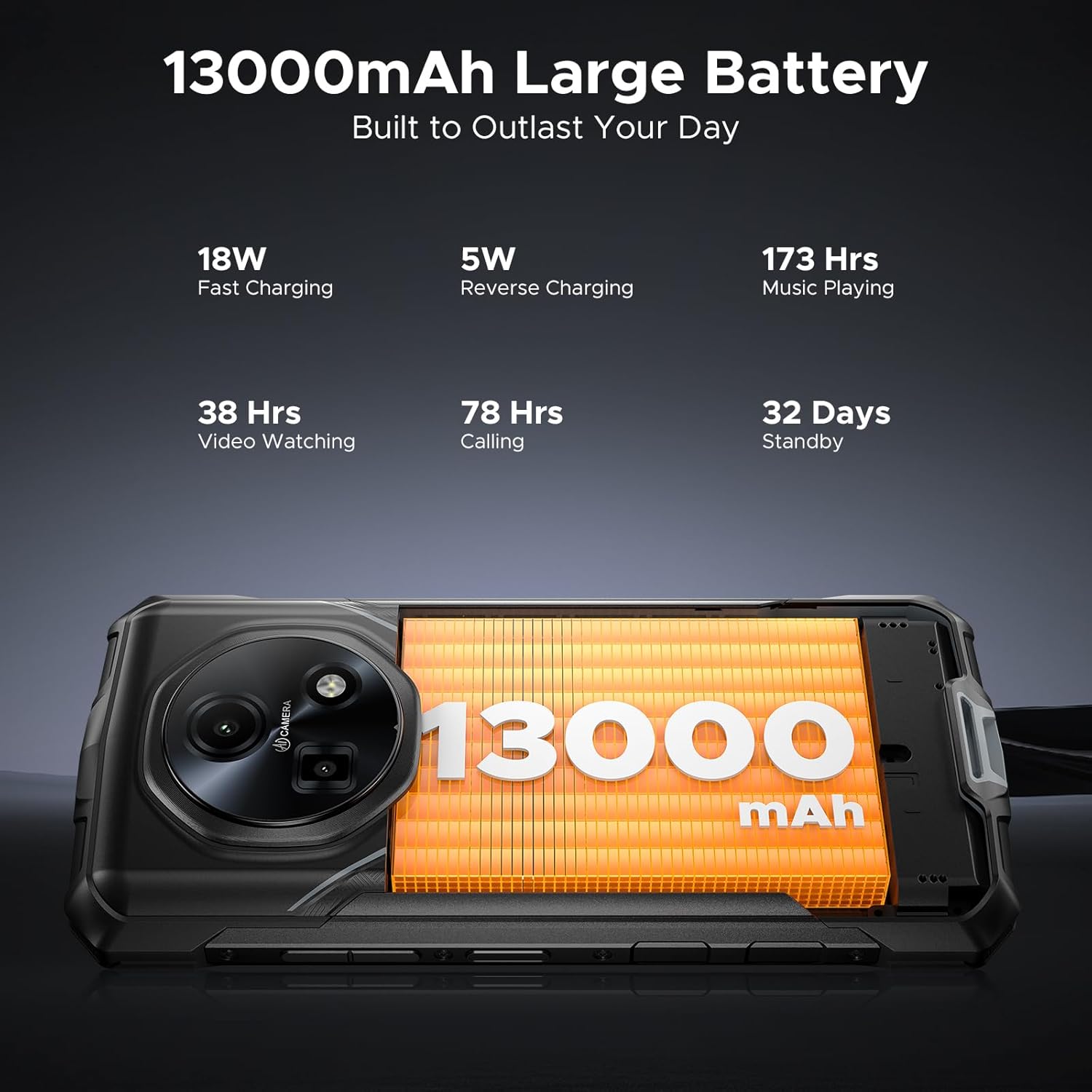
Image: Close-up of the DOOGEE Fire 5 Ultra's charging port with a USB-C cable connected.
Funcionament del vostre dispositiu
Engegada/Apagada i Bloqueig de Pantalla
- To power on, press and hold the Power button until the DOOGEE logo appears.
- Per apagar l'aparell, manteniu premut el botó d'engegada i, a continuació, seleccioneu "Apagar" de les opcions.
- To lock the screen, briefly press the Power button. To unlock, press the Power button and swipe up, or use fingerprint/face unlock.
Doble Camping Lights
The DOOGEE Fire 5 Ultra features dual camping lights on the back, providing illumination for various situations. These lights offer three modes: illumination, strobe, and SOS.
- Activació: Access the quick settings panel or a dedicated app to control the campllums enceses.
- Modes: Switch between steady illumination, strobe (flashing), and SOS (Morse code for distress).
- Brightness & Timer: Adjust the brightness level and set a timer for automatic shut-off through the phone's settings or the dedicated app.

Image: The back of the DOOGEE Fire 5 Ultra showing the dual camping lights illuminated.
Video: A demonstration of the DOOGEE Fire 5 Ultra's powerful dual camping lights, showcasing their brightness and different modes.
Funcions de la càmera
The phone is equipped with a 48MP AI main camera and an 8MP front camera. The camera app offers various modes for photography and video recording.
- Càmera principal: Supports AI shooting, night mode, panorama, and 2K video recording.
- Càmera frontal: Features beauty mode for enhanced selfies and supports face unlock.
- Accés: Obriu l'aplicació Càmera des de la pantalla d'inici o la pantalla de bloqueig.

Image: Close-up of the DOOGEE Fire 5 Ultra's rear camera module.
Visualització i navegació
The 6.6-inch HD IPS display features a 90Hz refresh rate for smooth visuals.
- Navegació: Use standard Android gestures or on-screen navigation buttons.
- Mode fosc: Enable Dark Mode in display settings for comfortable viewamb poca llum.
Video: A demonstration of the DOOGEE Fire 5 Ultra's 6.6-inch HD+ IPS display with a 90Hz refresh rate, showing smooth visuals.
Característiques de seguretat
- Side Fingerprint ID: Register your fingerprints in the Security settings for quick and secure unlocking. The sensor is located on the side of the device.
- Identificació facial: Configura el reconeixement facial per a un desbloqueig còmode.
Connectivity and Other Functions
- 4G LTE: Ensures stable cellular connectivity.
- NFC: For contactless payments and quick data transfer. Activate in Settings > Connected devices > NFC.
- OTG: On-The-Go functionality allows connecting USB devices like flash drives or external keyboards.
- Ràdio FM: Listen to FM radio stations (may require headphones as an antenna).
Durabilitat i protecció
The DOOGEE Fire 5 Ultra is built to withstand harsh conditions, certified with industry-leading durability standards.
- IP68/IP69K Rating: This certification indicates the device is highly resistant to dust and water. It can withstand immersion in 1.5 meters of water for up to 30 minutes and is protected against high-pressure, high-temperature water jets.
- MIL-STD-810H Compliance: Tested against military standards for durability, the phone is resistant to drops, shocks, vibrations, and extreme temperatures, making it suitable for industrial job sites and outdoor adventures.

Image: The DOOGEE Fire 5 Ultra shown in various rugged scenarios, including being dropped, submerged in water, and covered in mud, illustrating its IP68/IP69K and MIL-STD-810H ratings.
Rendiment i emmagatzematge
- Processador: Powered by the MediaTek Helio G81 octa-core processor, providing smooth performance for daily tasks and light gaming.
- Sistema operatiu: Funciona amb Android 15, que ofereix les darreres funcions i actualitzacions de seguretat.
- IA de Bessons: Integrated Gemini AI optimizes performance and power efficiency based on usage patterns.
- RAM: Features 32GB RAM (8GB physical + 24GB extended virtual RAM) for efficient multitasking.
- Emmagatzematge intern: Comes with 256GB of internal storage.
- Emmagatzematge ampliable: Supports storage expansion up to 2TB via a TF (microSD) card (sold separately).

Image: Visual representation of the MediaTek Helio G81 Octa-Core chipset and the 32GB RAM + 256GB ROM configuration.
Video: An animation highlighting the MediaTek Helio G81 Octa-Core processor and its role in the DOOGEE Fire 5 Ultra's performance.
Gestió de la bateria
The DOOGEE Fire 5 Ultra is equipped with a large 13000mAh battery, designed for extended use.
- Capacitat: 13000mAh for prolonged operation, ideal for outdoor activities or remote work.
- Càrrega ràpida: Supports 18W fast charging to reduce recharge times.
- Càrrega inversa OTG: The phone can act as a power bank to charge other small devices (e.g., headphones, flashlights) using an OTG cable (not included).
Image: The DOOGEE Fire 5 Ultra displaying its 13000mAh battery capacity and charging status.
Video: A visual representation of the DOOGEE Fire 5 Ultra's 13000mAh large battery and its fast charging capabilities.
Especificacions tècniques
| Característica | Especificació |
|---|---|
| Nom del model | Fire5 Ultra |
| Marca | DOOGEE |
| Sistema operatiu | Android 15 |
| Model de CPU | MediaTek Helio G81 Octa-Core |
| RAM | 32 GB (8 GB físic + 24 GB virtual) |
| Capacitat d'emmagatzematge de memòria | 256 GB (ampliable fins a 2 TB amb targeta TF) |
| Mida de la pantalla | 6.6 Inches HD+ IPS Display |
| Resolució | 2560 x 1440 |
| Freqüència d'actualització | 90 Hz |
| Càmera principal | Càmera principal amb IA de 48 MP |
| Càmera frontal | Càmera frontal de 8MP |
| Capacitat de la bateria | 13000 milionsamp Hores |
| Carregant | Càrrega ràpida de 18 W, càrrega inversa OTG |
| Característiques especials | Dual SIM, Octa Core Processor, Water Resistant (IP68/IP69K), MIL-STD-810H, Dual Camping Lights (1200LM), NFC, GPS, Side Fingerprint ID, Face ID, FM Radio |
| Dimensions del producte | 6.95 x 3.25 x 0.74 polzades |
| Pes de l'article | 13.9 unces |
Resolució de problemes
If you encounter issues with your DOOGEE Fire 5 Ultra, refer to the following common solutions:
- El dispositiu no s'encén: Assegureu-vos que la bateria estigui carregada. Connecteu el carregador i espereu uns minuts abans d'intentar tornar-lo a engegar.
- La pantalla no respon: Try restarting the device by holding the Power button for approximately 10-15 seconds until it reboots.
- Problemes de connectivitat de xarxa: Comproveu si la targeta SIM està inserida correctament. Verifiqueu que les dades mòbils estiguin activades a la configuració. Si els problemes persisteixen, poseu-vos en contacte amb el vostre proveïdor de xarxa.
- Les aplicacions es bloquegen o es bloquegen: Clear the cache of the problematic app in Settings > Apps. If the issue continues, try reinstalling the app.
- Rendiment lent: Close unnecessary background applications. Clear cached data regularly. Consider performing a factory reset if performance significantly degrades (back up your data first).
- Problemes de càrrega: Ensure the USB cable and charger are securely connected and undamaged. Try a different power outlet or charger if available.
Garantia i Suport
Your DOOGEE Fire 5 Ultra comes with a manufacturer's warranty. Please refer to the included warranty card for specific terms and conditions.
- Període de garantia: Typically includes a 1-year warranty service from the manufacturer.
- Política de devolució: Els productes comprats es poden retornar en un termini de 30 dies a partir de la seva recepció, d'acord amb la política de devolucions del venedor.
- Atenció al client: For technical assistance or warranty claims, please contact DOOGEE customer support. Refer to the contact information provided on the warranty card or the official DOOGEE weblloc.

Image: DOOGEE's service commitment, including 1-year warranty and customer service details.
Ask a question about this manual
Ask about setup, troubleshooting, compatibility, parts, safety, or missing instructions. Manuals+ will review the question and use this page’s manual context to help answer it.