
Introducció
This manual provides essential information for the setup, operation, maintenance, and troubleshooting of your AWOW Mini PC, Model BA7. Please read these instructions carefully before using the device.

Imatge: Més deview of the AWOW BA7 Mini PC, highlighting its compact design and key features.
Contingut del paquet
Verifiqueu que tots els elements siguin presents al paquet:
- AWOW BA7 Mini PC
- Adaptador d'alimentació
- Cargols de muntatge
- Suport de muntatge VESA
- Cable HDMI
- Manual d'usuari (aquest document)

Image: Illustration of the AWOW BA7 Mini PC and its included accessories: power adapter, screws, VESA mount, HDMI cable, and user manual.
Instruccions de configuració
- Connecteu els perifèrics: Connect your keyboard, mouse, and monitor(s) to the appropriate ports on the Mini PC.
Imatge: Frontal view of the Mini PC showing the Power Button, Type-C port, USB 3.2 ports, and 3.5mm Audio Jack.

Imatge: Part posterior view of the Mini PC showing the DC IN, DP1.2, HDMI2.0, USB 2.0 ports, and RJ45 LAN port.
- Connexió d'alimentació: Connect the power adapter to the DC IN port on the Mini PC, then plug the adapter into a power outlet.
- Encès: Press the power button located on the front of the Mini PC. The system will boot up.
- Configuració inicial: Seguiu les instruccions que apareixen a la pantalla per completar la configuració inicial del Windows 11 Pro, incloent-hi l'idioma, la regió, la connexió de xarxa i la creació del compte d'usuari.
- Connexió de xarxa:
- Amb cable: Connect an Ethernet cable to the RJ45 LAN port for a stable wired connection.
- Sense fil: During Windows setup or via Windows settings, connect to your Wi-Fi network using the built-in WiFi 6.
Instruccions de funcionament
Funcionament bàsic
- Encès/apagat: Press the power button to turn on the PC. To shut down, use the Windows Start menu options (Shut down, Restart, Sleep). A short press on the power button can put the PC to sleep. A long press (approx. 5 seconds) will force a shutdown.
- Sortida de visualització: The Mini PC supports up to three 4K displays simultaneously via DP, HDMI, and USB-C. Connect your monitors and configure display settings in Windows.

Image: A user working with a triple monitor setup, demonstrating the Mini PC's multi-display capability.
- Connectivitat USB: Utilize the USB 2.0 and USB 3.0 ports for connecting external devices such as external hard drives, USB flash drives, printers, and other peripherals. The Type-C port also supports data transfer and display output.
- Àudio: Connecteu uns auriculars o altaveus al connector d'àudio de 3.5 mm.
Ús avançat
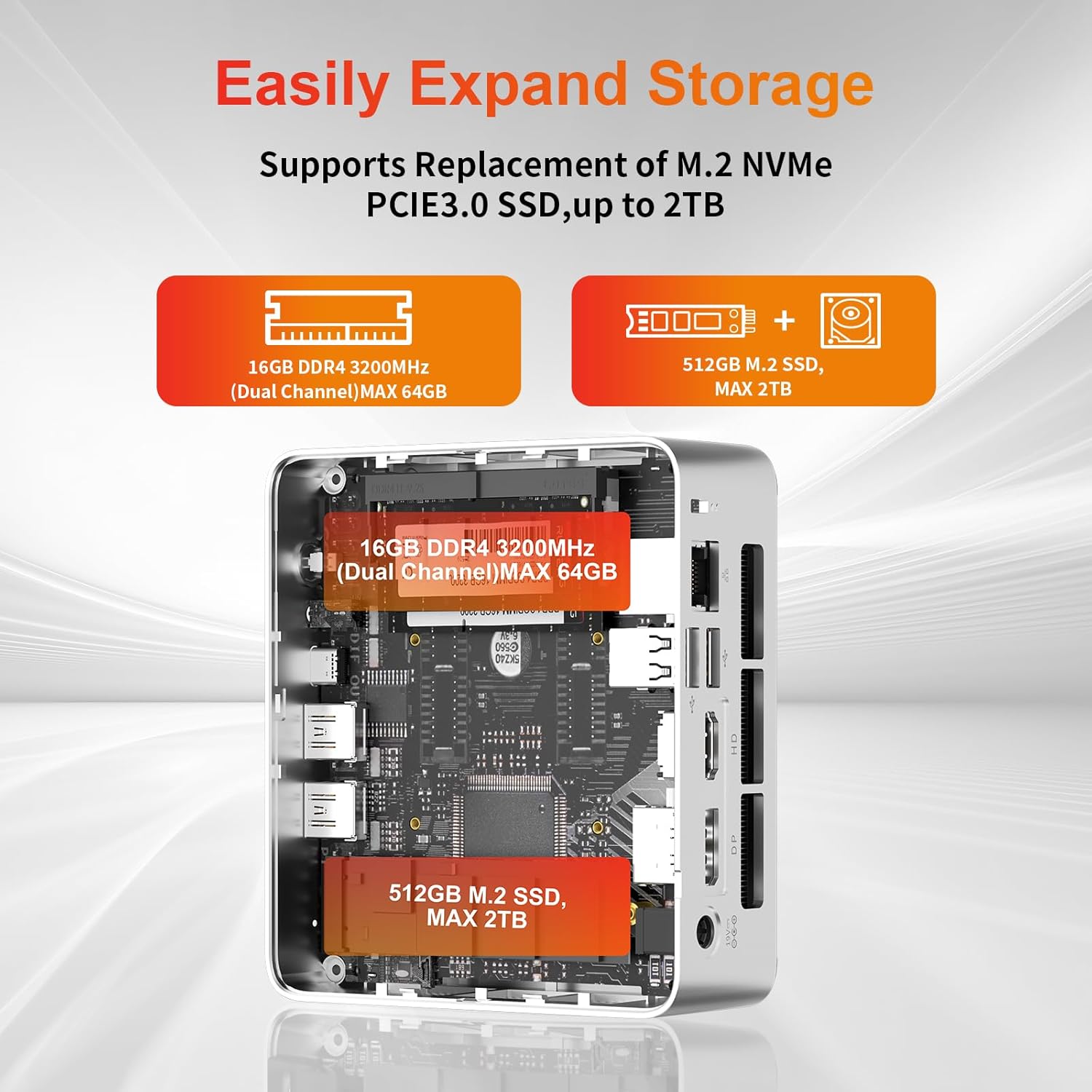
- Expansió d'emmagatzematge: The Mini PC supports replacement of the M.2 NVMe PCIe 3.0 SSD up to 2TB. It also supports memory expansion up to 64GB DDR4.

Image: Diagram illustrating the internal components and options for expanding storage (M.2 SSD up to 2TB) and RAM (DDR4 up to 64GB).
- Muntatge VESA: Use the included VESA mount bracket to attach the Mini PC to the back of a compatible monitor or to a wall mount, saving desk space.
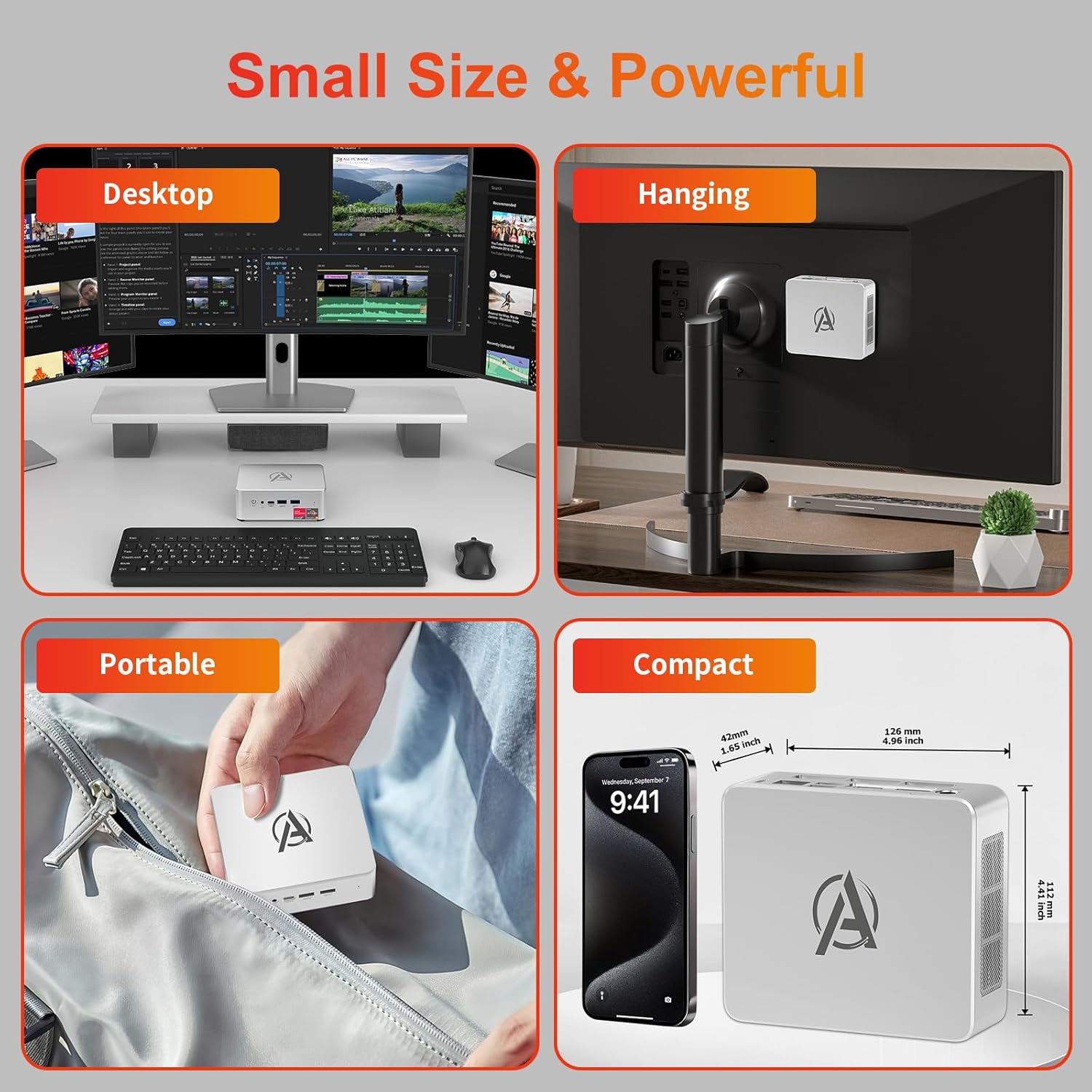
Image: Various usage scenarios for the Mini PC, including desktop, VESA-mounted behind a monitor, portable, and compact size comparison.
Manteniment
- Neteja: Use a soft, dry cloth to clean the exterior of the Mini PC. Do not use liquid cleaners or aerosols. Ensure ventilation openings are free from dust.
- Actualitzacions de programari: Comproveu i instal·leu regularment si hi ha actualitzacions de Windows i controladors per garantir un rendiment i una seguretat òptims.
- Gestió de la calor: Ensure the Mini PC is placed in a well-ventilated area. Avoid blocking the air vents. The intelligent cooling system is designed for low noise and efficient heat dissipation.

Image: Diagram illustrating the internal cooling fan and heat sink, showing airflow for efficient heat dissipation.
- Gestió d'emmagatzematge: Netegeu periòdicament allò innecessari files and applications to maintain system performance.
Resolució de problemes
- Sense energia:
- Comproveu si l'adaptador de corrent està connectat correctament tant al Mini PC com a la presa de corrent.
- Assegureu-vos que la presa de corrent funcioni.
- Proveu una presa de corrent diferent.
- Sense pantalla:
- Verify that the HDMI/DP/USB-C cable is securely connected to both the Mini PC and the monitor.
- Assegureu-vos que el monitor estigui encès i configurat a la font d'entrada correcta.
- Prova un cable de pantalla o monitor diferent si estàs disponible.
- Rendiment lent:
- Tanca les aplicacions innecessàries que s'executen en segon pla.
- Comproveu i instal·leu les actualitzacions de Windows o els controladors pendents.
- Ensure there is sufficient free space on the SSD.
- Monitor CPU and RAM usage in Task Manager to identify resource-intensive processes.
- Problemes de connectivitat de xarxa:
- For wired connections, ensure the Ethernet cable is properly connected and the router is working.
- For Wi-Fi, check if the Wi-Fi adapter is enabled and connected to the correct network. Restart your router/modem.
- El sistema es bloqueja/falla:
- Reinicieu el mini PC.
- Ensure the system is not overheating (check ventilation).
- Run a system diagnostic or check Windows Event Viewer per a missatges d'error.
Especificacions
| Model | AWOW BA7 Mini PC |
| Processador | AMD Ryzen 5 7430U (6 nuclis, 12 fils de treball, fins a 4.3 GHz) |
| Gràfics | Gràfics integrats d'AMD Radeon |
| RAM | 16 GB de DDR4 (ampliable fins a 64 GB) |
| Emmagatzematge | 512GB PCIe 3.0 M.2 SSD (Expandable up to 2TB) |
| Sistema operatiu | Windows 11 Pro |
| Sortida de vídeo | DP1.2 (4K@60Hz), HDMI2.0 (4K@60Hz), USB-C (4K@60Hz) - Supports Triple Display |
| Connectivitat | WiFi 6, Bluetooth 5.2, 1000Mbps RJ45 LAN |
| Ports | 2x USB 3.2, 2x USB 2.0, 1x Type-C (Full Function), 1x DP1.2, 1x HDMI2.0, 1x RJ45 LAN, 1x 3.5mm Audio Jack, 1x DC IN |
| Dimensions | 126 mm x 112 mm x 42 mm (aprox. 4.96 x 4.41 x 1.65 polzades) |
| Pes | 398 g (només el dispositiu) Image: The Mini PC with its dimensions (126mm x 112mm x 42mm) and weight (398g) labeled. |
Garantia i Suport
AWOW provides comprehensive support for its products.
- Garantia: This product includes a 12-month service period from the date of purchase, covering manufacturing defects.
- Suport tècnic: Lifetime technical support is available for all AWOW products.
- Contacte: For technical assistance, warranty claims, or any product-related inquiries, please visit the official AWOW weblloc o poseu-vos en contacte amb el seu servei d'atenció al client.

Image: AWOW brand message emphasizing fulfillment, lifetime technical support, and 12-month service.