
1. Producte acabatview
The HEIBAS G7 Bluetooth Headset is designed for clear communication and audio playback, featuring advanced Bluetooth 6.0 connectivity, active and environmental noise cancellation, and a long-lasting battery. Its ergonomic design ensures a comfortable and secure fit for extended use.

Imatge: Més deview of the HEIBAS G7 Bluetooth Headset highlighting Bluetooth 6.0 features.
2. Contingut del paquet
Si us plau, comproveu el paquet per veure si hi ha els elements següents:
- HEIBAS G7 Bluetooth Headset x 1
- Ear tips (S/M/L) x 3 pairs (6 pieces total)
- Cable de càrrega tipus C x 1
- Manual d'instruccions x 1

Image: Diagram showing the headset, charging case, ear tips, and charging cable included in the package.
3. Configuració i emparellament
3.1 Càrrec inicial
Before first use, fully charge the headset and its charging case using the provided Type-C cable. The LED display on the charging case indicates the battery level.

Image: The charging case with an LED display showing battery percentage, que indica l'estat de càrrega.
3.2 Vinculació amb un dispositiu
- Assegureu-vos que els auriculars estiguin carregats.
- Open the charging case. The headset will automatically enter pairing mode.
- Al telèfon intel·ligent, la tauleta o l'ordinador, activeu el Bluetooth i cerqueu els dispositius disponibles.
- Select "G7" from the list of devices to connect.
- Once connected, the headset is ready for use.
The headset supports automatic connection to previously paired devices when taken out of the case.

Image: The headset and charging case next to a smartphone, illustrating automatic connection upon removal from the case.
4. Portar els auriculars
The G7 headset features an adjustable design for a secure and comfortable fit on either ear.
4.1 Ajust de l'ajust
- The ear hook can be rotated 180° and 360° to fit various ear shapes.
- The head part can rotate 45° left or right, allowing use on either the left or right ear.
- Choose the appropriate ear tip size (S, M, L) for optimal comfort and sound quality.

Image: Diagrams illustrating the 180°, 360°, and 45° adjustment capabilities of the headset for a customized fit.
4.2 Wearing Method
- Rotate the ear hook 90 degrees to the left (for right ear use, rotate 90 degrees to the right).
- Rotate the ear hook 90 degrees upwards.
- Rotate the earphone head and adjust its position to fit your ear shape.
Image: Step-by-step guide on how to wear the headset, including selecting the correct ear tip size (S, M, L).
5. Controls i Funcions
The G7 headset features physical buttons for intuitive control of various functions.

Image: Diagram showing the physical buttons on the headset and their corresponding functions, including power, volume, play/pause, call control, mute, and Siri activation.
5.1 Operacions bàsiques
- Encès/apagat: Manteniu premut el botó principal durant 3 segons.
- Reproduir/pausa: Single press the main button.
- Pujar/baixar el volum: Press the volume buttons (indicated by +/-).
- Seguiment anterior / següent: Press and hold the volume buttons for 2 seconds.
5.2 Gestió de trucades
- Respondre/Finalitzar la trucada: Single press the main button.
- Rebutja la trucada: Manteniu premut el botó principal durant 2 segons.
- Silencia/Activa el silenci: During a call, press the dedicated mute button (located on the side of the headset).
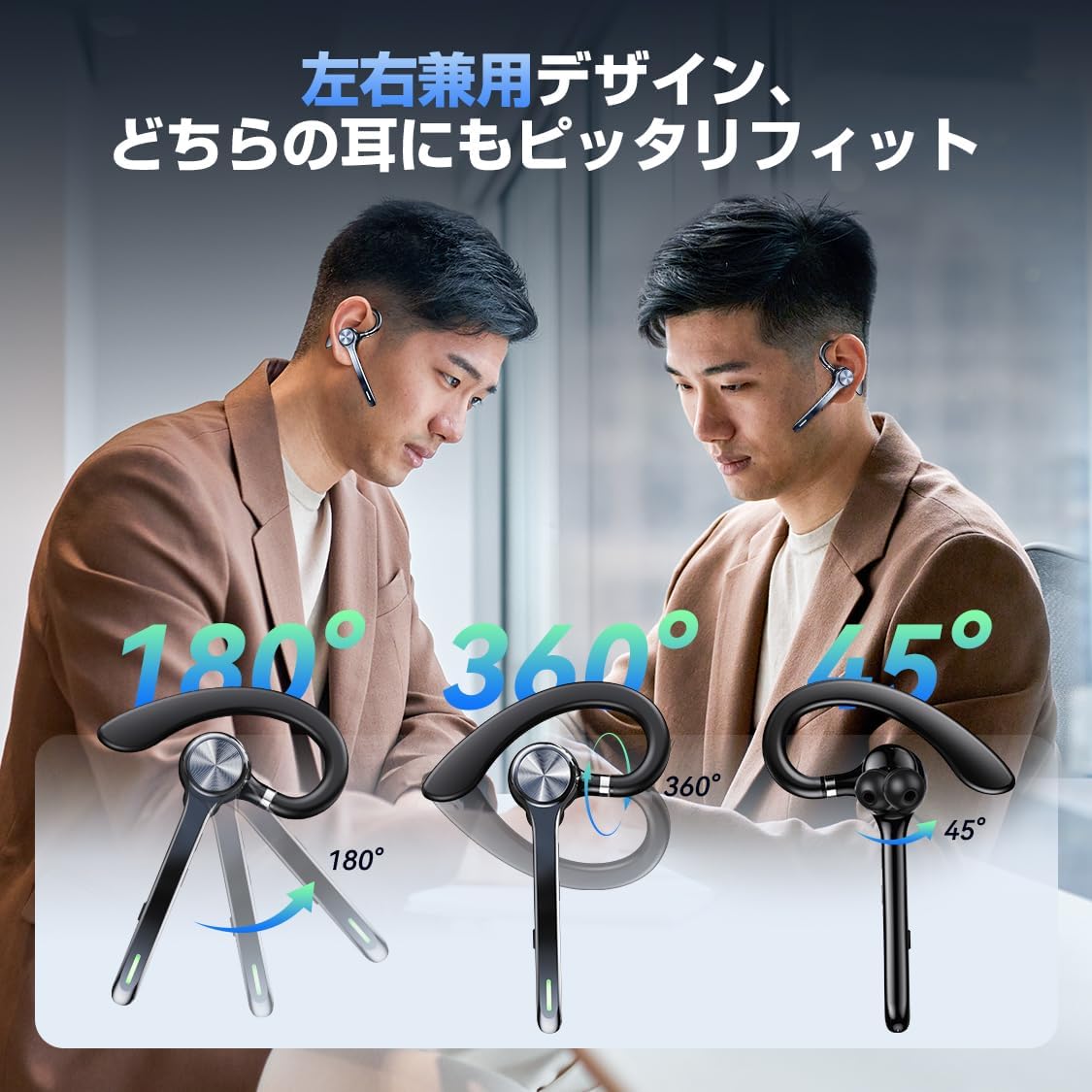
Image: A person using the headset during a call, demonstrating the mute function.
5.3 Assistent de veu (Siri)
- Activa Siri: Premeu dues vegades el botó principal.
6. Funcions avançades
6.1 Connexió multipunt
The G7 headset supports simultaneous connection to two devices (e.g., a smartphone and a PC). This allows for seamless switching between music playback on one device and calls on another.

Image: The headset connected to both a smartphone and a laptop, demonstrating the multipoint connection feature.
6.2 Noise Cancellation (ANC & ENC)
- Cancel·lació activa del soroll (ANC): Reduces low-frequency ambient noise during music playback (e.g., train sounds, air conditioner hum).
- Cancel·lació de soroll ambiental (ENC): Suppresses background noise during calls, ensuring your voice is transmitted clearly to the other party.

Image: Diagram illustrating the effect of ANC and ENC on sound, showing noise reduction before and after cancellation.
7. Bateria i càrrega
The G7 headset offers extended battery life for prolonged use.
- Headset Playback Time: Approximately 21-23 hours on a single charge.
- Temps total de reproducció (amb estoig de càrrega): Fins a 108 hores.
- Capacitat de la caixa de càrrega: 500 mAh.
- Interfície de càrrega: Tipus C.
- Temps de càrrega: Aproximadament 2-2.5 hores per a una càrrega completa.

Image: Visual representation of the headset's battery life, including single playback time, total time with the charging case, and standby time.
8. Especificacions
| Nom del model | G7 |
| Marca | HEIBAS (Origin qilin) |
| Tecnologia de connectivitat | Sense fil (Bluetooth 6.0) |
| Factor de forma dels auriculars | Bluetooth Headset (Single Ear) |
| Cancel·lació de soroll | ANC + ENC Dual Noise Cancellation |
| Durada de la bateria (auriculars) | 21-23 hores |
| Durada total de la bateria (amb funda) | Fins a 108 hores |
| Capacitat de la caixa de càrrega | 500 mAh |
| Interfície de càrrega | Tipus-C |
| Pes | Approx. 12g (headset) |
| Resistència a l'aigua | Waterproof (level not specified, generally splash-proof) |
| Dispositius compatibles | Telèfons intel·ligents, tauletes, ordinadors portàtils |
| Components inclosos | Bluetooth Headset, Ear tips, Cable, Instruction Manual |
9. Solució De Problemes
9.1 No es pot encendre
- Assegureu-vos que els auriculars estiguin completament carregats.
- Manteniu premut el botó d'engegada durant almenys 3 segons.
9.2 Cannot Pair
- Make sure the headset is in pairing mode (usually indicated by a flashing LED).
- Desactiva i torna a activar el Bluetooth al dispositiu.
- Assegureu-vos que els auriculars estiguin a menys de 10 metres del dispositiu.
- Forget "G7" from your device's Bluetooth list and try pairing again.
9.3 Poor Sound Quality or Disconnections
- Assegureu-vos que els auriculars estiguin completament carregats.
- Redueix la distància entre els auriculars i el dispositiu.
- Avoid obstacles (walls, large electronic devices) between the headset and your device.
- Comproveu si hi ha interferències d'altres dispositius sense fil.
9.4 Problemes amb el micròfon
- Ensure the microphone is not muted during a call.
- Check your device's audio settings to ensure the headset is selected as the input/output device.
10. Manteniment
- Netegeu els auriculars regularment amb un drap suau i sec.
- Eviteu exposar els auriculars a temperatures extremes, humitat o líquids corrosius.
- Store the headset in its charging case when not in use to protect it and keep it charged.
- Do not attempt to disassemble or repair the headset yourself. Contact customer support if issues arise.
11. Garantia i Suport
For warranty information or technical support, please refer to the contact details provided on the product packaging or the official HEIBAS weblloc. Conserveu el rebut de compra per a reclamacions de garantia.
12. Vídeo del producte
Vídeo: Una breu presentacióview demonstrating key features of the HEIBAS G7 Bluetooth Headset, including its design, charging, and controls.