
1. Introducció
This manual provides detailed instructions for the ANRAN Q04 5MP Solar Security Camera and the ANRAN F2M3 Solar Light Security Camera. It covers essential information regarding product setup, operation, maintenance, and troubleshooting to ensure optimal performance and longevity of your devices. Please read this manual thoroughly before installation and use.
2. Producte acabatview
2.1 ANRAN Q04 5MP Solar Security Camera
The ANRAN Q04 is a 5-megapixel wireless outdoor security camera featuring an integrated solar panel for continuous power. It offers pan and tilt capabilities for wide area surveillance.

Image: Two ANRAN Q04 solar security cameras, showcasing their design with integrated solar panels and dual antennas.

Image: An ANRAN Q04 camera illustrating its 355-degree pan and 90-degree tilt capabilities, with a smartphone displaying the live view.
2.2 ANRAN F2M3 Solar Light Security Camera
The ANRAN F2M3 combines a security camera with a motion-activated light, powered by a separate solar panel and a 5000 mAh battery. It includes features like two-way audio, a siren, and multiple night vision modes.

Image: Two ANRAN F2M3 solar light security cameras shown alongside their separate solar panels.

Image: An ANRAN F2M3 camera mounted on a wall, emphasizing its dual function as a wall light and camera, powered by a 3W solar panel and a 5000 mAh battery.

Image: An ANRAN F2M3 camera demonstrating its PIR detection and motion-activated light, along with icons for notification, 2-way audio, 70db siren, and 200-lumen brightness.
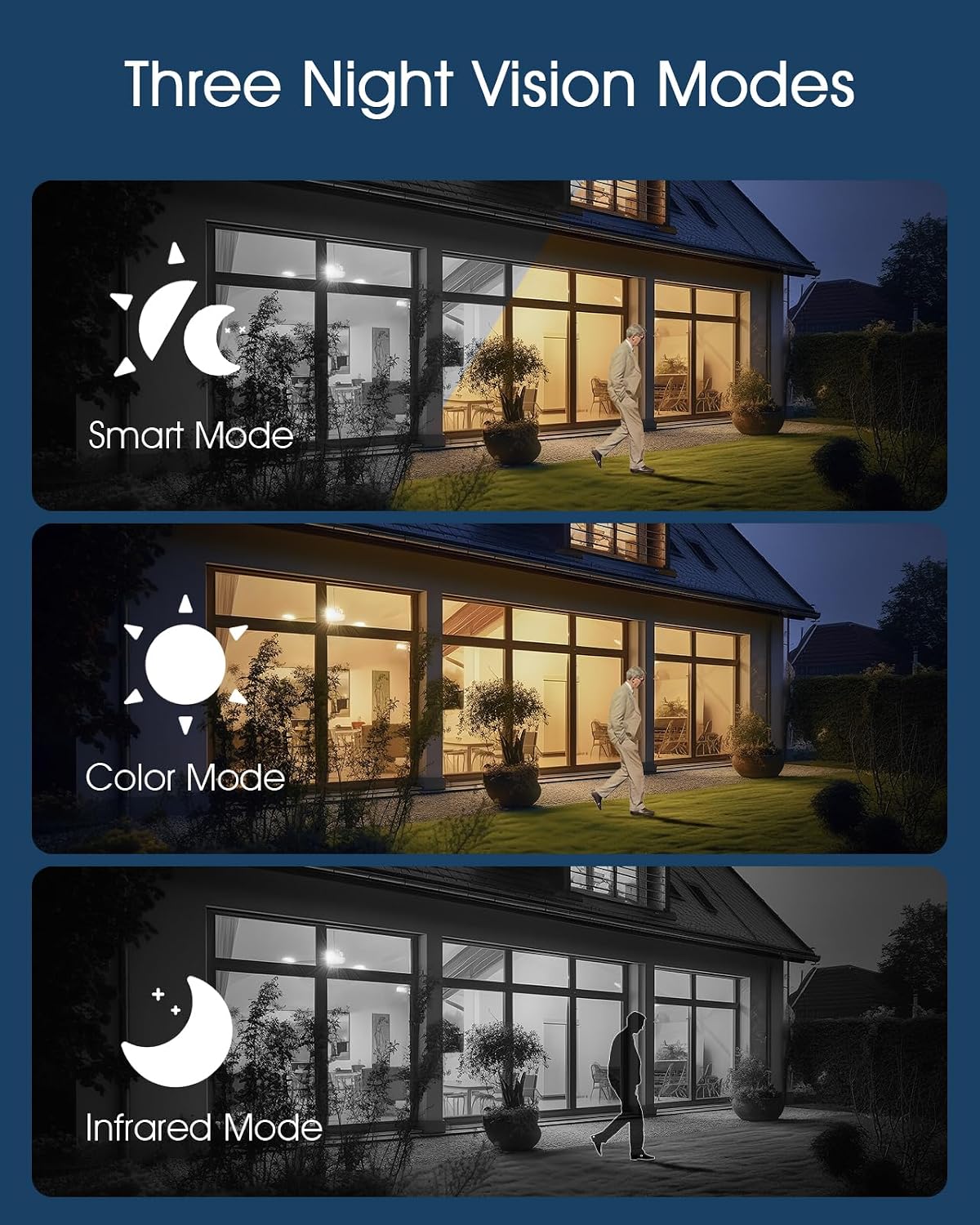
Image: Illustrations of the three night vision modes available for the F2M3 camera: Smart Mode, Color Mode, and Infrared Mode.
3. Configuració
3.1 Desembalatge i càrrega inicial
Carefully unpack all components. Before installation, ensure the camera's battery is fully charged. Connect the camera to a power source using the provided USB cable for several hours.
3.2 Instal·lació
Select an optimal location for your camera, ensuring good Wi-Fi signal strength and direct sunlight exposure for the solar panel. Mount the camera securely using the provided screws and mounting bracket.
ANRAN Q04 Installation
The Q04 camera features an integrated solar panel. Mount it in a location that receives ample direct sunlight throughout the day to maximize charging efficiency.

Image: A woman installing an ANRAN Q04 camera on a wall, demonstrating the simple installation process without the need for a separate solar panel.
ANRAN F2M3 Installation
The F2M3 camera uses a separate solar panel. Mount the camera at the desired surveillance point and position the solar panel in a location with maximum sun exposure, connecting it to the camera with the provided cable.

Image: A man installing an ANRAN F2M3 camera on an exterior wall, highlighting its easy installation and instant connection to 2.4GHz WiFi.
3.3 Connexió a l'aplicació
- Download the official ANRAN app from your smartphone's app store.
- Creeu un compte i inicieu sessió.
- Follow the in-app instructions to add your camera. Ensure your Wi-Fi network is 2.4GHz, as the cameras do not support 5GHz Wi-Fi.
- Scan the QR code on the camera or manually enter the device ID to pair.
4. Instruccions de funcionament
4.1 Viu View i Enregistrament
Once connected, open the ANRAN app to access the live video feed from your camera. You can initiate manual recordings or capture screenshots directly from the live view interfície.
4.2 Detecció de moviment i alertes
Configure motion detection sensitivity and alert settings within the app. The cameras will send notifications to your smartphone when motion is detected. For the F2M3, motion detection also activates the integrated light and can trigger the siren.
4.3 Two-Way Audio (F2M3)
The F2M3 camera supports two-way audio communication. Use the microphone and speaker icons in the app to speak through the camera and hear audio from its vicinity.
4.4 Night Vision Modes (F2M3)
The F2M3 offers three night vision modes:
- Mode intel·ligent: Automatically switches between infrared and color night vision based on detected motion.
- Mode de color: Utilizes the integrated light to provide full-color video at night.
- Mode infraroig: Provides black and white video using infrared LEDs for discreet surveillance.
4.5 Pan & Tilt Control (Q04)
For the Q04 camera, use the directional controls within the app to remotely adjust the camera's viewing angle (355° horizontal pan and 90° vertical tilt).
5. Manteniment
5.1 Neteja
Regularly clean the camera lens and solar panel surfaces with a soft, damp cloth to ensure clear image quality and efficient solar charging. Avoid abrasive cleaners.
5.2 Cura de la bateria
To prolong battery life, ensure the solar panel receives adequate sunlight. In prolonged periods of low light, consider temporarily charging the camera via USB if accessible.
5.3 actualitzacions de microprogramari
Check the ANRAN app periodically for available firmware updates. Keeping your camera's firmware up-to-date ensures optimal performance, security, and access to new features.
6. Solució De Problemes
6.1 La càmera no s'encén
- Ensure the battery is fully charged. Connect to a USB power source for several hours.
- Verify the solar panel connection (F2M3) or ensure the integrated panel (Q04) is receiving sunlight.
6.2 No es pot connectar a la Wi-Fi
- Confirm your Wi-Fi network is 2.4GHz. These cameras do not support 5GHz Wi-Fi.
- Assegureu-vos que la càmera estigui dins de l'abast del vostre encaminador Wi-Fi.
- Reinicieu el router i la càmera.
- Reset the camera to factory settings (refer to app for specific instructions) and attempt pairing again.
6.3 Mala qualitat d'imatge
- Netegeu la lent de la càmera.
- Assegureu-vos que no hi hagi obstacles en el camp de la càmera view.
- Comproveu la intensitat del senyal Wi-Fi; un senyal feble pot afectar la qualitat de la transmissió en temps real.
6.4 La detecció de moviment no funciona
- Verifica que la configuració de detecció de moviment estigui habilitada a l'aplicació.
- Ajusta els nivells de sensibilitat.
- Ensure the camera's PIR sensor (F2M3) or motion detection area (Q04) is clear of obstructions.
7. Especificacions
| Característica | ANRAN Q04 | ANRAN F2M3 |
|---|---|---|
| Resolució | 5 megapíxels | Not specified (typically 1080p/2K for light cameras) |
| Font d'alimentació | Integrated Solar Panel, Rechargeable Battery | Separate 3W Solar Panel, 5000 mAh Battery |
| Connectivitat | Wi-Fi de 2.4 GHz (IEEE 802.11b/g/n) | |
| Panorama/inclinació | Panorama de 355°, inclinació de 90° | No |
| Visió nocturna | Visió nocturna per infrarojos | Smart Mode, Color Mode, Infrared Mode |
| Àudio | One-Way Audio (Listening) | Àudio bidireccional |
| Sortida de llum | No | 200-Lumen Motion-Activated Light |
| Sirena | No | 70db Siren |
| Detecció | Detecció de moviment | PIR Detection, Motion Detection |
| Valoració exterior | Weatherproof (specific IP rating not provided, but designed for outdoor use) | |
8. Garantia i Suport
ANRAN products typically come with a limited warranty. Please refer to the warranty card included with your product or visit the official ANRAN weblloc web per obtenir informació detallada sobre els termes i condicions de la garantia.
For technical support, troubleshooting assistance, or any product-related inquiries, please contact ANRAN customer service through the contact information provided on their official website or within the ANRAN app.