
1. Introducció
This manual provides detailed instructions for the installation, operation, and maintenance of your ANRAN 4G LTE Cellular Security Camera, Q04 Solar Security Camera, and F2M3 Solar Light Security Camera systems. Please read this manual thoroughly before using the product to ensure correct usage and optimal performance. Keep this manual for future reference.
Important Notice: The 4G LTE Cellular Solar Security Camera does not support WiFi connection. It operates exclusively on a 4G LTE cellular network.
2. Contingut del paquet
Si us plau, comproveu el contingut del paquet en rebre'l. Si falta algun article o hi ha algun dany, poseu-vos en contacte amb el servei d'atenció al client.
- ANRAN 4G LTE Cellular Security Camera (with integrated solar panel)
- ANRAN Q04 Solar Security Camera (optional, 2-pack)
- ANRAN F2M3 Solar Light Security Camera (optional, 2-pack)
- Suport de muntatge i cargols
- Cable de càrrega USB
- Manual d'usuari
- SIM Card (pre-installed or included separately for 4G models)
- MicroSD Card (optional, e.g., 32GB)
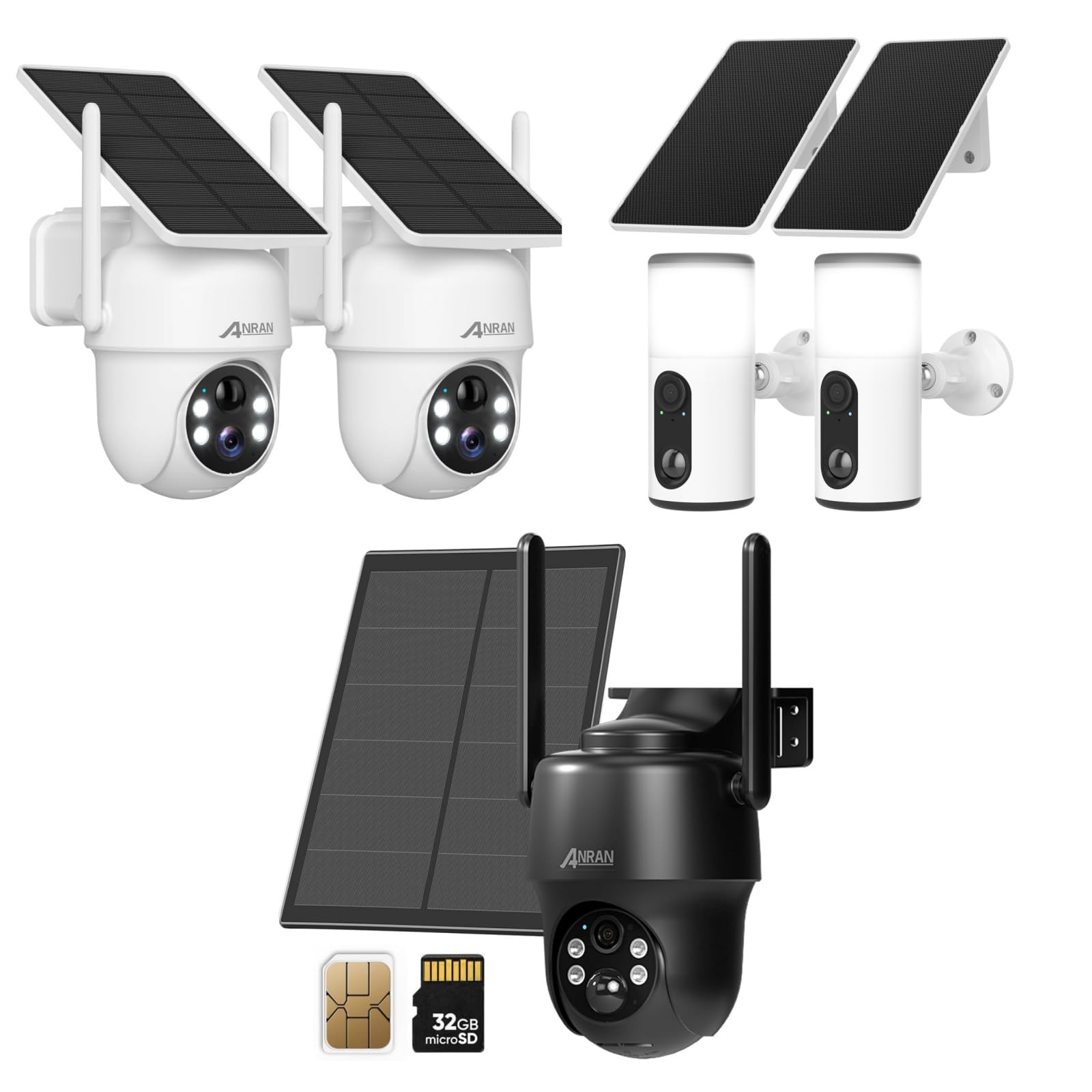
Image 2.1: ANRAN 4G LTE Cellular Security Camera with its solar panel, a SIM card, and a 32GB microSD card, illustrating typical package components.

Image 2.2: Two ANRAN Q04 Solar Security Cameras, typically sold as a pair, featuring integrated solar panels and a white finish.

Image 2.3: Two ANRAN F2M3 Solar Light Security Cameras, designed to function as both a security camera and a light source, shown with their solar panels.
3. Producte acabatview
The ANRAN security camera systems offer wire-free surveillance solutions, powered by solar energy and utilizing either 4G LTE cellular networks or local WiFi (for Q04/F2M3 models, if applicable). Each model is designed for outdoor use with robust construction.
3.1. ANRAN 4G LTE Cellular Security Camera
- Connectivitat: 4G LTE cellular network only (no WiFi support).
- Potència: Integrated solar panel for continuous charging.
- Característiques: Pan-Tilt-Zoom (PTZ) capabilities, night vision, motion detection.
- Emmagatzematge: Supports microSD card for local storage.

Image 3.1: An ANRAN 4G LTE Cellular Security Camera mounted on a tree, highlighting its wire-free operation and solar power capabilities. It explicitly states '4G' and 'not support WiFi'.
3.2. ANRAN Q04 Solar Security Camera
- Connectivitat: Typically WiFi-enabled (refer to specific product details for confirmation).
- Potència: Integrated solar panel.
- Disseny: Compact dome-style camera.
3.3. ANRAN F2M3 Solar Light Security Camera
- Connectivitat: Typically WiFi-enabled (refer to specific product details for confirmation).
- Potència: Integrated solar panel (3W) and 5000 mAh battery.
- Funcionalitat: Combines security camera features with an integrated wall light.

Imatge 3.2: Un primer pla view of the ANRAN F2M3 Solar Light Security Camera, illustrating its dual function as a wall light and a camera, powered by a 3W solar panel and a 5000 mAh battery.
4. Configuració
4.1. Càrrega inicial
Before first use, fully charge the camera's internal battery using the provided USB cable. Connect the cable to the camera's charging port and a 5V/2A power adapter (not included). The charging indicator light will show the charging status.
4.2. SIM Card and MicroSD Card Installation (for 4G LTE Cellular Camera)
- Locate the SIM card slot and microSD card slot on the camera (usually under a rubber seal).
- Insert the 4G LTE SIM card into the SIM slot with the gold contacts facing down and the notched corner oriented correctly. Ensure it clicks into place.
- Insert the microSD card (Class 10 or higher, up to 128GB recommended) into the microSD slot with the gold contacts facing down.
- Securely close the rubber seal to maintain waterproofing.
4.3. App Download and Account Registration
- Baixeu l'aplicació ANRAN des de l'App Store (iOS) o Google Play Store (Android).
- Open the app and register a new account using your email address or phone number.
- Seguiu les indicacions a la pantalla per completar el procés de registre.
4.4. Emparellament de la càmera amb l'aplicació
- Power on the camera. Wait for the status indicator light to flash, indicating it's ready for pairing.
- A l'aplicació ANRAN, toqueu la icona "+" per afegir un dispositiu nou.
- Select the appropriate camera model (e.g., 4G Camera, Solar Camera).
- Segueix les instruccions de l'aplicació per escanejar el codi QR de la càmera o introdueix manualment l'ID del dispositiu.
- For 4G cameras, ensure the SIM card has an active data plan. For WiFi cameras, connect to your 2.4GHz WiFi network when prompted.
- Un cop connectat, pots posar nom a la teva càmera i començar a fer directe viewing.
4.5. Muntatge de la càmera
Choose a mounting location that provides optimal solar exposure for the solar panel and a clear view of the area you wish to monitor. Ensure the camera is within cellular network range (for 4G models) or WiFi range (for WiFi models).
- Mark the drilling spots using the mounting bracket as a template.
- Drill holes and insert wall anchors if mounting on masonry or stucco.
- Secure the mounting bracket to the wall or surface using the provided screws.
- Fixeu la càmera al suport de muntatge i ajusteu l'angle per obtenir la cobertura desitjada.

Image 4.1: A woman installing an ANRAN solar security camera on a wall, demonstrating the simple installation process.
5. Instruccions de funcionament
5.1. En directe View
Open the ANRAN app and select the desired camera from your device list to access the live video feed. You can view foo en temps realtage, fer captures de pantalla i gravar vídeo manualment.
5.2. Detecció de moviment i alertes
Configure motion detection sensitivity and alert settings within the app. When motion is detected, the camera will record a video clip and send a notification to your smartphone.
- Sensibilitat: Adjust to minimize false alarms.
- Zona de detecció: Set specific areas for motion detection.
- Notification Schedule: Define times when you wish to receive alerts.
5.3. Playback and Recording
Access recorded video clips through the app's playback feature. Recordings are stored on the microSD card or in cloud storage (if subscribed). You can filter recordings by date and time.
5.4. Àudio bidireccional
Use the two-way audio feature to communicate with visitors or deter intruders. Tap the microphone icon in the live view to speak, and listen through the camera's speaker.
5.5. Pan-Tilt-Zoom (PTZ) Control (for applicable models)
For cameras with PTZ functionality, use the directional controls in the app to remotely adjust the camera's viewing angle (pan and tilt) and zoom in or out.
5.6. Light Control (for F2M3 Solar Light Camera)
The F2M3 model allows control of the integrated light through the app. You can set schedules for the light to turn on/off, or activate it manually.
6. Manteniment
6.1. Neteja
Netegeu regularment la lent de la càmera i el panell solar amb un drap suau i sec.amp cloth to ensure clear image quality and efficient solar charging. Avoid abrasive cleaners or harsh chemicals.
6.2. Cura de la bateria
The integrated solar panel helps maintain battery charge. In periods of low sunlight or heavy usage, the battery may require manual charging via the USB port. Ensure the charging port's rubber seal is always closed when not charging to prevent water ingress.
6.3. Actualitzacions de firmware
Check the ANRAN app periodically for firmware updates. Keeping your camera's firmware up-to-date ensures optimal performance, security, and access to new features.
7. Solució De Problemes
| Problema | Causa possible | Solució |
|---|---|---|
| La càmera no s'encén | Low battery; power button not pressed | Charge the camera fully; press and hold the power button for 3-5 seconds. |
| 4G camera not connecting to network | No active SIM card; poor cellular signal; incorrect APN settings | Ensure SIM card is active and has data; move camera to an area with better signal; check APN settings in app or contact carrier. |
| WiFi camera not connecting | Incorrect WiFi password; 5GHz network used; camera too far from router | Verify WiFi password; ensure you are connecting to a 2.4GHz network; move camera closer to router. |
| No s'han rebut alertes de moviment | App notifications disabled; motion detection sensitivity too low; detection schedule active | Enable app notifications; increase motion detection sensitivity; check and adjust detection schedule. |
| Mala qualitat d'imatge | Dirty lens; low light conditions; network bandwidth issues | Clean the camera lens; ensure adequate lighting; check network connection stability. |
8. Especificacions
- Resolució de vídeo: Typically 1080p or 2K (model dependent)
- Camp de View: Varies by model (e.g., 100-130 degrees fixed, 355 degrees pan, 90 degrees tilt for PTZ models)
- Visió nocturna: Infrared LEDs, Color Night Vision (model dependent)
- Àudio: Two-way audio with built-in microphone and speaker
- Emmagatzematge: MicroSD card (up to 128GB, Class 10 recommended), Cloud Storage (subscription required)
- Connectivitat: 4G LTE (for cellular models), 2.4GHz WiFi (for Q04/F2M3 models)
- Potència: Rechargeable battery, Solar Panel charging (3W for F2M3, integrated for others)
- Capacitat de la bateria: 5000 mAh (F2M3), others vary by model
- Temperatura de funcionament: -4 °F a 122 °F (-20 °C a 50 °C)
- Resistència a la intempèrie: IP65 or IP66 certified (dustproof and waterproof)
9. Garantia i Suport
ANRAN products typically come with a limited warranty. Please refer to the warranty card included with your product or visit the official ANRAN website for detailed warranty terms and conditions. For technical support, product inquiries, or warranty claims, please contact ANRAN customer service through the contact information provided on their official website or within the ANRAN app.
Weblloc: www.anran-cctv.com