
1. Producte acabatview
The DOOGEE Note 56 is a modern smartphone designed for daily use, featuring a powerful Octa-Core processor, a large 6150 mAh battery, and a vibrant 6.56-inch HD+ display with a 90 Hz refresh rate. This manual provides essential information for setting up, operating, and maintaining your device.

Figura 1.1: Davant i darrere view of the DOOGEE Note 56, showcasinel seu disseny elegant i la configuració de la càmera.
2. Què hi ha a la caixa
- DOOGEE Note 56 Smartphone
- Adaptador d'alimentació
- Cable USB
- Eina expulsora de SIM
- Guia d'inici ràpid
- Funda protectora (pot variar segons la regió)
- Protector de pantalla (preaplicat o inclòs)
3. Configuració
3.1 Inserció de targetes SIM i targetes MicroSD
The DOOGEE Note 56 supports Dual SIM functionality and MicroSD card expansion up to 2TB. Follow these steps to insert your cards:
- Apagueu el telèfon.
- Localitza la safata de la targeta SIM al lateral del dispositiu.
- Introduïu l'eina d'expulsió de la SIM al forat petit que hi ha al costat de la safata i premeu suaument fins que la safata surti.
- Place your Nano-SIM cards and/or MicroSD card into the designated slots on the tray. Ensure they are correctly oriented.
- Empenyeu amb cura la safata cap al telèfon fins que encaixi al seu lloc.
3.2 Powering On/Off and Initial Setup
To power on your device, press and hold the Power button until the DOOGEE logo appears. To power off, press and hold the Power button, then select 'Power off' from the options. On first use, follow the on-screen instructions to set up your language, Wi-Fi, Google account, and security features.
4. Funcionament del vostre dispositiu
4.1 Navegació bàsica
The DOOGEE Note 56 runs on Android 16, offering an intuitive user interface. Use gestures or the navigation bar at the bottom of the screen to navigate:
- Inici: Swipe up from the bottom or tap the Home button to return to the home screen.
- Enrere: Swipe from the left or right edge, or tap the Back button to go back to the previous screen.
- Aplicacions recents: Swipe up and hold from the bottom, or tap the Recent Apps button to view i canviar entre aplicacions obertes.
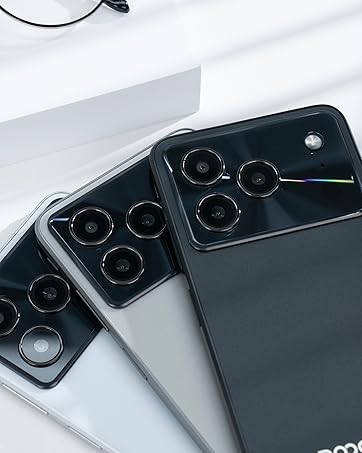
Figure 4.1: Android 16 operating system interface on the DOOGEE Note 56.
4.2 Trucades i missatges
To make a call, open the Phone app, enter the number, and tap the call icon. For messaging, open the Messages app, select a contact or start a new conversation, type your message, and send.
4.3 Funcions de la càmera
The DOOGEE Note 56 features an 8 MP rear camera and a 5 MP front camera. Open the Camera app to access various modes such as Photo, Video, Portrait, and more. Tap the shutter button to capture photos or start/stop video recording.

Figure 4.2: Camera features and AI scene recognition.
4.4 Configuració de la pantalla
Customize your 6.56-inch HD+ 90 Hz IPS display by going to Configuració > Pantalla. Here you can adjust brightness, dark mode, screen timeout, and refresh rate for a smoother visual experience.

Figure 4.3: The 90 Hz HD+ display provides smooth visuals.
5. Emmagatzematge i rendiment
The DOOGEE Note 56 is equipped with 24GB RAM (3GB physical + 21GB virtual) and 64GB of internal storage, expandable up to 2TB via a MicroSD card (sold separately). This configuration ensures smooth multitasking and ample space for your apps, photos, and videos.
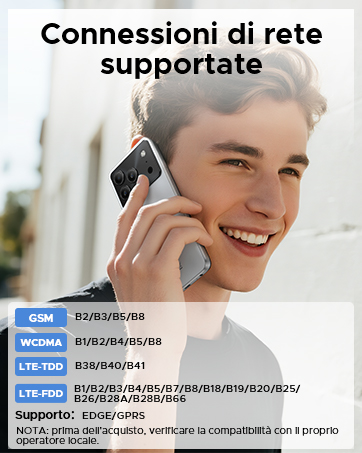
Figure 5.1: Memory configuration of the DOOGEE Note 56.
6. Connectivitat i seguretat
6.1 Connectivitat de xarxa
The device supports 4G LTE for fast mobile data. Ensure your SIM cards are active and correctly inserted. For Wi-Fi, go to Configuració > Xarxa i Internet > Wi-Fi and connect to your preferred network.

Figure 6.1: Supported network connections for the DOOGEE Note 56.
6.2 Identificació facial
Unlock your phone quickly and securely using Face ID. To set it up, go to Configuració > Seguretat > Desbloqueig facial i segueix les instruccions que apareixen a la pantalla per registrar la teva cara.
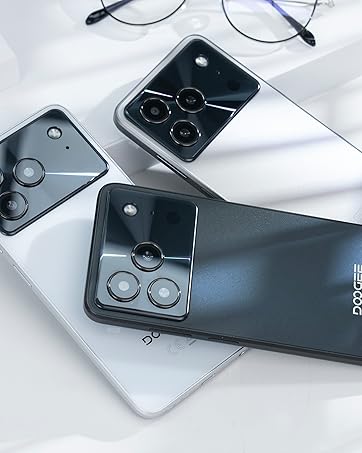
Figure 6.2: Instant facial recognition for unlocking.
6.3 OTG and GPS
The device supports OTG (On-The-Go) for connecting USB accessories like flash drives. GPS functionality provides accurate location services for navigation and location-based apps.
7. Gestió de la bateria
The DOOGEE Note 56 is equipped with a 6150 mAh silicon-carbon battery, offering extended usage. It supports 10W fast charging. To optimize battery life:
- Ajusteu la brillantor de la pantalla.
- Tanca les aplicacions no utilitzades que s'executen en segon pla.
- Activa el mode d'estalvi de bateria quan sigui necessari.
- Eviteu temperatures extremes.
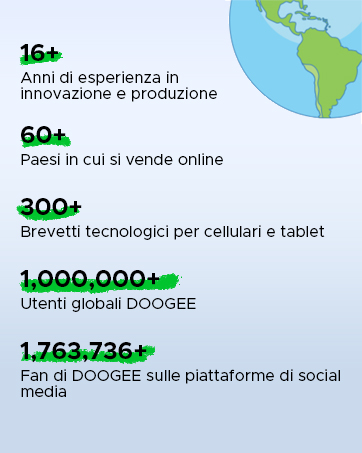
Figure 7.1: The 6150 mAh battery provides long-lasting power.

Figure 7.2: Estimated usage times on a single charge.
8. Manteniment
8.1 Actualitzacions de programari
Comproveu regularment si hi ha actualitzacions de programari per assegurar-vos que el dispositiu tingui les funcions i els pegats de seguretat més recents. Aneu a Configuració > Sistema > Actualització del sistema per comprovar i instal·lar actualitzacions.
8.2 Neteja del vostre dispositiu
Feu servir un drap suau i sense borrissol per netejar la pantalla i la carcassa del telèfon. Eviteu utilitzar productes químics agressius o materials abrasius.
9. Solució De Problemes
9.1 Problemes comuns i solucions
- El telèfon no s'encén: Assegureu-vos que la bateria estigui carregada. Connecteu-la al carregador durant almenys 10 minuts i, a continuació, proveu d'encendre-la.
- Les aplicacions es bloquegen: Clear the cache of the problematic app (Settings > Apps > [App Name] > Storage & cache > Clear cache). If the issue persists, reinstall the app.
- Poca durada de la bateria: Review Section 7 for battery optimization tips.
- Problemes de connectivitat de xarxa: Check if SIM cards are properly inserted. Restart the phone. Verify network settings in Settings > Network & internet.
10. Especificacions
| Característica | Especificació |
|---|---|
| Model | NOTA 56 |
| Sistema operatiu | Android 16 |
| Mostra | 6.56-inch HD+ IPS, 90 Hz |
| Processador | Octa-Core |
| RAM | 24 GB (3GB + 21GB virtual) |
| Emmagatzematge intern | 64 GB |
| Emmagatzematge ampliable | Up to 2 TB MicroSD |
| Càmera posterior | 8 MP |
| Càmera frontal | 5 MP |
| Capacitat de la bateria | 6150 mAh |
| Carregant | Càrrega ràpida de 10 W |
| Dimensions | 8.45 mm de gruix |
| Pes | 262 g |
| Connectivitat | 4G, Dual SIM, Wi-Fi, Bluetooth, GPS, OTG |
| Seguretat | Identificació facial |
11. Vídeos oficials de productes
Video 11.1: DOOGEE Note 56 Plus Smartphone Overview. This video highlights the ultra-thin design, camera features, and overall elegance of the Note 56 Plus, which shares many characteristics with the Note 56 model.
Video 11.2: DOOGEE Note 56 Plus Ultra-thin Smartphone. This video focuses on the slim profile and aesthetic appeal of the Note 56 Plus, demonstrating its comfortable handling and modern look.
12. Garantia i Suport
Your DOOGEE Note 56 smartphone comes with a limited warranty. Please refer to the warranty card included in your product packaging for specific terms and conditions. For technical support or service inquiries, please visit the official DOOGEE weblloc o poseu-vos en contacte amb el seu servei d'atenció al client.
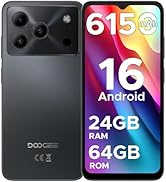
Figure 12.1: DOOGEE customer service details, including warranty and support options.