
1. Introducció
The DOOGEE Note56X Pro is an Android 16 smartphone designed for optimal performance and user experience. It features a sleek design, a powerful octa-core processor, a high-capacity battery, and advanced camera capabilities. This manual provides essential information for setting up, operating, and maintaining your device.

This image displays the DOOGEE Note56X Pro smartphone in light blue and black, showcasing és un professional elegantfile and key features such as its 8.45mm ultra-thin design, 6150mAh silicon-carbon battery, integrated Gemini AI with Android 16, 128GB expandable ROM, and a 6.56-inch HD+ 90Hz display.
2. Què hi ha a la caixa
Verifiqueu que tots els elements estiguin presents a l'embalatge del producte:
- 1 x DOOGEE Note56X Pro Smartphone
- 1 x cable de càrrega
- 1 x Carregador
- Protector de pantalla 1 x (pre-aplicat)
- 1 x SIM Card Ejection Tool
- 1 x funda protectora
- 1 x Caixa d’envasos
- 1 x Manual d'usuari
- 1 x Targeta de servei
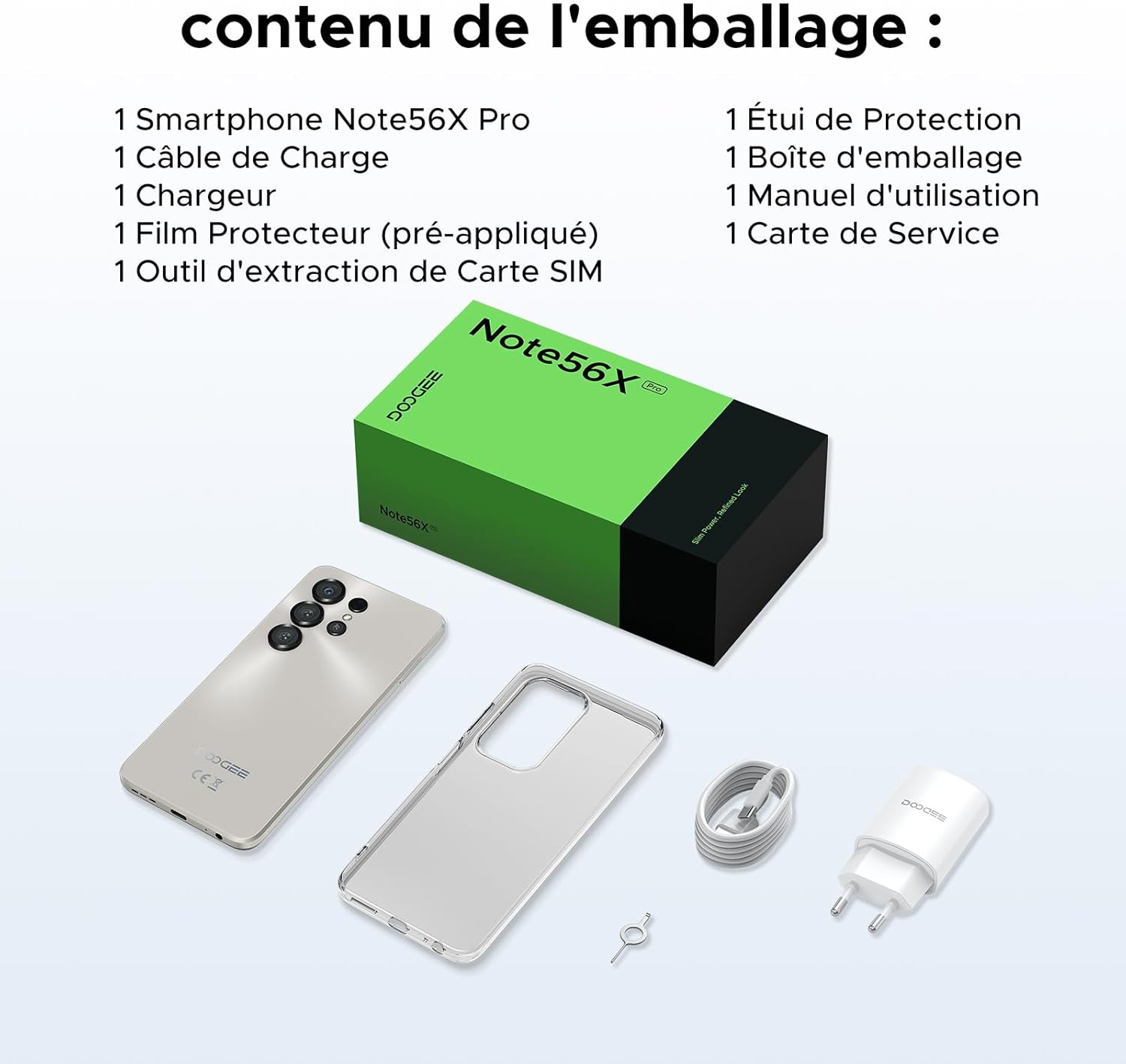
This image shows the contents included in the DOOGEE Note56X Pro packaging: the smartphone, a charging cable, a charger, a pre-applied screen protector, a SIM card ejection tool, a protective case, the packaging box, a user manual, and a service card.
3. Primers passos
3.1. Inserció de targetes SIM
The DOOGEE Note56X Pro supports Dual SIM functionality. To insert your SIM card(s):
- Localitza la safata de la targeta SIM al lateral del dispositiu.
- Use the provided SIM ejection tool to open the tray.
- Col·loqueu la targeta o targetes nano-SIM i/o la targeta microSD a la safata amb els contactes daurats cap avall.
- Empenyeu amb cura la safata cap a dins de la ranura fins que quedi alineada amb el dispositiu.
3.2. Encès / apagat
- Per encendre: Press and hold the Power button until the DOOGEE logo appears.
- Per apagar: Mantingueu premut el botó d'engegada fins que apareguin les opcions d'engegada a la pantalla i, a continuació, seleccioneu "Apagar".
- Per reiniciar: Mantingueu premut el botó d'engegada fins que apareguin les opcions d'engegada i, a continuació, seleccioneu "Reiniciar".
3.3. Configuració inicial
En engegar-lo per primera vegada, seguiu les instruccions que apareixen a la pantalla per completar la configuració inicial:
- Seleccioneu el vostre idioma.
- Connecteu-vos a una xarxa Wi-Fi.
- Inicia la sessió amb el teu compte de Google o crea'n un de nou.
- Set up screen lock (PIN, pattern, password, fingerprint, or Face ID).
- Review i acceptar els termes i condicions.
4. Funcionament del vostre dispositiu
4.1. Visualització
The Note56X Pro features a 6.56-inch HD+ IPS Waterdrop display with a 90Hz refresh rate, offering smooth visuals and vibrant colors. The 90% screen-to-body ratio provides an immersive viewexperiència.

This graphic highlights the display features of the DOOGEE Note56X Pro, including a 90Hz refresh rate for smooth visuals, support for 16.7 million colors, and a 90% screen-to-body ratio for an immersive viewexperiència.
A brief video demonstrating the smooth gaming experience on the DOOGEE Note56X Pro's 6.56-inch HD+ 90Hz display, showing responsive gameplay.
4.2. Rendiment
Powered by an UNISOC T7225 Octa-Core processor, the Note56X Pro ensures fluid multitasking and efficient application launch. It comes with 32GB of RAM (4GB physical + 28GB virtual) and 128GB of internal storage, expandable up to 2TB via a TF card (sold separately).

This image presents a technical diagram of the UNISOC T7225 Octa-Core processor, highlighting its 1.8 GHz high frequency and Mali G57 ARM GPU, ensuring smooth performance for web browsing, online learning, and chats.

This graphic illustrates the memory configuration of the DOOGEE Note56X Pro, featuring 32GB RAM (4GB physical + 28GB virtual) and 128GB ROM, expandable up to 2TB with a TF card (sold separately), providing ampespai per a aplicacions i suports multimèdia.
A short video highlighting the internal components of the DOOGEE Note56X Pro, specifically the Octa-Core UNISOC T7225 processor and the 32GB RAM (4GB + 28GB virtual) and 128GB ROM configuration.
4.3. Bateria
Equipped with a 6150mAh Silicon-Carbon battery, the Note56X Pro offers extended usage time and supports 5W reverse charging. The battery is designed for durability, with up to 1000 charge/discharge cycles and an estimated 4-year lifespan.

A detailed diagram showing the internal structure of the 6150mAh Silicon-Carbon battery within the DOOGEE Note56X Pro, emphasizing its extended endurance, 1000 charge/discharge cycles, 4-year lifespan, 20% reduced size, and 5W reverse charging capability.
Una breu projecció de vídeoasing the sleek design, vertical lens arrangement, ultra-thin 8.45mm body, lightweight 195g build, and available colors (Midnight Black, Glacier Blue, Titanium Grey Mist) of the DOOGEE Note56X Pro.
4.4. Càmera
Capture clear and vibrant photos with the Note56X Pro's camera system:
- Càmera principal: 13MP with AI recognition, HDR, Pro Mode, Smile Capture, Panoramas, Burst Mode, Night Mode, and Fun Filters.
- Càmera frontal: 8MP with Beauty Mode and Portrait Mode for natural selfies.

This graphic highlights the features of the 13MP main camera on the DOOGEE Note56X Pro, including AI recognition, HDR, Pro Mode, Smile Capture, Panoramas, Burst Mode, Night Mode, and Fun Filters, illustrated with a landscape photo taken by the phone.

This image showcases the 8MP front camera features of the DOOGEE Note56X Pro, including Beauty Mode and Portrait Mode, designed to simplify photography and produce bright, natural selfies.

This graphic details the intelligent features of the Google Smart Camera on the DOOGEE Note56X Pro, such as displaying search results, text extraction and translation, homework analysis, plant and animal identification, and online search capabilities.
4.5. Connectivitat
The device supports 4G cellular networks, Wi-Fi, Bluetooth 5.0, and NFC for secure contactless payments. It also includes GPS for precise navigation and OTG functionality for connecting external devices.
4.6. Característiques de seguretat
The Note56X Pro offers multiple security options to protect your data:
- Identificació facial: Desbloqueja el telèfon mitjançant el reconeixement facial.
- Reconeixement d'empremtes digitals: Un sensor d'empremtes dactilars muntat lateralment proporciona un accés ràpid i segur.
- Standard PIN, Pattern, and Password options are also available.
4.7. Operating System and AI
Running on Android 16, the Note56X Pro provides an intuitive and secure user experience. It integrates Google Gemini AI, offering intelligent assistance for various tasks.

A visual representation of the Android 16 operating system interface on the DOOGEE Note56X Pro, showcasing various application icons and a clean, intuitive user experience.

This image shows the Google Gemini AI chat interface on the DOOGEE Note56X Pro, demonstrating its capability for planning vacations, discussing current events, and practicing interview preguntes.
5. Especificacions
| Característica | Especificació |
|---|---|
| Marca | DOOGEE |
| Nom del model | Note56X Pro |
| Sistema operatiu | Android 16 |
| Mida de la pantalla | 6.56 polzades |
| Resolució de pantalla | 720 x 1612 |
| Freqüència d'actualització | 90 Hz |
| Processador | UNISOC T7225 Octa-Core |
| Mida de la RAM instal·lada | 32 GB (4 GB físic + 28 GB virtual) |
| Capacitat d'emmagatzematge de memòria | 128 GB (ampliable fins a 2 TB) |
| Tipus de bateria | Polímer de liti |
| Capacitat de la bateria | 6150 mAh |
| Tecnologia cel·lular | 4G |
| Operador sense fil | Tots els operadors (desbloquejats) |
| Connectivitat | Wi-Fi, Bluetooth 5.0, NFC |
| Característiques especials | Dual SIM, Integrated GPS, USB OTG Support, Face ID, Fingerprint Recognition |
| Jack d'àudio | 3.5 mm |
| Dimensions (gruix) | 8.45 mm |
| Pes | 195 g |

Un costat view of the DOOGEE Note56X Pro, emphasizing its ultra-thin 8.45mm profile and lightweight 195g construction, designed for easy portability and comfortable handling throughout the day.

This image displays the DOOGEE Note56X Pro in its available elegant colors: Midnight Black, Titanium Grey Mist, and Glacier Blue, showcasing the aesthetic options for the device.
6. Manteniment
To ensure the longevity and optimal performance of your DOOGEE Note56X Pro, follow these maintenance guidelines:
- Neteja: Feu servir un drap suau i sense borrissol per netejar la pantalla i la carcassa. Eviteu materials abrasius o productes químics agressius.
- Actualitzacions de programari: Regularly check for and install system updates to benefit from the latest features, security patches, and performance improvements. Go to Configuració > Sistema > Actualització del sistema.
- Cura de la bateria: Avoid extreme temperatures. Do not let the battery completely drain frequently. Use the original charger for optimal charging.
- Gestió d'emmagatzematge: Netegeu periòdicament els innecessaris files and uninstall unused apps to free up storage space and maintain device speed.
- Protecció: Use the provided protective case and screen protector to guard against scratches and minor impacts.
7. Solució De Problemes
If you encounter issues with your DOOGEE Note56X Pro, try the following solutions:
- El dispositiu no s'encén: Assegureu-vos que la bateria estigui carregada. Connecteu el carregador i espereu uns minuts abans d'intentar tornar-lo a engegar.
- La pantalla no respon: Force restart the device by pressing and holding the Power button for about 10-15 seconds.
- Les aplicacions es bloquegen/es bloquegen: Esborra la memòria cau de l'aplicació problemàtica (Configuració > Aplicacions > [Nom de l'aplicació] > Emmagatzematge i memòria cau > Esborra la memòria cau). Si el problema persisteix, desinstal·leu i torneu a instal·lar l'aplicació.
- Poca durada de la bateria: Comprova l'ús de l'aplicació en segon pla (Configuració > Bateria). Reduce screen brightness, disable unused features like Wi-Fi, Bluetooth, GPS when not needed.
- Problemes de connectivitat de xarxa: Toggle Airplane Mode on and off. Restart the device. Check SIM card insertion. Reset network settings (Configuració > Sistema > Opcions de restabliment > Restablir Wi-Fi, mòbil i Bluetooth).
- Fingerprint/Face ID Not Working: Ensure your fingers are clean and dry for fingerprint scanning. For Face ID, ensure adequate lighting and that your face is clearly visible to the front camera. Re-register your fingerprint or face if necessary.
- Rendiment lent: Close unused background apps. Clear cache and temporary files. Consider a factory reset as a last resort (Configuració > Sistema > Opcions de restabliment > Esborra totes les dades (restabliment de fàbrica) - Nota: Això esborrarà totes les dades del telèfon. Primer feu una còpia de seguretat de la informació important.).
8. Garantia i Suport
Your DOOGEE Note56X Pro comes with a 24-month warranty and a 30-day return policy. For any questions or assistance, please contact DOOGEE customer service via Amazon. Our dedicated support team is available to help you.

This image displays DOOGEE's customer service commitments: a 30-day money-back and free return guarantee, a 2-year limited warranty, and 24/7 online individual assistance.