
Introducció
This manual provides detailed instructions for the setup, operation, and maintenance of your LIGE EF19-A Smartwatch. This device features a 1.85-inch HD display, Bluetooth calling capabilities, extensive health monitoring, and over 100 sports modes. It is designed for durability with IP68 waterproofing and a robust build. Please read this manual thoroughly to ensure proper use and to maximize the functionality of your smartwatch.
1. Configuració
1.1 Contingut del paquet
- 1 x LIGE EF19-A Smartwatch
- 2 x Watch Straps (1 steel, 1 silicone)
- 1 x cable de càrrega USB
- 1 x cable de càrrega tipus C
- 1 x Strap Adjuster (Regulator)
- 1 x Manual d'usuari
1.2 Càrrega del rellotge intel·ligent
Before initial use, fully charge your smartwatch.
- Connecta el cable de càrrega magnètic als contactes de càrrega de la part posterior del rellotge intel·ligent.
- Connect the other end of the charging cable (USB or Type-C) to a compatible power source (e.g., USB wall adapter, computer USB port, power bank, car charger).
- La pantalla del rellotge indicarà l'estat de càrrega. Una càrrega completa sol trigar aproximadament 2 hores.

Image: The smartwatch connected to a charging cable, illustrating its 1000 mAh battery capacity and charging process.
A fully charged battery provides up to 7-15 days of normal use and up to 50 days in standby mode.
1.3 Instal·lació i emparellament de l'aplicació
To access all features, download the companion app on your smartphone. The smartwatch is compatible with Android 5.1 and higher, and iOS 9.0 and higher.
- Scan the QR code provided in the manual or on the watch packaging, or search for the app name (usually specified in the quick start guide) in your phone's app store (Google Play Store for Android, Apple App Store for iOS).
- Instal·leu l'aplicació i creeu un compte si se us demana.
- Assegureu-vos que el Bluetooth estigui habilitat al vostre telèfon intel·ligent.
- Open the app and follow the on-screen instructions to add your device. The app will search for your smartwatch.
- Select your smartwatch (e.g., "EF19-A" or similar Bluetooth name) from the list of available devices to pair.
- Confirm the pairing request on both your smartphone and smartwatch if a prompt appears.
1.4 Strap Installation/Adjustment
The smartwatch comes with two interchangeable straps: a steel strap and a silicone strap.
- Per connectar una corretja: Align the spring bar with the lug holes on the watch body and slide the pin into place.
- Per treure una corretja: Locate the small lever on the spring bar, pull it inwards, and gently detach the strap from the watch body.
- For the steel strap: Use the provided strap adjuster (regulator) to remove or add links for a comfortable fit. Refer to the specific instructions for the strap adjuster if needed.
2. Instruccions de funcionament
2.1 Navegació bàsica
- Pantalla tàctil: Llisca esquerra/dreta, amunt/avall per navegar pels menús i les funcions. Toca per seleccionar.
- Botó(ns) lateral(s): Typically, one button serves as a power on/off, back, or home button. Long press for power options, short press to return to the watch face or previous screen.
2.2 Trucades i notificacions per Bluetooth
Once paired with your smartphone, the smartwatch allows you to manage calls and receive notifications.
- Fer/Rebre trucades: When a call comes in, the watch will display the caller ID. You can answer or reject calls directly from the watch. You can also dial numbers or select contacts from the watch interface.
- Notificacions de missatges: Receive notifications for SMS, Facebook, WhatsApp, Twitter, TikTok, and other apps directly on your watch. Swipe down from the watch face to view notificacions recents.

Image: The smartwatch showing an incoming call, message notifications, and the voice assistant interface.
2.3 Vigilància de la salut
El rellotge intel·ligent controla contínuament diverses mètriques de salut.
- Freqüència cardíaca: Access the heart rate monitoring function to view la freqüència cardíaca actual i les dades històriques.
- Oxigen en sang (SpO2): Mesura els teus nivells d'oxigen a la sang.
- Qualitat del son: The watch automatically tracks your sleep patterns, including deep sleep, light sleep, and wake times. View detailed sleep reports in the companion app.
- Stress Level: Monitor your stress levels throughout the day.
- Entrenament de la respiració: Engage in guided breathing exercises to help manage stress.

Image: A user wearing the smartwatch, with the display showing real-time heart rate, blood oxygen saturation, and breathing exercise prompts.
Nota: This device is not a medical device. Health monitoring data is for reference only and should not be used for medical diagnosis or treatment.
2.4 modes esportius
The smartwatch supports over 100 sports modes for tracking your physical activity.
- Navigate to the "Workout" or "Sports" menu on your watch.
- Select your desired activity (e.g., running, cycling, swimming, hiking, yoga, badminton, basketball, golf).
- The watch will begin tracking metrics such as steps, distance, calories burned, and heart rate.
- End the workout by following the on-screen prompts. Detailed summaries are available on the watch and in the companion app.

Image: A person cycling while wearing the smartwatch, with the display showing steps, distance, calories, and heart rate for different sports activities.
2.5 Funció de la torxa
The smartwatch includes a built-in torch function for instant illumination.
- Access the torch function from the quick settings menu or app list.
- It offers different modes such as constant light, warning mode, and SOS mode.
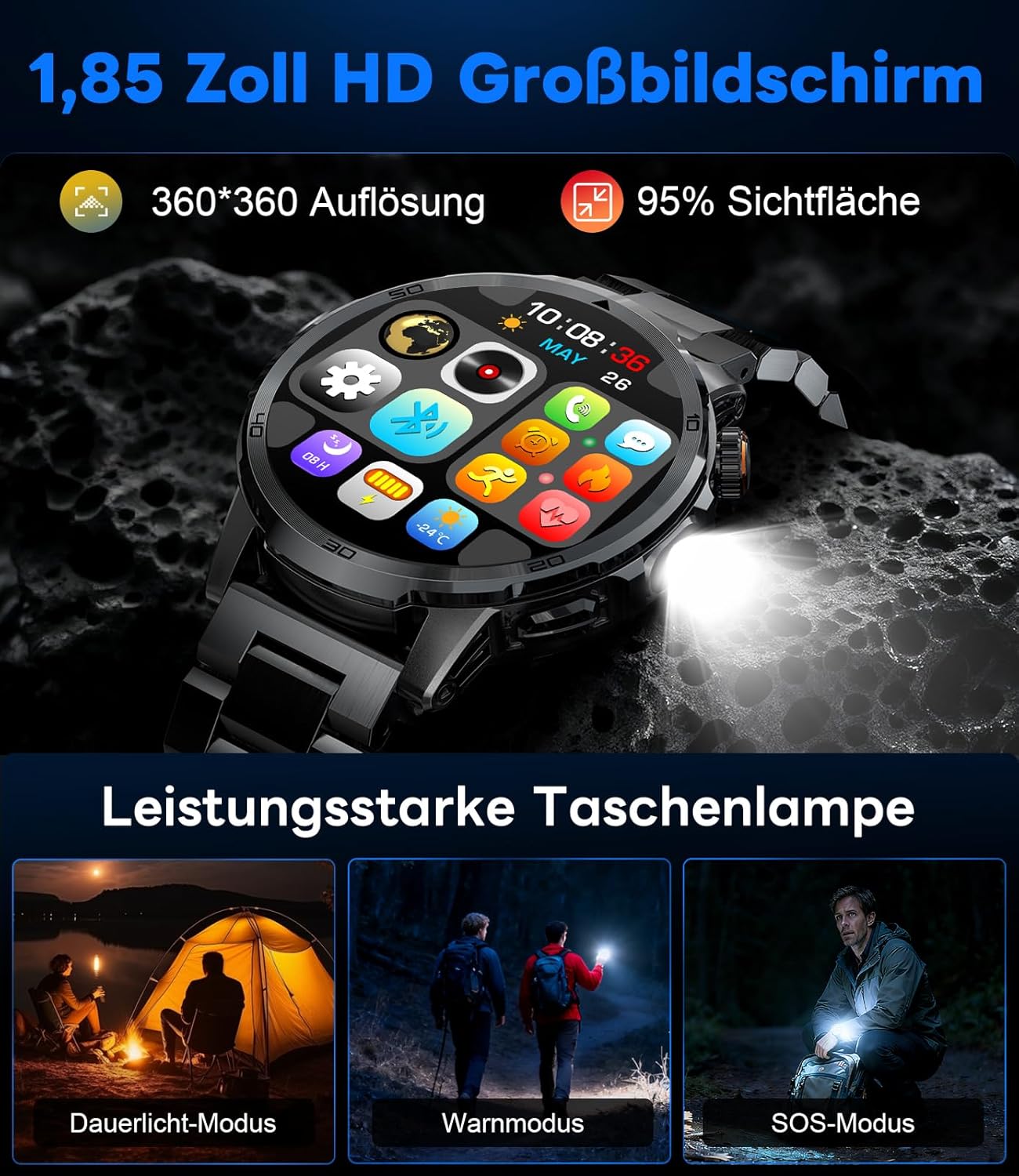
Image: The smartwatch displaying its 1.85-inch HD screen and demonstrating its powerful flashlight feature with different modes.
2.6 Altres funcions
- Assistent de veu: Activate the voice assistant to control your phone or get information (e.g., "What's the weather?").
- Control de música: Controla la reproducció de música al teu telèfon intel·ligent (reprodueix, pausa, salta pistes, ajusta el volum) directament des del rellotge.
- Control de la càmera: Feu servir el rellotge com a disparador remot per a la càmera del vostre telèfon intel·ligent.
- Pronòstic del temps: View condicions meteorològiques actuals i previsions.
- Alarmes i temporitzadors: Configura alarmes i utilitza les funcions de cronòmetre/temporitzador.
- Recordatori de begudes: Estableix recordatoris per beure aigua.
- Cares de visualització: Customize your watch face from over 100 options or upload your own photos via the app.

Image: The smartwatch interface displaying icons for music control, flashlight, camera control, weather, alarm, and drink reminders.

Image: A selection of diverse watch faces available for customization on the LIGE EF19-A Smartwatch.
3. Manteniment
3.1 Neteja
- Regularly clean your smartwatch and straps with a soft, dry, lint-free cloth.
- Si cal, utilitzeu una mica damp drap amb sabó suau i després eixugueu-lo.
- Eviteu utilitzar productes químics agressius, netejadors abrasius o dissolvents, ja que poden danyar l'acabat i els segells del rellotge.
- Assegureu-vos que els contactes de càrrega estiguin nets i secs abans de carregar.
3.2 Resistència a l'aigua (IP68)
The LIGE EF19-A Smartwatch is IP68 waterproof, meaning it is resistant to dust and can withstand immersion in water up to 1.5 meters for up to 30 minutes.
- It is suitable for daily use, such as hand washing, rain, and shallow water swimming.
- Avoid using the watch in hot water, saunas, or steam rooms, as steam can penetrate the seals and cause damage.
- No premeu botons sota l'aigua.
- After exposure to water, wipe the watch dry before charging or using.

Image: The smartwatch highlighting its robust military-grade design, including resistance to temperature extremes, shock, dust, and IP68 water resistance.
4. Solució De Problemes
4.1 El rellotge no s'encén
- Assegura't que el rellotge estigui completament carregat. Connecta'l al carregador durant almenys 30 minuts.
- Try long-pressing the side button for 10-15 seconds to force a restart.
4.2 No es pot emparellar amb el telèfon intel·ligent
- Assegureu-vos que el Bluetooth estigui habilitat al vostre telèfon intel·ligent.
- Ensure the smartwatch is within Bluetooth range (typically 10 meters).
- Reinicieu tant el telèfon intel·ligent com el rellotge intel·ligent.
- Check if the app has the necessary permissions (location, Bluetooth, etc.).
- If previously paired, try "forgetting" the device in your phone's Bluetooth settings and re-pairing through the app.
4.3 Dades de salut inexactes
- Assegureu-vos de portar el rellotge ben ajustat al canell, aproximadament un dit per sobre de l'os del canell.
- Eviteu moviments excessius durant les mesures.
- Netegeu el sensor de la part posterior del rellotge.
- Els factors ambientals i la fisiologia individual poden afectar les lectures.
4.4 Notificacions que no apareixen
- Verifiqueu que el rellotge s'hagi emparellat correctament amb el vostre telèfon intel·ligent.
- Check notification settings within the companion app to ensure desired apps are enabled for notifications.
- Ensure your phone's notification settings allow the companion app to display notifications.
- Make sure your phone is not in "Do Not Disturb" mode.
5. Especificacions
| Característica | Especificació |
|---|---|
| Número de model | EF19-A |
| Mostra | 1.85-inch IPS HD Touch Screen, 360x360 pixels |
| Capacitat de la bateria | Polímer de liti de 1000 mAh |
| Durada de la bateria (ús normal) | 7-15 dies |
| Durada de la bateria (mode d'espera) | Fins a 50 dies |
| Temps de càrrega | Aprox. 2 hores |
| Connectivitat | Bluetooth 5.2 |
| Resistència a l'aigua | IP68 (impermeable) |
| Capacitat d'emmagatzematge de memòria | 128 MB |
| Dispositius compatibles | Android 5.1+ / iOS 9.0+ Smartphones |
| Vigilància de la salut | Heart Rate, Blood Oxygen, Sleep Quality, Stress Level |
| Modes esportius | 100+ (e.g., Running, Cycling, Swimming, Hiking, Yoga) |
| Característiques addicionals | Bluetooth Calls, Message Notifications, Torch, Voice Assistant, Music Control, Camera Control, Weather, Alarms, Timers, Drink Reminder, Customizable Watch Faces |
| GPS | A través de Smartphone |
| Públic objectiu | Homes |
6. Informació de la garantia
The LIGE EF19-A Smartwatch comes with a 2 any de garantia des de la data de compra. Aquesta garantia cobreix defectes de fabricació i avaries en condicions d'ús normal.
La garantia no cobreix:
- Damage caused by improper use, accident, abuse, neglect, or unauthorized modification.
- Normal wear and tear, including scratches, dents, or cosmetic damage.
- Damage caused by exposure to extreme temperatures, liquids (beyond IP68 rating), or corrosive environments.
- Damage to accessories (straps, charging cables) unless defective upon receipt.
To claim warranty service, please retain your proof of purchase and contact customer support.
7. Atenció al client
If you encounter any issues or have questions regarding your LIGE EF19-A Smartwatch that are not covered in this manual, please contact our customer support team.
- Refer to the contact information provided on the product packaging or the official LIGE weblloc.
- When contacting support, please provide your product model number (EF19-A) and a detailed description of the issue.