
Introducció
This manual provides detailed instructions for setting up and operating your Bobtot KW79 5.1 Channel Home Theater System. Please read this manual thoroughly before use to ensure proper functionality and to maximize your audio experience. This system features a powerful 8-inch subwoofer, two wireless rear satellite speakers, two wired front speakers, and one wired center speaker, offering versatile connectivity options including Bluetooth 5.3, ARC, Optical, AUX, DVD, FM, USB, and SD card inputs.
Què hi ha a la caixa
Desembaleu amb cura tots els components i assegureu-vos que heu rebut els articles següents:
- 1 x 8" Subwoofer (with built-in receiver)
- 2 x Wireless Rear Speakers
- 1 x Wired Center Speaker
- 2 x Wired Front Speakers
- 1 x comandament a distància
- 1 x cable AUX
- 1 x TV ARC Cable
- 1 x cable òptic
- 1 x FM Antenna Cable
- 1 x Manual d'usuari

Configuració
Follow these steps to set up your Bobtot KW79 Home Theater System:
1. Connecting Wired Speakers
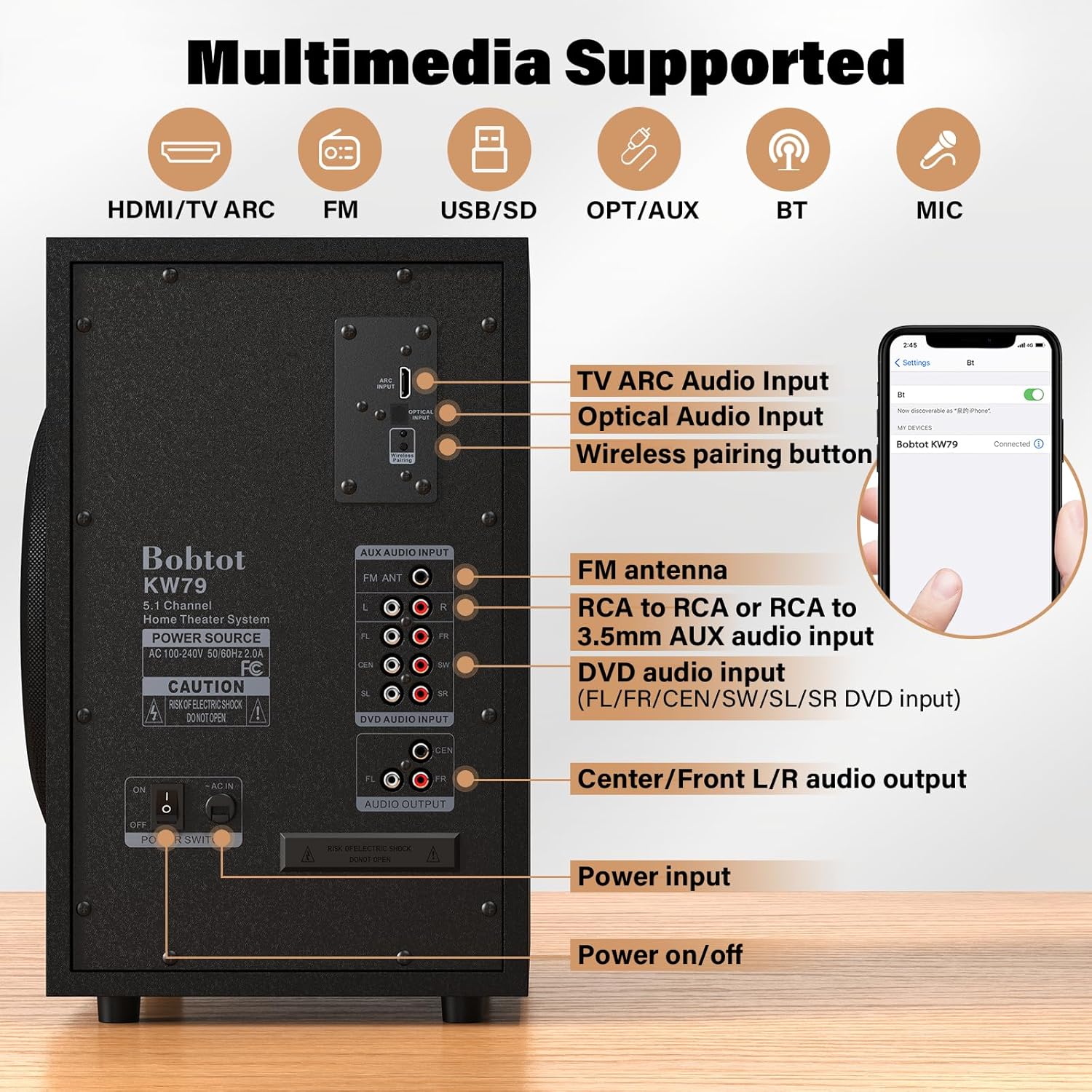
Connect the wired center speaker and the two wired front speakers to the corresponding "AUDIO OUTPUT" ports on the back of the subwoofer. Ensure each speaker cable is securely inserted into its designated port (FL for Front Left, FR for Front Right, CEN for Center).

2. Connecting Wireless Rear Speakers
The two wireless rear satellite speakers automatically connect to the subwoofer when powered on. Simply provide power to each wireless speaker by plugging them into an electrical outlet. They have a wireless range of up to 32 feet (10 meters).

3. Initial Power On and Mode Selection
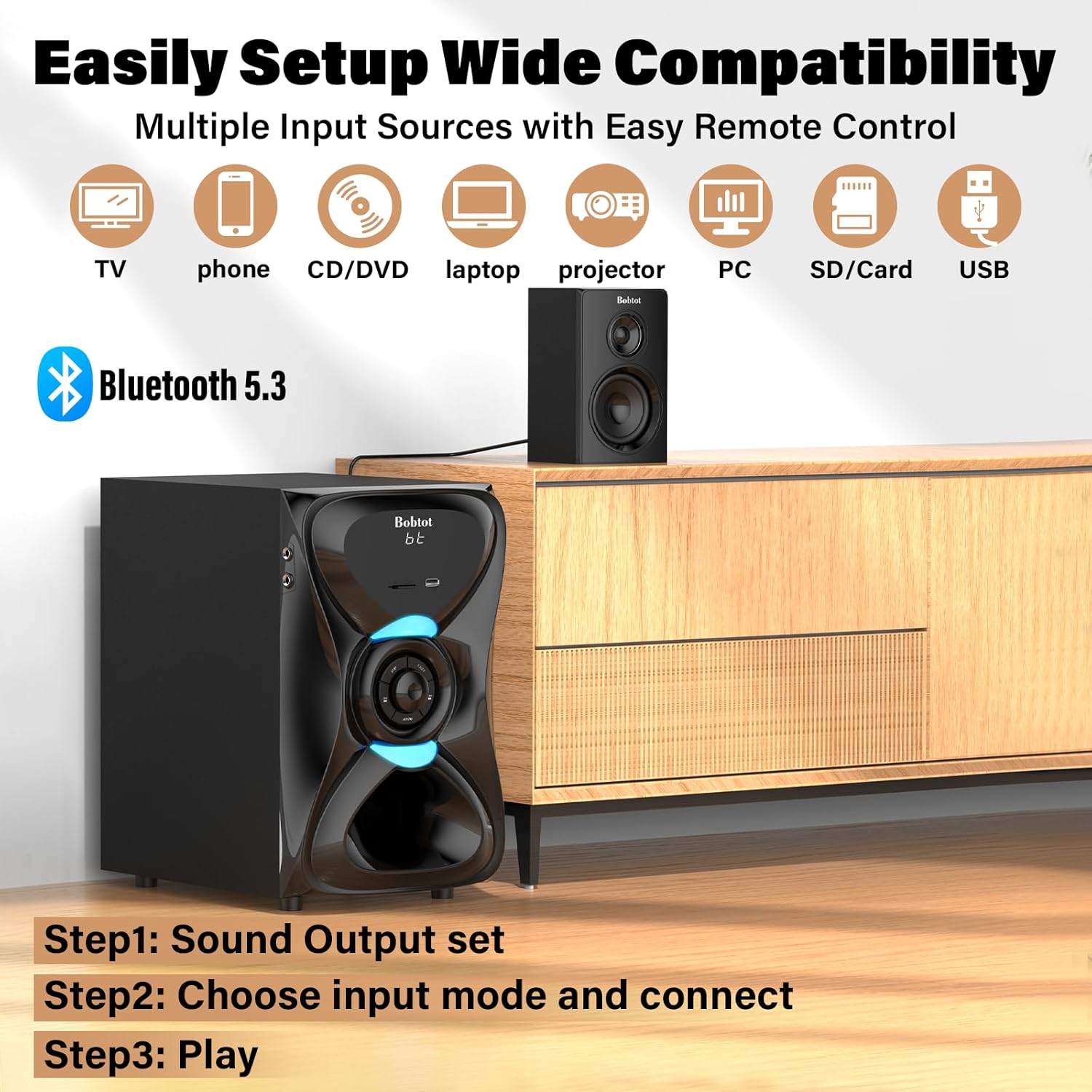
After connecting all speakers, plug the subwoofer into a power outlet and turn it on. Press the power button on the remote control or the subwoofer's front panel. Use the remote to select your desired input mode (e.g., BT for Bluetooth, ARC, OPT, AUX, DVD, FM, USB, SD).
4. Connexió Bluetooth
Per connectar-se mitjançant Bluetooth:
- Select the 'BT' input mode on the system.
- On your smart device (phone, tablet, laptop), enable Bluetooth and search for available devices.
- Select "Bobtot KW79" from the list to pair. The system will indicate a successful connection.
5. Connecting to TV (ARC/Optical)
For optimal digital audio quality from your TV:
- Mode ARC: Connect an HDMI ARC cable from your TV's HDMI ARC port to the ARC input on the subwoofer. The system display will automatically show 'ARC'.
- Mode òptic: Connect an Optical cable from your TV's Optical Digital Audio Out port to the OPTICAL INPUT on the subwoofer. The system display will show 'OPT'.
Important TV Setting: If there is no audio output when using ARC/Optical, navigate to your TV's sound settings. Set the Digital Output Audio Format to PCM. Some TVs may not pass through digital audio in other formats.

6. AUX/DVD/FM/USB/SD Connections
The system supports various other input modes:
- Entrada AUX: Use the provided 3.5mm to RCA cable to connect external devices (e.g., DVD player, computer) to the AUX AUDIO INPUT ports (L/R) on the subwoofer.
- DVD Input: Connect a DVD player using RCA cables to the DVD AUDIO INPUT ports (FL, FR, CEN, SW, SL, SR) for 5.1 channel audio.
- Ràdio FM: Connect the FM antenna cable to the FM ANT port for radio reception.
- Entrada USB/SD: Inseriu una unitat USB o una targeta SD a les ranures respectives del panell frontal per reproduir contingut multimèdia.
7. Guia de vídeo de configuració
Instruccions de funcionament
Funcions de control remot
The included remote control provides full functionality for your home theater system. Ensure the system is powered on before using the remote.
- Encès/apagat: Press the red power button to turn the system on or off.
- Input Mode Choose: Use the dedicated buttons (BT, ARC, OPT, FM, DVD, AUX, USB, SD) to switch between audio sources.
- 5.1/2.1 Channel Select: Switch between 5.1 surround sound and 2.1 stereo modes.
- Control de volum: Adjust the master volume for the entire system.
- Individual Speaker Volume: The remote allows separate volume adjustment for the subwoofer, center, and satellite speakers.
- EQ Mode Adjustment: Press the EQ button to cycle through preset equalizer curves such as Rock, Pop, Classic, Jazz, and Country. (Note: EQ effects may not apply in DVD/AUX mode).
- Mic Volume Adjustment: Control the volume for connected microphones.
System Operation Video
Col·locació dels altaveus
Proper speaker placement is crucial for an immersive 5.1 surround sound experience. Consider the following guidelines:
- Altaveus frontals esquerre i dret: Place these speakers on either side of your TV, equidistant from the viewing position, forming an equilateral triangle with your listening spot.
- Ponent del centre: Position the center speaker directly above or below your TV, centered horizontally. This speaker handles most dialogue.
- subwoofer: Corners or walls tend to amplify low frequencies, so try positioning the subwoofer near these areas for enhanced bass. Experiment with placement to find the best sound for your room.
- Rear Left and Right (Wireless) Speakers: Place these behind your main listening position, slightly to the sides, to create the surround effect. Ensure they are within the 32ft wireless range.
It is generally advised to place all speakers within the same room for optimal sound synchronization.

Especificacions
| Característica | Especificació |
|---|---|
| Nom del model | KW79 |
| Tipus d'altaveu | Subwoofer, satèl·lit |
| Configuració del canal de so envoltant | 5.1 |
| Potència de sortida màxima dels altaveus | 1000 watts (pic) |
| Diàmetre del subwoofer | 8 polzades |
| Tecnologia de connectivitat | ARC, Auxiliary/DVD, Bluetooth, Optical, USB/SD |
| Tecnologia de comunicació sense fils | Bluetooth 5.3 |
| Interval Bluetooth | 10 metres (32 peus) |
| Entrada Voltage | 120 Volts |
| Impedància | 8 ohms |
| Resposta de freqüència | 20 kHz |
| Ràtio senyal / soroll | 75 dB |
| Dimensions del producte | 13.5 "P x 9.25" W x 14.57" H |
| Pes de l'article | 10.1 quilograms (22.2 lliures) |
| Material | Acrylonitrile Butadiene Styrene (ABS), Wood |
| Tipus de muntatge | Wall Mount (for satellite speakers) |
| Components inclosos | Subwoofer, 2 Wireless Rear Speakers, Wired Center Speaker, 2 Wired Front Speakers, AUX Cable, TV ARC Cable, Optical Cable, FM Cable, Remote, User Manual |
Resolució de problemes
If you encounter any issues with your Bobtot KW79 Home Theater System, please refer to the following general troubleshooting tips:
- Sense energia: Ensure the power cable is securely connected to both the subwoofer and a working electrical outlet. Check the power switch on the subwoofer.
- Sense so: Verify that the correct input mode is selected on the system. Check all cable connections (speakers, audio sources). Ensure the volume is not muted or set too low. For TV connections, confirm the TV's audio output settings (e.g., PCM for digital output).
- No Sound from Wireless Speakers: Ensure the wireless rear speakers are powered on and within range of the subwoofer. They should pair automatically.
- Problemes de connexió Bluetooth: Make sure the system is in 'BT' mode and your device's Bluetooth is enabled and searching. Try unpairing and re-pairing the device.
- So distorsionat: Check cable connections for looseness or damage. Reduce the volume if it's too high. Ensure the audio source is not distorted.
For more specific issues or persistent problems, please contact customer support.
Garantia i Suport
The Bobtot KW79 Home Theater System comes with a limited warranty. Please refer to the warranty information provided with your purchase for details on coverage and duration.
For technical support, troubleshooting assistance, or warranty inquiries, please contact Bobtot customer service:
- Telèfon: 1-888-572-1716
Please have your model number (KW79) and purchase information ready when contacting support.