
1. Introducció
This manual provides essential information for setting up, operating, and maintaining your CHROX HK1RBOX X50 Android TV Box. Please read it carefully to ensure proper use and to maximize your device's performance.
2. Contingut del paquet
Verifiqueu que tots els elements siguin presents al paquet:
- 1 x HK1RBOX X50 Android TV Box
- 1 x comandament a distància
- 1 x cable HDMI
- 1 x Power Adapter (DC 5V/2A)
- 1 x Mini Wireless Keyboard
- 1 x Manual d'usuari (aquest document)

Image: The HK1RBOX X50 Android TV Box, its remote control, and the included mini wireless keyboard.
3. Informació de seguretat
Please handle the device with care to avoid drops and impacts. Ensure the product is securely assembled before use. Refer to the warning label for multilingual safety instructions.

Image: A warning label providing instructions on careful handling and secure assembly in various languages.
4. Especificacions
The CHROX HK1RBOX X50 Android TV Box features advanced hardware for a smooth media experience.
4.1 Configuració de maquinari
- Sistema operatiu: Android 14.0
- CPU: Amlogic S905A/X5M 64-bit Quad-core A55 CPU
- GPU: G31 MP2 Processor
- SDRAM: 4 GB
- Emmagatzematge flaix: 64GB (expandable via external HDD, SD card, TF card)
- Wi-Fi: 2.4G & 5G Dual-band Wi-Fi 6
- Bluetooth: BT 5.0
- Ethernet: Standard 10/100/1000M RJ-45
- HDMI: HDMI 2.0, supports 8Kx4K@60fps maximum resolution output
- SPDIF: Interfície d'àudio digital
- Amfitrió USB: 1x USB 2.0, 1x USB 3.0

Image: An illustration highlighting the Amlogic S905A processor, detailing its Quad-core Cortex-A55 CPU and ARM Mali-G31 GPU, indicating strong performance.
4.2 Video & Audio Capabilities
- 2D Graphics: Acceleració de maquinari de gràfics 2D
- Descodificador de vídeo:
- H.265 HEVC/MVC Main10 Profile YUV420@L5.1 up to 4096x2304@60fps
- H.264 AVC/MVC Main10 Profile YUV400/YUV420/YUV422/@L5.1 up to 4096x2304@60fps
- VP9 Profile0/2 YUV420@L5.1 up to 4096x2304@60fps
- VP8 Version2
- AV1 (saves 20%-30% bandwidth efficiency compared to H.265 or VP9)
- Video Coder:
- H.264/AVC BP/MP/HP@level4.2, up to 1920x1080@100fps
- H.265/HEVC MP@level4.1, up to 1920x1080@100fps (4096x4096@10fps with mosaic)
- Supports YUV/RGB video source with rotation and mirror
- JPEG Decoder: Supports YUV400/YUV411/YUV420/YUV422/YUV440/YUV444, 1920x1080@120fps, MJPEG

Image: A visual comparison demonstrating the enhanced clarity and detail of 4K Ultra HD video experience compared to 1080p Full HD.

Image: An illustration showing that AV1 decoding provides 20%-30% more bandwidth efficiency compared to H.265 or VP9, resulting in more videos for less time.
5. Guia de configuració
5.1 Connexió del descodificador de televisió
- Connectar-se al televisor: Use the provided HDMI cable to connect the HDMI port on the TV Box to an HDMI input port on your television.
- Connectar l'alimentació: Plug the power adapter into the DC 5V/2A port on the TV Box, then plug the adapter into a wall outlet. The device should power on automatically or can be turned on using the remote control.
5.2 Connexió de xarxa
- Connexió Wi-Fi: Once powered on, navigate to the 'Settings' menu on the TV Box. Select 'Network' or 'Wi-Fi', choose your desired Wi-Fi network, and enter the password. The device supports 2.4GHz and 5GHz dual-band Wi-Fi 6.
- Connexió Ethernet: For a stable wired connection, connect an Ethernet cable from your router to the RJ-45 Ethernet port on the TV Box. The device supports 10/100/1000M speeds.
5.3 Connexió de perifèrics
- Dispositius USB: Connect USB storage devices (e.g., flash drives, external hard drives) or other USB peripherals (e.g., mouse, keyboard) to the USB 2.0 or USB 3.0 ports.
- Targeta micro SD: Insert a Micro SD card into the designated slot for additional storage.
- Mini teclat sense fil: The included mini wireless keyboard connects via a USB dongle. Insert the dongle into one of the USB ports on the TV Box.
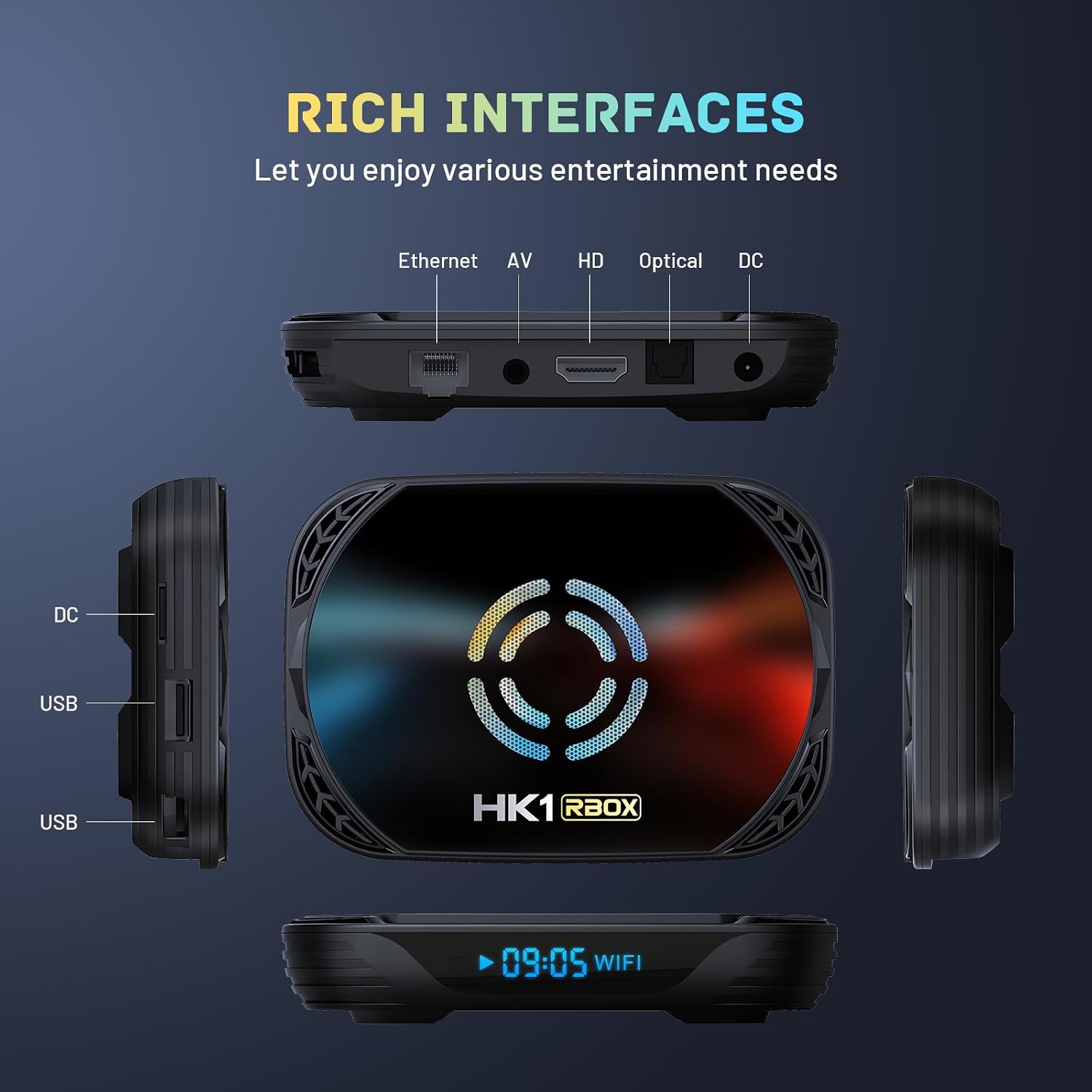
Imatge: Una imatge detallada view of the HK1RBOX X50 Android TV Box's interfaces, including Ethernet, AV, HD (HDMI), Optical, DC power input, and USB ports.
6. Instruccions de funcionament
6.1 Navegació per la interfície
The Android 14.0 operating system provides a user-friendly interface. Use the remote control or the mini wireless keyboard to navigate through menus, launch applications, and control media playback.
6.2 Media Playback and Streaming
- The TV Box supports Ultra HD 8K resolution with H.265 decoding technology, enhancing image quality with rich colors and deep details.
- Enjoy 3D content and various video formats.
- Access streaming applications through the Android interface.
6.3 Wireless Casting and Screen Mirroring
The built-in screen casting feature allows you to stream videos, photos, and applications directly from your smartphone, tablet, or laptop to your TV screen. Ensure your mobile device and the TV Box are connected to the same Wi-Fi network.

Image: A living room scene depicting a smartphone, tablet, and laptop wirelessly casting content to a large TV screen through the Android TV Box.
6.4 Multi-Scene Applications
The HK1RBOX X50 is suitable for various entertainment and utility scenarios:
- Teatre a casa: Stream movies and TV shows in high resolution.
- Replica de pantalla: Share content from your mobile devices.
- Jocs: Play compatible Android games.
- Música: Listen to music through connected audio systems.

Image: A collage illustrating the diverse applications of the TV Box, including use as a home theater, for screen mirroring, playing games, and listening to music.
7. Manteniment
- Actualitzacions de programari: The device supports OTA (Over-The-Air) updates, which automatically download and install update packages via the network. Ensure your device is connected to the internet for timely updates.
- Neteja: Feu servir un drap suau i sec per netejar l'exterior del televisor. Eviteu utilitzar netejadors líquids o materials abrasius.
- Ventilació: Ensure the TV Box is placed in a well-ventilated area to prevent overheating. Do not block ventilation openings.
8. Solució De Problemes
- Sense energia:
- Check if the power adapter is securely connected to the TV Box and the wall outlet.
- Assegureu-vos que la presa de corrent funcioni.
- Sense senyal a la televisió:
- Verify the HDMI cable is correctly connected to both the TV Box and the TV.
- Ensure your TV input source is set to the correct HDMI port.
- Prova un altre cable HDMI o port de televisió.
- Problemes de connexió Wi-Fi:
- Comproveu si el vostre encaminador Wi-Fi funciona correctament.
- Assegureu-vos que heu introduït la contrasenya de Wi-Fi correcta.
- Reinicieu el TV Box i el vostre encaminador Wi-Fi.
- El control remot no respon:
- Reviseu i substituïu les piles del comandament a distància.
- Assegureu-vos que no hi hagi obstacles entre el comandament a distància i el televisor.
- System Lag or Freezing:
- Tanca les aplicacions de fons innecessàries.
- Clear cache from applications in the 'Settings' menu.
- Reinicieu el televisor.
9. Garantia i Suport
Your CHROX HK1RBOX X50 Android TV Box comes with a standard warranty. For any questions or issues, please contact the seller, MYYGZQ. Their professional after-sales team is committed to resolving your concerns within 24 hours.
For support, please refer to the contact information provided with your purchase or on the seller's Amazon page.