
Introducció
This instruction manual provides detailed information for the safe and effective use of your NBD S205D 8K 64MP Digital Camera. Please read this manual thoroughly before operating the device and retain it for future reference. The NBD S205D is designed for high-quality photo and video capture, featuring 8K video recording, a 64MP sensor, autofocus, 16x digital zoom, and Wi-Fi connectivity.
Informació de seguretat
- No exposeu la càmera a l'aigua ni a una humitat excessiva.
- Eviteu deixar caure la càmera o sotmetre-la a impactes forts.
- Mantingueu la càmera allunyada de camps magnètics forts.
- No intenteu desmuntar ni modificar la càmera. Això anul·larà la garantia.
- Use only NBD-approved accessories and power adapters.
- Guardeu la càmera en un lloc fresc i sec quan no la feu servir.
- Mantenir fora de l'abast dels nens.
Contingut del paquet
Verifiqueu que tots els elements siguin presents al vostre paquet:
- NBD S205D Digital Camera
- 2 x Lithium-ion Batteries (2000 mAh each)
- Targeta Micro SD de 64 GB
- Cable de càrrega USB
- Manual d'usuari (aquest document)
- Corretja de la càmera
- Microphone (if included in kit)
Producte acabatview
Familiaritzeu-vos amb els components de la càmera.
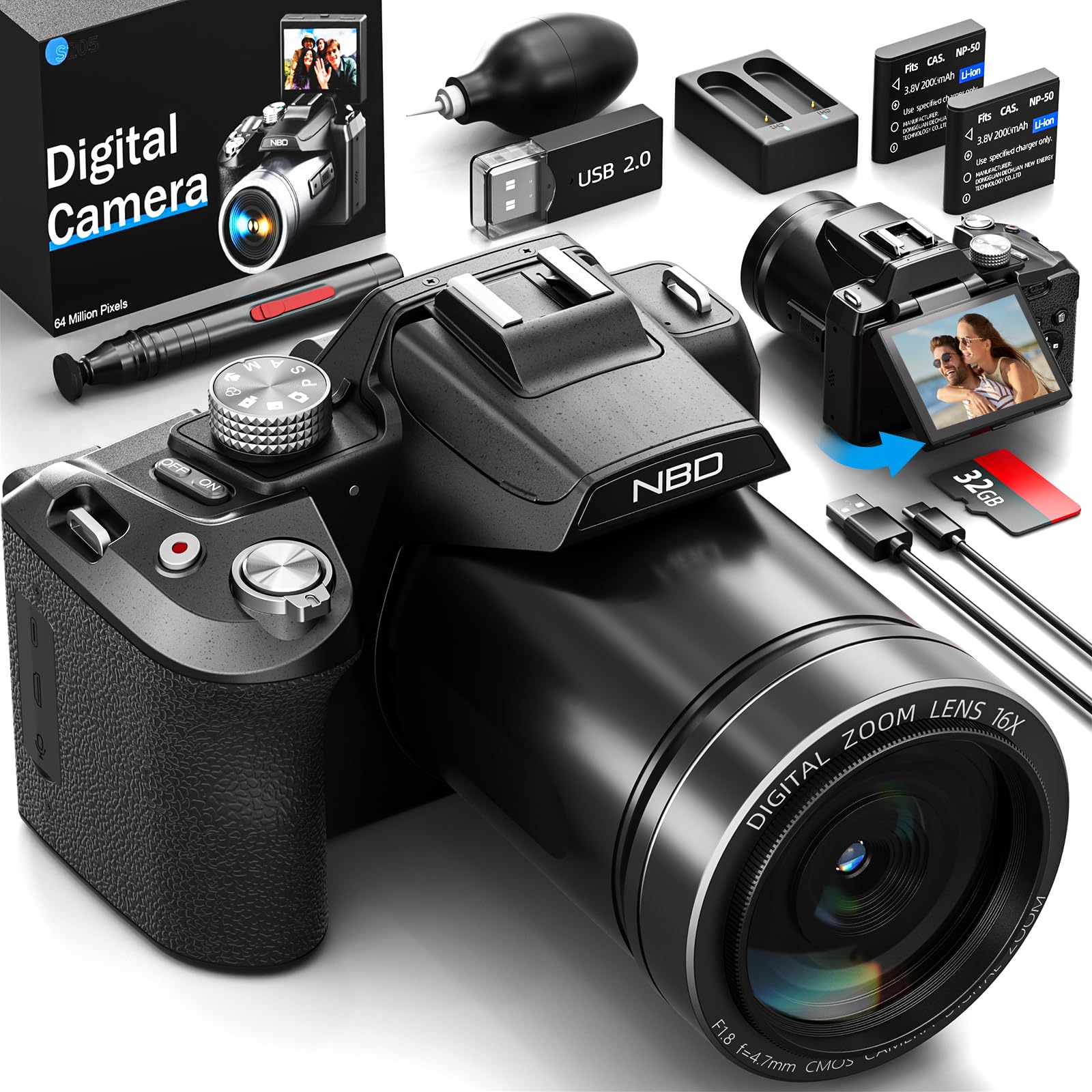
Imatge: Frontal view of the NBD S205D Digital Camera, showing the lens, flash, and the 3-inch 180-degree rotatable screen in an open position. The camera body is deep black.
Components clau:
- Lent: Captures images and videos. Features F1.8 night vision.
- Flash: Proporciona il·luminació en condicions de poca llum.
- 3" 180° Rotatable Screen: For framing shots, reviewing content, and vlogging.
- Botó d'encesa: Encén/apaga la càmera.
- Botó de l'obturador: Premeu fins a la meitat per enfocar, completament per capturar una foto.
- Marcador de mode: Selects shooting modes (e.g., Photo, Video, Playback).
- Palanca de zoom: Controls digital zoom (up to 16x).
- Botons de navegació: Per a la navegació pel menú i els ajustos de la configuració.
- Entrada de micròfon: Per a la connexió de micròfon extern.
- Port USB: Per a càrrega i transferència de dades.
- Ranura per a targeta SD: Per inserir la targeta Micro SD.
- Compartiment de la bateria: Houses the Lithium-ion batteries.
Configuració
1. Càrrega de les bateries
- Obriu la tapa del compartiment de la bateria.
- Insert the two provided Lithium-ion batteries, ensuring correct polarity.
- Tanqueu la tapa del compartiment de la bateria.
- Connect the camera to a power source using the USB charging cable. The charging indicator will illuminate.
- Charge until the indicator light changes or turns off, indicating a full charge.
2. Inserció de la targeta Micro SD
- Localitza la ranura per a targetes SD al lateral de la càmera.
- Insert the 64GB Micro SD card with the gold contacts facing down, until it clicks into place.
- Per treure-la, premeu suaument la targeta fins que surti disparada.
- Nota: Ensure the camera is powered off before inserting or removing the SD card to prevent data corruption.
3. Engegada inicial
- Premeu i manteniu premut el botó d'engegada fins que la pantalla s'il·lumini.
- Follow the on-screen prompts to set the language, date, and time.
Instruccions de funcionament
1. Fer fotos
- Turn the Mode Dial to Mode de fotografia.
- Frame your shot using the rotatable screen.
- Press the Shutter button halfway down to activate autofocus. The focus frame will turn green when focused.
- Press the Shutter button fully to capture the photo.
- Use the Zoom Lever to adjust the 16x digital zoom.
2. Gravació de vídeos
- Turn the Mode Dial to Mode de vídeo.
- Press the Shutter button to start recording. A red indicator will appear on the screen.
- Premeu de nou el botó de l'obturador per aturar la gravació.
- The camera supports resolutions up to 8K/30FPS and 4K/60FPS. Adjust video resolution in the camera settings menu.
3. Mode de reproducció
- Turn the Mode Dial to Mode de reproducció.
- Use the Navigation buttons to browse through your photos and videos.
- Premeu el botó OK/Intro per a view una foto o reproduir un vídeo.
4. Connectivitat Wi-Fi
- Enable Wi-Fi in the camera's settings menu.
- Download the NBD camera app on your smartphone or tablet.
- Connect your smart device to the camera's Wi-Fi network (SSID and password displayed on camera screen).
- Use the app to remotely control the camera, transfer files, and share content.
5. Night Vision (F1.8 Lens)
The camera's F1.8 lens is designed to capture significantly more light in low-light conditions, enhancing image clarity and detail without requiring additional settings. Simply use the camera as normal in dim environments.
Manteniment
- Neteja de la lent: Feu servir un drap suau i sense borrissol dissenyat específicament per a objectius de càmera. No utilitzeu materials abrasius ni productes químics agressius.
- Neteja de la pantalla: Wipe the screen gently with a microfiber cloth.
- Neteja corporal: Feu servir un drap suau i sec per netejar el cos de la càmera. Per a la brutícia persistent, fregueu lleugeramentampen el drap amb aigua.
- Emmagatzematge: When not in use for extended periods, remove the batteries and store the camera in a dry, dust-free environment.
- Cura de la bateria: Recharge batteries regularly, even if not fully depleted, to maintain battery health.
Resolució de problemes
| Problema | Causa possible | Solució |
|---|---|---|
| La càmera no s'encén. | La bateria està esgotada o inserida incorrectament. | Charge the batteries fully. Ensure batteries are inserted with correct polarity. |
| No es poden fer fotos/vídeos. | SD card is full, locked, or not inserted. | Insert a formatted SD card. Check if the SD card's write-protect switch is off. Delete unnecessary files o substituir la targeta. |
| Les imatges són borroses. | Lens is dirty, camera shake, or focus issue. | Clean the lens. Hold the camera steady or use a tripod. Ensure autofocus locks before shooting. |
| La connexió Wi-Fi falla. | Contrasenya incorrecta, Wi-Fi de la càmera no activat o problema amb l'aplicació. | Verify Wi-Fi is enabled on the camera. Re-enter password. Restart camera and smart device. Reinstall the app if necessary. |
| Durada de la bateria curta. | Frequent use of flash, Wi-Fi, or high-resolution recording. | Reduce use of power-intensive features. Carry spare charged batteries. |
Especificacions
| Número de model | NBD-EU-S205D (S205D) |
| La tecnologia de sensors | CMOS, 1/2 de polzada |
| Resolució màxima d'imatge | 64 Megapixels (via interpolation) |
| Resolució de captura de vídeo | 8K/30FPS, 5K, 4K/60FPS, 2K, 1080P, 720P |
| Obertura de lents | F1.8 (Night Vision) |
| Tipus de zoom | Zoom digital de 16x |
| Mostra | 3-inch 180° Rotatable OLED Screen (360 x 640 resolution) |
| Tipus d'enfocament | Automàtic, manual |
| Estabilització d'imatge | Digital |
| Connectivitat | Wi-Fi, USB |
| Mitjans d'emmagatzematge | Targeta Micro SD (fins a 128 GB, 64 GB inclosos) |
| File Formats | MP4 (Video), JPEG (Photo) |
| Tipus de bateria | Lithium-ion (2 x 2000 mAh included) |
| Dimensions (L x A x A) | 12.7 x 12.5 x 8.5 cm |
| Pes | Aprox. 500 g |
| Color | Negre profund |
Garantia i Suport
The NBD S205D Digital Camera comes with a garantia de per vida, covering manufacturing defects and malfunctions under normal use. For warranty claims or technical assistance, please contact NBD customer support.
NBD offers Atenció al client 24 hores al dia, 7 dies a la setmana to assist you with any questions or issues you may encounter. Please refer to the contact information provided on the NBD official website or your product packaging for support channels.
Nota: La garantia no cobreix els danys causats per mal ús, accidents, reparacions no autoritzades o desgast normal.