
Introducció
The Rapoo M308 is a versatile multi-mode wireless mouse designed for efficiency and comfort. It features an ambidextrous design, allowing comfortable use for both right-handed and left-handed individuals. With its dual connectivity options, Bluetooth 5.0 and 2.4 GHz wireless, you can seamlessly connect to up to three devices and switch between them with ease. The mouse is engineered for long-lasting performance, offering a battery life of up to 12 months.
Contingut del paquet
- Rapoo M308 Multi-mode Wireless Mouse
- Receptor USB (emmagatzemat dins del ratolí)
- 2 piles AA
- Guia d'inici ràpid (aquest manual)
Producte acabatview
Familiarize yourself with the components of your Rapoo M308 mouse.
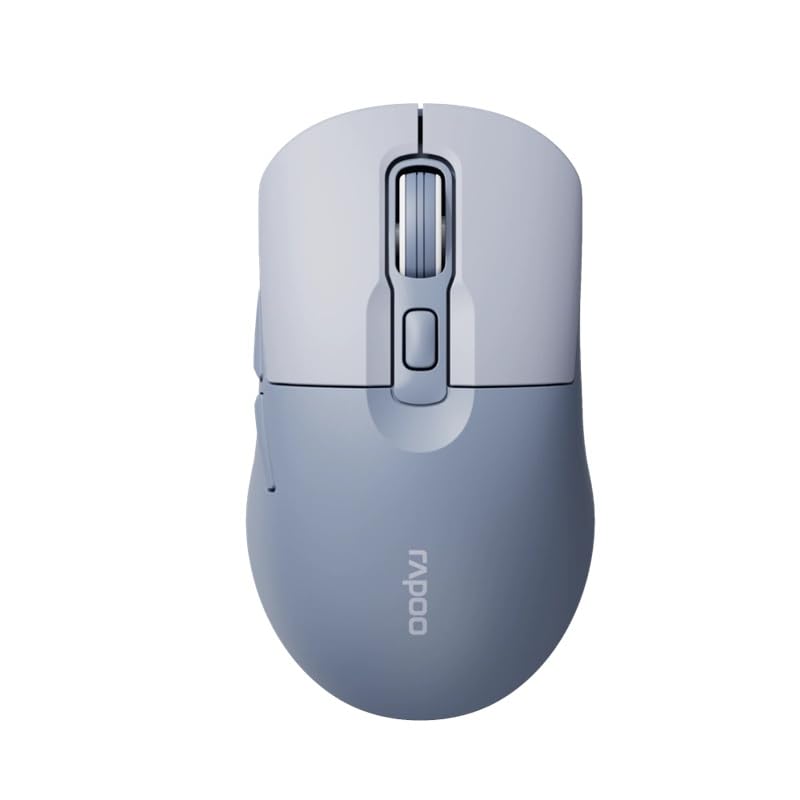
Image: The Rapoo M308 Multi-mode Wireless Mouse in blue, showcasing its ergonomic, ambidextrous design with a scroll wheel and multiple buttons.
- Botó esquerre: Funció estàndard del clic esquerre.
- Botó dret: Funció estàndard del clic dret.
- Roda de desplaçament: Per a la funció de desplaçament i clic amb el botó central.
- Botó DPI: Ajusta la sensibilitat del cursor (DPI).
- Mode Switch Button/Indicator: Switches between connected devices (2.4G, Bluetooth 1, Bluetooth 2) and indicates current mode.
- Botons laterals: Forward/Backward navigation (programmable).
- Compartiment de la bateria: Located on the underside, holds 2 AA batteries.
- USB Receiver Slot: Located inside the battery compartment for storage.
Configuració
1. Instal·lació de la bateria
- Obriu la tapa del compartiment de la bateria a la part inferior del ratolí.
- Introduïu les dues piles AA, assegurant-vos de la polaritat correcta (+/-).
- Tanqueu la tapa del compartiment de la bateria.
2. Connexió mitjançant una xarxa sense fil de 2.4 GHz
- Traieu el receptor USB de la ranura d'emmagatzematge que hi ha dins del compartiment de la bateria.
- Connecteu el receptor USB a un port USB disponible de l'ordinador.
- Turn on the mouse. The mouse should automatically connect to your computer. The mode indicator light will show a steady green light for a few seconds.
3. Connexió mitjançant Bluetooth
The M308 mouse supports two Bluetooth connections (BT1 and BT2).
- Enceneu el ratolí.
- Press the mode switch button to select either Bluetooth 1 (blue light flashes slowly) or Bluetooth 2 (blue light flashes slowly).
- Press and hold the mode switch button for 3 seconds until the blue light starts flashing rapidly. This indicates the mouse is in pairing mode.
- A l'ordinador o dispositiu, vés a la configuració de Bluetooth i cerca dispositius nous.
- Select "Rapoo M308" from the list of available devices to pair.
- Once paired, the blue light will become steady for a few seconds and then turn off.
Instruccions de funcionament
Canvi entre dispositius
The Rapoo M308 allows you to connect to up to three devices (one 2.4G wireless and two Bluetooth devices) and switch between them.
- Briefly press the mode switch button to cycle through the connected devices: 2.4G (green light), Bluetooth 1 (blue light), Bluetooth 2 (blue light).
- The indicator light will briefly illuminate in the corresponding color to confirm the selected mode.
Ajust de DPI
Press the DPI button (usually located behind the scroll wheel) to cycle through different DPI settings. This changes the cursor speed and sensitivity. The indicator light may flash to show the current DPI level (e.g., one flash for low DPI, two for medium, etc.).
Manteniment
- Neteja: Feu servir un drap suau i sec per netejar el ratolí. Per a la brutícia persistent, feu un drap lleugerament sec.amp Es pot fer servir un drap, però assegureu-vos que no entri humitat a l'aparell.
- Substitució de la bateria: When the mouse performance degrades or the indicator light signals low battery, replace the two AA batteries following the installation steps.
- Emmagatzematge: When not in use for extended periods, turn off the mouse to conserve battery life. Store the USB receiver inside the mouse to prevent loss.
Resolució de problemes
- El ratolí no respon:
- Comproveu si el ratolí està encès.
- Assegureu-vos que les piles estiguin correctament instal·lades i que no estiguin esgotades. Substituïu-les si cal.
- For 2.4G connection, ensure the USB receiver is securely plugged into a working USB port. Try a different USB port.
- For Bluetooth connection, ensure the mouse is in the correct Bluetooth mode (BT1 or BT2) and successfully paired with your device. Re-pair if needed.
- El moviment del cursor és erràtic o lent:
- Netegeu el sensor òptic de la part inferior del ratolí.
- Assegureu-vos que feu servir el ratolí sobre una superfície adequada (no reflectant, no transparent).
- Ajusteu la configuració de DPI amb el botó DPI.
- No es pot canviar entre dispositius:
- Ensure all devices are properly connected (2.4G receiver plugged in, Bluetooth devices paired).
- Briefly press the mode switch button to cycle through modes. A long press will initiate Bluetooth pairing mode.
Especificacions
| Nom de marca | Rapoo |
| Model | M308 |
| Tecnologia de connectivitat | Bluetooth 5.0, 2.4 GHz Radio Frequency |
| Característiques especials | Lleuger |
| Detecció de moviment | Òptic |
| Quantitat de botons | 4 |
| Orientació de la mà | Ambidextre |
| Usos recomanats | Oficina |
| Dispositius compatibles | Ordinador personal, portàtil |
| Pes de l'article | 50 grams |
| Sistema operatiu | Linux, Mac, Windows |
| Durada de la bateria | 12 mesos |
| Nombre de bateries | 2 AA (inclosos) |
| Font d'alimentació | Funciona amb bateria |
| Es requereix un sistema operatiu mínim | Mac OS 14 Sonoma, Windows 11 |
| Material | Plàstic |
| País d'origen | Xina |
| Components inclosos | Ratolí |
Garantia i Suport
The Rapoo M308 Multi-mode Wireless Mouse comes with a 2 any de garantia des de la data de compra. Aquesta garantia cobreix defectes de fabricació i avaries en condicions d'ús normal.
For technical support, warranty claims, or further assistance, please refer to the contact information provided on the Rapoo official website or your local distributor's support channels. Please retain your proof of purchase for warranty validation.