
1. Introducció
This manual provides detailed instructions for the NBD 5K Digital Camera, Model B0FR94J83W. This camera is designed for photography and vlogging, featuring 5K video recording, 64MP still images, a 180° flip screen, 16X digital zoom, auto-focus, and macro lens capabilities. Please read this manual thoroughly before using your camera to ensure proper operation and to maximize its features.
2. Contingut del paquet
Verifiqueu que tots els elements que s'enumeren a continuació s'inclouen al vostre paquet:
- NBD 5K Digital Camera (Model B0FR94J83W)
- Wide-angle/Macro Lens (52mm)
- Micròfon extern
- Targeta de memòria de 64 GB
- Cable USB
- 2 x bateries d'ions de liti
- Carregador de bateria
- Camera Neck Rope
- Black Leather Bag
- Drap de neteja de lents
- Lector de targetes
Note: The camera body and accessories are included as a complete kit.

Image: All components included in the NBD 5K Digital Camera kit.
3. Càmera acabadaview
Familiarize yourself with the main components of your NBD 5K Digital Camera.
Davant View
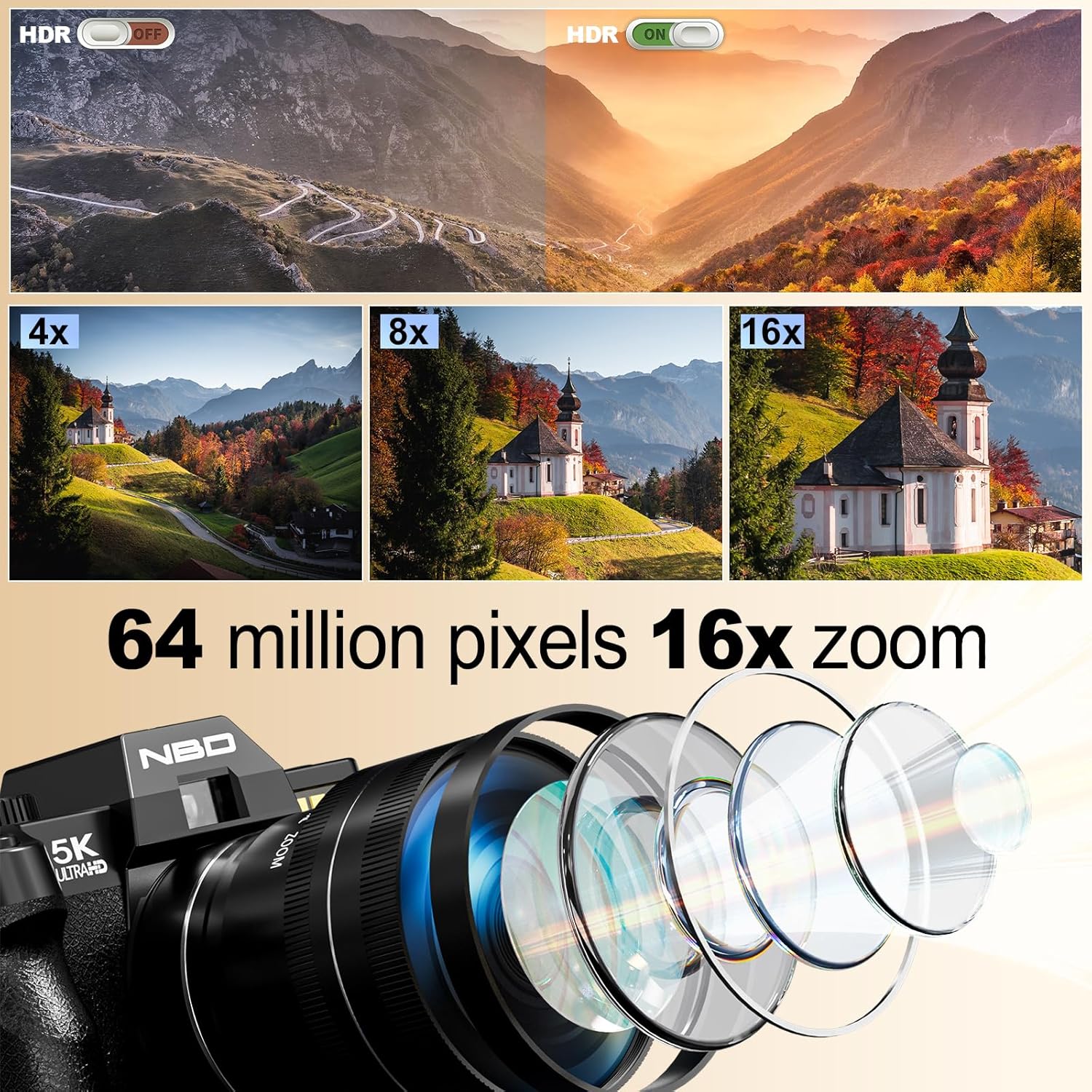
Imatge: Frontal view of the camera, showing the lens, flash, and NBD branding.
- Lent: Digital zoom lens with F1.8 aperture and macro capability.
- Flash: Flaix integrat per a condicions de poca llum.
- Botó de l'obturador: To capture photos or start/stop video recording.
posterior View

Imatge: Part posterior view of the camera, highlighting the 180° flip screen and control buttons.
- 180° Flip Screen (LCD): For easy self-portraits and vlogging.
- Botons de navegació: Per a la navegació pel menú i l'ajust de la configuració.
- Marcador de mode: Per seleccionar diversos modes de dispar.
lateral View (Ports)
Vídeo: Un primer pla view of the camera's ports, including USB and microphone input.
- Port USB: Per a càrrega i transferència de dades.
- Entrada de micròfon: Per connectar el micròfon extern.
4. Configuració
4.1. Instal·lació i càrrega de la bateria
- Obriu la tapa del compartiment de la bateria que es troba a la part inferior de la càmera.
- Insert a fully charged Lithium-Ion battery, ensuring correct polarity.
- Tanqueu bé la tapa del compartiment de la bateria.
- To charge, connect the camera to a power source using the provided USB cable and charger. The charging indicator light will show the charging status.
4.2. Instal·lació de la targeta de memòria
The camera supports a 64GB TF card (microSD). Ensure the card is inserted correctly.
- Localitza la ranura de la targeta de memòria, normalment a prop del compartiment de la bateria o al lateral.
- Insert the 64GB TF card with the gold contacts facing the correct direction until it clicks into place.
- It is recommended to format the memory card via the camera's menu before first use to ensure compatibility and optimal performance.
4.3. Fixació de la lent
The camera comes with a wide-angle/macro lens. This lens can be attached to the front of the camera's main lens.
Video: Demonstrates how to attach the wide-angle/macro lens to the camera.
- Align the threads of the wide-angle/macro lens with the threads on the front of the camera's built-in lens.
- Gently twist the accessory lens clockwise until it is securely fastened.
- To use the macro function, unscrew the front part of the accessory lens, leaving the macro component attached to the camera.
4.4. External Microphone Connection
For enhanced audio quality, connect the included external microphone.
- Locate the microphone input port on the camera (refer to the Camera Overview secció).
- Plug the external microphone's jack into the microphone input port.
- Ensure the microphone is securely connected before recording.
5. Funcionament de la càmera
5.1. Encendre/apagar
Press and hold the power button (usually located on the top or side) to turn the camera on or off.
5.2. Fotografia bàsica
- Seleccioneu el mode: Rotate the mode dial to the desired shooting mode (e.g., Automatic, Portrait).
- Enquadra la teva presa: Use the 180° flip screen to compose your image.
- Focus: The camera features auto-focus. Half-press the shutter button to allow the camera to focus. A green box will indicate focus lock.
- Captura: Fully press the shutter button to take a 64MP photo.
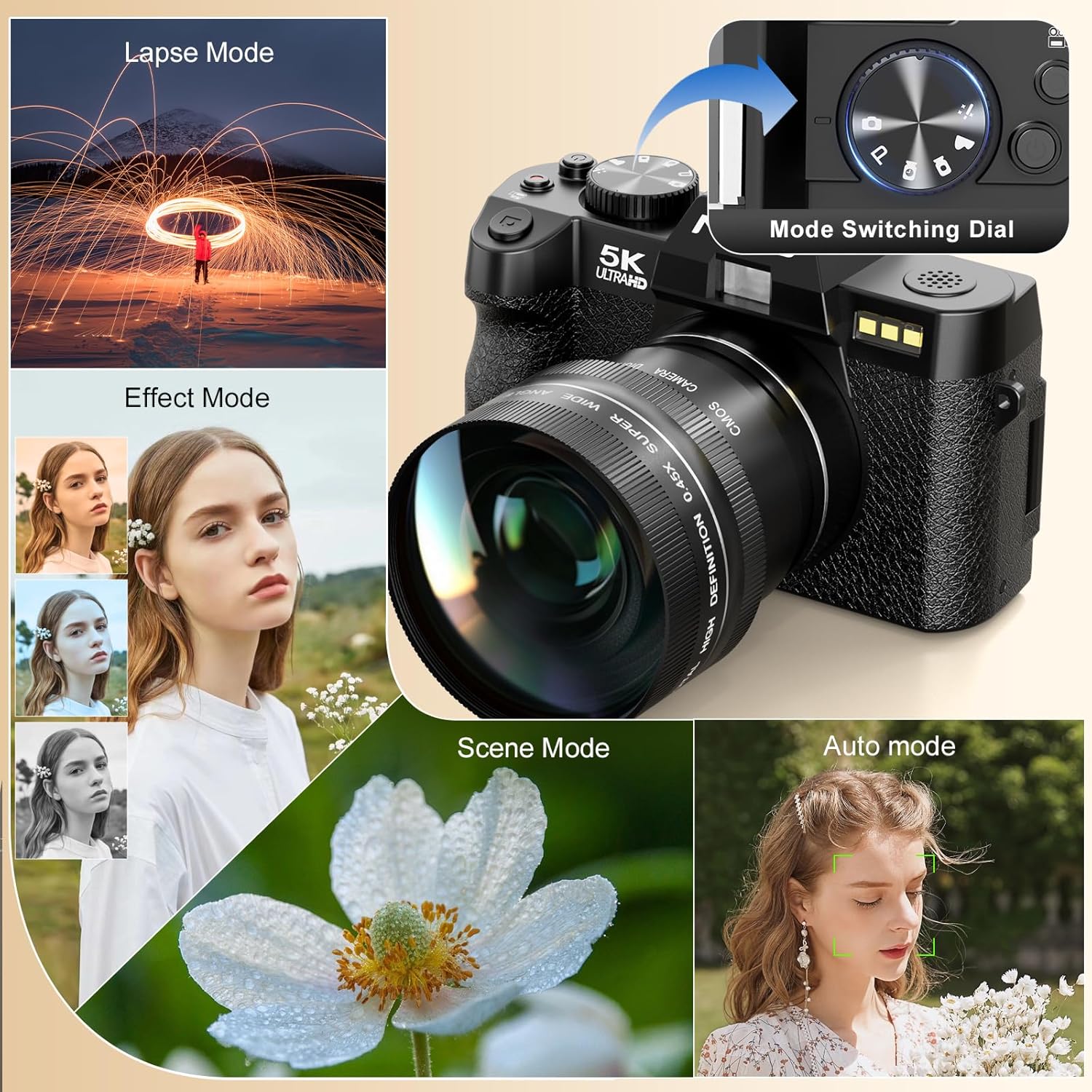
Image: Illustrates the camera's 64 million effective pixels, AF mode, and low-light focusing capabilities.
5.3. Ús del zoom digital
The camera supports 16X digital zoom. Use the zoom lever (often around the shutter button) to zoom in or out.
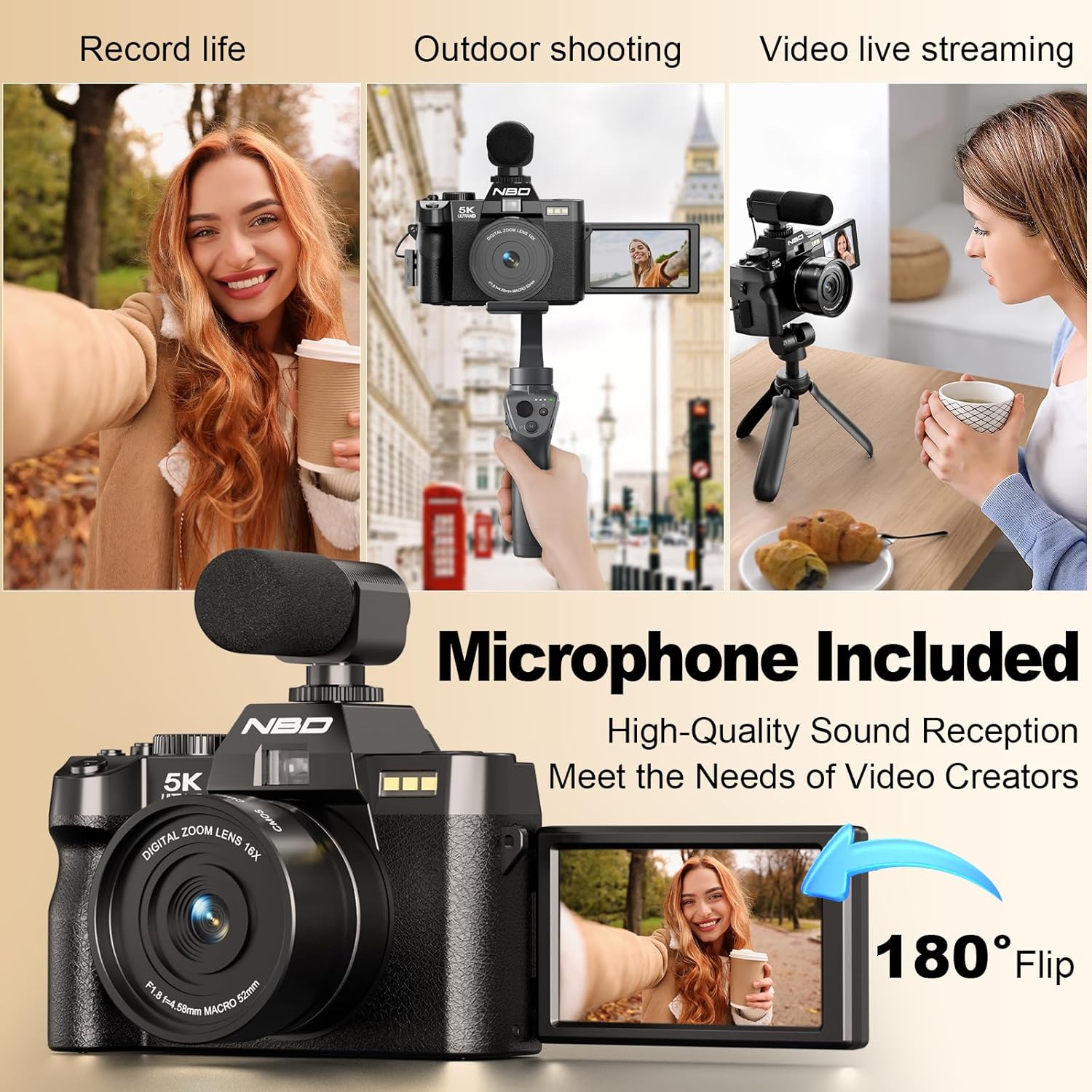
Image: Visual representation of 4x, 8x, and 16x digital zoom levels on the NBD 5K Digital Camera.
5.4. Gravació de vídeo
The camera supports 5K 25fps and 1080P 60fps video recording.
Video: Shows the NBD 5K Digital Camera in action, recording video in various settings.
- Seleccioneu el mode de vídeo: Rotate the mode dial to the video camera icon.
- Comença a gravar: Press the shutter button to begin recording.
- Atura la gravació: Torneu a prémer el botó de l'obturador per aturar la gravació.
- Vlogs: Utilize the 180° flip screen to monitor yourself while recording. Ensure the external microphone is connected for clear audio.

Image: Demonstrates the superior detail of 5K video resolution compared to 2K and 1080P.

Image: The camera set up for vlogging, showing the external microphone and flip screen.
5.5. Camera Modes
The mode dial allows selection of various shooting modes for different scenarios:
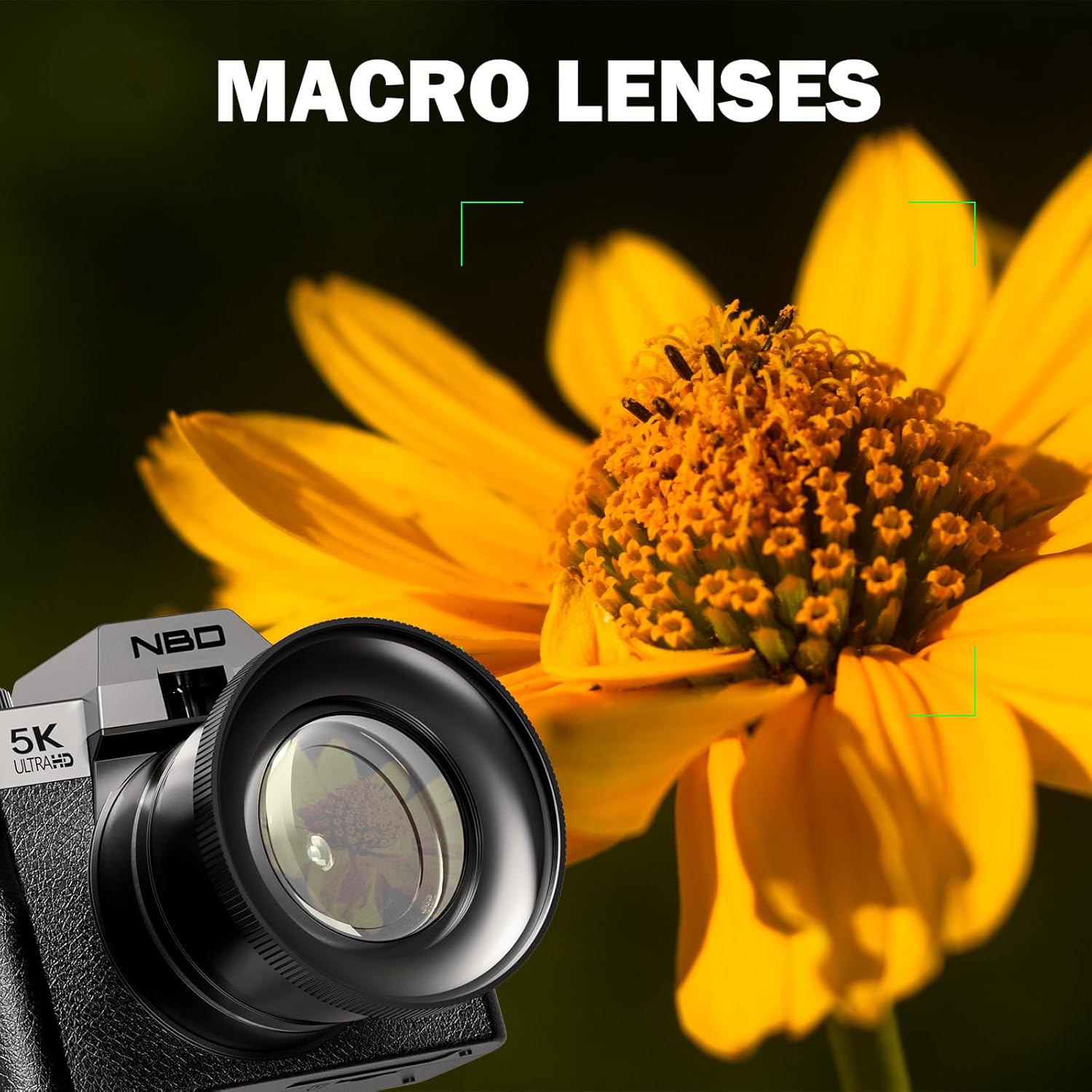
Image: The camera's mode dial and examples of Lapse Mode, Effect Mode, Scene Mode, and Auto Mode.
- Automàtic: General purpose shooting, camera adjusts settings automatically.
- Retrat: Optimizes settings for capturing portraits, often with background blur.
- Macro: For close-up shots of small subjects like flowers and insects.
- Pel·lícula: Dedicated video recording mode.
- Fàcil: Simplified mode for beginners.
- Lapse de temps: Captures a series of images over time to create a sped-up video.
- Càmera lenta: Grava vídeo a una freqüència d'imatges més alta per a la reproducció a càmera lenta.
5.6. Macro Photography
Attach the macro lens component for detailed close-up photography.
Image: The NBD 5K Digital Camera with the macro lens attached, capturing a detailed image of a flower.
6. Connectivitat
6.1. Connectivitat Wi-Fi
Connect your camera to a smartphone or tablet via Wi-Fi for remote control and quick file transferència.
Image: The camera displaying Wi-Fi hotspot information, with a smartphone showing a remote camera view.
- Activa la Wi-Fi: Access the camera's menu and enable Wi-Fi. The camera will display a network name (SSID) and password.
- Connectar el dispositiu: On your smartphone or tablet, go to Wi-Fi settings and connect to the camera's network using the provided password.
- Use App: Download and install the dedicated camera app (refer to camera packaging or manufacturer website for app name). Use the app for remote framing, controlling settings, and transferring photos/videos.
6.2. Connexió USB
Feu servir el cable USB per connectar la càmera a un ordinador per a file transferència.
- Connect one end of the USB cable to the camera's USB port.
- Connecteu l'altre extrem a un port USB de l'ordinador.
- The camera will appear as a removable drive on your computer, allowing you to access and transfer files.
7. Manteniment
7.1. Neteja de la càmera
- Lent: Use the provided lens cleaning cloth or a soft, lint-free cloth specifically designed for optical surfaces. Gently wipe the lens in a circular motion. Avoid using harsh chemicals.
- Pantalla: Use a soft, dry cloth to clean the LCD screen. For stubborn smudges, a slightly damp es pot fer servir un drap, seguit d'un de sec.
- Cos de la càmera: Netegeu el cos de la càmera amb un drap suau i sec.
7.2. Cura de la bateria
- Guardeu les piles en un lloc fresc i sec quan no les utilitzeu.
- Eviteu descarregar completament les bateries amb freqüència per allargar-ne la vida útil.
- No exposeu les piles a temperatures extremes.
7.3. Emmagatzematge
When not in use, store the camera in the provided black leather bag to protect it from dust and scratches. Remove batteries if storing for extended periods.
8. Solució De Problemes
If you encounter issues with your NBD 5K Digital Camera, refer to the following common problems and solutions:
| Problema | Causa possible | Solució |
|---|---|---|
| La càmera no s'encén. | La bateria està morta o està inserida incorrectament. | Carregueu la bateria o torneu-la a inserir correctament. |
| Les fotos són borroses. | Camera not focused, subject movement, low light. | Ensure auto-focus locks before shooting. Use flash in low light. Hold camera steady. |
| Error de la targeta de memòria. | Card incorrectly inserted, corrupted, or full. | Re-insert card. Format card (will erase data). Use a different card. Delete files per alliberar espai. |
| Problemes de connexió Wi-Fi. | Incorrect password, app not installed, distance. | Verify password. Ensure app is installed. Stay within range of the camera's Wi-Fi signal. |
| No audio in video. | External microphone not connected or faulty. | Ensure external microphone is securely plugged in. Check microphone settings in camera menu. |
If the problem persists, please contact NBD customer support for further assistance.
9. Especificacions
Key technical specifications for the NBD 5K Digital Camera:
| Característica | Detall |
|---|---|
| Marca | NBD |
| Nom del model | NBD |
| Número de model | B0FR94J83W |
| Resolució del sensor fotogràfic | 64 MP |
| Resolució de fixes efectius | 64 MP |
| Resolució de vídeo | 2160p (5K), 1080p |
| Velocitat de fotogrames | 25 fps, 30 fps, 60 fps, 120 fps |
| Zoom digital | 16X |
| Tipus de lent | Macro (with F1.8 aperture) |
| Mida de la pantalla | 3 polzades |
| Tipus de visualització | LCD (pantalla girable de 180°) |
| Capacitat d'emmagatzematge de memòria | 64 GB (targeta TF inclosa) |
| Tipus de sensor | CMOS |
| Estabilització d'imatge | Digital |
| Tecnologia d'enfocament automàtic | Detecció de contrast |
| Tecnologia de connectivitat | USB, Wi-Fi |
| Tipus de bateria | Ió de liti (2 inclosa) |
| Usos específics per al producte | Vlogging, Photography |
| Color | Negre |
| Nivell de resistència a l'aigua | No resistent a l'aigua |
10. Garantia i assistència
10.1. Garantia del producte
The NBD 5K Digital Camera comes with a limited warranty. Please refer to the warranty card included in your package or visit the official NBD weblloc web per obtenir termes i condicions detallats sobre la cobertura i la durada.
10.2. Atenció al client
For technical assistance, troubleshooting beyond this manual, or warranty claims, please contact NBD customer support. Contact information can typically be found on the product packaging, the official NBD weblloc web o a través del vostre distribuïdor.