
Introducció
This manual provides essential information for setting up, operating, maintaining, and troubleshooting your Apple iPhone 17. This device is a renewed, unlocked US Version with 256GB storage and eSIM capability. Please read these instructions carefully to ensure optimal performance and longevity of your device.
Dispositiu acabatview
The Apple iPhone 17 features a sleek design and powerful capabilities. Below are images highlighting key aspects of the device.
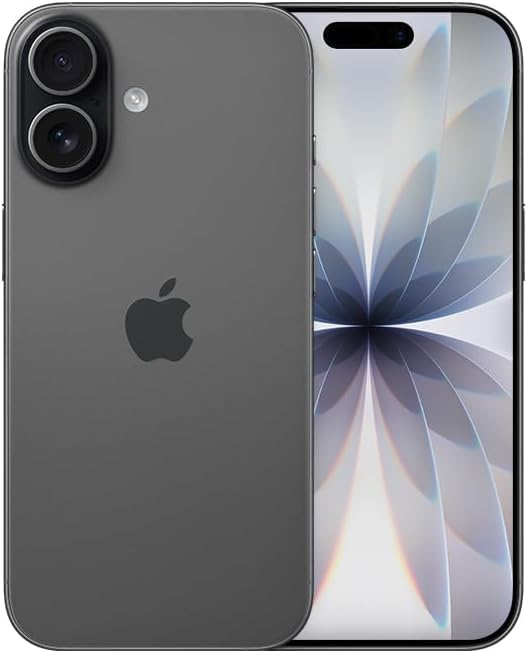
Imatge: Frontal view of the Apple iPhone 17 in Black. This image displays the device's screen and overall form factor.

Image: Close-up of the dual camera system on the rear of the Apple iPhone 17. This highlights the camera lenses and flash module.

Imatge: Side profile of the Apple iPhone 17, showing the power button and volume controls. This view emphasizes the device's slim design.
Configuració
Follow these steps to set up your renewed Apple iPhone 17:
- Compatibilitat de l'operador: This phone is unlocked and compatible with GSM and CDMA networks (e.g., AT&T, T-Mobile, Sprint, Verizon, US Cellular, Cricket, Metro, Tracfone, Mint Mobile). Before proceeding, verify compatibility with your chosen carrier.
- Activació de l'eSIM: The iPhone 17 uses an eSIM. Your carrier will provide instructions for activating the eSIM. Often, this involves scanning a QR code. Important: Do not discard any QR stickers provided with your device, as they may be essential for eSIM activation.
- Encès: Press and hold the power button on the side of the device until the Apple logo appears.
- Configuració inicial: Follow the on-screen prompts to select your language, region, connect to a Wi-Fi network, and transfer data from a previous device if applicable.
- Accessoris: The device includes a generic (Mfi certified) charger and charging cable. Headphones and a physical SIM card are not included.
Com fer funcionar el teu iPhone 17
Your iPhone 17 runs on iOS 18, offering a user-friendly interface and a wide range of features.
Navegació bàsica
- Pantalla d'inici: Swipe up from the bottom of the screen to return to the Home Screen.
- Commutador d'aplicacions: Swipe up from the bottom and pause in the middle of the screen to view obrir aplicacions.
- Centre de control: Llisca cap avall des de la cantonada superior dreta per accedir a la configuració ràpida.
- Notificacions: Llisca cap avall des de la part superior central fins a view notificacions.
Característiques de la càmera
The iPhone 17 is equipped with a powerful camera system:
- Càmera posterior: 48 MP sensor with LED flash and 10x digital zoom for high-quality photos and videos.
- Càmera frontal: Single front-facing camera for selfies and video calls.
- Captura de vídeo: Supports 1080p and 4k video recording.
Pantalla i connectivitat
- Visualització: 6.3-inch OLED display with 2622 x 1206 resolution and a 120Hz refresh rate, providing vibrant visuals and smooth scrolling.
- Connectivitat: Supports 5G cellular technology, Bluetooth, NFC, USB Type C, and Wi-Fi for seamless communication and data transfer.
Security and Additional Features
- Seguretat biomètrica: Face Recognition for secure unlocking and authentication.
- Característiques addicionals: Includes Always On Display, Built-In GPS, Dual SIM capability (via eSIM), and Wireless Charging.
Vídeos útils
Video: A comparison between the iPhone 17 and another phone model, highlighting design and features. This video is provided by Ersbit.
Vídeo: Una resposta honestaview of the Apple iPhone 17, discussing its performance and user experience. This video is provided by Dimitri.
Vídeo: Una revisió detalladaview of the Apple iPhone 17, covering various aspects of the device. This video is provided by Bonfashion.
Vídeo: Mostra un clip curtasing the Lavender color variant of the iPhone 17. This video is provided by Veronika.
Video: Demonstrating the Apple iPhone 17 in daily use scenarios. This video is provided by Ericka Garcia Garcia.
Video: A design comparison between the iPhone 17 Pro and the standard iPhone 17. This video is provided by Ersbit.
Vídeo: Un overview of the iPhone Air and iPhone 17's overall design. This video is provided by Ersbit.
Manteniment
Proper maintenance ensures the longevity and performance of your iPhone 17.
- Salut de la bateria: Your renewed iPhone 17 is guaranteed to have a minimum battery capacity of 80%. To preserve battery life, avoid extreme temperatures and excessive charging cycles.
- Neteja: Feu servir un drap suau i sense borrissol per netejar la pantalla i l'exterior. Eviteu materials abrasius o productes químics agressius.
- Actualitzacions de programari: Regularly update your iOS to the latest version to benefit from security patches, new features, and performance improvements.
- Gestió d'emmagatzematge: Periòdicament review i eliminar innecessaris files, apps, and media to optimize storage and performance.
Resolució de problemes
Si tens problemes amb el teu iPhone 17, considera les solucions habituals següents:
- Problemes de connectivitat de xarxa: If you experience problems with calls, texts, or data, first ensure your eSIM is properly activated with your carrier. Some carriers may have specific requirements or known compatibility issues. Contact your carrier's support for assistance.
- El dispositiu no respon: Perform a force restart. The exact steps may vary slightly by iOS version, but typically involve pressing and quickly releasing the Volume Up button, then the Volume Down button, then pressing and holding the Side button until the Apple logo appears.
- Drenatge de la bateria: Check battery usage in Settings to identify apps consuming significant power. Adjust settings like screen brightness, background app refresh, and location services to optimize battery life.
- Problemes amb l'aplicació: If an app is not functioning correctly, try closing and reopening it. If the issue persists, delete and reinstall the app, or check for app updates in the App Store.
- Errors de programari: Ensure your device is running the latest iOS version. If problems persist, consider backing up your data and performing a factory reset.
Especificacions
Detailed technical specifications for the Apple iPhone 17 (256GB, Unlocked, Renewed):
| Característica | Especificació |
|---|---|
| Marca | Apple |
| Nom del model | iPhone 17 |
| Sistema operatiu | iOS 18 |
| Capacitat d'emmagatzematge de memòria | 256 GB |
| Mida instal·lada de la memòria RAM | 8 GB |
| Model de CPU | Sèrie A |
| Velocitat de la CPU | 3.7 GHz |
| Mida de la pantalla | 6.3 polzades |
| Tipus de visualització | OLED |
| Resolució | 2622 x 1206 píxels |
| Freqüència d'actualització | 120 Hz |
| Display Pixel Density | 460 Pixels Per Inch (PPI) |
| Proveïdor de sense fil | Desbloquejat |
| Tecnologia cel·lular | 5G |
| Tecnologia de connectivitat | Bluetooth, NFC, USB, Wi-Fi |
| Nombre de ranures per a targetes SIM | E Sim |
| Tipus de connector | USB tipus C |
| Rear Facing Camera Photo Sensor Resolution | 48 MP |
| Number of Rear Facing Cameras | 1 |
| Number of Front Cameras | 1 |
| Flash de la càmera | LED |
| Zoom digital | 10.0 |
| Resolució de captura de vídeo | 1080p, 4k |
| Capacitat de la bateria | 3600 milionsamp Hores |
| Descripció de la bateria | Ió de liti |
| Funció de seguretat biomètrica | Reconeixement facial |
| Característiques addicionals | Always On Display, Built-In GPS, Dual SIM, Factory Unlocked, Wireless Charging |
| Nivell de resistència a l'aigua | No resistent a l'aigua |
| Pes de l'article | 14.88 unces |
| Dimensions de l'article | 6 x 4 x 2 polzades |
| Any model | 2025 |
| UPC | 756613503987 |
Garantia i Suport
Your renewed Apple iPhone 17 is covered by a 90-Day Amazon Renewed Guarantee. This warranty ensures that your device is in excellent working condition and provides options for replacement or refund if issues arise within the warranty period.
For further assistance, please refer to the following:
- Suport renovat d'Amazon: Visit the Amazon Renewed Store for information regarding your purchase and warranty claims.
- Assistència d'Apple: For general iOS and device functionality questions, visit the official Apple Support weblloc.
- Suport de l'operador: Contact your mobile carrier for any network-related issues, eSIM activation, or service plan inquiries.


