
1. Introducció
This manual provides detailed instructions for the safe and effective use of your Tungfull Mini Cordless Rotary Tool, Model DM-Black. This versatile tool is designed for light-duty tasks such as carving, sanding, engraving, grinding, and cutting in various DIY craft projects. Please read this manual thoroughly before operation to ensure proper usage and maintenance.
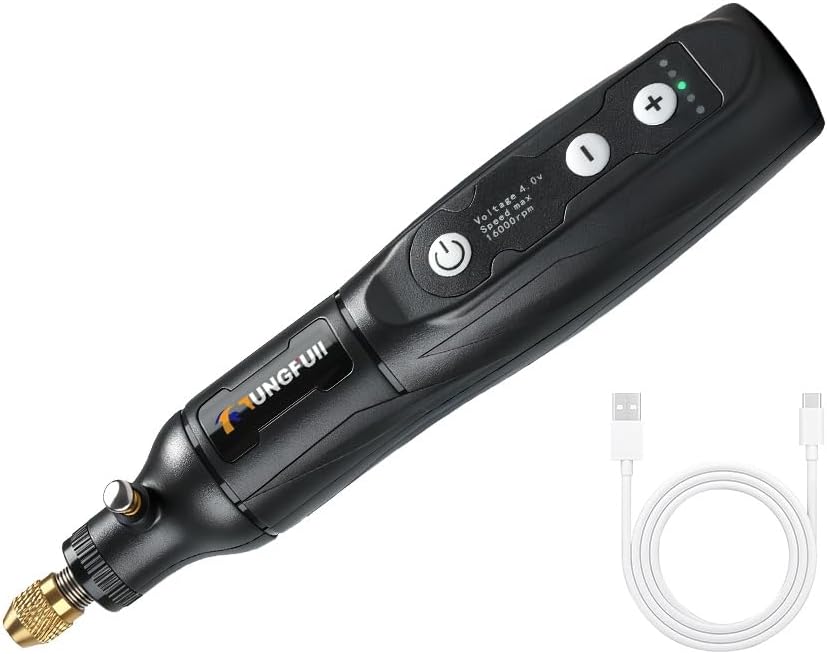
Image 1: The Tungfull Mini Cordless Rotary Tool, shown with its USB charging cable.
2. Informació de seguretat
Always observe basic safety precautions when using electrical tools to reduce the risk of fire, electric shock, and personal injury. Failure to follow these instructions may result in serious injury.
- Llegeix totes les instruccions: Familiaritzeu-vos amb el funcionament de l'eina i les pautes de seguretat abans d'utilitzar-la.
- Porteu protecció ocular: Feu servir sempre ulleres de seguretat o ulleres de seguretat amb protectors laterals.
- Peça de treball segura: Sempre clamp o fixar la peça de treball d'una altra manera per evitar que es mogui durant el funcionament.
- Mantenir una zona de treball neta: Cluttered areas invite accidents. Ensure your workspace is well-lit.
- Avoid Heavy-Duty Projects: This tool is designed for light-duty applications. Do not use it for tasks beyond its intended capacity.
- Ventilació adequada: Ensure adequate ventilation, especially when working with materials that produce dust or fumes.
- Desconnecteu l'alimentació: Always disconnect the tool from the power source before changing accessories, making adjustments, or performing maintenance.
- Emmagatzema amb seguretat: Store the tool out of reach of children and untrained persons.
3. Producte acabatview
Understand the different parts of your Tungfull Mini Cordless Rotary Tool for optimal use.

Image 2: Key components of the rotary tool, including the power outlet, gear indicator light, speed control buttons, switch, comfortable body, chuck lock button, and built-in copper core.
- Endoll: Port USB-C per carregar.
- Gear Indicator Light: Mostra la configuració de velocitat actual.
- Speed Control Buttons (+/-): Adjusts the rotational speed of the tool.
- Interruptor (botó d'engegada): Turns the tool on and off.
- Chuck Lock Button: Engages to hold the shaft stationary for accessory changes.
- Femella de pinça: Secures the collet and accessory.
- Pinça: Subjecta la tija de l'accessori.
4. Configuració
4.1 Càrrega de l'eina
Before first use, fully charge the tool's battery. Connect the provided USB charging cable to the tool's power outlet and a compatible USB power source (e.g., computer USB port, USB wall adapter). The 1500mAh battery typically charges in 1 hour, providing approximately 60 minutes of continuous operation.

Imatge 3: Primer pla view of the USB charging port on the rotary tool.
4.2 Attaching Accessories and Collets
Different tool accessories fit different collets. Ensure you use the correct collet size for your accessory to prevent slippage and ensure proper concentricity.
- Manteniu premut el botó Chuck Lock Button to prevent the shaft from rotating.
- Desenrosqueu el Pinça de pinça en sentit antihorari.
- Insereix el corresponent Collar into the collet nut.
- Insert the shank of your desired accessory into the collet.
- While still holding the chuck lock button, tighten the Pinça de pinça clockwise until the accessory is securely held. Do not overtighten.
- Release the chuck lock button. Gently pull on the accessory to confirm it is firmly seated. If the accessory comes off easily, replace the collet with one that matches the accessory shank size and re-tighten.

Image 4: Diagram illustrating the process of installing and securing interchangeable collets and accessories.
5. Instruccions de funcionament
5.1 Encès/Apagat
Premeu el botó Switch (Power Button) to turn the tool on. Press it again to turn the tool off.
5.2 Ajust de velocitat
The tool features 5-speed settings for precise control. Use the '+' i '-' speed control buttons to cycle through the available speeds. The gear indicator lights will illuminate to show the selected speed setting.
- Primera marxa: 8000 RPM
- Segona marxa: 10000 RPM
- Tercera marxa: 13000 RPM
- Quarta marxa: 15000 RPM
- Cinquena marxa: 16000 RPM

Imatge 5: Detallada view of the speed adjustment buttons and corresponding RPM settings.
5.3 Consells generals d'ús
Select the appropriate speed for your specific task and material. For delicate work or when starting a new project, begin with lower speeds. For more aggressive material removal or harder materials, higher speeds may be suitable. Always maintain a firm grip on the tool and apply gentle, consistent pressure. Avoid excessive force, which can damage the tool or workpiece. This tool is ideal for various DIY craft applications such as:
- Carving and Engraving: Use appropriate bits for detailed work on wood, plastic, or soft metals.
- Poliment i polit: Attach sanding bands or polishing wheels for smoothing surfaces or bringing out a shine.
- Mòlta: Utilize grinding stones for shaping or deburring.
- Tall: Employ cutting wheels for light cuts on thin materials.

Imatge 6: Ex.amples of the rotary tool's multifunctional uses, including lettering, cutting, rust removal, drilling, polishing, and grinding.
6. Manteniment
Un manteniment regular garanteix la longevitat i el rendiment òptim de la vostra eina rotativa.
- Neteja: After each use, disconnect the tool from any power source. Use a soft, dry cloth to wipe down the tool body. Remove any dust or debris from the collet and chuck area using a small brush or compressed air.
- Cura de la pinça: Inspect collets regularly for wear or damage. Worn collets can cause accessories to slip or vibrate excessively. Replace damaged collets promptly.
- Emmagatzematge: Store the tool in a dry, safe place away from direct sunlight, moisture, and extreme temperatures. Keep it out of reach of children.
- Cura de la bateria: Per a l'emmagatzematge a llarg termini, carregueu la bateria aproximadament al 50% per allargar-ne la vida útil. Eviteu descarregar completament la bateria durant períodes prolongats.
7. Solució De Problemes
Consulteu aquesta secció per obtenir solucions a problemes comuns que podeu trobar.
- Problem: Tool does not turn on.
Solució: Ensure the battery is fully charged. Connect the USB charging cable and allow it to charge for at least 1 hour. - Problem: Accessory comes loose or vibrates excessively during operation.
Solució: This indicates the collet size may not match the accessory shank, or the collet nut is not tightened sufficiently. Replace with the correct collet and ensure it is securely tightened. - Problem: Tool loses power quickly.
Solució: The battery may not be fully charged, or its capacity may be reduced over time. Ensure a full charge before use.
8. Especificacions
| Característica | Especificació |
|---|---|
| Marca | Tungfull |
| Model | DM-Black |
| Voltage | 3.7 Volts |
| Font d'alimentació | Alimentat per bateria (càrrega USB) |
| Capacitat de la bateria | 1500 mAh |
| Temps de càrrega | Aprox. 1 hora |
| Continuous Work Time | Aprox. 60 minuts |
| Clamping Range | 0.5 ~ 3.2mm |
| Velocitat sense càrrega | 8000 / 10000 / 13000 / 15000 / 16000 RPM (5-speed settings) |
| Dimensions (L x A x A) | 7.09 x 1.97 x 1.57 polzades |
| Pes de l'article | 7 unces |
9. Garantia i Suport
For warranty information and technical support, please contact your retailer or the manufacturer directly. Keep your purchase receipt as proof of purchase for any warranty claims.