
1. Introducció
Thank you for choosing the suevery All-in-One PC. This manual provides essential information for setting up, operating, and maintaining your new computer. The suevery All-in-One PC is designed for productivity, entertainment, and various applications, featuring a 21.5-inch Full HD display, Intel Core i5 processor, 16GB RAM, and a 256GB SSD. It comes equipped with a built-in HD webcam, Wi-Fi 6, and includes a keyboard and mouse for a complete out-of-the-box experience.
2. Què hi ha a la caixa
Si us plau, comproveu el contingut del vostre paquet. Si falta algun article o hi ha algun malmès, poseu-vos en contacte amb el servei d'atenció al client.
- suevery 21.5-inch All-in-One PC
- Adaptador d'alimentació
- Teclat
- Ratolí
- Manual d'usuari (aquest document)
3. Producte acabatview
3.1 Davant View i pantalla
The All-in-One PC features a 21.5-inch Full HD (1920x1080) IPS Anti-glare display, providing clear and vibrant visuals. The display is tiltable for ergonomic adjustment.

Figura 3.1: Frontal view of the suevery All-in-One PC, showcasinamb la seva pantalla de 21.5 polzades.
3.2 Built-in Audio-Video Components
The PC integrates a high-definition camera, microphone, and speakers, eliminating the need for external peripherals for video communication.

Figure 3.2: Illustration of the integrated speaker, camera, and microphone for video communication.
3.3 Ports i interfícies
The device provides various ports for connectivity. Refer to the diagram below for port locations and types.
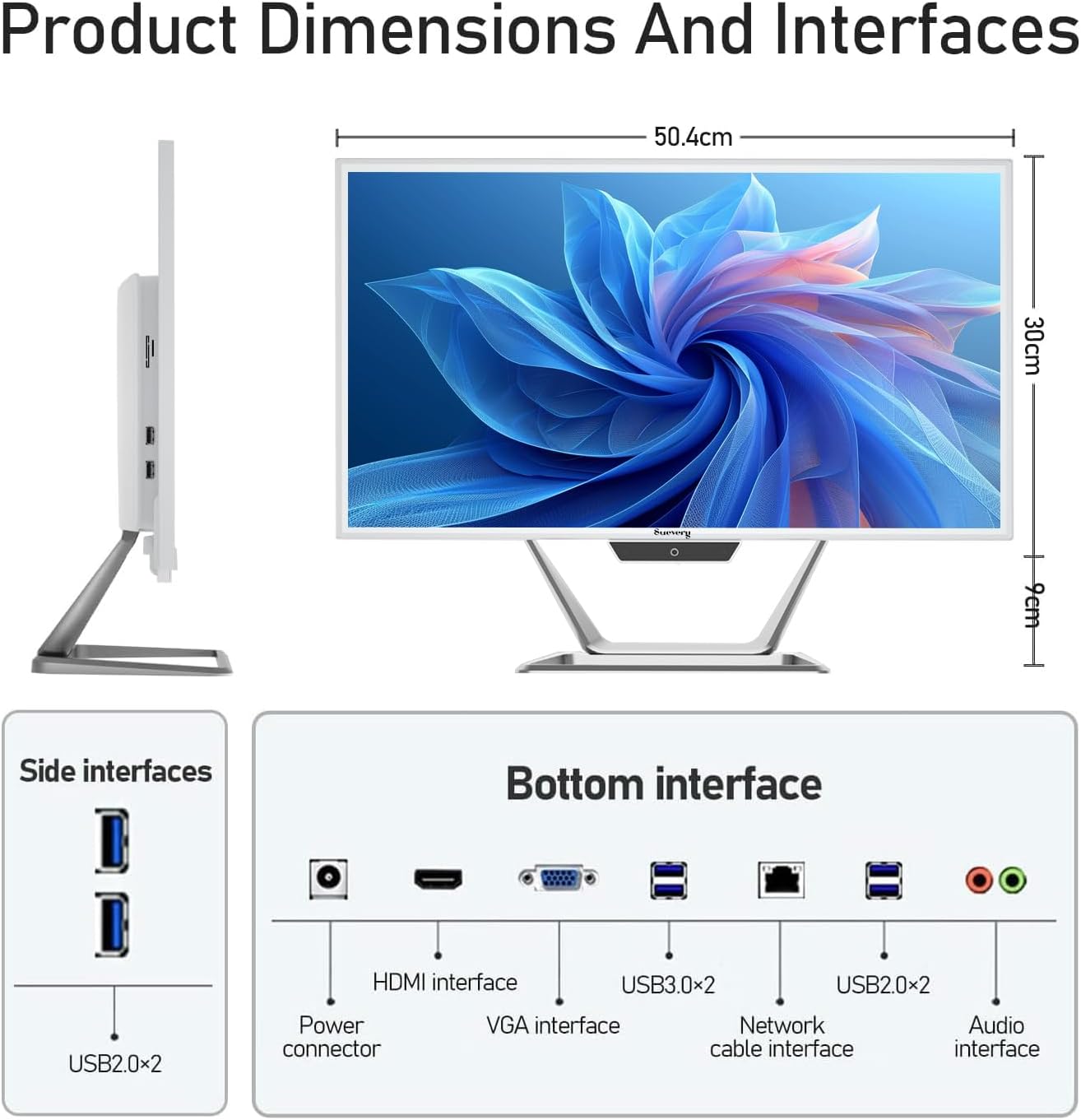
Figure 3.3: Product dimensions and interface layout. Includes USB 2.0, USB 3.0, HDMI, VGA, Network, Audio, and Power ports.
- Connector d'alimentació: Per connectar l'adaptador de corrent.
- Interfície HDMI: Per connectar a pantalles externes.
- VGA Interface: Per connectar a pantalles externes més antigues.
- USB 3.0 x 2: Ports de transferència de dades d'alta velocitat.
- USB 2.0 x 4: Standard data transfer ports (2 on side, 2 on bottom).
- Network Cable Interface: For wired Ethernet connection.
- Interfície d'àudio: Per connectar auriculars o altaveus externs.
4. Guia de configuració
Follow these steps to set up your suevery All-in-One PC.
- Desempaquetar l'ordinador: Traieu amb cura l'ordinador tot en un i tots els accessoris de l'embalatge. Col·loqueu l'ordinador sobre una superfície estable i plana.
- Connecteu el teclat i el ratolí: Connect the included keyboard and mouse to the available USB ports on the back or side of the PC.
- Connectar l'alimentació: Connect the power adapter to the power connector on the PC, then plug the power cord into a wall outlet.
- Encès: Press the power button, usually located on the bottom bezel or side of the display. The PC will boot up.
- Initial Operating System Setup: Your PC comes with DOS pre-installed. You will need to install your preferred operating system (e.g., Windows, Linux) following its specific installation instructions. This typically involves booting from a USB drive or DVD.
- Connecteu-vos a la xarxa: Once the OS is installed, connect to your network via Wi-Fi 6 or an Ethernet cable.
5. Instruccions de funcionament
5.1 Funcionament bàsic
- Encès/apagat: Press the power button to turn the PC on. To turn off, use the operating system's shutdown function. A short press on the power button can put the PC to sleep.
- Ajust de pantalla: The display can be tilted from -5 to 25 degrees to achieve an optimal viewing angle. Gently adjust the top or bottom edge of the screen to tilt it.

Figure 5.1: The display supports tilt angle adjustment for ergonomic viewing.
5.2 Ús de perifèrics integrats
- Weblleva: The built-in 5MP HD webcam is ready for video calls and conferences. Ensure your operating system and applications have permission to access the camera.
- Micròfon: The integrated microphone captures audio for calls and voice commands. Adjust microphone levels in your operating system's sound settings.
- Ponents: The built-in speakers provide audio output. Adjust volume using your operating system's sound controls or external keyboard media keys.
5.3 Connectivitat
- Wi-Fi 6: Connect to wireless networks for internet access. Configure Wi-Fi settings through your operating system.
- Ethernet: For a stable wired connection, plug an Ethernet cable into the network port.
- Ports USB: Use the USB 2.0 and USB 3.0 ports to connect external devices such as USB drives, printers, or additional peripherals.
- HDMI/VGA: Connect an external monitor or projector using the HDMI or VGA port for extended display options.
6. Manteniment
Un manteniment adequat garanteix la longevitat i el rendiment òptim del teu PC.
- Neteja de la pantalla: Utilitzeu un drap suau i sense pelusa lleugerament dampened with water or a screen cleaner specifically designed for electronics. Do not spray cleaner directly onto the screen.
- Neteja del xassís: Netegeu les superfícies exteriors amb un drap suau i sec. Eviteu productes de neteja o dissolvents abrasius.
- Ventilació: Ensure the ventilation openings on the back and sides of the PC are not blocked to prevent overheating.
- Actualitzacions de programari: Regularly update your operating system and drivers to ensure security and performance.
- Còpia de seguretat de dades: Feu còpies de seguretat periòdiques de les dades importants en un disc dur extern o en un emmagatzematge al núvol.
7. Solució De Problemes
Si teniu problemes, consulteu els problemes i solucions habituals següents.
| Problema | Possible solució |
|---|---|
| El PC no s'encén. | Check if the power adapter is securely connected to both the PC and the wall outlet. Ensure the power outlet is functional. |
| Sense visualització a la pantalla. | Ensure the PC is powered on. If an external monitor is connected, check its power and cable connection. Try restarting the PC. |
| El teclat o el ratolí no responen. | Check USB connections. Try plugging them into different USB ports. If wireless, ensure batteries are charged and dongle is connected. |
| No internet connection (Wi-Fi/Ethernet). | For Wi-Fi, check if Wi-Fi is enabled in your OS settings and if you're connected to the correct network. For Ethernet, ensure the cable is properly connected to both the PC and the router/modem. Restart your router/modem. |
| Webcam or microphone not working. | Check privacy settings in your operating system to ensure applications have permission to access the camera and microphone. Ensure drivers are up to date. |
8. Especificacions
Detailed technical specifications for the suevery All-in-One PC (Model: I22X W1-99).
| Característica | Detall |
|---|---|
| Marca | tota |
| Número de model | I22X W1-99 |
| Sistema operatiu | DOS (User-installable OS) |
| Model de CPU | Intel Core i5 7300U |
| Velocitat de la CPU | 2.6 GHz (up to 3.5 GHz Turbo) |
| Memòria RAM instal·lada | 16 GB DDR3 |
| Mida màxima de la memòria RAM | 32 GB |
| Capacitat d'emmagatzematge de memòria | 256 GB SSD (PCIE x 2) |
| Coprocessador gràfic | Intel HD Graphics 620 (integrat) |
| Mida de la pantalla | 21.5 polzades |
| Resolució de pantalla màxima | 1920 x 1080 píxels (Full HD) |
| Tipus de visualització | LED IPS Anti-glare |
| Tecnologia de connectivitat | Ethernet, Wi-Fi 6 |
| Interfície de sortida de vídeo | HDMI, VGA |
| Ports USB totals | 6 (2 USB 3.0, 4 USB 2.0) |
| Mitjans integrats | Webcam (5MP), Speakers, Microphone |
| Consum d'energia | 90 watts |
| Color | Blanc |
9. Informació de la garantia
The suevery All-in-One PC comes with a Garantia limitada de 1 anys from the date of purchase. This warranty covers manufacturing defects and workmanship under normal use. It does not cover damage caused by misuse, accidents, unauthorized modifications, or external factors. Please retain your proof of purchase for warranty claims.
10. Atenció al client
For technical assistance, troubleshooting beyond this manual, or warranty inquiries, please contact suevery customer support through the retailer where you purchased the product or refer to the official suevery weblloc per obtenir informació de contacte.
Please have your product model number (I22X W1-99) and proof of purchase ready when contacting support.