
Introducció
This manual provides detailed instructions for the safe and effective use of your HANMATEK Ti240 Thermal Imager. The Ti240 is a handheld infrared camera designed for various inspection tasks, including electrical, HVAC, and building diagnostics. It features a 96x96 VOx IR sensor with TISR 240x240 super resolution enhancement, a wide temperature measurement range, and a rugged IP54-rated design.
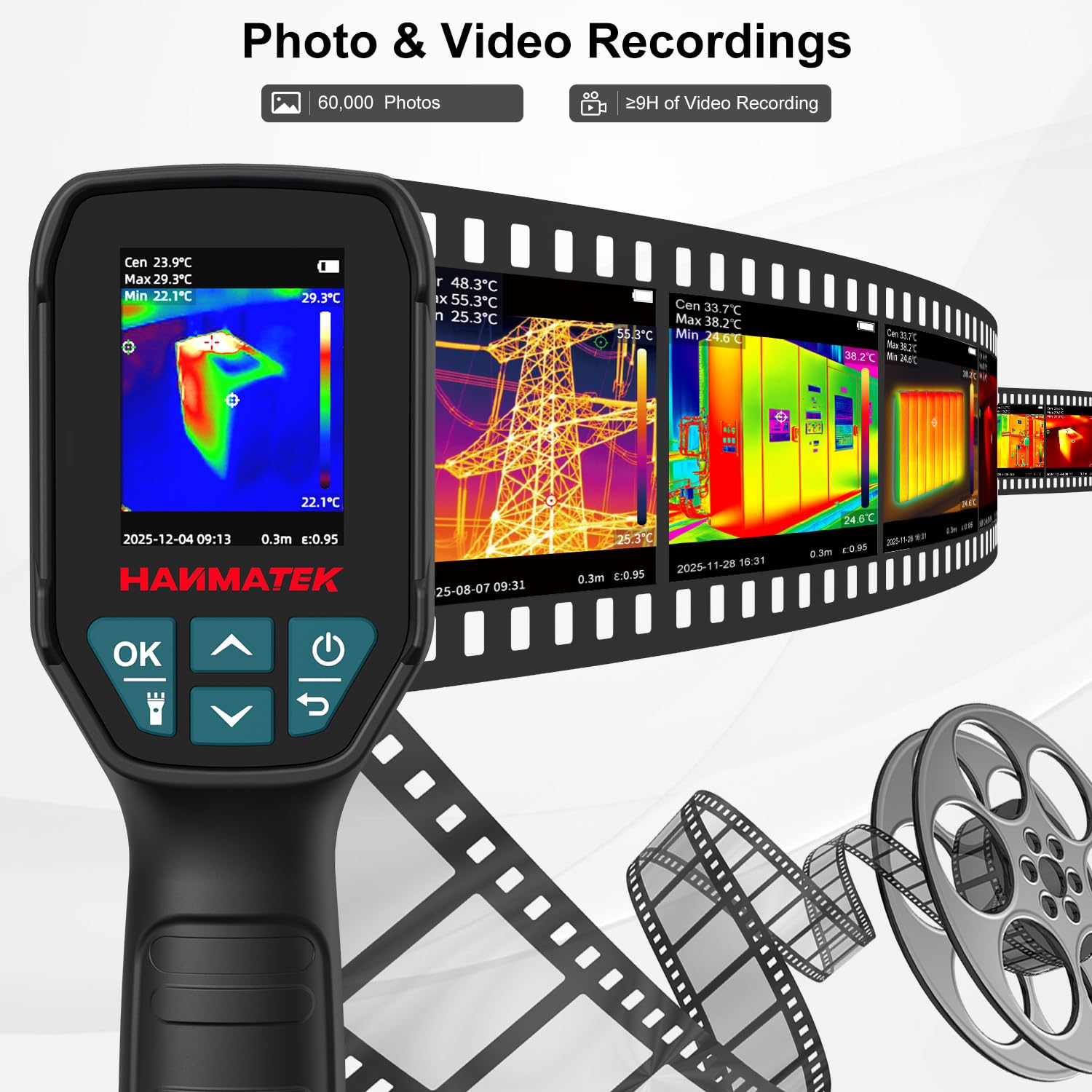
Figura 1: Frontal view of the HANMATEK Ti240 Thermal Imager, showing the display screen, navigation buttons (OK, Up, Down, Power, Return), and the HANMATEK logo.

Figure 2: The thermal imager demonstrating its IP54 protection rating against dust and splashes, and its ability to withstand a 1.5m drop.
Informació de seguretat
Before operating the device, please read and understand all safety warnings and instructions. Failure to do so may result in injury or damage to the device.
- Do not point the thermal imager directly at high-intensity heat sources (e.g., the sun, lasers) as this may damage the sensor.
- Ensure the device is clean and free from debris before use.
- No intenteu desmuntar ni modificar el dispositiu. Les reparacions només les ha de realitzar personal autoritzat.
- Keep the device away from water and excessive humidity, although it has an IP54 rating for splash resistance.
- Feu servir només el cable de càrrega i l'adaptador de corrent especificats.
Components del producte
Familiarize yourself with the main components of your HANMATEK Ti240 Thermal Imager and the contents of the package.
Contingut del paquet:

Figure 3: The package contents include the thermal imager, packing box, storage bag, multilingual user manual, lanyard, USB charging cable, lens cloth, and an 8GB SD card.
- 1x HANMATEK Ti240 Thermal Camera
- 1x Bossa d'emmagatzematge
- 1x Multilingual User Manual (this document)
- 1x cordó
- 1x cable de càrrega USB
- 1x Tela de lents
- 1 targeta SD de 8 GB
Configuració
1. Carregant la bateria
The device is equipped with a built-in rechargeable Lithium-Ion battery. Before first use, fully charge the device.
- Localitzeu el port USB tipus C al dispositiu.
- Connect the provided USB Type-C cable to the device and a compatible USB power adapter (not included) or a computer USB port.
- The charging indicator on the device will show the charging status. A full charge provides up to 9 hours of operation.

Figure 4: The USB Type-C port for charging the thermal imager, indicating up to 9 hours of battery life.
2. Inserció de la targeta SD
The device comes with an 8GB SD card for storing images and videos.
- Locate the SD card slot, usually near the USB port.
- Insert the provided 8GB SD card into the slot until it clicks into place.
- To remove, gently push the SD card until it springs out.
3. Encès / apagat
- To power on: Press and hold the Power button (usually marked with a circle and a vertical line) until the screen illuminates.
- Per apagar: premeu i manteniu premut el botó d'engegada fins que el dispositiu s'apagui.
Instruccions de funcionament
1. Navegació bàsica
Use the navigation buttons (OK, Up, Down, Return) to interact with the device menu and settings.
- Botó D'acord: Confirma les seleccions o accedeix a submenús.
- Botons amunt / avall: Navega per les opcions del menú o ajusta els valors.
- Botó de retorn: Goes back to the previous menu or exits a function.
2. Mesura de la temperatura
The Ti240 measures temperatures from -20°C to 550°C (-4°F to 1022°F) with an accuracy of ±2°C or ±2%.

Figure 5: The thermal imager displaying its temperature measurement capabilities, including range and accuracy.
3. TISR Super Resolution
The TISR (Thermal Image Super Resolution) feature enhances the clarity of thermal images, upscaling the 96x96 IR sensor output to 240x240 pixels for improved detail.
- Navegueu fins al menú "Configuració".
- Locate the 'TISR' option.
- Use the OK button to toggle TISR On or Off.

Figure 6: A visual comparison demonstrating the improved image clarity when TISR resolution enhancement is activated.
4. Paletes de colors
The Ti240 offers multiple color palettes to visualize temperature differences effectively. Select the palette that best suits your inspection environment.
- Available palettes include: White Hot, Black Hot, Rainbow, Iron, Red Hot, and Lava.
- To change the palette: Access the 'Color' option in the main menu or quick settings.

Figura 7: Examples of various color palettes (Iron oxide red, Rainbow, Black hot, White hot, Red hot, Lava) available on the thermal imager for different visual representations of temperature.
5. High & Low Temperature Tracking
El dispositiu pot fer un seguiment automàtic de les temperatures més altes, més baixes i centrals dins del camp de view, aiding in quick identification of anomalies.
- The screen displays markers for the high point, low point, and center point temperatures.
- An audible or visual alarm can be configured to alert users when temperatures exceed or fall below preset thresholds.

Figure 8: The thermal imager screen indicating the automatically tracked high, low, and center temperature points, along with a high/low temperature alarm notification.
6. Advanced Measurement Controls
For improved accuracy, adjust the following parameters:
- Emissivitat: Adjustable from 0.01 to 1.0. Set this value based on the material being inspected for accurate temperature readings.
- Configuració de distància: Adjust for optimal focus and measurement accuracy, typically from 0.3m to 3m.
- Ambient Temperature Compensation: Compensates for surrounding air temperature, ranging from -10°C to 50°C.
7. Enregistrament de fotos i vídeos
The Ti240 allows you to capture thermal images and videos for documentation and analysis.
- To take a photo: Press the trigger button or the designated photo capture button.
- To record video: Press and hold the trigger button or the designated video record button.
- All recordings are saved to the inserted 8GB SD card.

Figure 9: The thermal imager on a desk, demonstrating its ability to record and store details on an 8GB SD card, with images visible on a connected computer screen.
Vídeo 1: Un overview of the HANMATEK Ti240 Thermal Imager, demonstrating its features and usage scenarios.
8. PC Image Analysis
Transfer recorded images and videos to a computer for detailed analysis using professional software.
- Connect the thermal imager to your computer using the USB Type-C cable.
- El dispositiu hauria d'aparèixer com a dispositiu d'emmagatzematge extraïble.
- Copy the image and video files de la targeta SD a l'ordinador.
- Use compatible thermal analysis software (not provided with the device) to review and analyze the data.

Figure 10: The thermal imager positioned next to a computer screen showing professional software used for detailed analysis of thermal images and videos.
9. Escenaris d'aplicació
The HANMATEK Ti240 Thermal Imager is suitable for a variety of applications, including:
- Motor Detection
- Distribution Cabinet Testing
- Inspecció de la placa de circuits
- Conveyor Pipe Inspection
- Air Vent Inspection
- Air Conditioning Inspection

Figura 11: Examples of the thermal imager in use for motor detection, distribution cabinet testing, circuit board inspection, conveyor pipe inspection, air vent inspection, and air conditioning inspection.
Manteniment
1. Neteja del dispositiu
- Use the provided lens cloth to gently clean the thermal lens and display screen.
- For the device body, use a soft, damp tela. No utilitzeu netejadors abrasius ni dissolvents.
- Ensure no moisture enters the USB port or SD card slot.
2. Cura de la bateria
- Carregueu la bateria regularment, fins i tot si el dispositiu no s'utilitza amb freqüència, per mantenir-ne l'estat.
- Avoid storing the device in extreme temperatures.
Resolució de problemes
| Problema | Causa possible | Solució |
|---|---|---|
| El dispositiu no s'encén. | La bateria està esgotada. | Carregueu el dispositiu amb el cable USB proporcionat. |
| La imatge és borrosa o poc clara. | Lens is dirty; TISR is off; incorrect distance setting. | Clean the lens with the lens cloth. Enable TISR in settings. Adjust distance setting. |
| No es poden desar imatges/vídeos. | La targeta SD està plena o no s'ha inserit correctament. | Comproveu la inserció de la targeta SD. Suprimiu l'antiga files or replace SD card. |
| Les lectures de temperatura semblen inexactes. | Incorrect emissivity setting; external interference. | Adjust emissivity based on the target material. Ensure no obstructions or strong air currents. |
Especificacions
| Característica | Detall |
|---|---|
| IR Sensor Resolution | 96x96 VOx |
| TISR Super Resolution | 240 x 240 |
| Interval de temperatura | -20 °C a 550 °C (-4 °F a 1022 °F) |
| Precisió de la mesura | ±2°C o ±2% |
| Freqüència d'actualització | 25 Hz |
| Emissivitat | Ajustable (0.01-1.0) |
| Protecció contra caigudes | 1.5 m |
| Classificació IP | IP54 |
| Tipus de bateria | Ió de liti (inclòs) |
| Durada de la bateria | Fins a 9 hores |
| Port de càrrega | USB tipus C |
| Emmagatzematge | Targeta SD de 8 GB (inclosa) |
| Pes de l'article | 1.26 lliures |
| Dimensions del paquet | 10.51 x 5.79 x 4.69 polzades |
Garantia i Suport
Per obtenir informació sobre la garantia i assistència tècnica, consulteu la pàgina oficial de HANMATEK. weblloc web o contacteu directament amb el servei d'atenció al client. Conserveu el rebut de compra per a reclamacions de garantia.
Fabricant: Shenzhen Hanmatek Precision Technology Co., Ltd.