1. Introducció
This manual provides comprehensive instructions for the installation, operation, and maintenance of your SOYO X99 Motherboard Set. This kit includes a SOYO X99 Motherboard, an LGA2011-3 Xeon E5 2650 V4 CPU, and 16GB DDR4 RAM. Please read this manual carefully before proceeding with installation to ensure proper setup and optimal performance.
The SOYO X99 Motherboard Set is designed for high-performance desktop computers, offering robust capabilities for demanding applications, gaming, and professional tasks.
2. Contingut del paquet
Please verify that all items listed below are present in your package. If any items are missing or damaged, contact your retailer immediately.
- Placa base SOYO X99
- Intel Xeon E5 2650 V4 Processor (LGA2011-3)
- 16GB DDR4 RAM Module(s)
- Cables de dades SATA
- Escut d'E / S
- Manual d'usuari (aquest document)
3. Característiques clau
- Sòcol LGA2011-3: Supports Intel Xeon E5 2650 V4 series processors for high-performance computing.
- Suport de memòria DDR4: Includes 16GB DDR4 RAM for efficient multitasking and enhanced system speed.
- NVMe M.2 Support: Provides high-speed storage options for faster data transfer and system responsiveness.
- Disseny robust: Engineered for stability and durability in demanding desktop environments.
- Connectivitat versàtil: Offers a range of ports and expansion slots for various peripherals and upgrades.
4. Configuració i instal·lació
Before beginning installation, ensure your workspace is clean, well-lit, and static-free. It is recommended to wear an anti-static wrist strap to prevent damage to components.
Placa base 4.1view
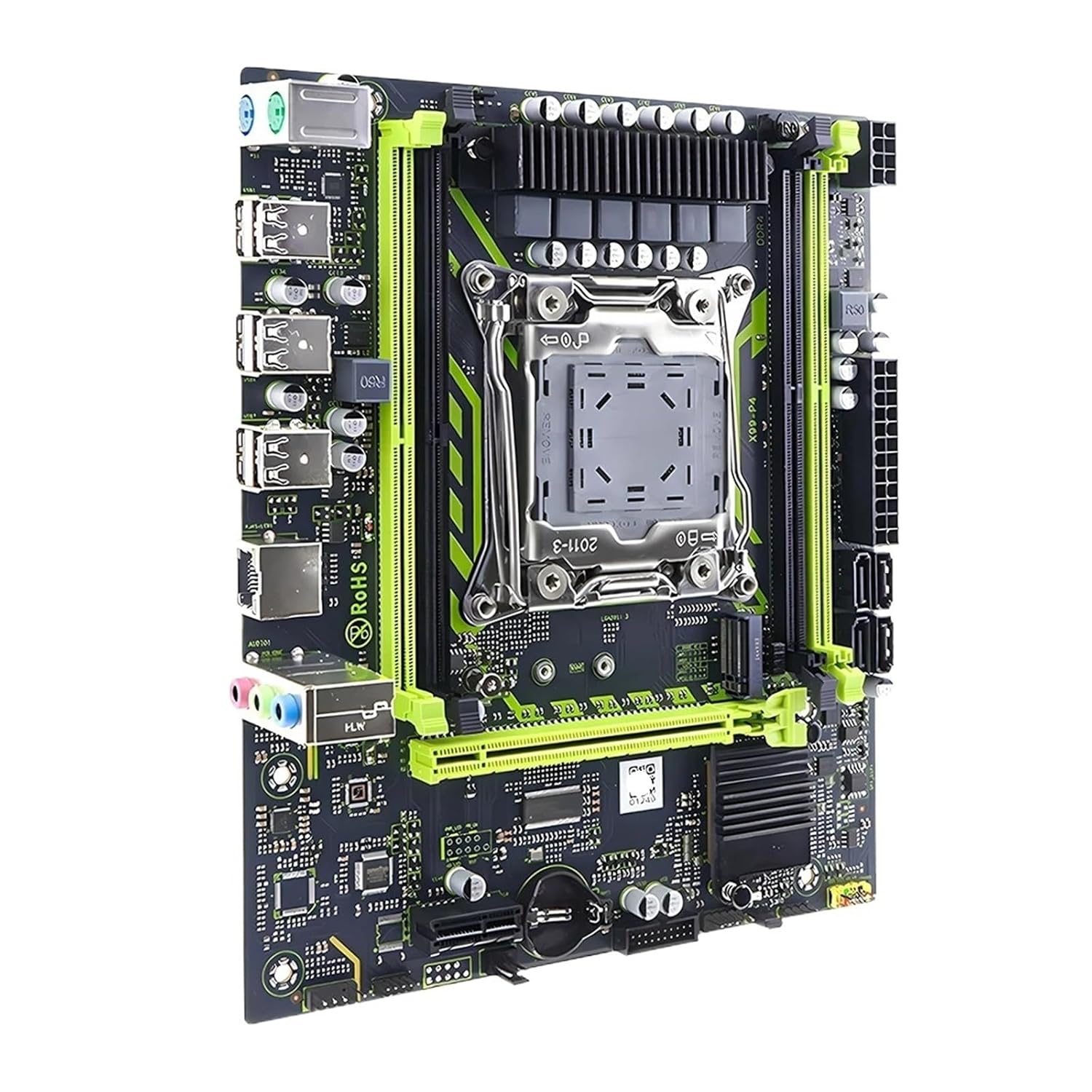
Figura 1: De dalt a baix view of the SOYO X99 Motherboard, highlighting the LGA2011-3 CPU socket, DDR4 RAM slots, PCIe slots, and I/O ports.
4.2 Instal·lació de la CPU
- Localitzeu el sòcol de la CPU LGA2011-3 a la placa base.
- Gently push down the metal retention arm and swing it open.
- Carefully align the Intel Xeon E5 2650 V4 CPU with the socket, matching the gold triangle on the CPU with the corresponding mark on the socket. Do not force the CPU into place.
- Once seated, close the retention arm until it clicks into place.
- Apliqueu una capa fina i uniforme de pasta tèrmica a la part superior de la CPU.
- Instal·leu el refrigerador de CPU segons les instruccions del fabricant.

Figura 2: Detallada view of the LGA2011-3 CPU socket on the SOYO X99 Motherboard, showing the retention bracket.
4.3 Installing the RAM
- Localitza les ranures de RAM DDR4 a la placa base.
- Open the clips at both ends of the RAM slot.
- Align the 16GB DDR4 RAM module with the slot, ensuring the notch on the module matches the key in the slot.
- Premeu fermament els dos extrems del mòdul RAM fins que els clips encaixin al seu lloc.
4.4 Motherboard Installation into Case
- Instal·leu la placa d'E/S a l'obertura posterior de la carcassa de l'ordinador.
- Align the motherboard with the standoffs inside the case.
- Fixeu la placa base amb cargols, assegurant-vos que estigui ben fixada.
- Connect the necessary power cables (24-pin ATX and 8-pin CPU power) from your power supply to the motherboard.
- Connect front panel connectors (power switch, reset switch, USB, audio) to the corresponding headers on the motherboard. Refer to your case manual for specific pin assignments.
- Connect SATA data cables to storage devices and the motherboard.

Figura 3: Angle view of the SOYO X99 Motherboard, detailing the rear I/O panel with USB ports, audio jacks, and Ethernet port.
5. Instruccions de funcionament
5.1 Primer arrencada
- After all components are installed and connected, ensure your monitor, keyboard, and mouse are connected.
- Enceneu el vostre sistema.
- Access the BIOS/UEFI setup by pressing the designated key (usually DEL or F2) during startup.
- Configure boot order, set system time, and verify component recognition.
- Save changes and exit BIOS/UEFI.
5.2 Instal·lació del sistema operatiu
Insert your operating system installation media (USB drive or DVD) and follow the on-screen prompts to install your preferred operating system. Ensure all necessary drivers for the motherboard, chipset, and other components are installed after the OS installation is complete. Drivers can typically be found on the manufacturer's weblloc.
6. Manteniment
- Eliminació de pols: Regularly clean dust from inside your computer case using compressed air. Pay attention to CPU cooler fins, RAM modules, and motherboard surfaces.
- Actualitzacions de la BIOS/UEFI: Reviseu periòdicament el fabricant website for BIOS/UEFI updates. Updates can improve stability, compatibility, and performance. Follow update instructions carefully.
- Actualitzacions de controladors: Keep all system drivers (chipset, audio, network, etc.) updated to ensure optimal performance and compatibility.
- Condicions ambientals: Operate the system in a well-ventilated area, away from direct sunlight, excessive heat, and moisture.
7. Solució De Problemes
| Problema | Causa possible | Solució |
|---|---|---|
| El sistema no s'encén. | Power cables not connected, faulty power supply, front panel connector issue. | Check 24-pin ATX and 8-pin CPU power connections. Verify power supply functionality. Recheck front panel power switch connection. |
| Sense sortida de visualització. | Monitor cable loose, graphics card not seated, RAM not seated correctly. | Ensure monitor cable is secure. Reseat graphics card (if applicable). Reseat RAM modules. |
| El sistema es bloqueja o falla. | Sobreescalfament, overclock inestable, RAM defectuosa, controladors obsolets. | Monitor temperatures. Reset BIOS to default. Test RAM modules. Update drivers. |
| Sistema operatiu no detectat. | Incorrect boot order, faulty storage drive, loose SATA cable. | Check BIOS boot order. Verify storage drive connections. Test storage drive. |
For further assistance, consult the manufacturer's support resources or a qualified technician.
8. Especificacions
| Component | Detall |
|---|---|
| Model de placa base | SOYO X99 |
| Socket de CPU | LGA2011-3 |
| CPU inclosa | Intel Xeon E5 2650 V4 |
| Tipus de memòria | DDR4 |
| RAM inclosa | 16 GB DDR4 |
| Suport d'emmagatzematge | NVMe M.2, SATA |
| Número de model de l'article | SVCBYUYUU-MOTHERBOARD+CPU+RAM |
| Dimensions del paquet | 0.39 x 0.39 x 0.39 polzades |
| Pes de l'article | 12.38 unces |
9. Garantia i Suport
This product is covered by a standard manufacturer's warranty. Please refer to the warranty card included with your purchase or visit the manufacturer's official website for detailed warranty terms and conditions. For technical support, driver downloads, or further assistance, please contact your retailer or the product manufacturer directly.
Conserveu el vostre comprovant de compra per a reclamacions de garantia.