
1. Acabatview
The NBD K200 is a compact digital camera designed for capturing high-quality photos and videos. It features a 64MP photo resolution, 4K video recording capabilities, 16X digital zoom, and autofocus. Its lightweight design and user-friendly interface make it suitable for various users, including beginners and travelers.

Imatge: Més deview of the NBD K200 camera highlighting its 64MP, 4K, Beauty Mode, Backlight Portrait, Auto Focus, 16X Zoom, Smart Stabilization, and Built-in Filters features.
Contingut del paquet
Assegureu-vos que tots els elements siguin presents al paquet:
- NBD K200 Digital Camera Body
- 64GB TF Card (MicroSD Card)
- Cable USB-C
- Corretja per al coll
- Manual d'usuari (aquest document)

Image: The NBD K200 camera, USB cable, card reader, 64GB memory card, lens cleaning cloth, and camera wrist strap, presented as a complete kit.
2. Configuració
2.1 Càrrega de la bateria
Before first use, fully charge the camera battery. The camera uses a Lithium Ion battery.
- Insert the battery into the camera's battery compartment.
- Connect the camera to a power source using the provided USB-C cable.
- The charging indicator light will show the charging status. A full charge typically allows for over 300 photos.

Image: The NBD K200 camera connected via USB-C cable to a power bank, illustrating the charging process and highlighting its powerful battery life for approximately 300 photos per charge.
2.2 Inserció de la targeta de memòria
The camera supports microSD cards. A 64GB TF card is included.
- Localitzeu la ranura de la targeta de memòria a la càmera.
- Insert the TF card into the slot with the gold contacts facing the correct direction until it clicks into place.
- Per treure-la, premeu suaument la targeta fins que surti.
3. Funcionament de la càmera
3.1 Encès/Apagat
Premeu i manteniu premut el botó d'engegada per encendre o apagar la càmera.
3.2 Controls bàsics
The camera features a Multi-Functional Roller Button for simplified operation.
- Botó de rodet: Used for one-touch mode switching and precise zoom adjustment. Roll left to zoom out, roll right to zoom in.
- Botó de l'obturador: Premeu per fer una foto o iniciar/aturar la gravació de vídeo.
- Botó de mode: Cycles through different shooting modes.
- Botó de flaix: Activates the built-in flash.
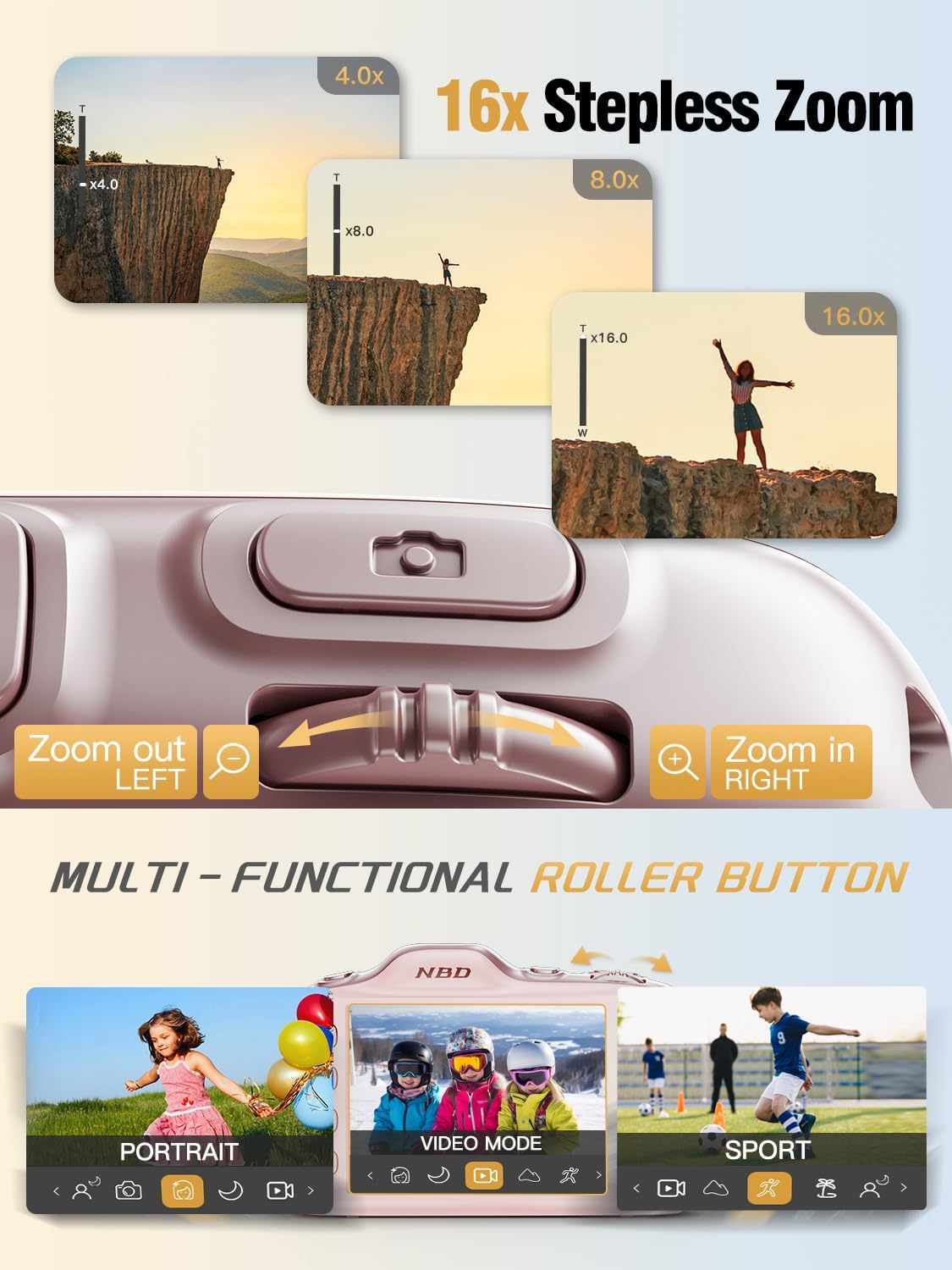
Image: Close-up of the NBD K200 camera's top, highlighting the 16x stepless zoom roller button for zooming in and out, and the mode switch for selecting different shooting modes like Portrait, Video, and Sport.
3.3 Fer fotos
The camera features autofocus for clear images.
- Point the camera at your subject. The autofocus system will automatically detect and focus.
- Use the roller button to adjust the 16X digital zoom as needed.
- Press the shutter button fully to capture the photo.

Image: A woman holding the NBD K200 camera, with the screen displaying an autofocus frame around a subject's face, illustrating the camera's auto-focus capability for effortless portrait photography.
3.4 Gravació de vídeos
The camera supports 4K video recording at various frame rates (24, 30, 60 FPS).
- Switch to video mode using the mode button or roller.
- Press the shutter button to start recording. A red indicator will typically appear on the screen.
- Torneu a prémer el botó de l'obturador per aturar la gravació.

Image: A young girl running through a field with balloons, illustrating the NBD K200 camera's 4K 30FPS cinema capture capability for smooth, ultra HD video recording.
3.5 Modes i funcions de tret
The NBD K200 offers several modes and features to enhance your photography.
- Mode de bellesa: Enhances facial features for portraits and selfies.
- Mode nocturn: Optimizes settings for low-light conditions, smoothing grain and balancing tones.
- Mode de retrat: Designed for capturing natural radiance in subjects, balancing tones and softening light.
- Mode esportiu: Ideal for capturing fast-moving subjects with anti-shake stabilization.
- Mode de ràfega: Captures multiple photos in quick succession (up to 10FPS) for action shots.
- Built-in Filters: Apply various creative filters like Vintage, Cool Tone, Warm Tone, Sepia, Sketch, and Japan Style.
- Temporitzador automàtic: Options for 3, 5, 7, or 10-second delays for group shots or selfies.

Image: A circular diagram illustrating the NBD K200 camera's various shooting modes, including Photo, Video, Night Mode, Portrait Mode, Burst Mode, and Beauty Mode, with examples imatges per a cadascuna.

Imatge: Examples of built-in filters available on the NBD K200 camera, including Vintage, Cool Tone, Warm Tone, Sepia, Sketch, and Japan Style, demonstrating how they alter image ambiance.
3.6 Transferència Files
Transfer photos and videos to a computer or smartphone using the USB-C cable.
- Connect the camera to your device using the USB-C cable.
- The camera will appear as a removable storage device.
- Arrossegueu i deixeu anar files a la ubicació desitjada.
4. Manteniment
4.1 Cura de la bateria
- Carregueu la bateria completament abans d'emmagatzemar-la durant un període prolongat.
- Eviteu exposar la bateria a temperatures extremes.
- Feu servir només els cables i adaptadors de càrrega proporcionats o aprovats.
4.2 Neteja de la càmera
- Feu servir un drap suau i sense borrissol per netejar el cos de la càmera.
- Per a la lent, feu servir un drap i una solució especials per a la neteja de lents. Eviteu tocar la lent directament.
- No utilitzeu productes químics o materials abrasius.
4.3 Emmagatzematge
- Guardeu la càmera en un lloc fresc i sec, allunyat de la llum solar directa.
- If storing for a long period, remove the battery.
- Keep the camera in its protective case or a soft pouch to prevent scratches.
5. Solució De Problemes
Si teniu problemes, consulteu les solucions habituals següents:
| Problema | Possible solució |
|---|---|
| La càmera no s'encén | Assegureu-vos que la bateria estigui carregada i inserida correctament. |
| No puc fer fotos/vídeos | Check if the memory card is inserted and has sufficient space. Ensure the camera is not in playback mode. |
| Les imatges són borroses | Ensure autofocus is engaged. Check for smudges on the lens. Hold the camera steady or use anti-shake feature. |
| Càmera no reconeguda per l'ordinador | Assegureu-vos que el cable USB-C estigui ben connectat. Proveu un altre port o cable USB. |
| El flaix no funciona | Ensure the flash is enabled in the camera settings or via the dedicated flash button. |
6. Especificacions
Detailed technical specifications for the NBD K200 Digital Camera:
| Característica | Detall |
|---|---|
| Marca | NBD |
| Nom del model | K200 |
| Resolució de fixes efectius | 64 MP |
| Resolució de vídeo | 4K (2160p) |
| Velocitat de fotogrames | 24, 30, 60 fotogrames per segon |
| Zoom | Zoom digital 16X |
| Enfocament automàtic | Yes (Contrast Detection) |
| Estabilització d'imatge | Anti sacsejada |
| Tecnologia del sensor fotogràfic | CMOS (1/2.4 polzades) |
| Abertura | F1.8 |
| Velocitat d'obturació mínima | 1/4000 segons |
| Tipus de visualització | LCD (2.8 Inches, Color Screen) |
| Mitjans d'emmagatzematge | microSD (up to 64GB included) |
| File Format (Photo) | JPEG (Fine Quality) |
| File Format (vídeo) | MOV |
| Tipus de bateria | Ió de liti |
| Connectivitat | USB-C |
| Pes de l'article | 0.26 quilograms (aprox. 121 g) |
| Nivell de resistència a l'aigua | No resistent a l'aigua |
7. Garantia i Suport
For warranty information and technical support, please refer to the contact details provided with your purchase or visit the official NBD weblloc web. Conserveu el comprovant de compra per a reclamacions de garantia.