
Introducció
Welcome to the user manual for your Samsung QN65QN990FFXZA 65 Inch QN990F Neo QLED 8K TV. This document provides essential information for setting up, operating, maintaining, and troubleshooting your television. Please read these instructions carefully to ensure proper use and to maximize your viewexperiència.

Figura 1: Frontal view of the Samsung QN65QN990FFXZA 65 Inch QN990F Neo QLED 8K TV.
Configuració
1. Desembalatge i col·locació
- Traieu amb cura el televisor i tots els accessoris de l'embalatge.
- Place the TV on a stable, flat surface or mount it on a wall using a VESA 400mm x 300mm compatible mount. Ensure adequate ventilation around the TV.
2. Connecting the Wireless One Connect Box
The Samsung QN990F utilizes a Wireless One Connect Box to manage all external connections, reducing cable clutter around the TV. Connect all your devices to this box.

Figure 2: Wireless One Connect Box for streamlined connections.
3. Connexions de dispositius externs
Connect your external devices (e.g., Blu-ray player, game console, soundbar) to the Wireless One Connect Box using the appropriate ports.

Figure 3: Detailed diagram of the Wireless One Connect Box ports.
- Cable/ANT: Connect for over-the-air antenna or cable TV signals.
- USB-A: Port rectangular estàndard per a alimentació o reproducció multimèdia.
- EX-Link: Port de servei Samsung per a control i diagnòstic externs.
- HDMI 1, 2, 4: Transmits high-definition video and audio from external devices. Supports 8K@120Hz / 4K@240Hz for Gaming.
- HDMI 3 (eARC): Enhanced audio return for high-quality sound and advanced formats. Supports 8K@120Hz / 4K@240Hz for Gaming.
- Ethernet: Connexió a Internet per cable per a streaming, actualitzacions i funcions intel·ligents.
- Sortida d'àudio (òptica): Ofereix àudio digital d'alta qualitat a barres de so o receptors.
- Potència: Connects the power cable to the Wireless One Connect Box.
4. Connexió d'alimentació
- Connect the power cable to the Wireless One Connect Box, then plug it into a wall outlet.
- Ensure the TV is properly connected to the One Connect Box.
Instruccions de funcionament
1. Initial Setup and Smart Features
Upon first power-on, the TV will guide you through the initial setup process, including network connection, channel scanning, and smart feature configuration. The TV runs on the One UI Tizen operating system.
- Processador NQ8 AI Gen3: This processor optimizes content for enhanced viewing.
- Escalat millorat 8K IA Pro: Lower resolution content is automatically upscaled to near 8K clarity.

Figure 4: 8K AI Upscaling Pro enhances content to near 8K resolution.
2. Millores de la qualitat de la imatge
- Sense enlluernaments: This technology minimizes reflections on the screen, improving visibility in bright environments.
- Neo Quantum HDR 8K+: Experience enhanced contrast and color depth.
- Quantum Matrix Technology Pro: Precise light control for detailed images.
- Ultra Viewangle: Maintains picture quality from various viewposant posicions.
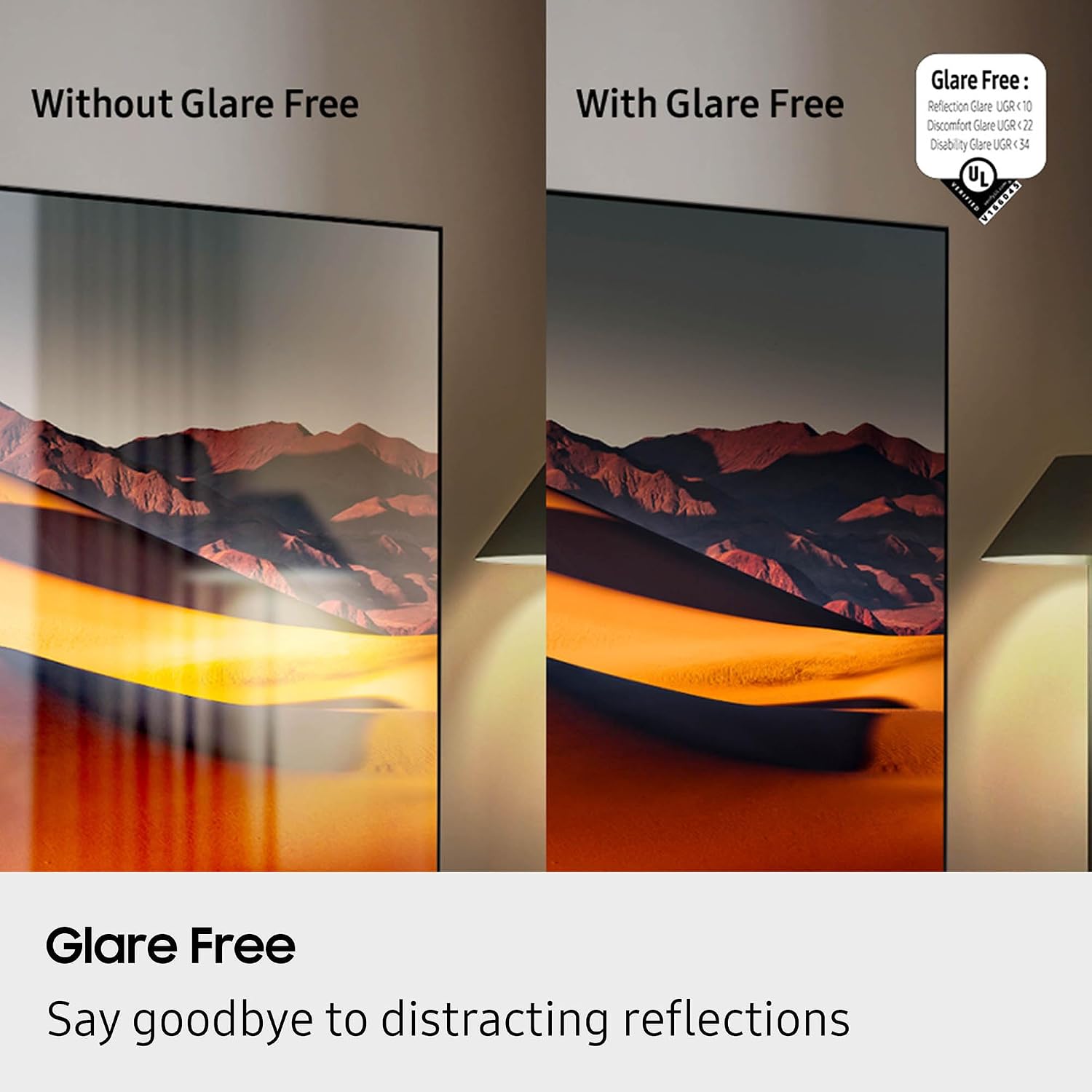
Figure 5: Glare Free technology reduces screen reflections.
3. Funcions d'àudio
- Dolby Atmos: Proporciona un so immersiu i multidimensional.
- Q-Simfonia: Synchronizes TV speakers with compatible Samsung soundbars for a richer audio experience.
- AVA Pro (Active Voice Amplifier Pro): Millora la claredat dels diàlegs en entorns sorollosos.
- So adaptatiu Pro: Optimitza el so en funció del contingut i de l'acústica de la sala.
- So envoltant de 6.2.4 canals: Integrated speaker system for a comprehensive audio field.
4. Característiques de joc
- Centre de jocs: Access cloud gaming services and console games directly from your TV.
- 120Hz Refresh Rate & VRR FreeSync Premium Pro: Garanteix un joc fluid i sense llàgrimes.

Figure 6: Samsung Gaming Hub for integrated gaming experience.
5. Vídeo oficial del producte
Video 1: An informational overview of the Samsung QN990F Series TV features and capabilities.
Manteniment
1. Neteja de pantalles
To clean your TV screen, use a soft, lint-free cloth. For stubborn marks, a non-ammonia and alcohol-free screen cleaning solution is recommended.

Figure 7: Recommended screen cleaning solution for display screens.
- Apply cleaning solution to the cloth, not directly to the screen.
- Netegeu suaument la pantalla per eliminar la pols, la brutícia i les empremtes dactilars.
- Eviteu productes químics o materials abrasius.
2. Actualitzacions de programari
Periodically check for and install software updates to ensure optimal performance and access to the latest features. This can usually be done through the TV's settings menu under "Support" or "Software Update."
Resolució de problemes
Si teniu problemes amb el televisor, consulteu els passos habituals següents per a la resolució de problemes.
No Power / No Picture
- Ensure the power cable is securely connected to both the One Connect Box and the wall outlet.
- Verify the One Connect Box is properly connected to the TV.
- Comproveu si la presa de corrent funciona connectant-hi un altre dispositiu.
- Premeu el botó d'engegada del comandament a distància o del televisor mateix.
Sense so
- Comproveu el nivell de volum tant del televisor com de qualsevol dispositiu d'àudio connectat (barra de so, receptor).
- Assegureu-vos que el televisor no estigui silenciat.
- Verify audio cables are correctly connected to the One Connect Box.
- If using external audio, check the audio output settings on the TV.
Mala qualitat d'imatge
- Check the source resolution. While 8K AI Upscaling Pro enhances content, native 8K content will provide the best quality.
- Adjust picture settings (brightness, contrast, sharpness, color) in the TV menu.
- Ensure all video cables are securely connected and not damaged.
- If using an antenna, check antenna positioning and signal strength.
El control remot no funciona
- Substituïu les piles del comandament a distància.
- Assegureu-vos que no hi hagi obstacles entre el comandament a distància i el televisor.
- Try re-pairing the remote control with the TV if it's a Bluetooth remote (refer to the TV's on-screen guide for pairing instructions).
Especificacions
| Característica | Especificació |
|---|---|
| Nom del model | QN65QN990FFXZA |
| Mida de la pantalla | 65 polzades |
| Tecnologia de visualització | Neo QLED |
| Resolució | 8K |
| Freqüència d'actualització | 120 Hz |
| Processador | Processador NQ8 AI Gen3 |
| Tecnologia de millora | Escalat millorat 8K amb IA Pro |
| Sistema operatiu | Una sola interfície d'usuari Tizen |
| Connectivitat | HDMI x 5, USB-A x 3, USB-C x 1, Ethernet, RF, Wireless One Connect, Bluetooth, Wi-Fi |
| Mode de sortida d'àudio | Surround (6.2.4 channel) |
| Integrated Surround Sound | Dolby Atmos |
| Format HDR compatible | HDR10+, HDR10 |
| Dimensions del producte (P x A x A) | 10.5 "P x 56.4" W x 35.1" H |
| Pes de l'article | 66.6 lliures |
| Estàndard de muntatge VESA | 400 mm x 300 mm |
| Color | Negre de grafit |
Garantia i Suport
Garantia del fabricant
Your Samsung QN65QN990FFXZA 65 Inch QN990F Neo QLED 8K TV comes with a full 1-year manufacturer's warranty. This warranty covers defects in materials and workmanship under normal use. Please retain your proof of purchase for warranty claims.
Atenció al client
For technical assistance, troubleshooting beyond this manual, or warranty service, please contact Samsung Customer Support. Refer to the official Samsung website or your product registration documents for the most current contact information.
- Assistència en línia: Visita el suport oficial de Samsung weblloc.
- Suport telefònic: Contact the Samsung customer service hotline.