
1. Introducció
This manual provides detailed instructions for the safe and efficient use of your Surfans F20 Pro Android Hi-Res Music Player. Please read this manual thoroughly before operating the device and retain it for future reference.
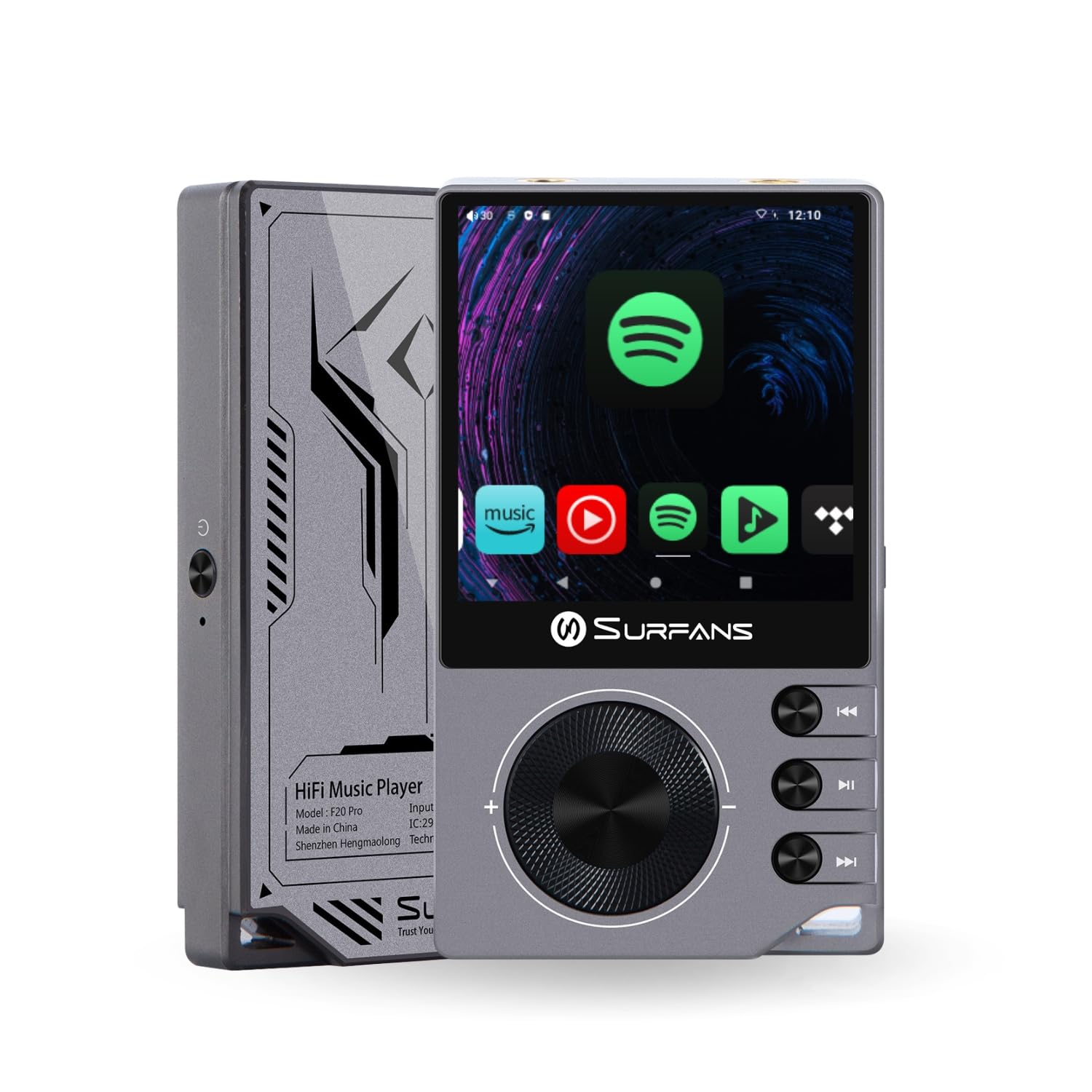
The Surfans F20 Pro Hi-Res Music Player, showcasing its compact design and touchscreen interface.
2. Contingut del paquet
Verifiqueu que tots els elements siguin presents al paquet:
- Surfans F20 Pro Hi-Res Music Player
- Cable USB-Type C
- 32 GB MicroSD Memory Card (pre-installed or separate)
- Funda protectora
- Manual d'usuari (aquest document)
3. Dispositiu acabatview
Familiarize yourself with the physical components and ports of your F20 Pro player.

Davant i darrere view of the Surfans F20 Pro, highlighting its robust CNC metal chassis and button layout.
3.1. Característiques clau
- Dual ESS9018Q2M DACs: For high-fidelity audio processing.
- Octa-Core Android 12 System: Enables streaming app compatibility and smooth operation.
- 3.5mm Single-Ended & 4.4mm Balanced Outputs: Versatile headphone connectivity.
- Bluetooth 5.0 with LDAC: High-quality wireless audio transmission.
- Dual-Band Wi-Fi (2.4GHz & 5GHz): For stable internet connectivity.
- Emmagatzematge ampliable: Supports up to 1TB via MicroSD card.
- Pantalla tàctil de 2.7 polzades: Interfície d'usuari intuïtiva.
4. Configuració
4.1. Càrrega del dispositiu
Before first use, fully charge the F20 Pro. Connect the included USB Type-C cable to the device's charging port and a compatible USB power adapter (not included) or computer USB port. The charging indicator will show the charging status.
4.2. Inserció d'una targeta MicroSD
The F20 Pro supports MicroSD cards up to 1TB for expanded storage. Locate the MicroSD card slot on the side of the device. Gently insert the card until it clicks into place. To remove, push the card in again until it springs out.
4.3. Engegada inicial
Press and hold the power button until the screen illuminates. Follow the on-screen prompts to complete the initial setup, including language selection and Wi-Fi connection.
4.4. Connexió a Wi-Fi
Navega a Configuració > Xarxa i Internet > Wi-Fi. Select your desired network and enter the password if prompted. The F20 Pro supports both 2.4GHz and 5GHz Wi-Fi bands.

The Surfans F20 Pro demonstrating its dual-band Wi-Fi capability for fast and stable connections.
4.5. Emparellament Bluetooth
To connect Bluetooth headphones or speakers:
- Assegureu-vos que el dispositiu Bluetooth estigui en mode d'emparellament.
- On the F20 Pro, go to Configuració > Dispositius connectats > Vincular dispositiu nou.
- Seleccioneu el dispositiu de la llista i confirmeu l'emparellament.

An illustration of the Bluetooth 5.0 chip, indicating support for high-resolution wireless audio codecs like LDAC.
5. Funcionament del dispositiu
5.1. Navegació bàsica
The F20 Pro features a 2.7-inch touchscreen for navigation. Swipe to scroll, tap to select, and use the physical buttons for quick controls:
- Botó d'encesa: Power on/off, screen on/off.
- Roda de volum: Ajusta el volum de sortida d'àudio.
- Botons de control de reproducció: Reproduir/Pausa, Pista següent, Pista anterior.
5.2. Reproducció de música
The F20 Pro supports various audio formats including DSD512, 192kHz/24bit, FLAC, WAV, WMA, M4A, MP3, MP2, and AAC.
5.2.1. Local Files
Transferir música files to the device's internal storage or MicroSD card via USB connection to a computer. Use the pre-installed music player application to browse and play your library.
5.2.2. Aplicacions de transmissió en temps real
The Android 12 operating system allows installation of streaming apps like Spotify, Apple Music, Tidal, or YouTube. Connect to Wi-Fi and download apps from the Google Play Store or other compatible sources.

The Surfans F20 Pro's screen showing various streaming application icons, demonstrating its Android capabilities.
5.3. Headphone Connections
The device offers both single-ended and balanced audio outputs.
- Sortida d'un sol extrem de 3.5 mm: Standard headphone jack (125mW/32Ω).
- Sortida equilibrada de 4.4 mm: For enhanced audio performance with compatible headphones (500mW/32Ω).

Primer pla view of the 3.5mm single-ended and 4.4mm balanced audio output ports on the Surfans F20 Pro.
6. Manteniment
6.1. Neteja
Use a soft, dry, lint-free cloth to clean the device. Avoid using abrasive cleaners or solvents, which may damage the surface.
6.2. Actualitzacions de programari
Periodically check for software updates to ensure optimal performance and access to new features. Updates can typically be found in Configuració > Sistema > Actualització del sistema.
6.3. Cura de la bateria
Per allargar la durada de la bateria, eviteu descarregar completament el dispositiu amb freqüència. Guardeu el dispositiu en un lloc fresc i sec quan no l'utilitzeu durant períodes prolongats.

Un intern view of battery cells, representing the long-lasting battery capacity of the F20 Pro.
7. Solució De Problemes
If you encounter issues with your F20 Pro, refer to the following common problems and solutions:
| Problema | Causa possible | Solució |
|---|---|---|
| El dispositiu no s'encén | Bateria baixa; Fallada del sistema | Charge the device; Press and hold the power button for 10-15 seconds to force restart. |
| Sense sortida de so | Volume too low; Incorrect output selected; Faulty headphones | Increase volume; Check headphone connection; Test with different headphones. |
| No es pot connectar a la Wi-Fi | Incorrect password; Out of range; Router issue | Verify password; Move closer to router; Restart router. |
| Rendiment lent/Fallades de l'aplicació | Massa aplicacions en execució; Poc emmagatzematge; Programari obsolet | Close background apps; Free up storage; Check for system updates. |
8. Especificacions
Detailed technical specifications for the Surfans F20 Pro:
| Característica | Detall |
|---|---|
| Marca | Surfans |
| Nom del model | F20 PRO |
| Xips DAC | Dual ESS9018Q2M |
| Op-Amps | Dual OPA1612 |
| Sistema operatiu | Android 12 |
| RAM | 3 GB |
| Emmagatzematge intern | 32 GB |
| Emmagatzematge ampliable | Fins a 1 TB mitjançant targeta MicroSD |
| Mida de la pantalla | 2.73 polzades |
| Connectivitat | Aux, Bluetooth 5.0 (LDAC), USB Type-C, Wi-Fi (2.4GHz & 5GHz) |
| Sortides d'àudio | 3.5mm Single-Ended (125mW/32Ω), 4.4mm Balanced (500mW/32Ω) |
| Formats d'àudio compatibles | DSD512, 192kHz/24bit, FLAC, WAV, WMA, M4A, MP3, MP2, AAC |
| Color | Gris |

An illustration of the dual ESS9018K2M DAC chips, central to the F20 Pro's high-resolution audio capabilities.
9. Informació de la garantia
The Surfans F20 Pro comes with a 1 anys de garantia from the date of purchase. This warranty covers manufacturing defects and workmanship under normal use. It does not cover damage caused by misuse, accidents, unauthorized modifications, or normal wear and tear. Please retain your proof of purchase for warranty claims.
10. Atenció al client
For further assistance, technical support, or warranty inquiries, please contact Surfans customer service through the official website or your retailer. You may also find additional resources and FAQs online.