
Introducció
Thank you for choosing the Surfans F20 Pro Android Hi-Res Music Player. This manual provides essential information for setting up, operating, and maintaining your device. Please read it thoroughly to ensure optimal performance and longevity of your music player.
1. Configuració
1.1 Desembalatge i contingut del paquet
Carefully unpack your Surfans F20 Pro. Ensure all components are present.
El paquet ha de contenir:
- 1 x Surfans F20 Pro Music Player
- (Other accessories like USB cable, protective case, etc., may be included depending on the specific package.)
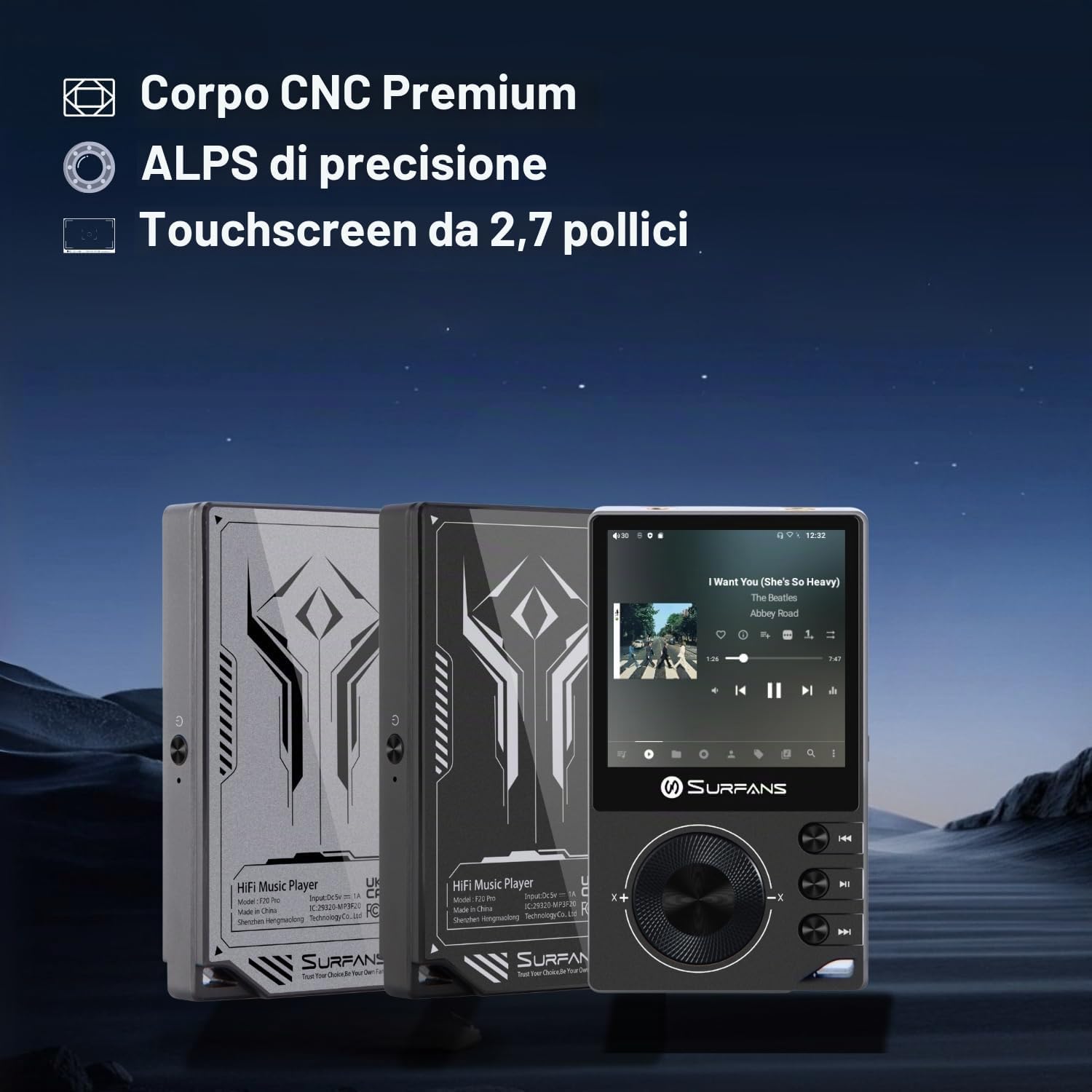
The Surfans F20 Pro features a premium CNC body for durability and aesthetics.
1.2 Càrrega del dispositiu
Before first use, fully charge the device. Connect the included USB cable to the player's charging port and to a USB power adapter (not included) or a computer's USB port. The charging indicator will show the charging status. A full charge typically takes approximately 3 hours.
The Surfans F20 Pro features a 1450mAh rechargeable battery, providing up to 15 hours of music playback on a full charge.
1.3 Engegada/apagada
- Per encendre: Press and hold the Power button located on the side of the device until the screen lights up.
- Per apagar: Press and hold the Power button until a power-off menu appears on the screen. Select "Power Off" to shut down the device. A short press will turn the screen on/off.
1.4 Configuració inicial
Upon first power-on, you may be guided through an initial setup process. This typically includes:
- Selecció d'idioma: Trieu el vostre idioma preferit.
- Configuració Wi-Fi: Connect to a Wi-Fi network to enable streaming services and software updates. Navigate to Settings > Network & Internet > Wi-Fi.
- Compte de Google: Inicia la sessió amb el teu compte de Google per accedir a Google Play Store i altres serveis de Google.
1.5 Expansió de l'emmagatzematge
The Surfans F20 Pro comes with 32GB of internal memory. You can expand the storage up to 1TB using a Micro SD card. Insert the Micro SD card into the designated slot on the device.
2. Instruccions de funcionament
2.1 Dispositiu acabatview i Navegació
The F20 Pro features a 2.73-inch touchscreen for primary interaction and physical buttons for quick control.

The Surfans F20 Pro features a touchscreen interface for easy navigation and access to various applications.
- Pantalla tàctil: Tap, swipe, and pinch to navigate menus, select options, and control playback.
- Botons físics: Use the side buttons for power, volume control, and playback (play/pause, skip tracks). The scroll wheel provides tactile navigation.
2.2 Reproducció de música
The F20 Pro supports various audio formats including MP3, AAC, FLAC, WAV, and DSD. You can play music stored on the device's internal memory or Micro SD card, or stream from online services.
- Reproducció local: Use the pre-installed music player app to browse and play your local audio files.
- Transmissió en temps real: Install and use streaming applications like Spotify, Apple Music, Tidal, or YouTube from the Google Play Store.
2.3 Connexió de dispositius d'àudio
The player offers both wired and wireless audio output options.

The F20 Pro features both 3.5mm single-ended and 4.4mm balanced audio output ports for versatile headphone connectivity.
- Auriculars amb cable:
- 3.5 mm d'una sola punta: Connect standard headphones to the 3.5mm port.
- 4.4 mm equilibrat: For enhanced audio quality and power, connect compatible balanced headphones to the 4.4mm port. This port provides 500mW of power.
- Bluetooth Headphones/Speakers:
- The F20 Pro supports Bluetooth 5.0 with LDAC for high-fidelity wireless audio.
- To pair: Go to Settings > Connected devices > Pair new device. Ensure your Bluetooth device is in pairing mode.

The F20 Pro supports Bluetooth 5.0 with LDAC for high-quality wireless audio streaming.
This video demonstrates the process of pairing a Bluetooth device with a music player. The steps shown are generally applicable to the Surfans F20 Pro.
Connectivitat Wi-Fi 2.4
The device supports dual-band Wi-Fi (2.4GHz and 5GHz) for fast downloads and smooth streaming.

The Surfans F20 Pro supports dual-band Wi-Fi for reliable internet connection and streaming.
- To connect: Go to Settings > Network & Internet > Wi-Fi. Select your network and enter the password.
- Once connected, you can use pre-installed or downloaded streaming apps.
2.5 Connexió a un ordinador
You can connect the F20 Pro to a computer via USB to transfer files or use it as a USB DAC.
This video illustrates how to easily connect a music player to a PC for file transfer or other functions. The process is similar for the Surfans F20 Pro.
- Connecteu el reproductor a l'ordinador mitjançant el cable USB.
- On the player, swipe down from the top of the screen to access notifications. Tap on the USB connection notification and select "File transfer" or "USB DAC" mode as needed.
3. Manteniment
3.1 Neteja del dispositiu
To keep your F20 Pro in optimal condition:
- Use a soft, dry, lint-free cloth to wipe the screen and body.
- Avoid using abrasive cleaners, solvents, or aerosol sprays, which can damage the finish.
- No exposeu el dispositiu a una humitat excessiva.
3.2 Cura de la bateria
Per maximitzar la durada i el rendiment de la bateria:
- Eviteu temperatures extremes.
- No deixeu el dispositiu completament descarregat durant períodes prolongats.
- Per a l'emmagatzematge a llarg termini, carregueu la bateria al 50% aproximadament i guardeu-la en un lloc fresc i sec.
3.3 Actualitzacions de programari
The F20 Pro runs on Android 12. Periodically check for software updates to ensure the best performance and access to new features. Connect to Wi-Fi and go to Settings > System > System update.
4. Solució De Problemes
4.1 El dispositiu no s'encén
- Assegureu-vos que la bateria estigui carregada. Connecteu el dispositiu a un carregador durant almenys 30 minuts.
- Try pressing and holding the Power button for 10-15 seconds to force a restart.
4.2 Sense sortida de so
- Check headphone connections (3.5mm or 4.4mm). Ensure they are fully inserted.
- Verify volume levels on the device and any connected Bluetooth audio devices.
- Si feu servir Bluetooth, assegureu-vos que el dispositiu estigui correctament emparellat i connectat.
- Test with different headphones or speakers to rule out a faulty audio accessory.
4.3 Wi-Fi or Bluetooth Connection Issues
- Ensure Wi-Fi or Bluetooth is enabled in the settings.
- Restart the F20 Pro and your router/Bluetooth device.
- Oblida't de la xarxa o del dispositiu a la configuració i intenta tornar-te a connectar.
- Ensure you are within range of the Wi-Fi network or Bluetooth device.
4.4 Rendiment lent o bloquejos de l'aplicació
While the F20 Pro has an Octa-Core processor and 3GB RAM, some apps or heavy multitasking might affect performance.
- Tanca les aplicacions en segon pla que no fas servir.
- Esborra la memòria cau de les aplicacions (Configuració > Aplicacions > [Nom de l'aplicació] > Emmagatzematge i memòria cau > Esborra la memòria cau).
- Assegureu-vos que el programari del dispositiu estigui actualitzat.
- If issues persist, consider a factory reset (Settings > System > Reset options > Erase all data), but back up your data first.
5. Especificacions
Below are the key technical specifications for the Surfans F20 Pro Music Player:
| Característica | Detall |
|---|---|
| Nom del model | F20 Pro |
| Marca | Surfans |
| Sistema operatiu | Android 12 |
| Processador | Octa-Core |
| RAM | 3 GB |
| Emmagatzematge intern | 32 GB |
| Emmagatzematge ampliable | Up to 1TB via Micro SD |
| DAC | Dual ESS9018 |
| Suport d'àudio d'alta resolució | DSD512 |
| Connectivitat | AUX, Bluetooth 5.0 (LDAC), USB, Dual-Band Wi-Fi (2.4GHz & 5GHz) |
| Mida de la pantalla | 2.73 polzades |
| Tecnologia de pantalla | Pantalla tàctil |
| Formats d'àudio compatibles | MP3, AAC, FLAC, WAV, DSD |
| Sortida equilibrada | 4.4mm (500mW) |
| Capacitat de la bateria | 1450 mAh |
| Durada de la bateria | Fins a 15 hores de reproducció de música |

The Surfans F20 Pro features dual ESS9018 DACs for superior audio decoding.

Internal audio architecture showing dual DACs and multi-stage amplifier design for both single-ended and balanced outputs.
6. Garantia i assistència
For warranty information and technical support, please refer to the documentation provided with your purchase or contact the seller directly. The seller for this product is SurfansAudio.
Conserva el comprovant de compra per a qualsevol reclamació de garantia.