
Introducció
This manual provides detailed instructions for the installation, operation, and maintenance of your Gawfolk GF490D 49-inch Ultra-Wide Curved Gaming Monitor. Please read this manual thoroughly before using the product to ensure proper setup and optimal performance. Keep this manual for future reference.
Informació de seguretat
Always follow these basic safety precautions when using your monitor:
- No col·loqueu el monitor sobre un carretó, suport o taula inestable.
- No bloquejar les obertures de ventilació.
- Do not use near water or sources of heat.
- Use only the power cord and adapter provided by the manufacturer.
- Demaneu tot el servei a personal de servei qualificat.
- Desendolleu el monitor durant tempestes o quan no l'utilitzeu durant períodes prolongats.
Contingut del paquet
Verifiqueu que tots els components siguin presents al paquet:
- Gawfolk GF490D Monitor
- Monitor Stand Components (Base, Neck)
- Adaptador d'alimentació i cable
- Cable HDMI
- Cable DisplayPort
- Manual d'usuari
Configuració
1. Muntatge del suport
- Traieu amb cura el monitor del seu embalatge, mantenint-lo protegit sobre una superfície tova.
- Fixeu el coll del suport al panell del monitor.
- Fixeu la base del suport al coll amb els cargols proporcionats.

Figura 1: Illustration of monitor ergonomic adjustments, including height adjustment (0-160mm), wall bracket compatibility (75x75mm), and tilt adjustment (-5° to 15°).
2. Connexió a dispositius
The monitor is equipped with multiple input ports for various devices:
- Power Connector (DC): Connect the power adapter to this port and then to a power outlet.
- Ports HDMI 2.1 (x2): Connect to devices such as PCs, game consoles (PS5/Xbox Series X), or laptops using an HDMI cable.
- Ports DisplayPort 1.4 (x2): Connect to PCs or other compatible devices using a DisplayPort cable for high-resolution and high-refresh-rate signals.
- Interfície de sortida d'àudio: Connecteu altaveus externs o auriculars.

Figura 2: posterior view of the monitor showing the available input ports: DC power connector, two DisplayPort 1.4 interfaces, two HDMI 2.1 interfaces, and an audio output interface.
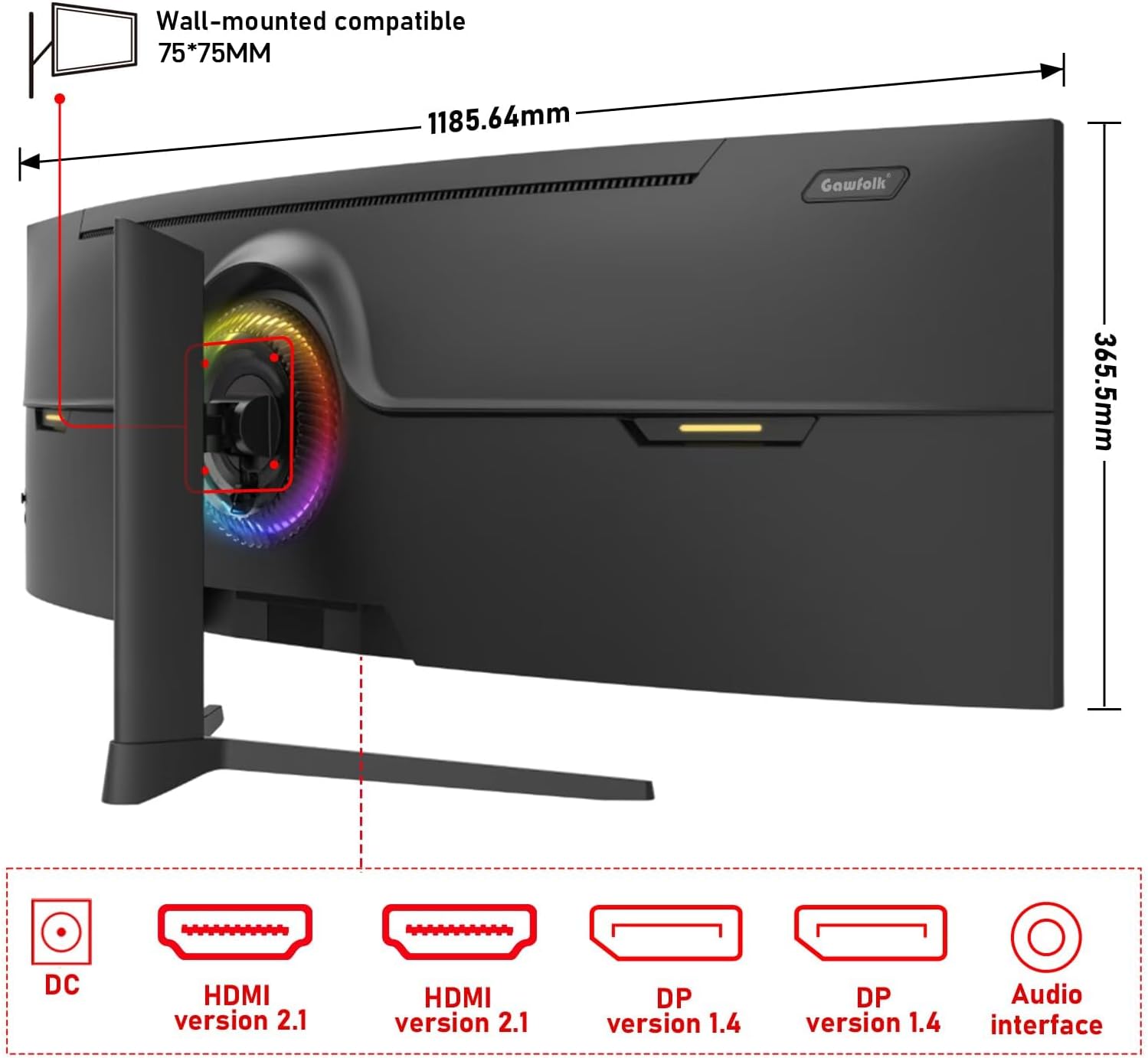
Figura 3: posterior view of the monitor illustrating its approximate dimensions (1185.64mm width, 365.5mm height without stand) and indicating 75x75mm VESA wall-mount compatibility.
3. Muntatge a la paret (opcional)
The monitor supports a 75x75mm VESA wall mount. Ensure the wall mount can support the monitor's weight (7.9 kg) and follow the wall mount manufacturer's instructions for installation.
Instruccions de funcionament
1. Encès / apagat
- Connect the power adapter to the monitor and a power outlet.
- Press the power button (location typically on the rear or bottom-right of the monitor) to turn the monitor on or off.
2. Ajustar la configuració de la pantalla
The monitor features an On-Screen Display (OSD) menu for adjusting various settings. Use the joystick or buttons (refer to the physical monitor for exact controls) to navigate the OSD menu.
- Font d'entrada: Select between HDMI 1, HDMI 2, DP 1, or DP 2.
- Brillantor/Contrast: Adjust image luminance.
- Configuració de color: Modify color temperature, gamma, and color gamut (120% sRGB).
- Freqüència d'actualització: The monitor supports up to 240Hz. Ensure your connected device and cable support this refresh rate for optimal performance.
- Sincronització adaptativa (FreeSync): Enable this feature in the OSD and your graphics card settings to synchronize the monitor's refresh rate with your GPU's frame rate, reducing screen tearing and stuttering.
- Mode de llum blava baixa: Activate to reduce eye strain during prolonged use.

Figura 4: The 49-inch 32:9 ultra-wide display with DQHD (5120x1440) resolution, offering an expansive field of view compared to traditional 16:9 QHD (2560x1440) monitors.

Figura 5: Visual comparison demonstrating the smoothness of a 240Hz refresh rate versus lower refresh rates (100Hz and 60Hz), highlighting reduced motion blur and stuttering.

Figura 6: Illustration of Adaptive Sync (FreeSync) technology, showing how it eliminates screen tearing and input lag for a smoother gaming experience compared to when it is disabled.

Figura 7: The 1500R curvature of the screen, designed to provide an immersive viewing experience by conforming to the human eye's natural field of vision.

Figura 8: Display characteristics including 120% sRGB color gamut, 8-bit color depth (16.7 million colors), 3000:1 contrast ratio, and 330 cd/m² brightness, ensuring rich and accurate color reproduction.

Figura 9: A visual comparison demonstrating the difference between a 1000:1 contrast ratio and the monitor's 3000:1 contrast ratio, showing enhanced detail in dark and bright areas.
3. Ajustaments físics
El suport del monitor permet ajustaments ergonòmics:
- Ajust d'alçada: Adjust the screen height by up to 160mm.
- Girar: Rotate the monitor left or right by 15 degrees.
- Inclinació: Adjust the screen tilt from -5 degrees to 20 degrees.
4. RGB Ambient Lighting
The monitor features customizable RGB ambient lighting on its rear. This can be configured through the OSD menu to match your preferences or gaming setup.
Manteniment
Neteja del monitor
- Desconnecteu sempre el monitor abans de netejar-lo.
- Utilitzeu un drap suau i sense pelusa dampesbandida amb aigua o un netejador de pantalles suau i no abrasiu.
- No ruixeu el netejador directament sobre la pantalla.
- Eviteu utilitzar benzè, diluent o qualsevol dissolvent volàtil, ja que poden danyar la superfície del monitor.
Resolució de problemes
| Problema | Causa possible | Solució |
|---|---|---|
| No hi ha imatge a la pantalla | Cable d'alimentació desconnectat, cable de vídeo desconnectat, font d'entrada incorrecta seleccionada. | Check power and video cable connections. Select the correct input source via the OSD menu. Ensure the computer is powered on. |
| La imatge és borrosa o distorsionada | Incorrect resolution or refresh rate settings, faulty video cable. | Set the display resolution to 5120x1440 and refresh rate to 240Hz (or compatible with your GPU). Try a different video cable. |
| Pantalla trencada o entretallat | Adaptive Sync (FreeSync) is not enabled or not supported by GPU/game. | Enable FreeSync in the monitor's OSD menu and your graphics card control panel. Ensure your GPU supports FreeSync. |
| Píxel(s) mort(s) | Defecte de fabricació. | Refer to warranty policy. A small number of dead pixels may be considered within acceptable manufacturing tolerances. |
| Sense àudio | Audio cable disconnected, incorrect audio output selected on PC, monitor volume too low. | Check audio cable connection. Ensure the correct audio output device is selected in your computer's sound settings. Adjust monitor volume. |
Especificacions
| Característica | Detall |
|---|---|
| Número de model | GF490D |
| Mida de la pantalla | 49 polzades |
| Resolució | DQHD (5120x1440 Pixels) |
| Relació d'aspecte | 32:9 |
| Curvatura | 1500R |
| Freqüència d'actualització | 240 Hz |
| Temps de resposta | 1 mil·lisegon |
| Tipus de panell | VA (LCD Display Technology) |
| Brillantor | 350 candeles (cd/m²) |
| Relació de contrast | 3000:1 |
| Gamma de colors | 120% sRGB |
| Viewangle ing | 178 graus |
| Sincronització adaptativa | FreeSync |
| Entrades de vídeo | 2x HDMI 2.1, 2x DisplayPort 1.4 |
| Sortida d'àudio | 3.5mm Àudio Jack |
| Tipus de muntatge | Wall Mount (75x75mm VESA compatible) |
| Dimensions del producte (P x A x A) | 5 x 118.5 x 43 cm (amb suport) |
| Pes de l'article | 7.9 quilos |
| Característiques addicionals | Blue Light Filter, Curved, Frameless, RGB Ambient Lighting |
Garantia i Suport
The Gawfolk GF490D monitor comes with a Servei postvenda de 12 mesos (1 year manufacturer warranty). If you encounter any issues or have questions regarding your monitor, please contact Gawfolk customer support for assistance.
Manufacturer: Shenzhen Qinghong Zhuoyue Technology Co., Ltd.