
1. Producte acabatview
The iRobot Roomba 106 Robot Vacuum with AutoEmpty Dock is designed for automated dry floor cleaning. It features a 3-stage cleaning system, powerful suction, an edge-sweeping brush, and bristle brushes for various dirt types. The integrated ClearView LiDAR mapping system ensures precise navigation and obstacle avoidance. The AutoEmpty Dock automatically empties the robot's dustbin, storing up to 75 days of debris.

Image 1: The Roomba 106 robot vacuum, its AutoEmpty Dock, and a smartphone displaying the iRobot app interface.
2. Configuració
2.1 Desembalatge
- Carefully remove the robot vacuum, AutoEmpty Dock, and all accessories from the packaging.
- Remove all protective films, stickers, and packing materials from the robot and the dock.
- Place the AutoEmpty Dock against a wall in an open, uncluttered area with good Wi-Fi coverage. Ensure there is at least 1.5 feet (0.5 meters) of clear space on each side of the dock and 4 feet (1.2 meters) in front of it.
2.2 Càrrega del robot
Place the Roomba robot onto the AutoEmpty Dock, ensuring the charging contacts on the robot align with those on the dock. The robot will emit a tone to confirm it is charging. Allow the robot to charge for at least 3 hours before its first use, or until the battery indicator light turns solid green.
2.3 Connexió a la Wi-Fi i a l'aplicació
- Download the iRobot Home App from your device's app store.
- Obriu l'aplicació i seguiu les instruccions a la pantalla per crear un compte o iniciar sessió.
- Select 'Add a Robot' and choose your Roomba 106 model.
- Follow the app's prompts to connect your robot to your home Wi-Fi network. This will enable advanced features, scheduling, and remote control.
3. Instruccions de funcionament
3.1 Inici d'una neteja
- Utilitzant l'aplicació iRobot Home: Open the app and tap the 'Clean' button.
- Using the Robot Buttons: Press the 'CLEAN' button on the robot's top panel.
- Ús de l'Assistent de veu: If connected to a compatible voice assistant (e.g., Amazon Echo, Google Home), use a voice command such as "Hey Google, tell Roomba to start cleaning."
3.2 Scheduling Cleans
To set up recurring cleaning schedules, use the iRobot Home App. Navigate to the 'Schedule' section and follow the instructions to set specific cleaning times and days for your robot.
3.3 Understanding Cleaning Modes
The Roomba 106 utilizes a 3-stage cleaning system. It automatically adjusts its cleaning method based on floor type and dirt level. The system includes an edge-sweeping brush for corners and walls, dual multi-surface rubber brushes to agitate and lift debris, and powerful suction to draw dirt into the dustbin.
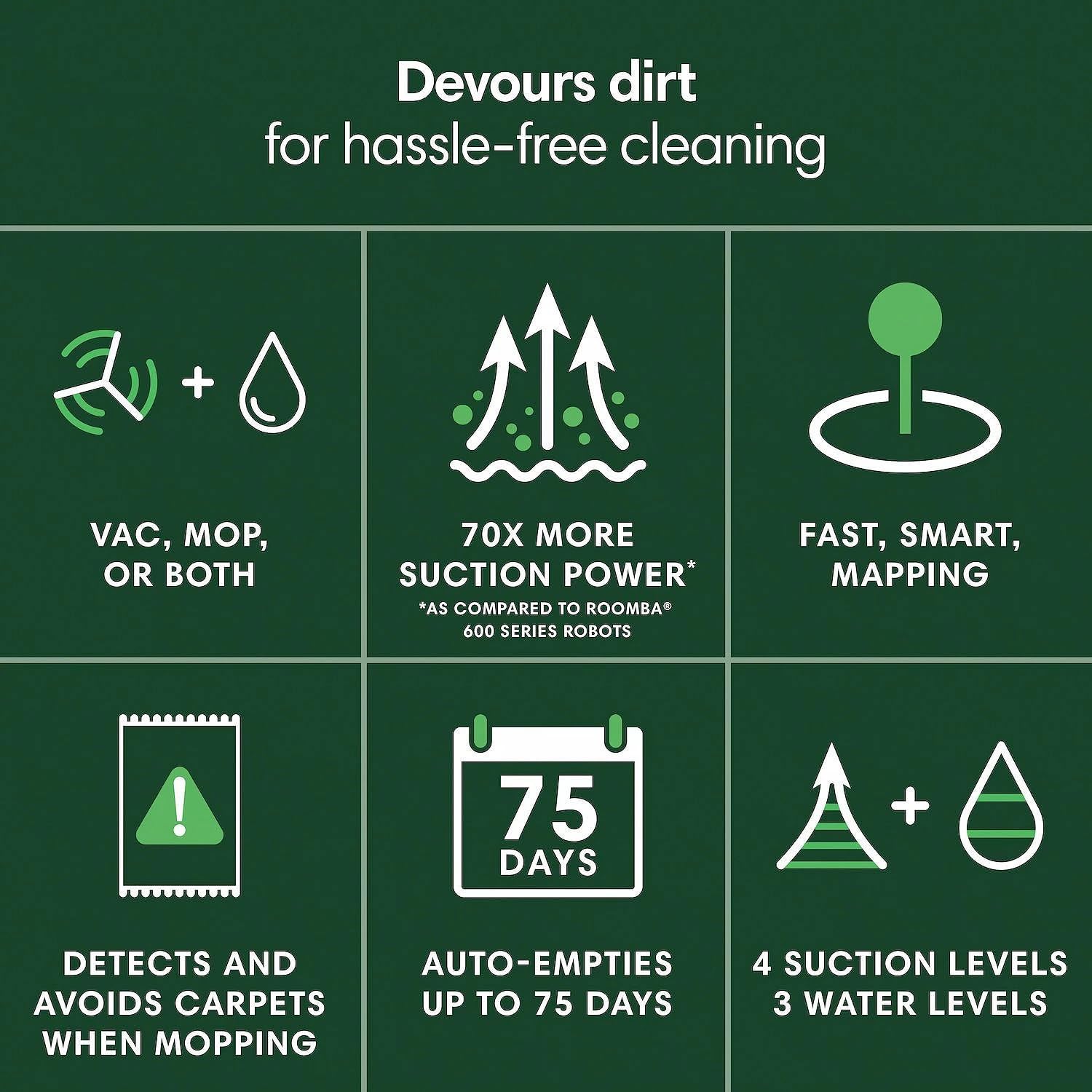
Image 2: An infographic highlighting key cleaning features of the Roomba 106, including its powerful suction and self-emptying capability.
4. Manteniment
Regular maintenance ensures optimal performance of your Roomba 106. Always turn off the robot and disconnect it from the dock before performing any maintenance.
4.1 Emptying the AutoEmpty Dock
The AutoEmpty Dock can hold up to 75 days of debris. When the bag is full, the iRobot Home App will notify you. To empty:
- Lift the lid of the AutoEmpty Dock.
- Carefully pull the full disposal bag upwards to remove it. The bag opening will seal automatically to prevent dust leakage.
- Discard the full bag and insert a new iRobot disposal bag into the dock.
- Close the dock lid securely.
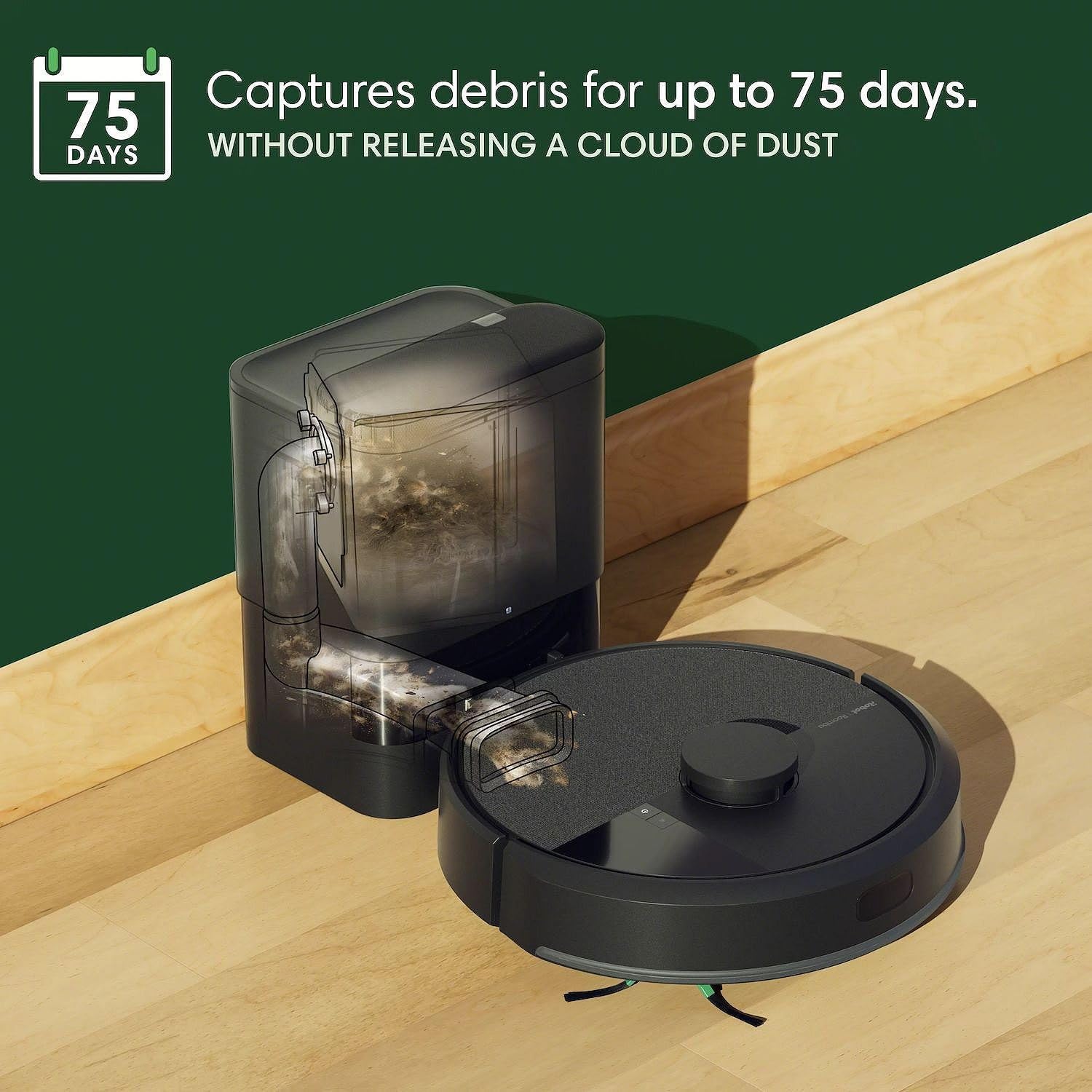
Image 3: The Roomba 106 robot vacuum next to its AutoEmpty Dock, illustrating the dock's ability to capture debris for an extended period without releasing dust.
4.2 Neteja dels pinzells
Periodically remove hair and debris from the robot's brushes:
- Pinzells multisuperfície: Open the brush frame by pressing the green tabs. Remove the brushes and use the included cleaning tool to remove hair and debris. Reinsert the brushes, ensuring they click into place.
- Pinzell de escombrat de vores: Use a small screwdriver to remove the screw holding the edge-sweeping brush. Remove any tangled hair or debris and reattach the brush.
4.3 Neteja del filtre
The filter should be cleaned weekly and replaced every 2-3 months, or as needed:
- Open the robot's dustbin lid.
- Traieu el filtre agafant la pestanya groga.
- Tap the filter against a trash can to dislodge debris. Do not wash the filter.
- Reinsert the clean filter or replace it with a new one.
4.4 Neteja dels sensors
Wipe the robot's sensors with a clean, dry cloth monthly:
- Sensors de penya-segats: Situat a la part inferior del robot.
- Charging Contact Pads: On the robot's underside and the dock.
- Sensor LiDAR: The raised circular component on top of the robot.
5. Solució De Problemes
| Problema | Solució |
|---|---|
| El robot no es carrega | Ensure the charging contacts on both the robot and the dock are clean and free of debris. Verify the dock is plugged into a working power outlet. |
| Robot encallat o perdut | Clear obstacles from the robot's path. If the robot is lost, manually place it back on the dock or initiate a new cleaning cycle from the app. Check for tangled brushes or wheels. |
| Mal rendiment de neteja | Clean the multi-surface brushes, edge-sweeping brush, and filter. Ensure the dustbin is not full. Check for any blockages in the suction path. |
| El robot no es connecta a la Wi-Fi | Ensure your Wi-Fi router is on and within range. Restart your router and the robot. Follow the app's troubleshooting steps for network connection. |
| AutoEmpty Dock not emptying | Check if the disposal bag in the dock is full and needs replacement. Ensure the dock lid is securely closed. Verify there are no obstructions in the dock's suction path. |
For more detailed troubleshooting, refer to the iRobot Home App or the official iRobot support weblloc.
6. Especificacions
- Nom del model: Roomba 106
- Marca: iRobot
- Components inclosos: Roomba 106 Robot Vacuum, AutoEmpty Dock
- Font d'alimentació: Funciona amb bateria
- Tipus de filtre: Bag (for AutoEmpty Dock)
- Característiques especials: LiDAR Navigation, Edge Cleaning, Self-Emptying, Scheduling, Cordless
- Tipus de controlador: Control d'aplicacions, control de veu
- Dispositius compatibles: Telèfons intel·ligents, Amazon Echo, Google Home
- Factor de forma: Ronda
- Pes de l'article: 6.2 Pounds (Robot only)
- Usos recomanats: Cleaning dry floors (carpet, hardwood, laminate, marble, tile, stone, rubber, wood)
7. Informació de la garantia
The iRobot Roomba 106 Robot Vacuum comes with a manufacturer's warranty that covers mechanical and electrical failures. This warranty includes 100% parts and labor with no hidden fees. For warranty claims, fast repairs, and replacements, easy online claims are available 24/7. Please retain your proof of purchase for warranty validation.
8. Atenció al client
If you encounter any issues not covered in this manual or require further assistance, please visit the official iRobot support website or contact their customer service. You can find contact details and additional resources within the iRobot Home App or on the iRobot brand weblloc.