
Introducció
Thank you for choosing the TOZO NC9 Bluetooth 5.3 Hybrid ANC Wireless Earbuds. These earbuds are designed to provide a superior audio experience with advanced features such as Hybrid Active Noise Cancellation, clear call quality, and extended battery life. This manual will guide you through the setup, operation, and maintenance of your new earbuds.
Contingut del paquet
Si us plau, assegureu-vos que tots els articles estiguin presents al vostre paquet:
- TOZO NC9 Wireless Earbuds (Left and Right)
- Estoig de càrrega
- Ear Tips (Multiple Sizes)
- Cable de càrrega USB-C
- Manual d'usuari (aquest document)
Producte acabatview
Familiarize yourself with the components of your TOZO NC9 earbuds and charging case.
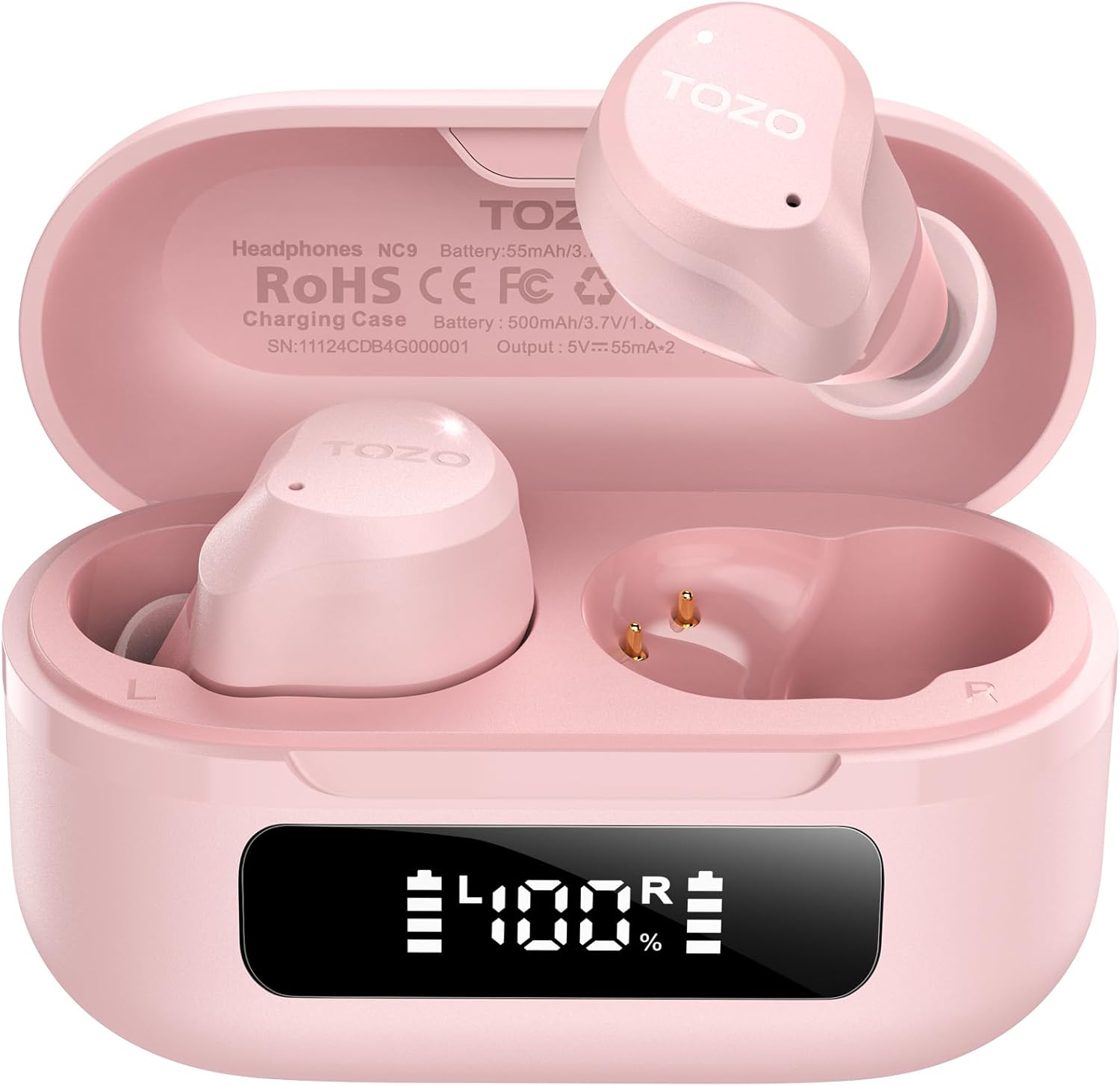
Image: The TOZO NC9 earbuds shown with their charging case. The earbuds are pink and feature an in-ear design. The charging case is also pink with a smooth, compact form factor. This image provides a general view dels components del producte.

Image: The TOZO NC9 earbuds are placed inside their open charging case, revealing an LED display on the front of the case that shows battery percentage. This illustrates how the earbuds are stored and charged within the case.

Image: A detailed diagram illustrating the internal driver components of the TOZO NC9 earbud, highlighting the OrigX Acoustics Technology. This visual explains the audio engineering behind the sound quality.
Configuració
1. Càrrega dels auriculars i l'estoig
Abans del primer ús, carregueu completament els auriculars i l'estoig de càrrega.
- Col·loca els auriculars a l'estoig de càrrega. Assegura't que estiguin correctament col·locats.
- Connecteu el cable de càrrega USB-C al port de càrrega de la funda i a una font d'alimentació.
- The LED display on the charging case will indicate the charging status. A full charge may take approximately 5 hours if completely depleted.

Image: The TOZO NC9 charging case with earbuds, displaying "60 hrs" to indicate the total playtime. This image emphasizes the extended battery life of the product.

Image: A close-up of the TOZO NC9 charging case's LED display showing "100%" battery charge, with the "SmartPow Power Management" logo. This highlights the intelligent battery optimization feature.
2. Emparellament amb el dispositiu
The TOZO NC9 earbuds use Bluetooth 5.3 for a stable connection.
- Obre l'estoig de càrrega. Els auriculars entraran automàticament en mode d'emparellament.
- Al dispositiu (telèfon intel·ligent, tauleta, ordinador), aneu a la configuració de Bluetooth.
- Cerca "TOZO NC9" a la llista de dispositius disponibles i seleccioneu-lo per connectar-vos.
- Un cop connectats, sentireu un missatge d'àudio i els auriculars estaran llestos per al seu ús.

Image: A visual representation of the TOZO App interface on a smartphone, showing various settings like ANC modes, EQ adjustments, and white noise tracks. This demonstrates the app's capabilities for customizing the earbud experience.
Instruccions de funcionament
Controls tàctils
Els auriculars TOZO NC9 tenen controls tàctils intuïtius. Es poden personalitzar funcions específiques a través de l'aplicació TOZO.
| Acció | Funció |
|---|---|
| Toc únic (E/D) | Reproduir/pausa, respondre a una trucada |
| Doble Toc (L) | Pista anterior |
| Doble toc (R) | Pista següent |
| Triple Toc (E/D) | Activa l'Assistent de veu |
| Premda llarga (E/D) | Switch ANC/Transparency/Normal Mode, Reject Call |
Modes de cancel·lació activa de soroll (ANC)
The TOZO NC9 offers Hybrid ANC to reduce ambient noise by up to 45dB, along with a Transparency Mode.
- Mode de cancel·lació activa del soroll (ANC): Redueix el soroll exterior, ideal per a viatges o entorns sorollosos.
- Mode de transparència: Allows you to hear your surroundings without removing the earbuds, useful for conversations or awareness.
- Mode normal: Standard audio experience without noise cancellation or transparency.
Cycle through these modes by long-pressing either earbud (customizable via app).

Image: A person wearing TOZO NC9 earbuds on an airplane, illustrating the effectiveness of the up to 45dB advanced noise cancellation feature for a peaceful listening experience.
Trucades clares
Equipped with 6 ENC (Environmental Noise Cancellation) microphones, the NC9 ensures your voice is clear during calls, even in noisy environments.

Image: A person wearing TOZO NC9 earbuds while walking in a city environment, making a phone call. This image highlights the crystal-clear call quality provided by the six ENC microphones, minimizing background noise.
Integració de l'aplicació TOZO
Download the TOZO App for enhanced control and customization:
- Adjustable Noise Control Modes (6 options)
- 32 Preset EQ Modes and access to over 2000 user-shared EQs
- 100+ White Noise Tracks
- Actualitzacions de firmware
The app allows for a personalized audio experience.
Manteniment
Neteja
- Netegeu regularment els auriculars, especialment les puntes i els contactes de càrrega, amb un drap suau, sec i sense borrissol.
- No utilitzeu netejadors abrasius ni dissolvents.
Emmagatzematge
- Quan no els utilitzeu, guardeu els auriculars a la seva funda de càrrega per protegir-los i mantenir-los carregats.
- Emmagatzemar en un lloc fresc i sec, allunyat de temperatures extremes.
Resistència a l'aigua (IPX8)
The TOZO NC9 earbuds are IPX8 waterproof, meaning they are protected against immersion in water up to 1 meter for up to 30 minutes. This makes them suitable for workouts and light rain, but they are not designed for swimming or prolonged submersion.

Image: A person wearing TOZO NC9 earbuds while reading, demonstrating the ergonomic design for all-day comfort and a secure fit. This image emphasizes the comfort aspect of the earbuds.
Resolució de problemes
| Problema | Possible solució |
|---|---|
| Els auriculars no es carreguen | Ensure earbuds are correctly seated in the case. Check charging cable and power source. Clean charging contacts. |
| No es pot emparellar amb el dispositiu | Ensure Bluetooth is enabled on your device. Place earbuds in case, close, then open to re-enter pairing mode. Forget "TOZO NC9" from your device's Bluetooth list and try pairing again. |
| No hi ha so d'un auricular | Place both earbuds back in the case, close it, then open again. Ensure both earbuds are charged. Perform a factory reset (refer to TOZO App or online support for specific steps). |
| L'ANC no funciona eficaçment | Ensure ear tips provide a good seal. Try different sized ear tips. Ensure ANC mode is activated. |
| Poca qualitat de trucada | Ensure microphones are not obstructed. Check network signal. |
For further assistance, please refer to the TOZO App or contact TOZO customer support.
Especificacions
| Nom del model | NC9 |
| Versió Bluetooth | 5.3 |
| Control de soroll | Hybrid Noise Reduction (up to 45dB ANC) |
| Micròfons | 6 micròfons ENC |
| Tipus de controlador d'àudio | Dynamic (10mm drivers) |
| Interval de freqüència | 15 Hz - 20,000 Hz |
| Durada de la bateria (auriculars) | Aproximadament 14 hores (una sola càrrega) |
| Temps de reproducció total (amb estoig) | Fins a 60 hores |
| Classificació de resistència a l'aigua | IPX8 (impermeable) |
| Tipus de control | Control tàctil, Control d'aplicacions |
| Dispositius compatibles | Phones, Laptops, Tablets, Smart Speakers |
| GTIN / UPC | 810102982537 |
Garantia i Suport
Els productes TOZO inclouen una garantia estàndard. Per obtenir informació detallada sobre la garantia, el registre del producte o l'assistència tècnica, visiteu el lloc web oficial de TOZO. weblloc web o poseu-vos en contacte amb el servei d'atenció al client. Conserveu el rebut de compra per a reclamacions de garantia.
Política de devolució: The product has a return policy duration of 30 days for refund/replacement.