1. Introducció
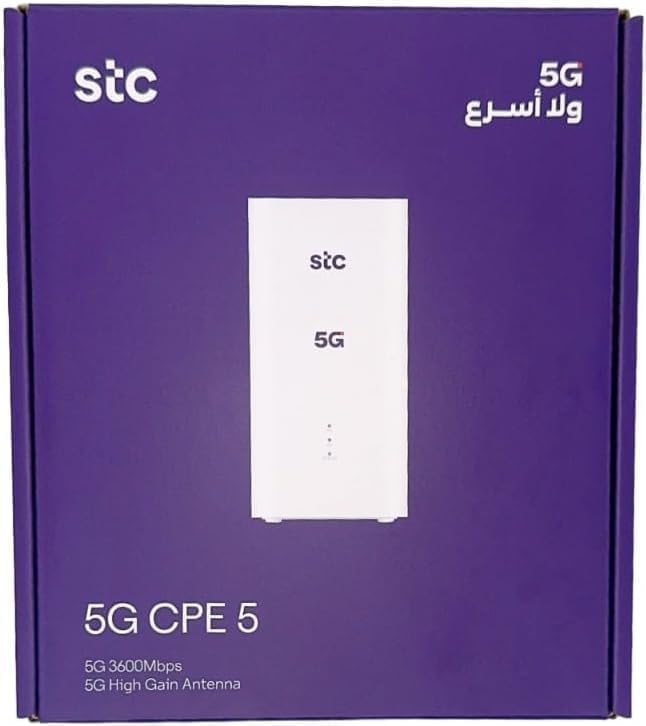
This manual provides comprehensive instructions for the setup, operation, and maintenance of your Generic H155-383 5G CPE Router. This device is designed to deliver high-speed internet connectivity using 5G technology and Wi-Fi 6, ensuring a seamless online experience for various activities such as gaming, streaming, and remote work.
The H155-383 router supports download speeds up to 3600 Mbps and upload speeds up to 500 Mbps. It is compatible with all SIM cards and features dual-band Wi-Fi for enhanced coverage and stable connections, even with multiple devices connected simultaneously.
2. Contingut del paquet
Si us plau, verifiqueu que tots els elements que s'enumeren a continuació s'inclouen al paquet del producte:
- 1 x Generic H155-383 5G CPE Router
- 1 x adaptador de corrent
- 1 x cable Ethernet
- 1 x User Manual (English and Arabic)
3. Instruccions de configuració
- Insereix la targeta SIM: Locate the SIM card slot on the router. Ensure your SIM card is active and correctly inserted. The device supports all SIM cards.
- Encès: Connect the power adapter to the router and plug it into a power outlet. The router will begin to power on.
- Engegada inicial: Allow 3 to 5 minutes for the router to fully boot up and establish a network connection. The indicator lights on the device will show its status.
- Connexió de dispositius:
- Connexió sense fil: Find the Wi-Fi network name (SSID) and password on the label at the bottom of the router. Connect your devices (smartphones, tablets, PCs) to this Wi-Fi network.
- Connexió per cable: Use the provided Ethernet cable to connect your computer or other network devices to one of the LAN ports on the router.
- Accediu a la configuració de l'encaminador: Obre a web browser on a connected device and enter the router's IP address (e.g., 192.168.8.1) found on the bottom label. Log in using the default username and password (also on the label) to configure advanced settings.


4. Instruccions de funcionament
Once the router is set up and connected, it will automatically provide internet access to your connected devices. Here are some general operating guidelines:
- Llums indicadores: Observe the LED indicators on the front of the router to monitor its status (power, network connection, Wi-Fi activity, signal strength). Refer to the full user manual for detailed explanations of each indicator.
- Wi-Fi Management: You can change the Wi-Fi network name (SSID) and password through the router's web interface or a dedicated application (if available).
- Antenes externes: The router supports external antenna ports for improved signal reception, especially in areas with weak 5G coverage. Connect compatible external antennas to these ports if needed.
- Ports Ethernet: Use the Ethernet ports for stable, high-speed wired connections to devices like desktop computers, smart TVs, or gaming consoles.
5. Manteniment
To ensure optimal performance and longevity of your H155-383 router, follow these maintenance tips:
- Col·locació: Col·loqueu el router en una zona oberta, allunyat d'obstacles, objectes metàl·lics grans i altres dispositius electrònics que puguin causar interferències.
- Neteja: Keep the router clean and free from dust. Use a soft, dry cloth to wipe the exterior. Do not use liquid cleaners.
- Actualitzacions de firmware: Periodically check for firmware updates through the router's web interface. Keeping the firmware updated ensures the best performance, security, and compatibility.
- Reiniciant: If you experience network issues, try restarting the router by unplugging it from the power source for 10-15 seconds and then plugging it back in.
6. Solució De Problemes
Si teniu problemes amb el vostre encaminador, consulteu les solucions habituals següents:
6.1. SIM Card Related Issues
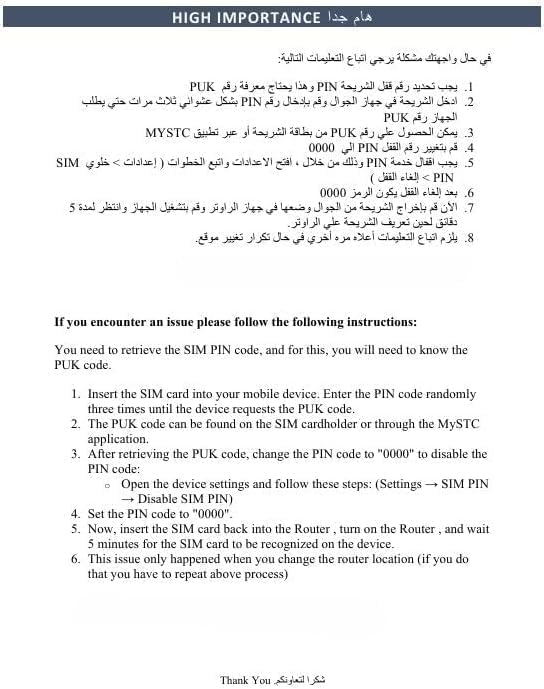
- PIN/PUK Code: If the device requests a PIN or PUK code, you will need to retrieve it from your mobile service provider or the SIM card holder. Insert the SIM card into your mobile device and enter the PIN code randomly three times until the device requests the PUK code. The PUK code can be found on the SIM cardholder or through the MYSTC application.
- Changing PIN: After retrieving the PUK code, change the PIN code to "0000" to disable the PIN code. This can usually be done via the router's settings (Settings → SIM PIN → Disable SIM PIN).
- Targeta SIM no reconeguda: If the SIM card is not recognized after insertion, ensure it is active and correctly inserted. Reinsert the SIM card into the router, turn on the router, and wait 5 minutes for the SIM card to be recognized. This issue typically occurs only when changing the router location.
6.2. General Connectivity Issues
- Sense accés a Internet:
- Check if the SIM card is active and has data allowance.
- Verify that the router's indicator lights show a stable 5G connection.
- Reinicieu el router i els dispositius connectats.
- Velocitats lentes:
- Ensure the router is placed in an optimal location for 5G signal reception.
- Reduir el nombre de dispositius connectats o d'activitats que requereixen molta amplada de banda.
- Consider connecting external antennas if signal strength is low.
- Desconnexions de Wi-Fi:
- Comproveu si hi ha interferències d'altres dispositius electrònics.
- Assegureu-vos que els vostres dispositius estiguin dins de l'abast del Wi-Fi del router.
- Update the router's firmware.
7. Especificacions
| Característica | Detall |
|---|---|
| Marca | Genèric |
| Nom del model | H155-383 |
| Característiques especials | Internet Security, Remote Access, Quality of Service (QoS), Access Point Mode |
| Classe de banda de freqüència | Doble banda |
| Comunicació sense fils estàndard | 802.11ax (Wi-Fi 6) |
| Dispositius compatibles | Smart TV, Tablet, Personal Computer, Smartphone, Gaming Console |
| Usos recomanats | Gaming, Business, Home |
| Tecnologia de connectivitat | 5G, Ethernet, Wi-Fi |
| Color | Blanc |
| Sistema operatiu | RouterOS |
| Protocol de seguretat | WPS2 |
| Number of Ethernet LAN Ports | 3 |
| Data Transfer Rate (Download) | Fins a 3600 Mbps |
| Data Transfer Rate (Upload) | Fins a 500 Mbps |
| Generació Wi-Fi | Wi-Fi 6 |
| Compatibilitat del mòdem | No (Integrated 5G modem) |
| Cobertura | Wide Network Coverage |
| Fabricant | Xina |
8. Informació de la garantia
Aquest producte ve amb un 2 any de garantia from the date of purchase. Please retain your proof of purchase for any warranty claims. The warranty covers manufacturing defects and malfunctions under normal use conditions. It does not cover damage caused by misuse, accidents, unauthorized modifications, or natural disasters.
For detailed warranty terms and conditions, please refer to the warranty card included in your package or contact customer support.
9. Suport
For further assistance or if you have questions not covered in this manual, please refer to the following resources:
- Recursos en línia: Detailed setup instructions and additional troubleshooting tips may be available on the product's official support page or the retailer's weblloc.
- Atenció al client: Contact your retailer or the product manufacturer's customer service for technical support.


