
1. Introducció
Thank you for choosing the Donerton Bluetooth 5.4 Wireless Headphones, Model W90. These headphones are designed to provide a high-quality audio experience with advanced features such as Bluetooth 5.4 connectivity, HiFi stereo sound, Environmental Noise Cancelling (ENC) for calls, and IP7 waterproofing. This manual will guide you through the setup, operation, and maintenance of your new headphones to ensure optimal performance and longevity.
2. Informació de seguretat
- Do not disassemble or modify the headphones or charging case. This may cause malfunction or damage and will void the warranty.
- Keep the device away from extreme temperatures (hot or cold), humidity, and water, except for the specified IP7 water resistance.
- Avoid prolonged exposure to loud volumes to prevent hearing damage.
- Netegeu els auriculars amb un drap suau i sec. No utilitzeu productes químics agressius ni materials abrasius.
- Mantenir fora de l'abast dels nens i mascotes.
- Desfeu-vos del dispositiu i dels seus components de manera responsable d'acord amb la normativa local.
3. Contingut del paquet
Si us plau, comproveu el contingut del paquet en obrir-lo per assegurar-vos que hi hagi tots els elements:
- Donerton W90 Wireless Headphones (Left and Right earbuds)
- Estoig de càrrega
- Cable de càrrega USB
- Manual d'usuari (Aquest document)
4. Producte acabatview
Familiarize yourself with the components of your Donerton W90 Wireless Headphones.
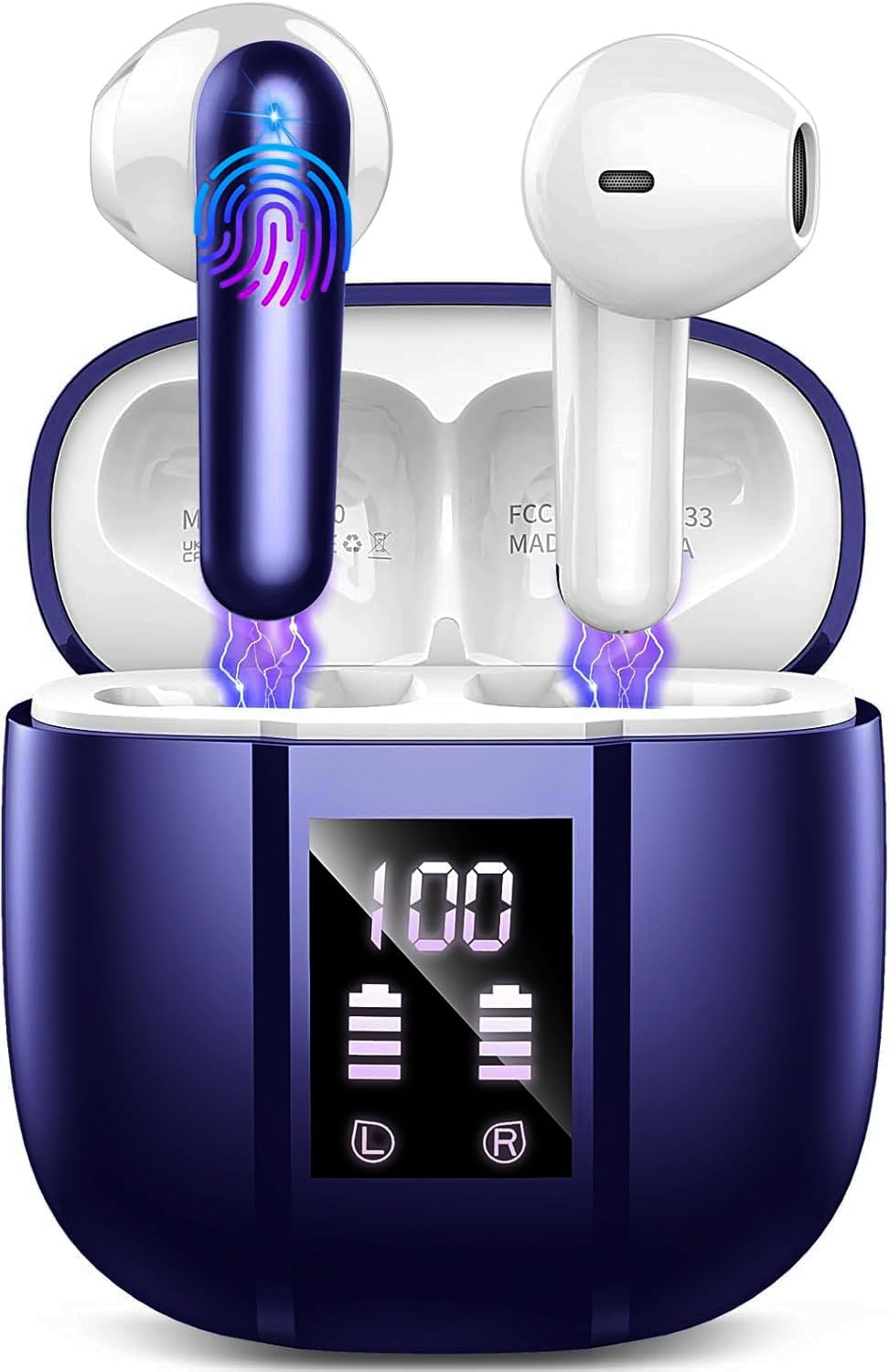
Image: Donerton W90 Wireless Headphones and Charging Case. This image displays the overall design of the earbuds and their charging case.
- Auriculars: Left and Right earbuds with touch control areas and charging contacts.
- Estoig de càrrega: Allotja i carrega els auriculars i disposa d'una pantalla LED que indica l'estat de la bateria.
- Port de càrrega USB-C: Situat a la caixa de càrrega per a l'entrada d'alimentació.
- Micròfons: Integrated into each earbud for calls and ENC functionality.
5. Configuració
5.1 Càrrega dels auriculars
Abans del primer ús, carregueu completament els auriculars i l'estoig de càrrega.
- Place both earbuds into the charging case. Ensure they are correctly seated, and the charging indicators on the case light up.
- Connecteu el cable de càrrega USB al port de càrrega de la carcassa i a una font d'alimentació USB (per exemple, un ordinador, un adaptador de paret).
- The LED display on the charging case will show the battery level. A full charge typically takes about 1.5 hours for the case.
- Un cop estigui completament carregat, desconnecteu el cable de càrrega.
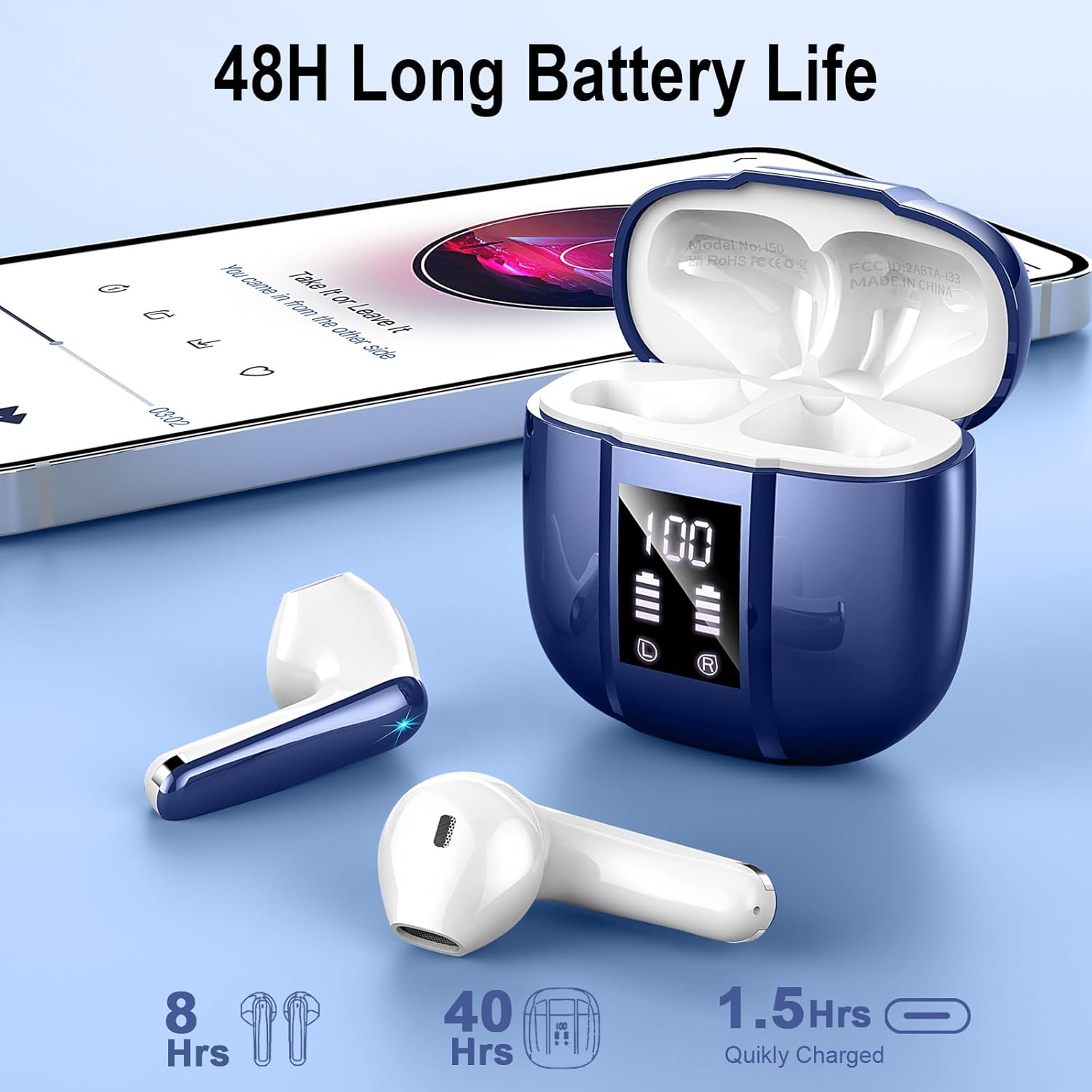
Image: Donerton W90 Charging Case with LED Display. This image illustrates the charging case displaying battery levels for both earbuds and the case itself, indicating a quick charge time of 1.5 hours for the case and up to 8 hours of playback per earbud charge, with an additional 40 hours from the case.
5.2 Emparellament inicial
Follow these steps to pair your headphones with a Bluetooth-enabled device for the first time:
- Assegureu-vos que els auriculars estiguin carregats.
- Open the charging case. The earbuds will automatically power on and enter pairing mode. The indicator lights on the earbuds will flash.
- Al dispositiu (telèfon intel·ligent, tauleta, etc.), activeu el Bluetooth.
- Cerca available Bluetooth devices. Select "Donerton W90" from the list.
- Once connected, the earbud indicator lights will turn off or flash slowly, and you will hear a confirmation tone.

Image: Donerton W90 One-Step Pairing and Touch Control. This image demonstrates the simple pairing process by opening the charging case and selecting the device on a smartphone's Bluetooth settings. It also highlights the touch control functions on the earbuds.
5.3 Automatic Re-pairing
After the initial pairing, the headphones will automatically connect to the last paired device when you open the charging case and take them out, provided Bluetooth is enabled on your device and it is within range.
6. Instruccions de funcionament
6.1 Com posar-se els auriculars
Per a una qualitat de so i una comoditat òptimes, assegureu-vos que els auriculars estiguin correctament col·locats a les orelles.
- Identifica els auriculars esquerre (E) i dret (R).
- Introduïu suaument cada auricular al canal auditiu corresponent.
- Gira lleugerament l'auricular fins que estigui segur i còmode.

Image: Donerton W90 Ergonomic Design and Fit. This image highlights the ergonomic design of the earbuds, showing how they fit comfortably and securely in the ear, emphasizing their lightweight nature and portability.
6.2 Controls tàctils
The Donerton W90 headphones feature intuitive touch controls on each earbud. The specific functions may vary slightly depending on your device and application.
| Acció | Auricular esquerre (L) | Auricular dret (R) |
|---|---|---|
| Reproducció/pausa de música | Un sol toc | Un sol toc |
| Pista següent | Fes doble toc | Fes doble toc |
| Pista anterior | Triple toc | Triple toc |
| Puja el volum | Mantén premut | N/A |
| Baixa el volum | N/A | Mantén premut |
| Respondre/Finalitzar la trucada | Un sol toc | Un sol toc |
| Rebutja la trucada | Manteniu premut durant 2 segons | Manteniu premut durant 2 segons |
| Activa l'Assistent de veu | Toc quàdruple | Toc quàdruple |
The headphones feature Environmental Noise Cancelling (ENC) for clear calls. This technology automatically reduces background noise during phone conversations.

Image: Donerton W90 Crystal Clear Call with ENC. This image visually represents the Environmental Noise Cancelling (ENC) feature, showing how background noise is reduced to ensure clear voice transmission during calls.
7. Manteniment
7.1 Neteja
- Netegeu regularment els auriculars i l'estoig de càrrega per evitar l'acumulació de brutícia i cerumen.
- Feu servir un drap suau, sec i sense borrissol per netejar les superfícies.
- Per a la brutícia persistent, lleugerament dampRenta el drap amb aigua. No utilitzeu alcohol, dissolvents ni productes de neteja abrasius.
- Assegura't que els contactes de càrrega dels auriculars i de la funda estiguin nets i lliures de residus per mantenir una càrrega correcta.
7.2 Emmagatzematge
- Quan no els utilitzeu, guardeu els auriculars a la seva funda de càrrega per protegir-los i mantenir-los carregats.
- Guardeu el dispositiu en un lloc fresc i sec, allunyat de la llum solar directa i de temperatures extremes.
7.3 Resistència a l'aigua (IP7)
The Donerton W90 headphones are rated IP7 waterproof. This means they are protected against immersion in water up to 1 meter for up to 30 minutes. They are resistant to splashes, sweat, and rainwater.
- Do not intentionally submerge the charging case in water, as it is not waterproof.
- Ensure the earbuds are completely dry before placing them back into the charging case to prevent damage to the charging contacts.
- La resistència a l'aigua no és una condició permanent i pot disminuir com a conseqüència del desgast normal.
8. Solució De Problemes
If you encounter issues with your Donerton W90 headphones, refer to the following common problems and solutions:
8.1 Headphones Not Pairing
- Ensure Bluetooth is enabled: Check that Bluetooth is turned on on your device.
- Re-enter pairing mode: Place the earbuds back into the charging case, close the lid, then open it again to re-initiate pairing mode.
- Forget device: On your device, go to Bluetooth settings, find "Donerton W90", and select "Forget" or "Unpair". Then, try the pairing process again from step 5.2.
- Càrrega d'auriculars: Ensure both earbuds and the charging case have sufficient battery.
- Distància: Make sure the headphones are within the Bluetooth range (up to 15 meters) of your device.
8.2 Sense so o volum baix
- Check volume levels: Adjust the volume on both your connected device and using the headphone touch controls.
- Torna a connectar: Disconnect and re-connect the headphones to your device.
- Clean earbuds: Ensure there is no earwax or debris blocking the earbud speakers.
- Try another audio source: Test with a different song or application.
8.3 Problemes de càrrega
- Check cable and adapter: Ensure the USB charging cable and power adapter are working correctly. Try a different cable or adapter.
- Clean charging contacts: Wipe the charging contacts on both the earbuds and inside the case with a dry cloth.
- Proper seating: Make sure the earbuds are correctly placed in the charging case.
8.4 Un auricular no funciona
- Torna a emparellar: Try forgetting the device and re-pairing as described in 8.1.
- Restablir: Some issues can be resolved by resetting the headphones. Refer to the manufacturer's website or contact support for specific reset instructions if needed.
- Càrrec: Assegureu-vos que els dos auriculars estiguin carregats.
9. Especificacions
| Característica | Detall |
|---|---|
| Model | W90 |
| Versió Bluetooth | 5.4 |
| Protocols Bluetooth | HFP, HSP, A2DP, AVRCP |
| abast sense fils | Fins a 15 metres (49 peus) |
| Controladors d'altaveus | Altaveus dinàmics de 13 mm |
| Control de soroll | Environmental Noise Cancellation (ENC) with 4 microphones |
| Temps de reproducció dels auriculars | 6-8 hores (una sola càrrega) |
| Temps total de reproducció (amb estoig) | Fins a 45-50 hores |
| Temps de càrrega (cas) | Aproximadament 1.5 hores |
| Classificació impermeable | IP7 (només auriculars) |
| Pes de l'auricular | Approximately 3 grams each |
| Material | Plàstic |
| Tipus de bateria | Polímer de liti |
| Compatibilitat | iOS 9.0+, Android 10.0+, Bluetooth 5.4+ devices |
10. Garantia i Suport
Donerton products are designed and manufactured to the highest quality standards. For detailed warranty information, please refer to the warranty card included with your purchase or visit the official Donerton weblloc.
If you experience any issues or have questions regarding your Donerton W90 Wireless Headphones, please contact Donerton customer support through the retailer where you purchased the product or via the contact information provided on the official Donerton weblloc.