
1. Introducció
This manual provides essential information for the safe and efficient use of your Haier H55C95EUX 55-inch OLED 4K HDR Smart TV. Please read these instructions thoroughly before operating your television and retain them for future reference.
The Haier H55C95EUX features a 55-inch OLED display for deep blacks and vibrant colors, 4K HDR resolution, a 144Hz refresh rate for smooth motion, integrated Harman Kardon sound, and the Google TV operating system for smart functionality and voice control.

Imatge 1.1: acabatview of Haier C95 Series OLED TV features, highlighting Harman Kardon audio, 144Hz gaming, Dolby Vision IQ, Dolby Atmos, HDR10+, Google TV, and 3GB RAM with 32GB storage.
2. Informació de seguretat
Seguiu sempre les precaucions de seguretat bàsiques quan utilitzeu aquest televisor per reduir el risc d'incendi, descàrrega elèctrica i lesions.
- Font d'alimentació: Connecteu el televisor només a una font d'alimentació de CA de 220-240 V, 50/60 Hz.
- Ventilació: Assegureu-vos que hi hagi una ventilació adequada al voltant del televisor. No bloquegeu les obertures de ventilació.
- Aigua i humitat: No exposeu el televisor a la pluja ni a la humitat. No col·loqueu objectes plens de líquids, com ara gerros, a sobre del televisor.
- Neteja: Desendolleu el televisor de la presa de corrent abans de netejar-lo. Feu servir un drap suau i sec. No utilitzeu netejadors líquids ni aerosols.
- Muntatge: If wall-mounting, ensure the wall mount is compatible with the VESA standard (100 x 100 mm) and can support the TV's weight.
- Nens: Supervise children to ensure they do not play with the television.
3. Què hi ha a la caixa
Desembaleu la caixa amb cura i assegureu-vos que tots els elements hi siguin presents i no estiguin danyats.
- Haier H55C95EUX 55-inch OLED 4K HDR Smart TV
- Control remot
- Manual d'usuari (aquest document)
- Cable d'alimentació
- Components del suport de TV (si escau)
4. Configuració
4.1 Instal·lació física
Before installation, consider the TV's dimensions to ensure proper placement.

Imatge 4.1: Frontal view dimensions of the 55-inch Haier TV, indicating a width of 1225mm and a height of 749mm.

Image 4.2: Detailed dimensions of the Haier 55-inch TV, showing measurements with and without the stand.
Instal·lació de l'estand
- Col·loqueu el televisor cara avall sobre una superfície suau i plana per evitar que la pantalla es faci malbé.
- Attach the stand components to the designated slots on the bottom of the TV using the provided screws.
- Assegureu-vos que el suport estigui ben fixat abans de col·locar el televisor en posició vertical.
Muntatge a la paret
If wall-mounting, use a VESA-compatible mount (100 x 100 mm) and follow the mount manufacturer's instructions. Ensure the wall can support the TV's weight.
4.2 Connexió de dispositius
Your TV is equipped with multiple ports for connecting external devices.
- HDMI: Connect Blu-ray players, game consoles, or set-top boxes to the HDMI 2.1 ports for high-quality audio and video.
- USB: Connecteu dispositius d'emmagatzematge USB per a la reproducció de contingut multimèdia.
- Ethernet: Per a una connexió a Internet per cable estable.
- Bluetooth: Connecteu auriculars sense fil o altres dispositius Bluetooth.
4.3 Engegada i configuració inicials
- Connecteu el cable d'alimentació al televisor i a una presa de corrent.
- Premeu el botó d'engegada del comandament a distància o del televisor.
- Follow the on-screen instructions to complete the initial setup, including language selection, network connection (Wi-Fi or Ethernet), and Google TV account login.
5. Funcionament del televisor
5.1 Control remot
The included remote control allows you to navigate the TV's features. It may feature a solar cell for eco-friendly charging and USB-C for backup charging.

Image 5.1: The Haier TV remote control, featuring navigation, volume, and app access buttons.
5.2 Interfície de Google TV
Your TV runs on Google TV, providing access to a wide range of streaming services, apps, and personalized content.

Image 5.2: The Google TV home screen, showcasing various streaming applications and content recommendations.
Control de veu
Use the built-in voice control feature to search for content, launch apps, and control your TV hands-free. Simply say "Hey Google" or press the voice assistant button on your remote.

Image 5.3: Demonstrating voice control functionality with the Haier TV and Google TV.
5.3 Configuració d'imatge i so
Tecnologia OLED
The OLED display provides absolute blacks and infinite contrast for a lifelike viewexperiència.

Image 5.4: Visual representation of OLED technology, showcasing negres profunds i colors vibrants.
Harman Kardon Sound
Experience immersive audio with clear dialogues and cinematic depth, delivered by the integrated Harman Kardon sound system.

Image 5.5: Depiction of the Harman Kardon sound system, emphasizing clear and powerful audio.
Dolby Atmos
Enjoy three-dimensional, immersive sound that moves around you, enhancing your audio experience.
Freqüència de refresc de 144 Hz
The 144Hz refresh rate ensures smooth and fluid motion, ideal for fast-paced content like gaming and sports.

Image 5.6: Visual comparison illustrating the fluidity of 144Hz motion compared to 60Hz, particularly beneficial for gaming.
6. Manteniment
6.1 Neteja del televisor
- Desendolla sempre el televisor abans de netejar-lo.
- Feu servir un drap suau, sec i sense borrissol per netejar la pantalla i la carcassa.
- Per a marques difícils, esbandiu lleugeramentampNetegeu el drap amb aigua o amb un netejador de pantalles especialitzat. No ruixeu mai el netejador directament sobre la pantalla.
- Eviteu utilitzar netejadors abrasius, ceres o dissolvents.
6.2 Actualitzacions de programari
Your Haier TV may receive software updates to improve performance and add new features. Ensure your TV is connected to the internet to receive these updates automatically or check for them manually through the settings menu.
7. Solució De Problemes
Si teniu problemes amb el televisor, consulteu les solucions habituals següents:
| Problema | Possible solució |
|---|---|
| Sense poder | Check if the power cable is securely connected to the TV and the wall outlet. Ensure the outlet is functioning. Try pressing the power button on the TV itself. |
| No hi ha imatge, però hi ha so | Comproveu la font d'entrada. Assegureu-vos que el dispositiu connectat estigui encès i funcioni correctament. Proveu un cable o port HDMI diferent. |
| No hi ha so, però hi ha imatge | Check the volume level. Ensure the TV is not muted. Verify audio output settings (e.g., internal speakers, external sound system). Check audio cables if using external speakers. |
| El control remot no funciona | Check the remote control's battery level. Ensure there are no obstructions between the remote and the TV's IR sensor. If it's a solar remote, ensure it has sufficient light exposure. |
| Problemes de connexió de xarxa | Restart your router and modem. Check Wi-Fi password. If using Ethernet, ensure the cable is connected properly. Try connecting to a different network if available. |
8. Especificacions
| Característica | Detall |
|---|---|
| Nom del model | H55C95EUX |
| Mida de la pantalla | 55 polzades |
| Tecnologia de visualització | OLED |
| Resolució | 4K (3840 x 2160) |
| Freqüència d'actualització | 120 Hz (Motion Enhancement: 144Hz) |
| Format HDR compatible | Dolby Vision |
| Sistema operatiu | Google TV |
| Emmagatzematge intern | 32 GB |
| Sistema d'àudio | Harman Kardon 2.1 Sound System |
| Surround Sound Format | Dolby Atmos |
| Connectivitat | Bluetooth, Ethernet, HDMI (x4), USB (x1) |
| Tecnologia sense fils | Bluetooth, WiFi |
| Mètode de control | Control remot, veu |
| Dimensions del producte (PxWxH) | 29.5P x 122.5l x 76.8H cm (with stand) |
| Estàndard de muntatge VESA | 100 x 100 mm |
| Classe d'eficiència energètica (SDR) | F (77 kWh/1000h) |
| Classe d'eficiència energètica (HDR) | G (70 kWh/1000h) |
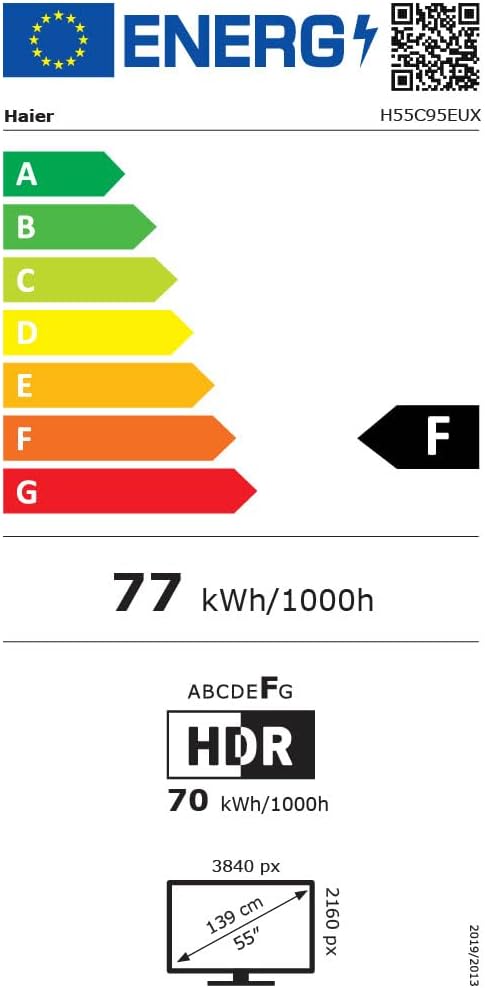
Image 8.1: EU Energy Label for the Haier H55C95EUX TV. For more details, visit the Base de dades EPREL.
9. Garantia i assistència
Your Haier H55C95EUX television comes with a Garantia del fabricant de 2 anysSi us plau, conserveu el comprovant de compra per a reclamacions de garantia.
For technical support, service, or further inquiries, please refer to the contact information provided on the official Haier weblloc web o al vostre centre de servei autoritzat local.