1. Introducció
The COUGAR CFV235 is an innovative PC case featuring a Central Floating Ventilation (CFV) structure. This design separates the power supply unit compartment from the main chamber, utilizing the space between them as a highly effective ventilation channel to enhance cooling performance. The CFV235 combines a full panoramic view, a compact footprint, and structurally reinforced cooling capabilities to achieve superior airflow beyond traditional case designs.
This manual provides essential information for the proper installation, operation, and maintenance of your COUGAR CFV235 PC case. Please read it thoroughly before beginning assembly.
2. Característiques clau
- Central Floating Ventilation (CFV) Structure: Innovative design for enhanced cooling efficiency.
- Full Panoramic View: Clear tempered glass panels for showcasing components interns.
- High Airflow Design: Optimized for superior air circulation.
- Àmplia compatibilitat: Supports Mini ITX, Micro ATX, ATX, and CEB motherboards.
- AmpOpcions d'emmagatzematge: Multiple drive bays for 3.5" HDDs and 2.5" SSDs.
- Gran liquidació de components: Accommodates long GPUs, tall CPU coolers, and standard PSUs.
- Construcció duradora: Built with robust materials for longevity.

Figura 2.1: Part frontal view of the COUGAR CFV235 PC case, highlighting its panoramic glass panels and illuminated interior.

Figure 2.2: The COUGAR CFV235 PC case showcasing its design in both black and white variants, with internal components and customizable RGB lighting.
3. Guia de configuració
3.1 Unpacking the Case
- Traieu amb cura la carcassa de l'ordinador del seu embalatge.
- Inspeccioneu la caixa per detectar qualsevol signe de dany durant el transport. Poseu-vos en contacte amb el vostre distribuïdor immediatament si trobeu algun dany.
- Remove all protective films and internal packaging materials.
3.2 Instal·lació de components
Before installing components, ensure you have all necessary tools, including a Phillips head screwdriver.
- Instal·lació de la placa base:

Figure 3.1: Interior of the CFV235 case, showing pre-installed motherboard standoffs.
- Instal·leu la protecció d'E/S a l'obertura posterior de la carcassa.
- Align your Mini ITX, Micro ATX, ATX, or CEB motherboard with the pre-installed standoffs.
- Fixeu la placa base amb els cargols proporcionats.
- Instal·lació de la unitat d'alimentació (PSU):
- The CFV235 features a dedicated PSU compartment. Install your ATX PSU (up to 200mm length) into this compartment.
- Fixeu la font d'alimentació amb els cargols de la part posterior de la carcassa.
- Instal·lació de la unitat d'emmagatzematge:

Figure 3.2: Rear interior of the CFV235, illustrating cable management options and locations for 2.5" and 3.5" drive bays.
- Install 3.5" HDDs into the designated drive bays (up to 2 drives).
- Install 2.5" SSDs into the dedicated SSD mounts (up to 4 drives, 2 of which are shared with 3.5" bays).
- Ensure all drives are securely fastened.
- Instal·lació de la targeta gràfica (GPU):

Figure 3.3: Diagram indicating the maximum GPU length of 430mm supported by the CFV235 case.
- The case supports GPUs up to 430mm in length.
- Insert your GPU into the appropriate PCIe slot on the motherboard and secure it with the retention clip and screw.
- Instal·lació del refrigerador de CPU:
- The case supports CPU coolers up to 175mm in height.
- Instal·leu el refrigerador de la CPU segons les instruccions del fabricant.
- Gestió de cables:
- Utilitzeu els retalls de cablejat i els punts d'amarratge que hi ha darrere de la safata de la placa base per gestionar els cables de manera ordenada.
- Proper cable management improves airflow and aesthetics.
4. Instruccions de funcionament
4.1 Panell frontal d'E/S

Figure 4.1: The front I/O panel of the CFV235, featuring USB ports, audio jacks, and the power button.
El panell frontal d'E/S proporciona un accés convenient als ports i controls essencials:
- Botó d'encesa: Press to power on/off your system.
- Botó de restabliment: Press to restart your system.
- Ports USB: Connecteu dispositius USB.
- Preses d'àudio: Connecteu auriculars i micròfons.
4.2 Flux d'aire i refrigeració
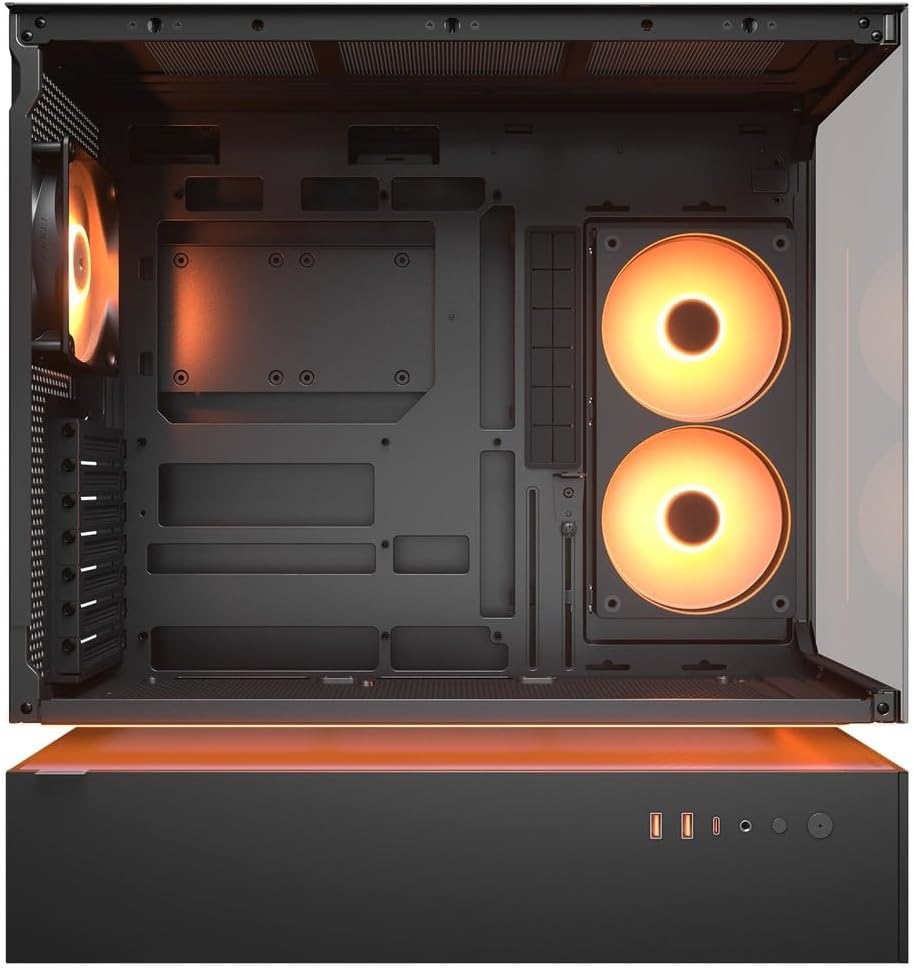
Figura 4.2: Intern view of the CFV235 with fans installed, demonstrating the potential for high airflow.
The CFV235 is designed for optimal airflow. Ensure all fans are correctly installed and oriented to facilitate efficient cooling. The Central Floating Ventilation structure promotes direct airflow to critical components.
5. Manteniment
5.1 Neteja del filtre de pols

Figure 5.1: Removable magnetic dust filter for easy cleaning.
Regular cleaning of dust filters is crucial for maintaining optimal airflow and preventing dust buildup inside your PC. The CFV235 features easily removable dust filters:
- Gently remove the magnetic dust filters located on the top and bottom of the case.
- Clean the filters using compressed air or by rinsing them with water. Ensure they are completely dry before reattaching.
- Reattach the filters to their respective positions.
5.2 Neteja general
- Utilitzeu un suau, damp cloth to wipe down the exterior surfaces of the case.
- Avoid using harsh chemicals or abrasive materials that could damage the finish or tempered glass.
- For internal cleaning, use compressed air to remove dust from components and fan blades.
6. Solució De Problemes
This section addresses common issues you might encounter. For more complex problems, please refer to the support section.
6.1 El sistema no s'encén
- Comproveu si el cable d'alimentació està connectat correctament tant a la font d'alimentació com a la presa de corrent.
- Ensure the PSU switch is in the "ON" position.
- Verifiqueu que el cable del botó d'engegada del panell frontal estigui connectat correctament a la placa base.
- Confirm that all internal power connections (24-pin ATX, CPU, GPU) are firmly seated.
6.2 Problemes de sobreescalfament
- Ensure all case fans and CPU/GPU coolers are functioning correctly.
- Clean any dust buildup from fans and dust filters (refer to Section 5.1).
- Verify that fans are oriented for optimal airflow (intake and exhaust).
- Check for proper cable management to avoid obstructing airflow.
6.3 USB/Audio Ports Not Working
- Ensure the front panel USB and audio cables are correctly connected to the motherboard headers.
- Check your operating system's device manager for any driver issues.
7. Especificacions
| Característica | Especificació |
|---|---|
| Marca | COUGAR |
| Nom del model | CFV235 |
| Dimensions del producte (W x H x D) | 235 x 493 x 460 mm |
| Pes del producte | 9.5 kg |
| Plaques base compatibles | Mini ITX / Micro ATX / ATX / CEB |
| Drive Bays | 5.25" x0 / 3.5" x2 / 2.5" SSD x2+2 (2 shared with 3.5" bays) |
| Longitud màxima de la GPU | 430 mm |
| Alçada màxima del refrigerador de la CPU | 175 mm |
| Longitud màxima de la PSU | 200 mm |
| Color | Negre |
| Característiques | Central Floating Ventilation, Panoramic Glass, High Airflow, Built-in Fans |
8. Garantia i Suport
Your COUGAR CFV235 PC case comes with a 1 any de garantia des de la data de compra. Aquesta garantia cobreix defectes de fabricació i defectes de materials en condicions d'ús normal.
For technical support, warranty claims, or further assistance, please visit the official COUGAR website or contact your local retailer. Please have your product model number (CFV235) and proof of purchase ready when contacting support.
Official COUGAR Weblloc: cougargaming.com