
Introducció
Aquest manual proporciona instruccions completes per a la instal·lació, el funcionament i el manteniment del Luminor RC-B4.01 Replacement Controller. This controller is specifically designed for use with Luminor BLACKCOMB 4.1 series UV water disinfection systems, ensuring optimal performance and monitoring of your UV system.
Please read this manual thoroughly before attempting any installation or operation to ensure safe and correct usage.
Producte acabatview
The Luminor RC-B4.01 is a sophisticated replacement controller that serves as the central monitoring and control unit for your BLACKCOMB 4.1 UV system. It provides critical information regarding the system's operational status and UV lamp rendiment.
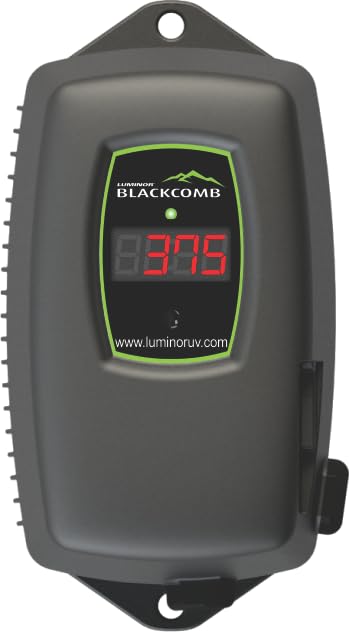
Figure 1: Luminor RC-B4.01 Replacement Controller. This image shows the front view of the controller with its 4-digit LED display and splash-proof casing.
Característiques principals:
- Monitors UV light intensity to ensure effective disinfection.
- Converts native power supply to the necessary voltage for the UV lamp.
- Tracks and displays days remaining until the next lamp replacement is due.
- Monitors overall lamp functionality and alerts to potential issues.
- Designed for seamless integration with LUMINOR BLACKCOMB 4.1 series UV water disinfection systems.
- Features a 4-digit LED display for clear status indication.
- Equipped with a splash-proof case for enhanced durability.
- Auto-ranging 90-265 V operation for versatile power compatibility.
Informació de seguretat
Observeu sempre les següents precaucions de seguretat per evitar lesions o danys al producte:
- Risc elèctric: Disconnect power to the UV system before installing, servicing, or replacing any components. Failure to do so may result in electric shock.
- Radiació UV: No mireu mai directament un UV l il·luminatamp. UV radiation can cause severe eye and skin damage.
- Danys per aigua: Ensure all connections are secure and watertight to prevent leaks and potential water damage to electrical components.
- Personal qualificat: Installation and servicing should only be performed by qualified personnel familiar with UV water treatment systems and electrical safety procedures.
- Recanvis originals: Use only genuine Luminor replacement parts to ensure proper operation and maintain warranty validity.
Contingut del paquet
Verifiqueu que tots els elements siguin presents i no estiguin danyats en desempaquetar-los:
- Luminor RC-B4.01 Replacement Controller (1 unit)
- Manual d'instruccions (aquest document)
- Mounting hardware (if applicable, not specified in product data)
Especificacions
| Atribut | Valor |
|---|---|
| Número de model | RC-B4.01 |
| Compatibilitat | Luminor BLACKCOMB 4.1 series UV systems |
| Entrada Voltage | 90-265 V (Auto-Range) |
| Freqüència | 50-60 Hz |
| Mostra | LED de 4 dígits |
| Tancament | Splash-Proof Case |
| Funcions de seguiment | Lamp Life, UV Intensity, Total Operating Time |
| Pes de l'article | 1 lliures |
| Dimensions del producte | 6.8 x 4 x 3.6 polzades |
Configuració i instal·lació
Follow these steps to properly install your Luminor RC-B4.01 controller. Ensure the main power to the UV system is disconnected before beginning.
- Desconnexió d'alimentació: Locate the main power supply for your BLACKCOMB 4.1 UV system and turn it off. Verify that no power is reaching the system.
- Muntatge: Choose a suitable location for the controller, ensuring it is protected from direct sunlight, extreme temperatures, and excessive moisture. Use appropriate mounting hardware (not included, typically) to secure the controller to a wall or panel.
- Connecta UV Lamp: Connecteu la UV lamp cable from your BLACKCOMB 4.1 system to the designated port on the RC-B4.01 controller. Ensure a firm and secure connection.
- Connect UV Sensor (if applicable): If your BLACKCOMB 4.1 system includes a UV intensity sensor, connect its cable to the corresponding port on the controller.
- Connexió d'alimentació: Connect the power cord from the RC-B4.01 controller to a grounded electrical outlet.
- Restaura l'alimentació: Once all connections are secure, restore power to the UV system. The controller's LED display should illuminate.
Figura 2: posterior view of the RC-B4.01 controller (representative image). This image would ideally show the connection ports for the UV lamp and sensor, and the power input.
Instruccions de funcionament
The RC-B4.01 controller provides real-time feedback on your UV system's status via its 4-digit LED display.
LED Display Readings:
- Lamp Vida restant: The display will typically show the number of days remaining until the UV lamp needs replacement. This countdown helps you plan for timely maintenance.
- UV Intensity: If a UV sensor is connected, the display may show the current UV intensity as a percentage or a specific value, indicating the effectiveness of the UV disinfection.
- Total Operating Time: The controller also tracks the total hours or days the UV system has been operational.
- Codis d'error: In case of a malfunction (e.g., lamp failure, low UV intensity), the display will show specific error codes. Refer to the Troubleshooting section for details.
Consult your BLACKCOMB 4.1 UV system manual for specific details on interpreting all display codes and indicators.
Manteniment
Regular maintenance ensures the longevity and effectiveness of your UV water disinfection system. The RC-B4.01 controller assists in monitoring key maintenance intervals.
UV Lamp Substitució:
- The controller will count down the days until the UV lamp reaches its recommended operational lifespan (typically 9,000 hours or approximately 1 year).
- Quan la lamp life reaches zero or an alert is displayed, replace the UV lamp according to the instructions provided in your BLACKCOMB 4.1 UV system manual.
- Després de substituir la lamp, reinicieu la lamp life counter on the RC-B4.01 controller as per your system's instructions (often involves pressing and holding a button or a specific sequence).
Neteja de mànigues de quars:
While the controller monitors lamp performance, it is crucial to regularly clean the quartz sleeve that encases the UV lamp. Refer to your BLACKCOMB 4.1 UV system manual for detailed instructions on cleaning frequency and procedure.
Resolució de problemes
This section provides solutions to common issues you might encounter with your RC-B4.01 controller or connected UV system.
| Problema | Causa possible | Solució |
|---|---|---|
| La pantalla del controlador està apagada. | Sense font d'alimentació; connexió fluixa. | Check power outlet and ensure power cord is securely connected. Verify main power to the UV system is on. |
| "LAMP" or "ERR" displayed. | UV lamp failure; lamp a prop del final de la vida. | Substituïu la UV lamp. Reinicia la lamp life counter after replacement. |
| Low UV intensity reading. | Dirty quartz sleeve; aging UV lamp; faulty UV sensor. | Clean the quartz sleeve. If issue persists, replace the UV lamp. If still low, the UV sensor may need replacement or calibration. |
| Inaccurate lamp compte enrere de la vida. | Lamp life counter not reset after lamp substitució. | Refer to your BLACKCOMB 4.1 system manual for instructions on resetting the lamp life counter. |
If you encounter an issue not listed here or if the suggested solutions do not resolve the problem, please contact Luminor customer support.
Garantia i Suport
Informació de la garantia:
Luminor products are manufactured to high-quality standards and are backed by a manufacturer's warranty. Specific warranty terms and conditions may vary. Please refer to the warranty card included with your original BLACKCOMB 4.1 UV system or visit the official Luminor weblloc per obtenir informació detallada sobre la garantia.
Atenció al client:
For technical assistance, troubleshooting, or to inquire about replacement parts, please contact Luminor customer support. Have your product model number (RC-B4.01) and the serial number of your BLACKCOMB 4.1 UV system ready when contacting support.
You can typically find contact information on the official Luminor weblloc: www.luminoruv.com (example link, verify actual URL).

