
1. Introducció
Welcome to the FUNYET NY-03 16-inch Laptop user manual. This guide provides essential information for setting up, operating, maintaining, and troubleshooting your new laptop. Please read this manual thoroughly to ensure optimal performance and longevity of your device.
2. Informació de seguretat
To prevent damage to your device or injury to yourself and others, please observe the following safety precautions:
- No exposeu el portàtil a temperatures extremes, llum solar directa ni humitat elevada.
- Eviteu col·locar objectes pesats sobre l'ordinador portàtil.
- Keep liquids away from the device. In case of spills, immediately power off and disconnect the charger.
- Feu servir només l'adaptador de corrent original que s'inclou amb el vostre portàtil.
- Do not attempt to disassemble or repair the laptop yourself. Contact qualified service personnel for assistance.
- Assegureu-vos de ventilar correctament per evitar el sobreescalfament. No bloquegeu les reixetes de ventilació.
3. Contingut del paquet
Verifiqueu que tots els elements siguin presents al paquet del producte:
- FUNYET NY-03 16-inch Laptop
- Adaptador d'alimentació
- Manual d'usuari (aquest document)
4. Producte acabatview
Familiarize yourself with the physical features and components of your FUNYET NY-03 laptop.
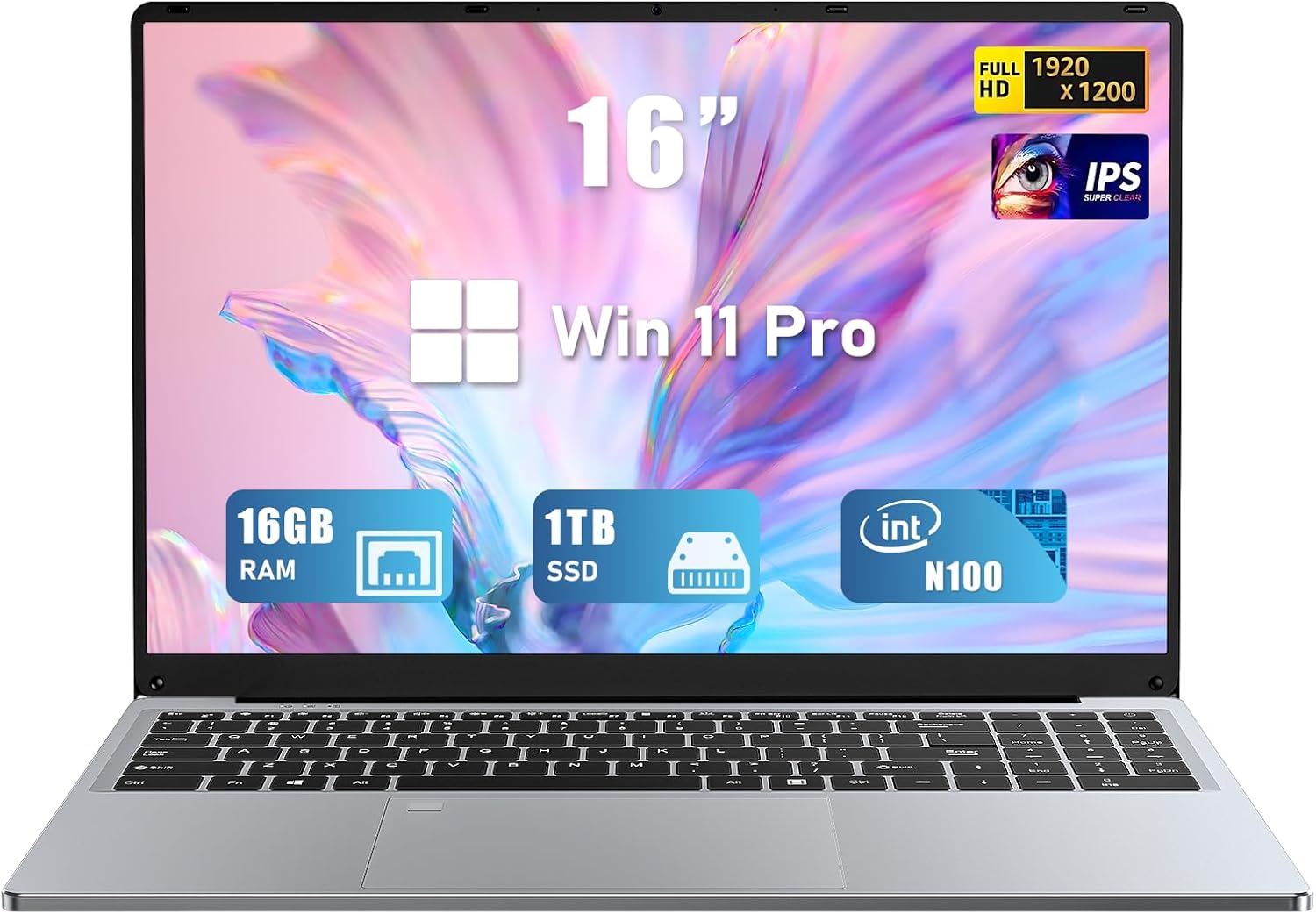
Figura 4.1: Frontal view of the FUNYET NY-03 16-inch Laptop, showcasinpel seu disseny elegant i la seva gran pantalla.
4.1. Components externs
- Pantalla IPS FHD de 16.0 polzades: High-resolution screen for clear visuals.
- Teclat retroil·luminat: Full-size keyboard with adjustable backlighting for comfortable typing in various lighting conditions.
- Large Touchpad: Responsive touchpad for precise navigation.
- Integrat Weblleva: Located above the display for video calls.
- Lector d'empremtes digitals: Integrated for secure and quick login.
4.2. Ports i connectors

Figura 4.2: lateral view of the FUNYET NY-03 laptop highlighting the various input/output ports.
- Ports USB 3.0: Per connectar dispositius USB d'alta velocitat.
- Port USB 2.0: Per connectar dispositius USB estàndard.
- Port mini HDMI: Per connectar a pantalles externes.
- Entrada d'alimentació de CC: Per connectar l'adaptador de corrent.
- Conector d'àudio de 3.5 mm: Per connectar auriculars o altaveus externs.
4.3. Vídeos de productes
Vídeo 4.1: Un overview of the FUNYET 16-inch laptop, demonstrating its design and key features. This video provides a visual guide to the laptop's physical aspects and functionality.
Video 4.2: A detailed look at the FUNYET 16-inch gaming laptop, showcasing its various components and user experience. This video highlights the laptop's build quality and interface.
5. Configuració
5.1. Engegada inicial
- Connect the power adapter to the DC power input port on your laptop and then to a power outlet.
- Premeu el botó d'engegada que es troba al teclat per engegar el portàtil.
- Follow the on-screen instructions to complete the initial Windows 11 Pro setup, including language, region, and network settings.
5.2. Connexió a la xarxa
Per connectar-se a una xarxa Wi-Fi:
- Feu clic a la icona Wi-Fi de la barra de tasques.
- Seleccioneu la xarxa desitjada de la llista.
- Enter the network password if prompted and click Connecta't.
6. Com fer servir el portàtil
6.1. Operacions bàsiques
- Encès/apagat: Premeu el botó d'engegada per engegar. Per apagar, feu clic al botó Inici i, a continuació, a Engegada > Apaga.
- Teclat: The backlit keyboard allows for comfortable typing. Use the Fn keys (e.g., Fn + F5/F6) to adjust backlight brightness.
- Touchpad: Admet gestos multitàctils per a la navegació. Consulteu la configuració de Windows per personalitzar-la.
- Lector d'empremtes digitals: Set up your fingerprint for secure and fast login via Windows Hello in Settings > Accounts > Sign-in options.
6.2. Característiques de la pantalla

Figure 6.1: The 16-inch FHD IPS display with a 1920x1200 resolution, offering a vibrant and immersive viewexperiència.
The 16.0-inch FHD IPS display provides a resolution of 1920x1200 pixels, ensuring sharp and vibrant visuals. The micro-bezel design enhances the immersive viewexperiència.
6.3. Rendiment

Figure 6.2: Visual representation of the Intel 12th Gen N100 Processor, highlighting its 4 cores and 3.4 GHz turbo frequency for efficient performance.
Powered by an Intel 12th Gen N100 processor with 4 cores and 4 threads, operating up to 3.4 GHz, the laptop delivers seamless performance for daily tasks. With 16GB of RAM and a 1TB high-speed SSD, it efficiently handles multitasking and provides ampl'emmagatzematge.
6.4. Connectivitat
The laptop supports 802.11a/b/g/n/ac Wi-Fi for fast internet access and Bluetooth for connecting wireless peripherals.
6.5. Gestió de la bateria

Figure 6.3: Illustration of the laptop's long battery life, indicating up to 8 hours of usage on a single charge.
The laptop is equipped with a 6000mAH rechargeable battery, offering up to 8 hours of battery life. To maximize battery longevity, ensure the laptop is fully charged before first use and avoid frequent deep discharges.
6.6. Operating System: Windows 11 Pro
Your laptop comes pre-installed with Windows 11 Pro, offering enhanced security, productivity features, and a modern user interface. Explore features like Snap Layouts, Widgets, and Microsoft Teams integration for an optimized computing experience.
7. Manteniment
- Neteja: Feu servir un drap suau i sense borrissol per netejar la pantalla i l'exterior. Eviteu productes de neteja o dissolvents abrasius.
- Actualitzacions de programari: Comproveu i instal·leu regularment si hi ha actualitzacions de Windows per garantir l'estabilitat i la seguretat del sistema.
- Emmagatzematge: Guardeu el portàtil en un lloc fresc i sec quan no el feu servir.
8. Solució De Problemes
Aquesta secció tracta problemes comuns que podeu trobar amb el vostre ordinador portàtil.
- El portàtil no s'encén: Assegureu-vos que l'adaptador de corrent estigui ben connectat i que la bateria estigui carregada. Proveu una altra presa de corrent.
- Sense connexió Wi-Fi: Comproveu si el Wi-Fi està habilitat a la configuració de Windows. Reinicieu el router i el portàtil.
- Rendiment lent: Close unnecessary applications, check for malware, and ensure sufficient free space on the SSD.
- Problemes de pantalla: Adjust display brightness. If the screen remains blank or distorted, try connecting to an external monitor via Mini HDMI to diagnose.
9. Especificacions
| Característica | Especificació |
|---|---|
| Marca | FUNYET |
| Nom del model | NY-03 |
| Mida de la pantalla | 16 polzades |
| Resolució de pantalla | 1920 x 1200 pixels (FHD IPS) |
| Processador | Intel 12th Gen N100 (up to 3.4GHz) |
| RAM | 16 GB DDR4 |
| Emmagatzematge | SSD de 1 TB |
| Sistema operatiu | Windows 11 Pro |
| Targeta gràfica | Integrat (gràfics Intel UHD) |
| Tipus sense fil | 802.11a/b/g/n/ac, Bluetooth |
| Ports | 1x USB 3.0, 1x USB 2.0, 1x Mini HDMI, 1x DC Power Input, 1x 3.5mm Audio Jack |
| Característiques especials | Teclat retroil·luminat, lector d'empremtes dactilars |
| Bateria | 6000mAH (up to 8 hours) |
| Pes de l'article | 5.1 lliures |
| Dimensions del producte | 14 x 9 x 0.8 polzades |
10. Garantia i Suport
Your FUNYET NY-03 laptop comes with a 1 any de garantia. For any issues or queries, please contact FUNYET customer support. They aim to reply within 24 hours.
- Atenció al client: Enjoy worry-free usage with dedicated round-the-clock customer service.
- Informació de contacte: Refer to the contact details provided in your product packaging or on the official FUNYET weblloc de suport.