
1. Introducció
Thank you for choosing the LEONLITE 30W LED Security Light with GFCI Outlets. This manual provides essential information for the safe installation, operation, and maintenance of your new security light. Please read these instructions thoroughly before installation and retain them for future reference.
2. Informació de seguretat
- ADVERTIMENT: Risc de descàrrega elèctrica. Desconnecteu l'alimentació al fusible o al disjuntor abans de la instal·lació o el manteniment.
- Aquest producte s'ha d'instal·lar d'acord amb el codi d'instal·lació aplicable per una persona familiaritzada amb la construcció i el funcionament del producte i els perills que comporta.
- Use only UL/ETL listed wire for connections.
- Assegureu-vos que totes les connexions estiguin segures i aïllades correctament.
- No instal·leu a prop de materials combustibles.
- The GFCI outlets are for outdoor use and must be protected from direct water spray.
3. Contingut del paquet
The package includes the LEONLITE 30W LED Security Light with GFCI Outlets and a light kit for installation.
4. Característiques del producte
- Endolls GFCI dobles: Two built-in Ground Fault Circuit Interrupter outlets provide convenient and safe power access for outdoor tools and devices. These outlets remain powered when the main switch is on, regardless of lighting mode.
- Dos modes d'il·luminació:
- Mode sensor de moviment: Light remains off during the day and activates at night when motion is detected.
- Mode del capvespre a l'alba: Light remains on throughout the night and turns off automatically during the day.
- Adjustable Illumination Duration: Selectable delay durations of 30s, 60s, or 120s for motion-activated lighting.
- Ampli rang de detecció: Motion detection range from 13ft to 45ft with a 150° detection angle.
- Adjustable Heads and Sensor: The two light heads and the motion sensor are independently adjustable for optimal coverage.
- Construcció duradora: Made from aluminum and polycarbonate, suitable for wet locations and operating temperatures from -4°F to 104°F.
- Certificat ETL: Garanteix el compliment de les normes de seguretat.
5. Configuració (Instal·lació)
This security light is designed for wall or ceiling mount installation. Professional installation is recommended.
5.1 Preinstal·lació
- Apagueu l'alimentació a l'interruptor o a la caixa de fusibles.
- Assegureu-vos que la superfície de muntatge estigui neta i seca.
5.2 Cablejat
- Connecteu el cable negre del dispositiu al cable negre (actiu) de la caixa de connexions.
- Connecteu el cable blanc del dispositiu al cable blanc (neutre) de la caixa de connexions.
- Connect the green (ground) wire from the fixture to the bare copper or green (ground) wire from the junction box.
- Secure all wire connections with appropriate wire nuts and electrical tape.
5.3 Muntatge
- Col·loqueu la placa de muntatge a la caixa de connexió amb els cargols proporcionats.
- Align the fixture with the mounting plate and secure it with the retaining screws.
- Ensure the fixture is sealed against the mounting surface to prevent water intrusion.
5.4 GFCI Outlet Activation
After power is restored, press the RESET button on each GFCI outlet to activate them. A green indicator light should appear.

Image: Pressing the RESET button on the GFCI outlet to activate it.
Video: Demonstrates the installation process and activation of the GFCI outlets on the security light.
6. Instruccions de funcionament
6.1 Adjusting Light Heads and Sensor
The two light heads can be adjusted up to 160 degrees horizontally and 350 degrees vertically. The motion sensor can be rotated 140 degrees horizontally and 160 degrees vertically to cover the desired area.
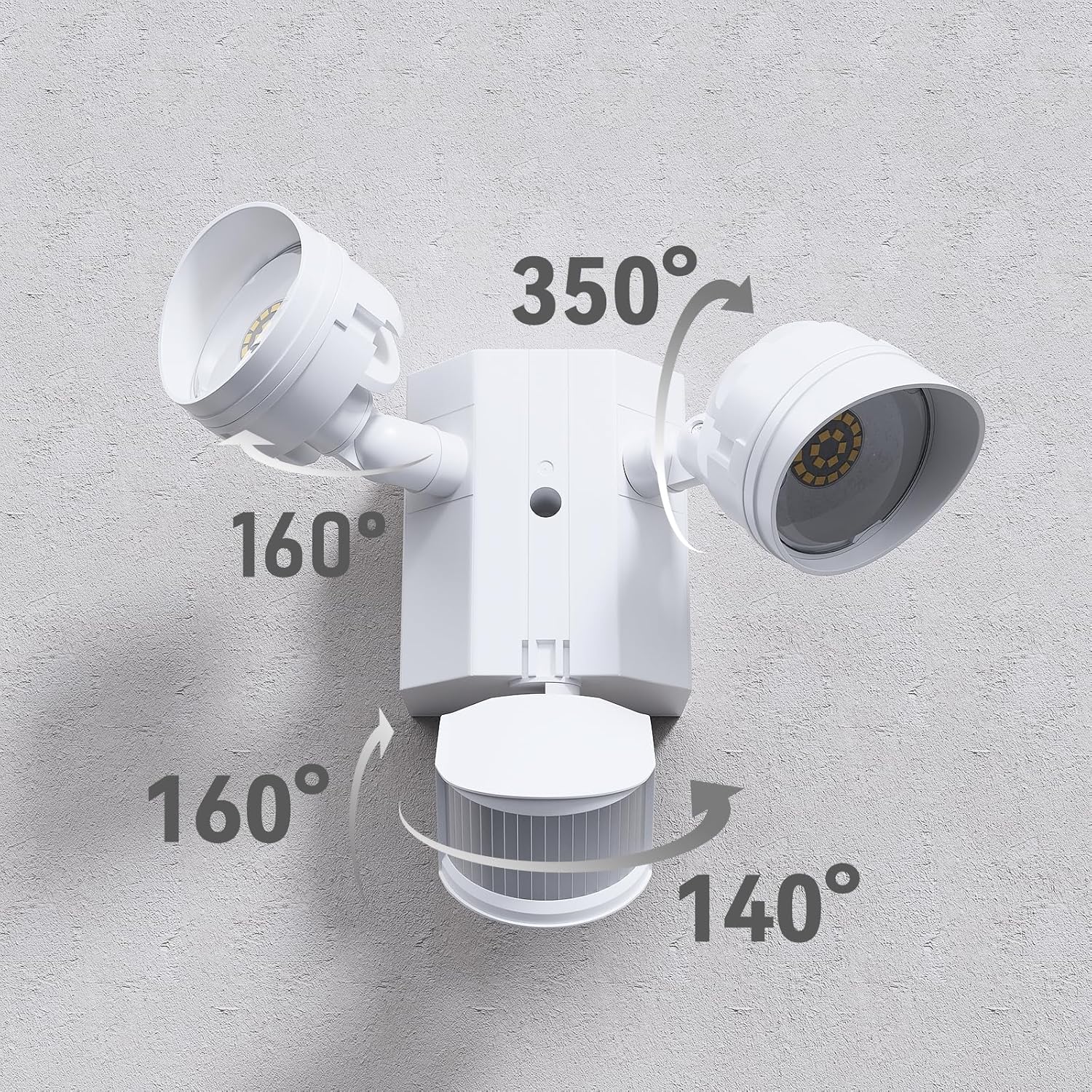
Image: Adjustable light heads and motion sensor for customized coverage.
6.2 Setting Lighting Modes and Sensitivity
The control panel on the motion sensor allows you to select the operating mode, light duration, and motion sensitivity.

Image: Motion sensor control panel with time and sensitivity settings.
- Configuració HORA: Adjusts how long the light stays on after motion is detected. Options are 30s, 60s, or 120s. The 'TEST' mode is for verifying sensor operation during daylight.
- SENSITIVITY Setting: Adjusts the motion detection range. Options are L (13-20ft), M (20-33ft), or H (33-45ft).
- Dusk to Dawn Mode (D2D): To activate this mode, set the TIME dial to the 'D2D' position. The light will remain on all night and turn off automatically at dawn.
- Mode sensor de moviment: To activate this mode, set the TIME dial to 30s, 60s, or 120s. The light will only activate at night when motion is detected.

Image: Motion detection range and coverage area.
7. Manteniment
- Neteja: Netegeu l'aparell amb un suau, damp tela. No utilitzeu netejadors abrasius ni dissolvents.
- Inspecció: Periodically inspect the fixture for any damage to the wiring, housing, or lenses.
- Prova GFCI: Test the GFCI outlets monthly by pressing the 'TEST' button, then the 'RESET' button. The power should trip and then reset. If it does not, the GFCI may be faulty and should be replaced.
8. Solució De Problemes
| Problema | Causa possible | Solució |
|---|---|---|
| La llum no s'encén a la nit. | No power; Sensor set to 'TEST' mode; Ambient light too high; Faulty sensor. | Check circuit breaker; Ensure TIME dial is not on 'TEST'; Relocate fixture or adjust sensor; Contact support. |
| La llum es manté encesa durant el dia. | Sensor is covered or obstructed; Wiring error; Faulty sensor. | Clear obstruction from sensor; Verify wiring connections; Contact support. |
| Light turns on too frequently or not enough. | Sensitivity setting is too high/low; Sensor is aimed incorrectly. | Adjust SENSITIVITY dial; Reposition sensor to cover desired area. |
| GFCI outlets are not working. | GFCI tripped; No power; Faulty GFCI. | Press 'RESET' button on GFCI; Check circuit breaker; Contact support. |
9. Especificacions
- Marca: LEONITA
- Número de model: A-65487
- Wattage: 30W
- Brillantor: 2800 lúmens
- Temperatura de color: 5000K de llum del dia
- Voltage: 120 V
- Material: Alumini, Policarbonat
- Color: Blanc
- Ús interior/exterior: A l'aire lliure
- Nivell de resistència a l'aigua: Waterproof (Wet Location)
- Temperatura de funcionament: -4 °F a 104 °F
- Dimensions (L x A x A): 8.62" x 6.57" x 5.98" (219 mm x 167 mm x 152 mm)
- Certificacions: ETL, FCC, UL Listed

Imatge: Dimensions del producte.
10. Garantia
This LEONLITE product comes with a 3-year manufacturer's warranty from the date of purchase. The warranty covers defects in materials and workmanship under normal use. Please retain your proof of purchase for warranty claims.
11. Suport
For technical assistance, troubleshooting not covered in this manual, or warranty inquiries, please contact LEONLITE customer support through their official website or the retailer where the product was purchased. Please have your model number (A-65487) and purchase date available when contacting support.