
1. Introducció
Thank you for choosing the Yoosee YB-93 Mini IP WiFi Camera. This manual provides essential information for the proper installation, operation, and maintenance of your security camera. Please read this manual thoroughly before using the product to ensure optimal performance and safety.
The Yoosee YB-93 is a versatile wireless security camera designed for indoor use, offering a 360-degree panoramic view, high-definition video recording, night vision, motion detection, and two-way audio communication. It connects via Wi-Fi and can be controlled and monitored remotely via a smartphone or tablet application.
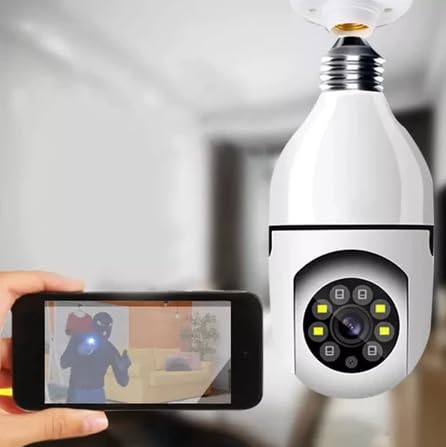
Image 1.1: Yoosee YB-93 Mini IP WiFi Camera and E27 socket adapter. This image shows the camera unit, which resembles a light bulb, alongside a separate E27 screw-in socket adapter, highlighting its design for easy installation into standard light fixtures.
2. Producte acabatview
2.1 Característiques clau
- Vídeo d'alta definició: 2.0 Megapixel (1280x960P) resolution for clear imaging, with 1080p video capture.
- Panoràmica de 360 graus View: Pan and Tilt functionality for comprehensive area coverage.
- Visió nocturna: Equipped with IR LEDs for clear monitoring in low-light conditions.
- Detecció de moviment: Alerts and recording triggered by detected movement.
- Àudio bidireccional: Micròfon i altaveu integrats per a la comunicació.
- Connectivitat Wi-Fi: Wireless connection (IEEE802.11b/g/n) for remote access.
- Emmagatzematge local: Supports Micro SD card up to 128GB for video recording.
- Fàcil instal·lació: Designed for standard E27 light bulb sockets.
2.2 Components de la càmera

Image 2.1: Labeled components of the Yoosee YB-93 Camera. This diagram identifies key parts including the E27 power connector, built-in WiFi antenna, microphone (MIC), white and IR LEDs, camera lens, light sensor, reset button, MicroSD card slot, and speaker.
- E27 Power Connector: Standard screw-in base for power supply.
- Built-in WiFi Antenna: For wireless network connection.
- MIC (Micròfon): Captures audio for two-way communication and recording.
- White and IR LEDs: Provide illumination for night vision and potentially additional lighting.
- Lent de la càmera: Captura vídeo footage.
- Sensor de llum: Detects ambient light levels to activate night vision.
- Reset Button & MicroSD Card Slot: Used for factory reset and local storage.
- Ponent: Sortides d'àudio per a la comunicació bidireccional.
3. Instruccions de configuració
3.1 Instal·lació
The Yoosee YB-93 camera is designed for easy installation into a standard E27 light bulb socket. Ensure the power to the socket is turned off before installation.
- Prepareu el sòcol: Ensure the E27 light bulb socket is clean and dry.
- Cargol a la càmera: Gently screw the camera into the E27 socket until it is secure. Do not overtighten.
- Encès: Turn on the power to the E27 socket. The camera will power on and initiate its self-test. You may hear a voice prompt indicating it is ready for connection.

Image 3.1: Easy installation into an E27 standard base. This image illustrates the simple process of screwing the camera into a standard E27 light bulb socket, emphasizing its user-friendly design.
3.2 App Download and Initial Connection
To operate the camera, you need to download the Yoosee or YYP2P application on your smartphone or tablet.
- Descarregar l'aplicació: Cerca "Yoosee" or "YYP2P" in your device's app store (Google Play Store for Android, Apple App Store for iOS) and install it.
- Registre del compte: Obre l'aplicació i segueix les instruccions que apareixen a la pantalla per registrar un compte nou o iniciar la sessió si ja en tens un.
- Afegeix un dispositiu: Tap the "+" icon or "Add Device" option in the app. Select the method for adding your camera (e.g., "Add via Wi-Fi connection" or "Scan QR code" if available on the camera/packaging).
- Connecta't a Wi-Fi: Follow the app's prompts to connect the camera to your 2.4GHz Wi-Fi network. Ensure your phone is connected to the same Wi-Fi network during setup.
- Configuració completa: Un cop connectat, pots posar nom a la teva càmera i començar a fer directe viewing.
If you encounter issues during setup, refer to the Troubleshooting section or use the camera's reset button (refer to Image 2.1 for location).
4. Instruccions de funcionament
The Yoosee YB-93 camera is controlled entirely through the Yoosee or YYP2P mobile application.
4.1 Viu View i Control
- Accés al canal en directe: Open the app and select your camera from the device list to view la transmissió de vídeo en directe.
- Panoràmica i inclinació: Swipe your finger across the live view screen to remotely adjust the camera's horizontal (pan) and vertical (tilt) angles, providing a 360-degree coverage.
- Zoom digital: Pinch in/out on the live view to digitally zoom in or out of the image.
- Àudio bidireccional: Toca la icona del micròfon a l'aplicació per parlar a través de l'altaveu de la càmera i escoltar l'àudio del micròfon de la càmera.
- Visió nocturna: The camera automatically switches to night vision mode in low light. You can usually manually toggle this setting in the app if needed.
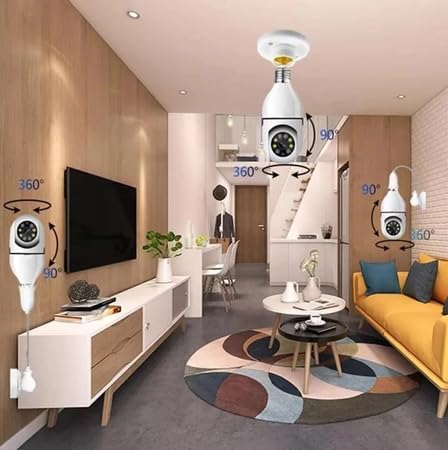
Image 4.1: Camera demonstrating 360-degree coverage in a room. This image shows the camera installed in various positions within a room, illustrating its ability to pan and tilt for full 360-degree surveillance.
4.2 Enregistrament i emmagatzematge
- Targeta micro SD: Insert a Micro SD card (up to 128GB, Class 10 recommended) into the designated slot (refer to Image 2.1). The camera will automatically begin recording based on your app settings.
- Gravació de detecció de moviment: Enable motion detection in the app settings. The camera will record video clips when motion is detected and send alerts to your phone.
- Emmagatzematge al núvol: The app may offer optional cloud storage services for recorded footage (subscription may be required).
- Reproducció: Access recorded videos via the app's playback feature, typically found in the camera's settings or timeline view.

Image 4.2: Key features of the Yoosee YB-93 Camera. This graphic highlights features such as Full HD 1080P, compatibility with Tuya, remote pan & tilt, Wi-Fi connection, light function, motion detection, remote viewing, and a Micro SD card slot.
5. Manteniment
- Neteja: Netegeu suaument la lent i el cos de la càmera amb un drap suau i sec. No utilitzeu productes químics agressius ni netejadors abrasius.
- Actualitzacions de firmware: Periodically check the Yoosee/YYP2P app for available firmware updates. Keeping your camera's firmware updated ensures optimal performance and security.
- Cicle d'alimentació: If the camera becomes unresponsive, try turning off the power to the E27 socket for a few seconds, then turning it back on.
6. Solució De Problemes
- La càmera no es connecta a la Wi-Fi:
- Ensure your Wi-Fi network is 2.4GHz. This camera does not support 5GHz Wi-Fi.
- Comproveu l'exactitud de la contrasenya del Wi-Fi.
- Acosteu la càmera al router Wi-Fi.
- Perform a factory reset using the reset button (refer to Image 2.1) and try setup again.
- Sense canal de vídeo:
- Verifiqueu que la càmera estigui engegada i connectada a la Wi-Fi.
- Comproveu la vostra connexió a Internet.
- Reinicieu la càmera i l'aplicació.
- Motion detection alerts not working:
- Assegureu-vos que la detecció de moviment estigui activada a la configuració de l'aplicació.
- Revisa la configuració de notificacions de l'aplicació al telèfon.
- Ajusta la sensibilitat de detecció de moviment.
- Micro SD card not recording:
- Ensure the SD card is inserted correctly and formatted within the app.
- Check if the SD card is full; consider enabling loop recording or replacing it.
- Verifica la configuració de gravació a l'aplicació.
7. Especificacions
| Característica | Especificació |
|---|---|
| Nom del model | YB-93 (YOOSEE or YYP2P) |
| Tecnologia de connectivitat | Wireless (Wi-Fi IEEE802.11b/g/n) |
| Ús interior/exterior | Interior |
| Dispositius compatibles | Smartphone, tauleta |
| Tipus de muntatge | Presa E27 |
| Color | Blanc |
| Material | Plàstic |
| Nivell de resistència a l'aigua | Water Repellent (Not waterproof for outdoor use) |
| Formulari d'article | Round (Bulb-shaped) |
| Resolució | 2 MP (1280x960P / 1080p video capture) |
| Font d'alimentació | Electric with cord (via E27 socket) |
| Voltage | 110-220 Volts (Bivolt) |
| Piles necessàries | No |
| Viewangle ing | 360 graus |
| Tipus d'enfocament | Enfocament automàtic |
| Tipus de zoom | Zoom digital |
| Compatibilitat màxima amb targetes SD | 128 GB |
| Dimensions | 10 x 21 x 25 cm (approximate packaging/product dimensions) |
8. Garantia i Suport
This product is covered by a standard manufacturer's warranty. Please refer to your purchase documentation for specific warranty terms and conditions. For technical support, troubleshooting assistance, or warranty claims, please contact your retailer or the manufacturer's customer service through the contact information provided at the point of purchase.
Always ensure you are using the latest version of the Yoosee or YYP2P application for the best experience and access to the most current features and security updates.