
Introducció
This manual provides detailed instructions for the setup, operation, and maintenance of your Tivoli Audio PAL BT (Gen 3) Portable Bluetooth FM Radio. Please read this manual thoroughly before using your device to ensure proper function and longevity.

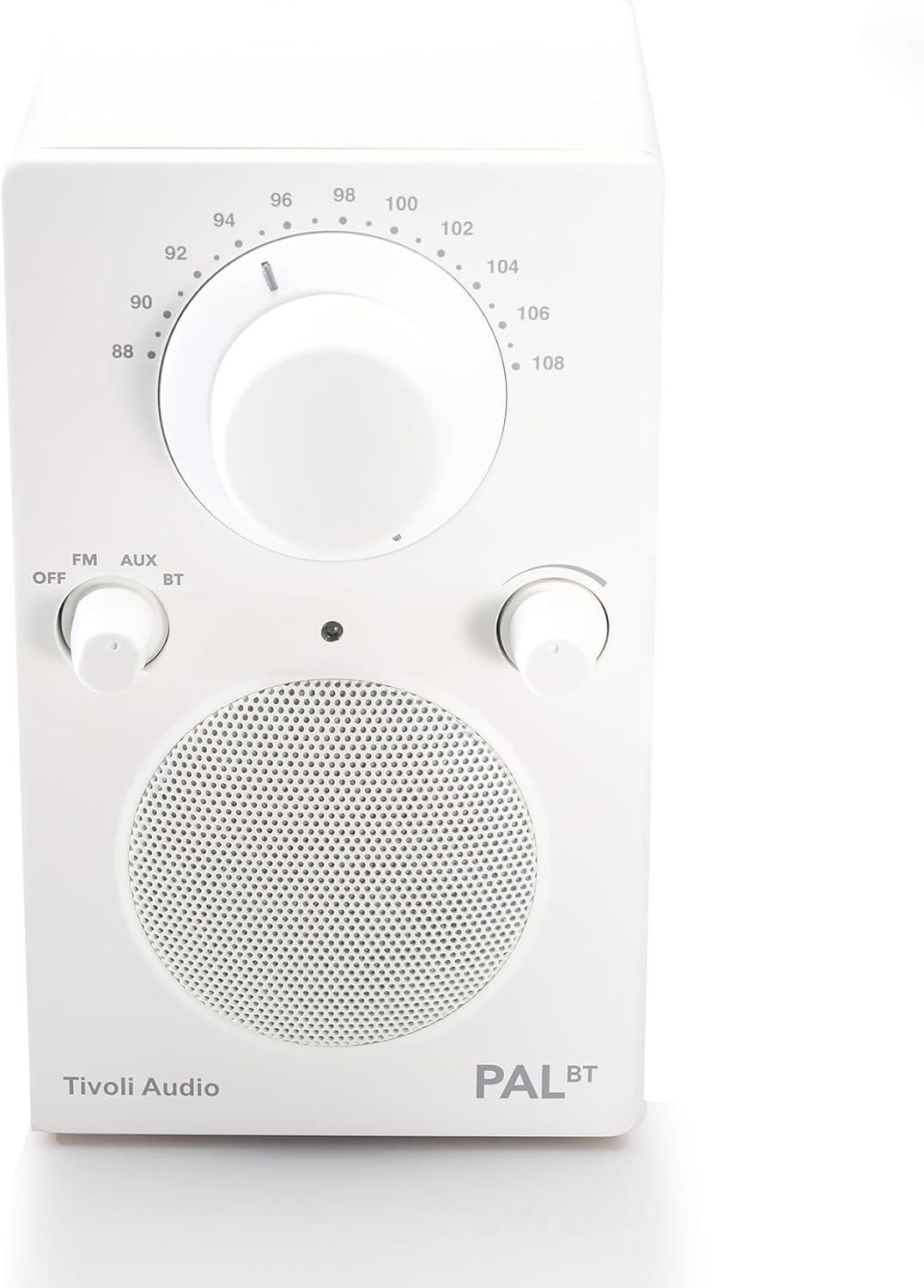
Image: The Tivoli Audio PAL BT (Gen 3) radio, showcasinel seu disseny compacte i els seus controls frontals.
Contingut del paquet
Verifiqueu que tots els elements siguin presents al vostre paquet:
- Tivoli Audio PAL BT (Gen 3) Portable Bluetooth FM Radio
- Cable de càrrega USB-C
- Manual del propietari (aquest document)
Configuració
1. Carregant la bateria
The PAL BT (Gen 3) features a built-in rechargeable battery. Before first use, fully charge the device.
- Locate the USB-C charging port on the back or side of the unit.
- Connect the provided USB-C cable to the radio and to a compatible USB power adapter (not included) or a powered USB port.
- The charging indicator light will illuminate. Allow several hours for a full charge. A full charge provides over 14 hours of playback.
Imatge: Lateral view of the Tivoli Audio PAL BT (Gen 3), illustrating its portable design and potential location for the USB-C charging port.
2. Encès / apagat
Use the multi-function knob on the front of the unit to control power and source selection.
- To power on, rotate the knob from "OFF" to "FM", "AUX", or "BT".
- To power off, rotate the knob to "OFF".
Instruccions de funcionament
1. Controls sobreview
The PAL BT (Gen 3) features three main control knobs:
- Source/Power Knob: Selects between OFF, FM, AUX, and Bluetooth (BT) modes.
- Pom d'afinació: Adjusts the FM radio frequency.
- Pom de volum: Controls the audio output level.

Imatge: Frontal view of the PAL BT (Gen 3) highlighting the control knobs and FM frequency dial.
2. Funcionament de la ràdio FM
- Rotate the Source/Power knob to "FM".
- Esteneu l'antena telescòpica per a una recepció òptima.
- Rotate the Tuning knob to select your desired FM station.
- Adjust the Volume knob to your preferred listening level.
3. Bluetooth (BT) Pairing
The PAL BT (Gen 3) uses Bluetooth 5.0 for wireless audio streaming.
- Rotate the Source/Power knob to "BT". The Bluetooth indicator light will begin to flash, indicating it is in pairing mode.
- Al dispositiu amb Bluetooth (per exemple, un telèfon intel·ligent o una tauleta), aneu a la configuració de Bluetooth i activeu-lo.
- Cerca available devices. You should see "Tivoli PAL BT" or similar in the list.
- Select "Tivoli PAL BT" to connect. Once paired, the Bluetooth indicator light on the radio will glow solid.
- You can now stream audio from your device to the PAL BT (Gen 3).
4. Entrada auxiliar
Connect external audio sources using the auxiliary input.
- Rotate the Source/Power knob to "AUX".
- Connect a 3.5mm audio cable (not included) from your external audio device's headphone jack or line-out to the AUX input port on the PAL BT (Gen 3).
- Reprodueix àudio des del teu dispositiu extern.
- Adjust the Volume knob on the PAL BT (Gen 3) and your external device for optimal sound.
5. Sortida d'auriculars
For private listening, connect headphones to the dedicated output.
- Plug a standard 3.5mm headphone jack into the headphone output port.
- The internal speaker will mute automatically.
- Adjust the Volume knob for comfortable listening.
Manteniment
Neteja
To maintain the appearance of your PAL BT (Gen 3):
- Desconnecteu sempre la unitat abans de netejar-la.
- Feu servir un drap suau i sec per netejar les superfícies.
- Avoid using abrasive cleaners, solvents, or strong detergents, as these can damage the finish.
Cura de la bateria
Per maximitzar la durada de la bateria:
- Eviteu descarregar completament la bateria amb freqüència.
- If storing the unit for an extended period, charge it to approximately 50% every few months.
- No exposeu la unitat a temperatures extremes.
Resistència a la intempèrie
The PAL BT (Gen 3) is designed with a weather-resistant housing, making it suitable for outdoor use. However, it is not waterproof. Avoid submerging the unit in water or exposing it to heavy rain for prolonged periods.
Resolució de problemes
| Problema | Causa possible | Solució |
|---|---|---|
| Sense poder | Battery discharged; Unit not turned on. | Charge the battery using the USB-C cable; Rotate the Source/Power knob to an active source (FM, AUX, BT). |
| Sense so | Volum massa baix; Font incorrecta seleccionada; Auriculars connectats. | Augmenta el volum; Selecciona la font correcta; Desconnecta els auriculars. |
| Mala recepció FM | Antena no estesa; Senyal feble. | Esteneu completament l'antena telescòpica; Reposicioneu la ràdio per obtenir un millor senyal. |
| Bluetooth no emparellat | Radio not in pairing mode; Device too far; Previously paired device connected. | Ensure radio is in BT mode and indicator is flashing; Move device closer; Disconnect from other devices or forget "Tivoli PAL BT" on your device and re-pair. |
Especificacions
- Número de model: PALBT3-3059-NA
- Connectivitat: Bluetooth 5.0, FM Tuner, Auxiliary Input
- Font d'alimentació: Alimentat per bateria (càrrega USB-C)
- Durada de la bateria: Over 14 hours (playback)
- Dimensions (L x A x A): 3.6" x 4.5" x 6"
- Característiques especials: Portable, Weather-Resistant Housing
- Components inclosos: Manual del propietari
Informació de la garantia
The Tivoli Audio PAL BT (Gen 3) comes with a 2 any de garantia from the date of purchase. This warranty covers manufacturing defects and workmanship under normal use. Please retain your proof of purchase for warranty claims. For full warranty terms and conditions, please visit the official Tivoli Audio weblloc o contacteu amb el servei d'atenció al client.
Atenció al client
If you encounter any issues not covered in this manual or require further assistance, please contact Tivoli Audio customer support:
- Weblloc: www.tivoliaudio.com/support
- Correu electrònic: Refer to the Tivoli Audio weblloc per obtenir informació de contacte.
- Telèfon: Refer to the Tivoli Audio weblloc per obtenir informació de contacte.
When contacting support, please have your product model number (PAL BT (Gen 3)) and purchase information ready.