
1. Introducció
Thank you for choosing the ANJIELO SMART 4-Wire Video Intercom System. This manual provides detailed instructions for the installation, operation, and maintenance of your new video doorbell system. Please read this manual thoroughly before installation and use to ensure proper function and safety. Keep this manual for future reference.
2. Producte acabatview
The ANJIELO SMART 4-Wire Video Intercom System is designed to enhance home security and communication. It features a 7-inch indoor monitor and an outdoor doorbell unit, offering two-way audio, video monitoring, and ID card unlocking capabilities. The system supports flexible configurations for various residential needs.
Característiques principals:
- Flexible Device Configuration: Supports one outdoor camera connected to two to twelve indoor displays, accommodating buildings with varying numbers of residents. Each household's display operates independently, ensuring privacy.
- Two-Way Video Intercom: When a visitor rings the doorbell, the indoor screen automatically displays the entrance area. Press the answer button to initiate two-way communication. The screen automatically turns off after 60 seconds if the call is unanswered or ended.
- Visió nocturna intel·ligent: Equipped with ambient light detection technology, it automatically activates night vision mode in low-light conditions. Clear images of visitors are displayed even at night for quick identification.
- All-Weather Waterproof Design: Constructed from aluminum alloy with an IP65 protection rating, designed to withstand rain and snow.
- Pantalla HD de 7 polzades: Features a slim touch screen supporting hands-free communication. The outdoor unit includes an infrared sensor that triggers monitoring without pressing the doorbell, keeping you informed of activity at the door.
- Convenient Installation Integration: Includes a comprehensive installation kit for quick setup. The system is compatible with electronic door locks; adding a power regulator allows for centralized management of electric locks.
3. Contingut del paquet
Si us plau, comproveu el contingut del paquet per assegurar-vos que tots els elements hi són i no estan danyats:
- Outdoor Doorbell Unit
- Indoor Monitor Unit
- Adaptador d'alimentació
- Font d'alimentació
- Standard 5-meter Connection Cable
- Installation Kit (screws, mounting brackets, etc.)
- Manual d'usuari
4. Informació de seguretat
Per evitar danys al producte o lesions a vostè o a altres persones, observeu les següents precaucions de seguretat:
- Seguretat elèctrica: Ensure power is disconnected before installation or maintenance. All wiring should be performed by a qualified electrician if you are unsure.
- Entorn d'instal·lació: Install the outdoor unit in a location protected from direct sunlight and heavy rain, even though it is waterproof. Ensure the indoor monitor is installed in a dry, stable environment.
- Gestió de cables: Route cables carefully to avoid tripping hazards or damage. Do not pinch or cut cables.
- Temperatura de funcionament: Do not operate the device outside its specified temperature range (-30°C to 60°C).
- Neteja: Utilitzeu un drap suau i sec per netejar. No utilitzeu netejadors abrasius ni dissolvents.
5. Configuració i instal·lació
This section guides you through the physical installation and initial setup of your video intercom system.
5.1. Component Dimensions
Refer to the following diagrams for the dimensions of the indoor monitor and outdoor doorbell unit to plan your installation locations.
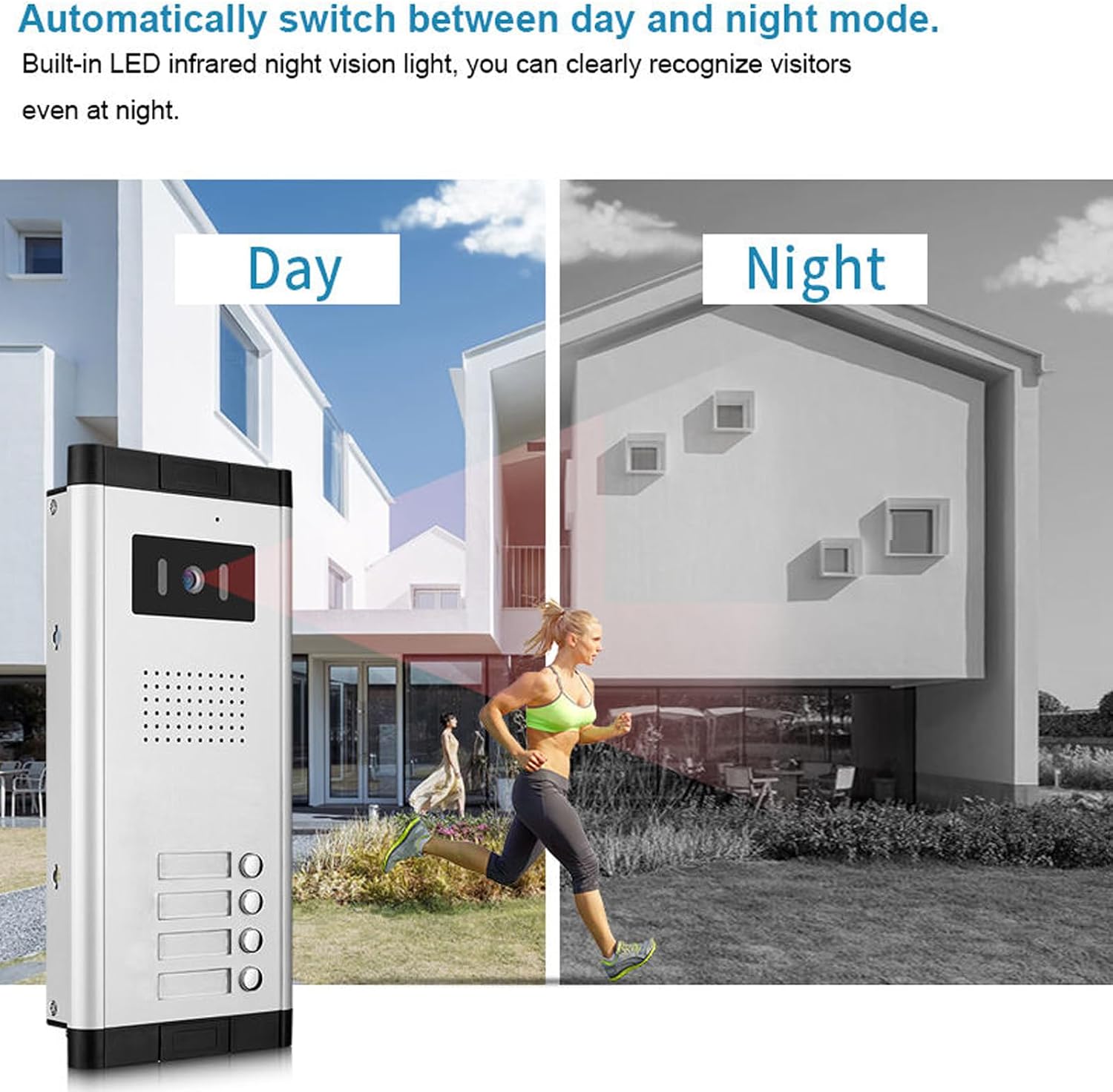
Image: Dimensions of the ANJIELO SMART indoor monitor (205mm x 118mm) and outdoor doorbell unit (275mm x 123mm x 44mm).
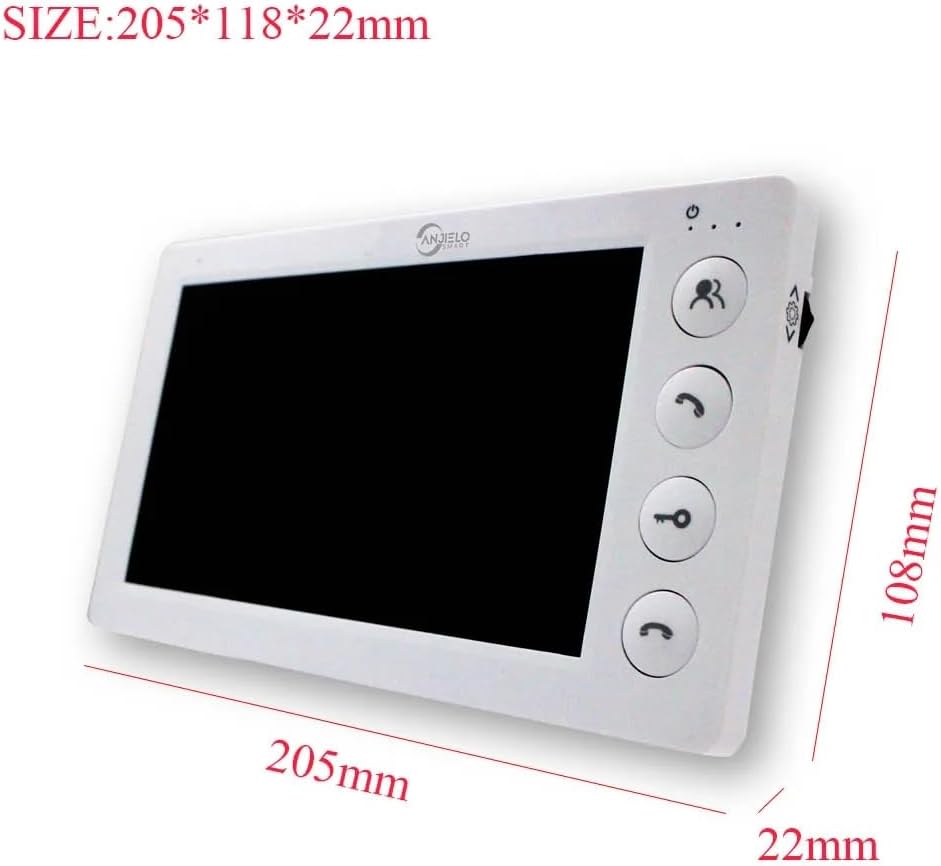
Image: Detailed dimensions of the ANJIELO SMART indoor monitor, showing 205mm length, 118mm width, and 22mm thickness.
5.2. Esquema de cablejat
The system uses a 4-wire cable for connection between the outdoor unit and indoor monitor. Ensure correct polarity and secure connections. A standard 5-meter cable is included, but longer cables may be required for some installations.
(Note: A detailed wiring diagram is typically provided in the physical manual. Please refer to the diagram included with your product for specific connection points.)
5.3. Mounting the Outdoor Unit
- Choose a suitable location near your entrance, at a height that allows visitors to easily reach the doorbell button and the camera to capture faces clearly.
- The outdoor unit is designed for flush-mounted installation. Mark the drilling points using the mounting bracket as a template.
- Drill holes and insert wall plugs. Secure the mounting bracket to the wall.
- Connect the 4-wire cable and power supply wires to the outdoor unit as per the wiring diagram.
- Mount the outdoor unit onto the bracket and secure it.
5.4. Mounting the Indoor Monitor
- Select a convenient indoor location, such as a hallway or living room, where the monitor is easily accessible.
- The indoor monitor is designed for surface-mounted installation. Mark the drilling points using its mounting bracket.
- Drill holes, insert wall plugs, and secure the mounting bracket.
- Connect the 4-wire cable from the outdoor unit and the power adapter to the indoor monitor.
- Attach the indoor monitor to its mounting bracket.
5.5. Connexió d'alimentació
Connect the power adapter to the indoor monitor and then plug it into a standard electrical outlet. The system will power on automatically.
5.6. Electronic Lock Integration
The system is compatible with electronic door locks. For integration, an additional power regulator may be required to manage electric locks centrally. Consult a professional for complex electronic lock setups.
6. Instruccions de funcionament
This section details how to use the various functions of your ANJIELO SMART video intercom system.
6.1. Contestar una trucada
- When a visitor presses the doorbell button on the outdoor unit, the indoor monitor will ring and automatically display the live video feed from the outdoor camera.
- Premeu el botó Respon button (typically a phone icon) on the indoor monitor to begin two-way audio communication with the visitor.
- Per finalitzar la conversa, premeu la tecla Respon button again. If no action is taken, the screen will automatically turn off after 60 seconds.
6.2. Obrint la porta
The system supports one-key unlocking for connected electronic door locks.
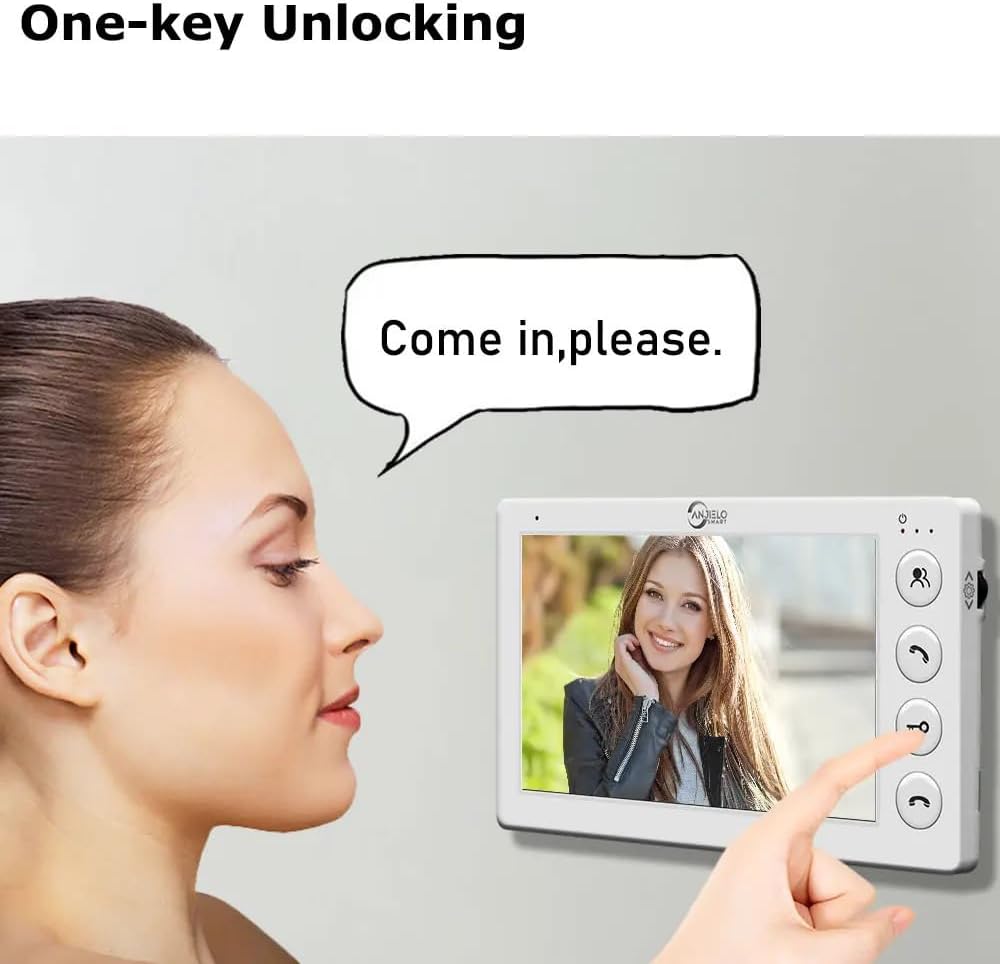
Image: The indoor monitor displaying a visitor and a finger pressing the unlock key icon.
- Durant una trucada o mentre monitoritzeu la unitat exterior, premeu el botó Desbloqueja button (typically a key icon) on the indoor monitor.
- The connected electronic door lock will momentarily open.
6.3. Monitoring the Outdoor Area
Pots manualment view the outdoor area at any time.
- Premeu el botó Monitor button (typically an eye icon) on the indoor monitor to view the live feed from the outdoor camera.
- The outdoor unit's infrared sensor can also automatically trigger monitoring if activity is detected, even without the doorbell being pressed.
6.4. Smart Night Vision
The system automatically adapts to lighting conditions, providing clear visibility day and night.
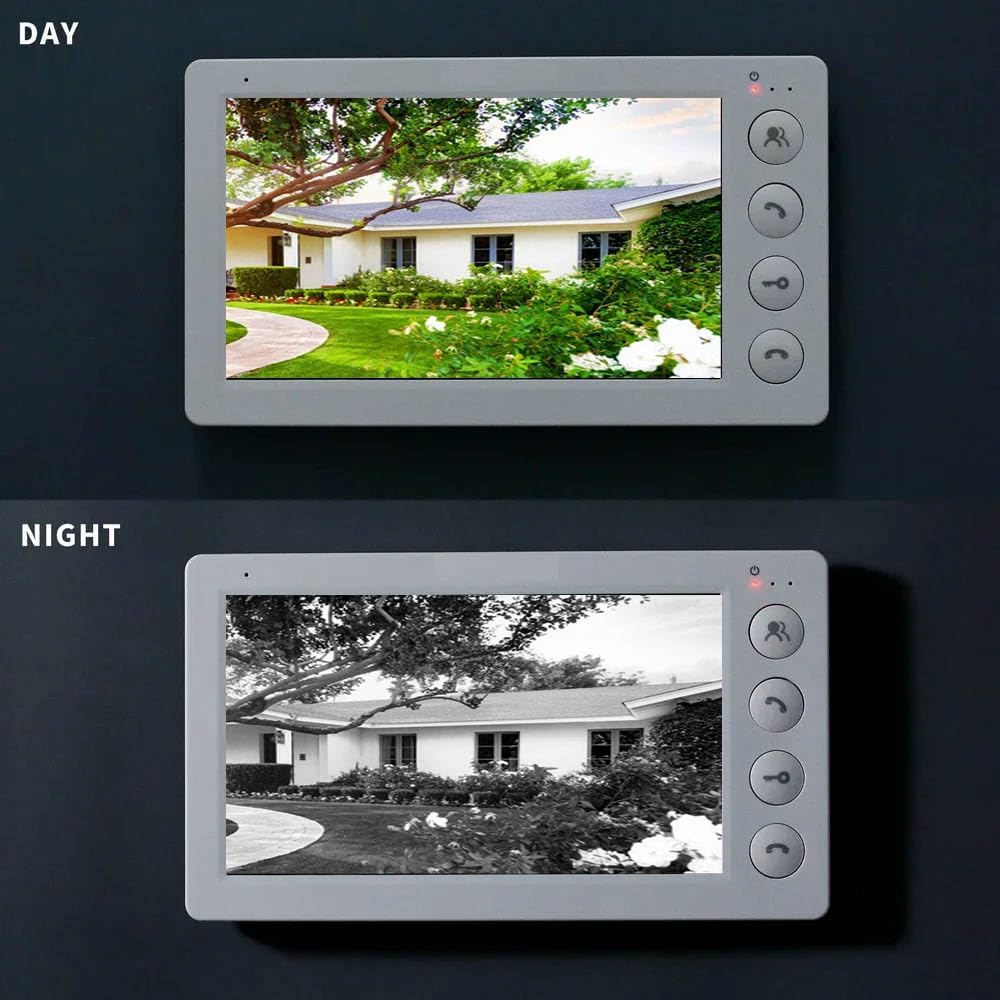
Image: The outdoor unit automatically switching between day and night vision modes based on ambient light.
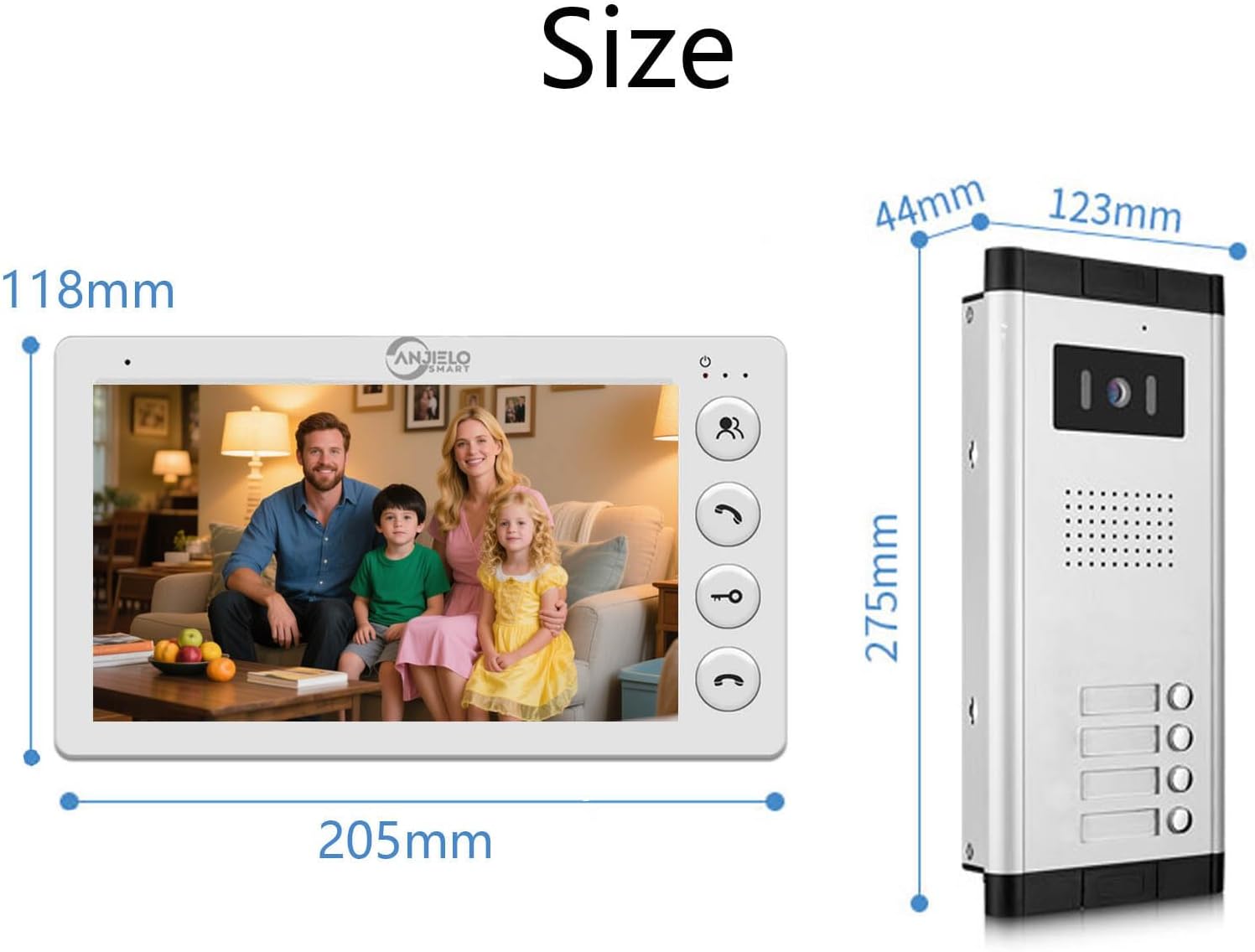
Image: The indoor monitor showing a clear color view during the day and a clear black and white view a la nit.
The outdoor unit features built-in LED infrared night vision lights. When ambient light is low, the system automatically switches to night vision mode, providing a clear black and white image on the indoor monitor.
6.5. Adjusting System Parameters
The indoor monitor allows for adjustment of various system settings.
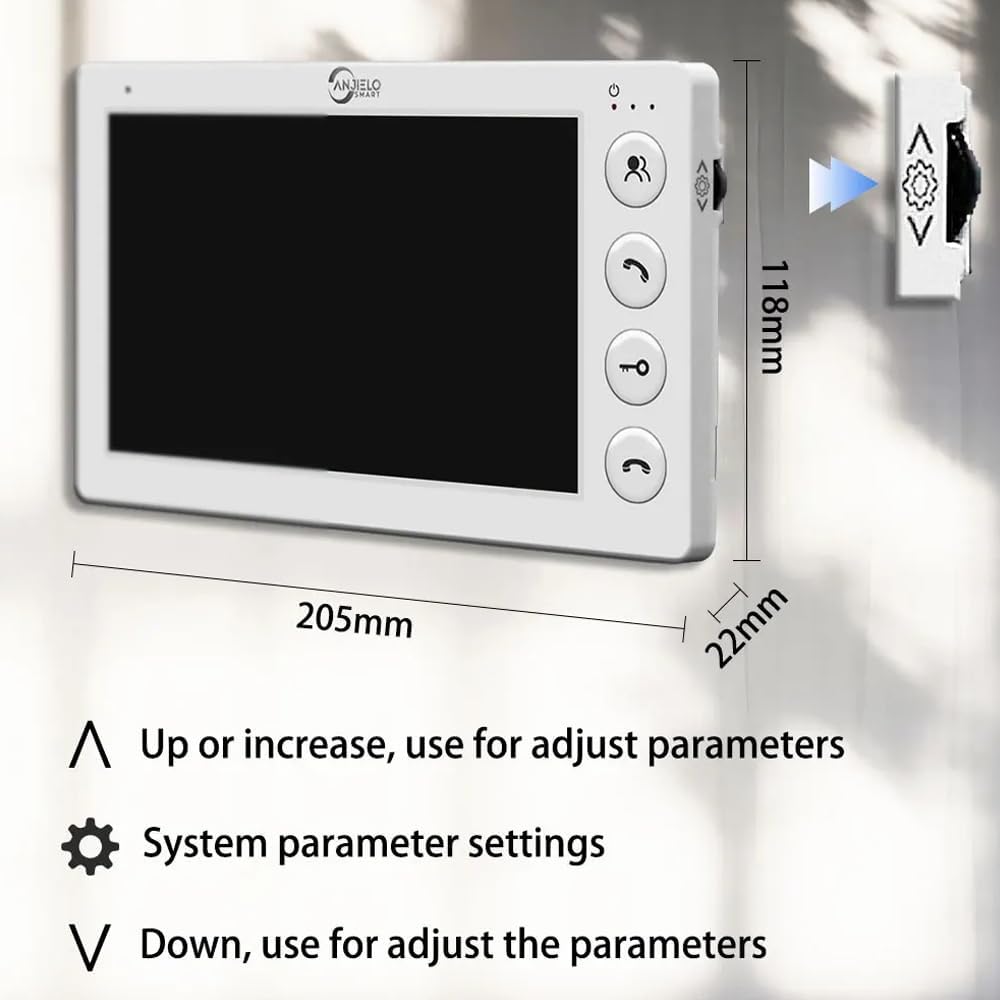
Image: The indoor monitor showing buttons for adjusting parameters: 'Up' or 'Increase' (arrow up), 'System parameter settings' (gear icon), and 'Down' or 'Decrease' (arrow down).
Utilitza el Up i Avall arrow buttons to navigate menus and adjust values. Press the Configuració dels paràmetres del sistema button (gear icon) to access the settings menu, which may include options for ringtone, volume, display brightness, and other system configurations.
7. Manteniment
Regular maintenance ensures the longevity and optimal performance of your video intercom system.
- Neteja: Wipe the indoor monitor and outdoor unit with a soft, slightly damp drap. No utilitzeu productes químics agressius, dissolvents ni netejadors abrasius.
- Comproveu les connexions: Inspeccioneu periòdicament totes les connexions del cablejat per assegurar-vos que estiguin ben fixades i que no presentin corrosió ni danys.
- Lent de la càmera: Keep the outdoor camera lens clean and free from dust, dirt, or smudges to ensure clear video quality.
- Actualitzacions de programari: Comproveu el del fabricant weblloc web per a qualsevol actualització de firmware disponible per al vostre sistema.
8. Solució De Problemes
If you encounter any issues with your ANJIELO SMART video intercom system, refer to the following troubleshooting guide:
| Problema | Causa possible | Solució |
|---|---|---|
| No power to indoor monitor | Power adapter unplugged or faulty; power outlet not working. | Check power adapter connection. Test the outlet with another device. Replace adapter if faulty. |
| No video from outdoor unit | Loose or incorrect 4-wire connection; damaged cable; faulty outdoor unit camera. | Verify all 4-wire connections are secure and correct. Inspect cable for damage. Contact support if issue persists. |
| No audio during intercom | Microphone or speaker issues; volume set too low; incorrect wiring. | Check volume settings on the indoor monitor. Ensure 4-wire connections are correct. |
| El desbloqueig de la porta no funciona | Electronic lock not connected properly; power regulator issue; faulty unlock button. | Verify connection to the electronic lock. Check power regulator if installed. |
| Mala qualitat de visió nocturna | Dirty camera lens; insufficient infrared illumination; ambient light interference. | Clean the camera lens. Ensure no obstructions are blocking the infrared LEDs. |
If you cannot resolve the issue using this guide, please contact ANJIELO SMART customer support for assistance.
9. Especificacions
Detailed technical specifications for the ANJIELO SMART 4-Wire Video Intercom System:
- Marca: ANJIELO SMART
- Número de model: 65201+64705-W
- Tecnologia de connectivitat: Wired (4-wire cable)
- Font d'alimentació: Electric Cable (DC 15V 1.2A from indoor monitor)
- Tipus d'instal·lació: Outdoor Unit: Flush-mounted; Indoor Monitor: Surface-mounted
- Interval màxim: 100 metres
- Usos recomanats del producte: Outdoor Security, Home Security
Especificacions de la unitat exterior:
- Sensor de càmera: 1.0 MP, 1/10.2 cm CMOS
- Lent: 3.6 mm
- Viewangle: 90 graus
- Rainproof & Night Vision: IP65 rated, 10m night vision
- Dimensions (L x A x A): 275 x 125 x 45 mm
- Material: Aliatge d'alumini
- Temperatura de funcionament: -30 °C a 60 °C
Indoor Monitor Specifications:
- Mida de la pantalla: 7 polzades
- Tipus de control: Toca la tecla
- Resolució: 800 x 480
- Funcions: 2-way intercom, Monitor, Unlock, Mute mode
- Dimensions (L x A x A): 205 x 108 x 22 mm
- Material: Panell de vidre
10. Garantia i Suport
For warranty information, please refer to the warranty card included with your product or visit the official ANJIELO SMART website. If you require technical support, have questions about installation, or need assistance with troubleshooting, please contact ANJIELO SMART customer service. Contact details can typically be found on the product packaging or the manufacturer's weblloc.