
Introducció
This manual provides detailed instructions for the installation, operation, and maintenance of your GAMDIAS Aura GC11 ARGB Mid-Tower PC Case. Please read this manual thoroughly before beginning installation to ensure proper setup and safe use of the product. The GAMDIAS Aura GC11 ARGB is designed to accommodate Mini-ITX, Micro-ATX, and ATX motherboards, featuring a bar-patterned mesh front panel for optimal airflow and four pre-installed 120mm ARGB fans.
Informació de seguretat
- Desconnecteu sempre l'alimentació de la presa de corrent abans d'instal·lar o treure qualsevol component per evitar descàrregues elèctriques.
- Manipuleu tots els components amb cura per evitar danys.
- Wear an anti-static wrist strap or frequently touch a grounded metal object to discharge static electricity before handling internal components.
- Mantingueu les peces petites i els materials d'embalatge fora de l'abast dels nens.
- Assegureu-vos que hi hagi una ventilació adequada al voltant de la carcassa de l'ordinador per evitar el sobreescalfament.
Contingut del paquet
Verifiqueu que tots els elements següents siguin presents al vostre paquet:
- GAMDIAS Aura GC11 ARGB Mid-Tower PC Case
- 4 x Pre-installed 120mm ARGB Fans
- Kit d'accessoris (cargols, separadors, brides per a cables)
- Manual d'usuari (aquest document)
Configuració i instal·lació
1. Desembalatge de la caixa
Carefully remove the PC case from its packaging. Inspect the case for any signs of damage during transit. Remove any protective films from the tempered glass panel.

Imatge: Anglesa view of the GAMDIAS Aura GC11 ARGB PC case, showcasing the tempered glass side panel and the distinctive bar-patterned mesh front panel.
2. Accés a l'interior
To access the interior of the case, locate and remove the thumbscrews securing the tempered glass side panel. Carefully lift and remove the panel. The opposite solid side panel can also be removed for cable management access.

Imatge: Interior view of the GAMDIAS Aura GC11 ARGB PC case, with the side panel removed, revealing the motherboard mounting area, fan cutouts, and cable management space.
3. Instal·lació de la placa base
- Install the necessary motherboard standoffs into the motherboard tray according to your motherboard's form factor (Mini-ITX, Micro-ATX, or ATX).
- Install your motherboard's I/O shield into the rear opening of the case.
- Col·loca amb cura la placa base sobre els separadors, alineant els forats dels cargols.
- Fixeu la placa base amb els cargols proporcionats.
4. Instal·lació de la font d'alimentació (PSU)
- Mount your PSU into the dedicated compartment at the bottom rear of the case.
- Fixeu la font d'alimentació amb els cargols de la part posterior de la carcassa.
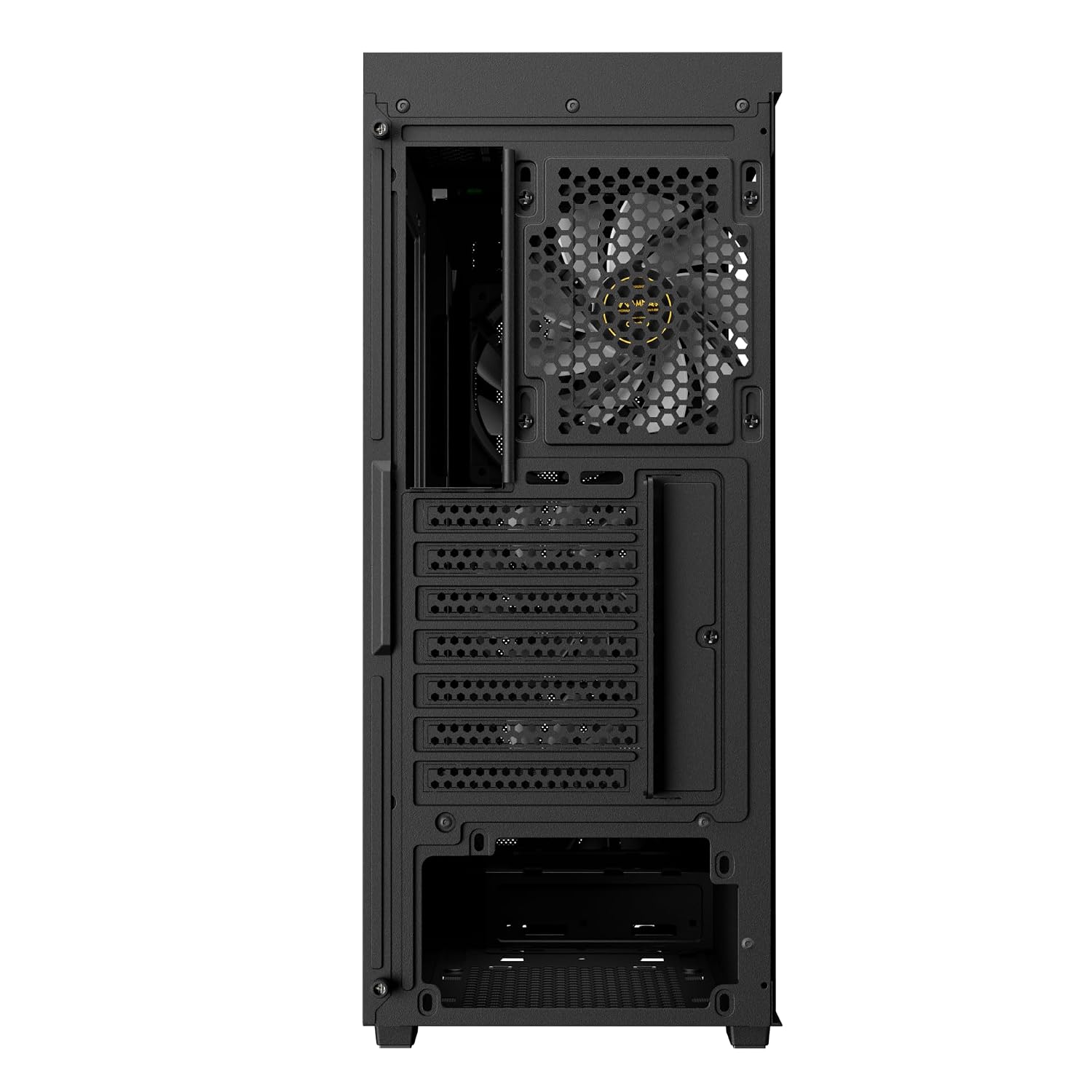
Imatge: Part posterior view of the GAMDIAS Aura GC11 ARGB PC case, highlighting the power supply unit mounting bracket at the bottom and the expansion slots for graphics cards and other components.
5. Instal·lació de la unitat d'emmagatzematge
The case supports multiple storage drives. Refer to the accessory kit for specific mounting hardware.
- SSD de 2.5 polzades: Mount SSDs to the designated trays or mounting points behind the motherboard tray.
- Discs durs de 3.5 polzades: Install HDDs into the drive cage located beneath the PSU shroud.
6. Graphics Card (VGA) and Expansion Card Installation
- Traieu les cobertes de les ranures d'expansió necessàries de la part posterior de la carcassa.
- Inseriu la targeta gràfica o altres targetes d'expansió a les ranures PCIe corresponents de la placa base.
- Fixeu les targetes amb cargols.
7. Cable Management and Front Panel Connections
Route all power and data cables through the cutouts in the motherboard tray for a clean build. Connect the front panel I/O cables (USB, HD Audio, Power, Reset, LED) to their corresponding headers on your motherboard. The case features a Type-C port, two USB 2.0 ports, HD Audio, and Reset button on the top panel.

Imatge: Part superior frontal view of the GAMDIAS Aura GC11 ARGB PC case, displaying the front I/O panel with Type-C, USB 2.0 ports, and audio jacks, along with the top magnetic dust filter.
8. Tancament del cas
Once all components are installed and cables are managed, reattach the side panels, starting with the solid panel, then the tempered glass panel. Secure them with the thumbscrews.
Instruccions de funcionament
1. First Power-On
After ensuring all connections are secure, connect your PC to a power outlet and press the power button on the top panel of the case. The pre-installed ARGB fans will illuminate, and your system should begin to boot.

Imatge: Frontal view of the GAMDIAS Aura GC11 ARGB PC case, with the four pre-installed ARGB fans visible and illuminated behind the bar-patterned mesh front panel.
2. Control del ventilador ARGB
The pre-installed ARGB fans are typically connected to a controller or directly to an ARGB header on your motherboard. Refer to your motherboard's manual or the fan controller's instructions for details on how to customize the lighting effects.
Manteniment
1. Neteja del filtre de pols
The GAMDIAS Aura GC11 ARGB case includes a magnetic dust filter on the top panel and a removable filter for the PSU intake. Regularly clean these filters to maintain optimal airflow and prevent dust buildup inside your system.
- Gently remove the magnetic dust filter from the top of the case.
- Slide out the PSU dust filter from the bottom rear of the case.
- Clean the filters using compressed air or by rinsing them with water. Ensure they are completely dry before reattaching.
2. Neteja general
Utilitzeu un suau, damp cloth to wipe down the exterior surfaces of the case. Avoid using harsh chemicals or abrasive materials that could damage the finish or tempered glass.
Resolució de problemes
No Power After Assembly
- Assegureu-vos que la font d'alimentació estigui engegada i connectada correctament a la presa de corrent.
- Verify that the 24-pin ATX and 8-pin CPU power cables are securely connected to the motherboard.
- Comproveu que el cable de l'interruptor d'alimentació del panell frontal estigui connectat correctament al capçal del panell frontal de la placa base.
Fans Not Spinning or ARGB Not Working
- Confirm that the fan power cables are connected to the motherboard or fan controller.
- Ensure ARGB cables are properly connected to the motherboard's ARGB header or the fan controller.
- Check your motherboard's BIOS/UEFI settings or ARGB software for fan and lighting control.
Problemes de sobreescalfament
- Ensure all case fans are spinning correctly and oriented for optimal airflow (intake at front, exhaust at rear/top).
- Clean all dust filters and internal components to remove dust buildup.
- Verifiqueu que el refrigerador de la CPU i els ventiladors de la GPU funcionin correctament.
Especificacions
| Característica | Detall |
|---|---|
| Marca | GAMDIAS |
| Nom del model | Aura GC11 ARGB |
| Tipus de cas | Torre mitja |
| Compatibilitat amb la placa base | Mini-ITX, Micro-ATX, ATX |
| Ventiladors preinstal·lats | 4 ventiladors ARGB de 120 mm |
| Mètode de refrigeració | Aire |
| Material de tancament | Metall, Vidre temperat |
| Ports d'E/S | 1 x Type-C, 2 x USB 2.0, 1 x HD Audio, 1 x Reset |
| Limitació d'alçada del refrigerador de la CPU | 160 mm |
| VGA Length Limitation | 300 mm |
| Limitació de longitud de la PSU | 150 mm |
| Internal Bays Quantity | 3 (for 2.5"/3.5" drives) |
| Característiques especials | Bar Patterned Mesh Front Panel, Magnetic Dust Filter |
| Pes de l'article | 4000 grams |
| Dimensions de l'article (D x W x H) | 46P x 20A x 40H centímetres |
| País d'origen | Xina |
Informació de la garantia
Aquest producte ve amb un 1 YEAR MANUFACTURER warranty. Please retain your proof of purchase for warranty claims. For detailed terms and conditions, refer to the official GAMDIAS weblloc o contacteu amb el servei d'atenció al client.
Suport
If you encounter any issues or have questions regarding your GAMDIAS Aura GC11 ARGB PC Case that are not covered in this manual, please contact GAMDIAS customer support. You can find contact information on the official GAMDIAS weblloc web o a través del vostre distribuïdor.
Manufacturer Contact Information: GAMDIAS TAIWAN, No. 113, Jian 2nd Rd., Zhonghe, Dist., New Taipei City 235, Taiwan
Importer Contact Information: Allway Distributions Pvt Ltd, No-49, H.B. Samajha Road, Baswangudi, Bengaluru- 560004, Contact -8904307700