
1. Configuració
1.1 Desembalatge i contingut del paquet
Carefully remove all items from the packaging. Ensure all components are present before proceeding with installation.
- Roku Select Series 55" 4K TV
- Stands and screws
- Control remot
- Manual d'usuari

Figure 1: Contents of the Roku Select Series 55-inch TV package.
1.2 Instal·lació física
The Roku Select Series TV can be installed using the included stands for table mounting or by using a compatible VESA wall mount (200 x 100 mm, sold separately).
Table Mount Installation:
- Col·loqueu la pantalla del televisor amb la pantalla cap avall sobre una superfície suau i neta per evitar ratllades.
- Attach the two TV stands to the designated slots on the bottom of the TV using the provided screws. Ensure they are securely fastened.
- Aixequeu el televisor amb cura i col·loqueu-lo sobre una superfície estable i plana.
Instal·lació de muntatge a la paret:
For wall mounting, refer to the instructions provided with your VESA 200 x 100 mm compatible wall mount kit. Ensure the wall can support the weight of the television (approximately 20.1 pounds without stand).

Figure 2: TV dimensions and package contents overview.
1.3 Connexió de perifèrics
The TV features multiple ports for connecting external devices. Refer to the back panel diagram for port locations.

Figure 3: Rear panel connections including HDMI, USB, and network ports.
- HDMI Ports (3 total): Connect gaming consoles, Blu-ray players, soundbars, or other HDMI-enabled devices.
- USB Port (1 total): Connecteu dispositius d'emmagatzematge USB per a la reproducció de contingut multimèdia.
- Port Ethernet (LAN): Per a una connexió a Internet per cable.
- Entrada d'antena/cable: Connecteu una antena per a emissions per aire o una connexió de televisió per cable.
- Optical (S/PDIF) Output: For digital audio output to a sound system.
1.4 Engegada inicial i connexió de xarxa
- Connecteu el cable d'alimentació al televisor i a una presa de corrent.
- Premeu el botó d'engegada del comandament a distància per encendre el televisor.
- Follow the on-screen instructions to complete the initial setup, including language selection (English, Spanish, French, Portuguese are supported).
- Select your preferred network connection:
- Wi-Fi: Choose your Wi-Fi network from the list and enter the password.
- Ethernet: If an Ethernet cable is connected, the TV will automatically attempt to establish a wired connection.
- The TV will guide you through linking to a Roku account, which is necessary to access streaming channels and features.
2. Instruccions de funcionament
2.1 Funcions de control remot
The included voice remote provides intuitive control over your TV. It operates via Bluetooth, eliminating the need for direct line-of-sight.

Figure 4: Roku Voice Remote layout and key functions.
- Botó d'encesa: Encén o apaga el televisor.
- Pad direccional (botó OK al centre): Navega pels menús i selecciona elements.
- Pujar/baixar el volum: Ajusta el volum del televisor.
- Botó de silenci: Silencia o activa l'àudio del televisor.
- Botó de veu: Activates voice search and control.
- Repetició instantània: Retrocedeix uns segons en la reproducció del vídeo.
- Botó de TV en directe: Accesses the live TV channel guide.
- Botons d'inici ràpid: Dedicated buttons for popular streaming apps (e.g., Netflix, Disney+, Apple TV, Prime Video). These can be customized for your favorite apps.
- Lost Remote Finder: If the remote is misplaced, use the Roku mobile app to activate an audible alert from the remote.
2.2 Home Screen Navigation and Streaming
The Roku home screen provides quick access to all your streaming channels, inputs, and settings.
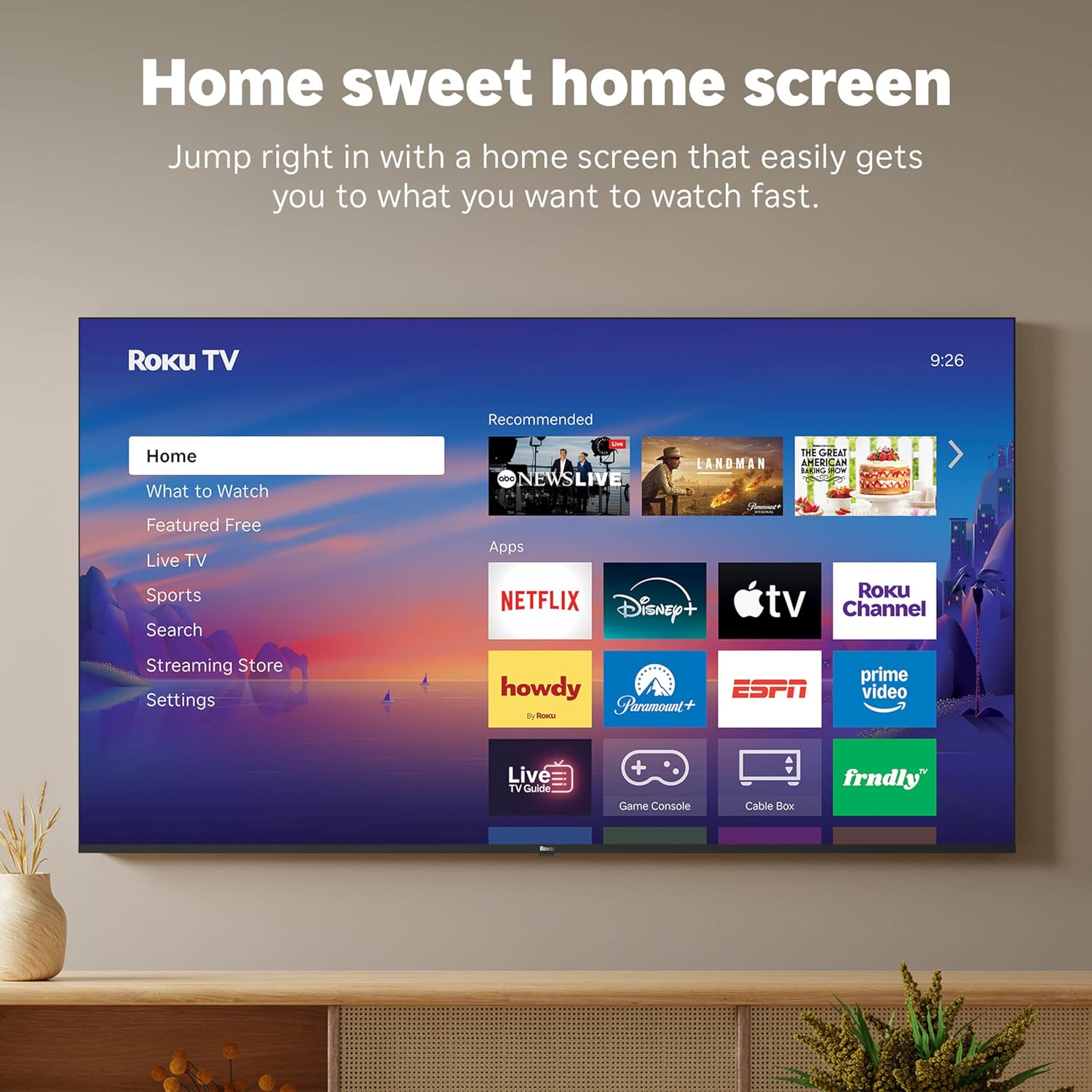
Figure 5: The Roku TV home screen interface.
- Use the directional pad on your remote to navigate through the menu options on the left side of the screen (Home, What to Watch, Live TV, Sports, Search, Streaming Store, Settings).
- Select an app icon from the main grid to launch your desired streaming service.
- The TV's fast Wi-Fi and optimized app launch ensure quick access to entertainment.
2.3 Configuració d'imatge i so
The Roku Select Series TV offers advanced picture and sound technologies for an enhanced viewexperiència.
- Pantalla QLED 4K: Provides sharp 4K resolution and accurate colors.
- Suport HDR10: Enhances contrast and color depth for compatible content.
- Roku Smart Picture: Automatically optimizes incoming TV signals and selects the appropriate picture mode for content.
- Dolby Audio: Delivers clear speech and enhanced sound quality through the integrated 2.1 channel speakers (20 Watts maximum output power).
- Bluetooth Headphone Mode: Connect Bluetooth headphones for private listening without disturbing others.
2.4 Control per veu i integració de la llar intel·ligent
Control your TV and integrate it into your smart home ecosystem.

Figure 6: Roku TV's smart home compatibility.
- Roku Voice: Use the voice button on your remote to search for content, launch apps, or control playback.
- Smart Assistant Compatibility: The TV is compatible with Siri, Alexa, and Google Assistant for voice control through external smart devices.
- Apple AirPlay: Share videos, photos, music, and more from your Apple devices directly to your TV.
2.5 Live TV Access
Access live television channels directly from the home screen.

Figure 7: Live TV channel guide interface.
- Connect an antenna to the TV's Antenna/Cable input.
- Use the 'Live TV' option on the home screen or the dedicated button on the remote to access the channel guide.
- The TV supports ATSC tuner type for digital broadcasts.
3. Manteniment
3.1 Neteja del televisor
- Desendolla sempre el televisor abans de netejar-lo.
- Feu servir un drap suau, sec i sense borrissol per netejar suaument la pantalla i la carcassa.
- Per a marques difícils, esbandiu lleugeramentampNetegeu el drap amb aigua o un netejador de pantalles suau i no abrasiu. No ruixeu el netejador directament sobre la pantalla.
- Eviteu utilitzar productes químics agressius, esponges abrasives o dissolvents, ja que poden danyar l'acabat del televisor.
3.2 Actualitzacions de programari
The Roku TV receives automatic software updates to provide new features and improvements. Ensure your TV is connected to the internet to receive these updates.
4. Solució De Problemes
If you encounter issues with your Roku TV, consider the following basic troubleshooting steps:
- Sense energia: Assegureu-vos que el cable d'alimentació estigui ben connectat tant al televisor com a una presa de corrent que funcioni. Proveu una altra presa de corrent.
- Sense imatge/so: Verify that the correct input source is selected. Check all cable connections (HDMI, antenna, etc.) for looseness.
- El comandament a distància no respon: Replace the AAA batteries in the remote control. Ensure there are no obstructions between the remote and the TV (though Bluetooth reduces this issue). Re-pair the remote if necessary (refer to Roku support documentation).
- Problemes de connexió de xarxa: Vés a Configuració > Xarxa > Comprova la connexió to diagnose network problems. Restart your router and modem.
- App Not Loading/Crashing: Try restarting the app. If the issue persists, remove the app and reinstall it from the Streaming Store.
- Mala qualitat d'imatge: Check your internet speed for streaming content. For broadcast TV, adjust your antenna. Ensure the TV's picture settings are appropriate for the content being viewed.
For more detailed troubleshooting or persistent issues, visit the Roku support website or consult the full User Manual PDF available online.
5. Especificacions
| Característica | Detall |
|---|---|
| Nom del model | Roku 55" Select Series 4K |
| Número de model | 55R5D5 |
| Mida de la pantalla | 55 polzades |
| Tecnologia de visualització | 4K UHD, LED, QLED |
| Resolució | 4K (3840 x 2160) |
| Freqüència d'actualització | 60 Hz |
| Format HDR compatible | HDR10, HDR10+, HLG |
| Picture Quality Enhancement | 4K, Roku Smart Picture |
| Potència de sortida d'àudio | 20 watts |
| Integrated Surround Sound | Dolby Audio |
| Tecnologia de connectivitat | Bluetooth, Ethernet, USB C, Wi-Fi |
| Ports HDMI | 3 |
| Ports USB | 1 |
| Sistema operatiu | Roku OS |
| Control de veu | Roku Voice, Siri, Alexa, Google Assistant |
| Mirall de pantalla | AirPlay 2, Miracast |
| Dimensions del producte (P x A x A) | 12.7 "P x 48.3" W x 30.5" H |
| Pes de l'article | 20.5 lliures |
| Estàndard de muntatge VESA | 200 x 100 mm |
| Consum d'energia | 160 watts |
| UPC | 829610009322 |
6. Garantia i Suport
6.1 Garantia limitada
Roku warrants the hardware of this device against defects in materials and workmanship under normal use for a period of un (1) any from the date of purchase (“Warranty Period”), provided it is used in accordance with the provided documentation.
If Roku determines that the device’s hardware is defective during the Warranty Period, Roku’s sole obligation, and your exclusive remedy, will be to either repair or replace the unit with either a new or rebuilt device, at its option.
Important information about warranty returns and replacements is available on the Roku support site.
6.2 Devolucions de productes
You may return a device for any reason, subject to the terms of the applicable return policy:
- Within thirty (30) days from the date of purchase from Roku.
- Within the applicable return period if purchased from an authorized reseller or distributor.
Additional details regarding product returns can be found on the Roku support site.
6.3 Suport addicional
For further assistance, including detailed guides and FAQs, please refer to the official Roku support website. A downloadable PDF version of the User Manual is also available for reference: Manual d'usuari (PDF).