
Introducció
The OneOdio Solocaster is a versatile 5-channel audio mixer designed for streaming, podcasting, karaoke, and general audio production. It features 48V phantom power for XLR microphones, Bluetooth connectivity, RGB lighting, and multiple input/output options for compatibility with PC, Mac, and mobile devices. This manual provides detailed instructions for setting up, operating, maintaining, and troubleshooting your Solocaster audio mixer.

Image: The OneOdio Solocaster audio mixer in a typical streaming setup, highlighting its core functionalities.
Guia de configuració
Follow these steps to connect and prepare your OneOdio Solocaster for use.
1. Unboxing i Inspecció Inicial
- Traieu amb cura tots els components de l'embalatge.
- Verify that all accessories are present: Solocaster mixer, USB-C cable, and user manual.
- Inspect the device for any signs of physical damage.
2. Connecting to Power and Device
- Connect the provided USB-C cable to the 'TYPE-C' port on the rear of the Solocaster.
- Connect the other end of the USB-C cable to your computer (PC/Mac) or a compatible USB power adapter (5V). The device will power on automatically.
- For mobile devices, use an appropriate adapter (not included) to connect the USB-C cable.

Image: Rear panel of the Solocaster, illustrating various connectivity options.
3. Connexions d'entrada d'àudio
- XLR Microphone: Connect your XLR microphone to the XLR/1/4" combo jack. If using a condenser microphone requiring phantom power, press the '48V' button on the mixer.
- 3.5mm Microphone/Headset: Connect a 3.5mm microphone or a gaming headset to the 'HEADSET' or 'HEADPHONE' jacks as appropriate.
- Línia d'entrada: Use the 'LINE IN' 3.5mm port to connect external audio sources like smartphones or other audio players.
- Bluetooth: Activate Bluetooth on the Solocaster by pressing the 'BT' button. Pair with your mobile device to stream background music wirelessly.

Image: Detail of the 48V phantom power feature for XLR microphones.
4. Connexions de sortida d'àudio
- Auriculars: Connect your monitoring headphones to the 'HEADPHONE' 3.5mm jack.
- Sortida de línia: Use the 'LINE OUT' 3.5mm port to connect to external speakers or another recording device.

Image: Comprehensive diagram of the Solocaster's compatibility and connectivity ports.
Instruccions de funcionament
Understand the controls and features of your Solocaster mixer.
1. Controls bàsics
- Faders: Adjust the volume levels for Microphone (Mic), Background Music (Music), and Headphones independently.
- Manilles: Control Echo, X-Volume (overall output volume), and Line Out volume.
- Mute Buttons: Individual mute buttons for Mic, Music, and Headphone channels provide instant silence.

Image: Front panel controls, including faders and mute buttons for independent channel management.
2. Voice Effects and Sound Pads
- Canviador de veu: Press the 'Voice Changer' button to cycle through 6 different voice modes: Female, Male, Kid, Old Man, Beast, and Robot.
- Coixinets de so: The four customizable sound pads can be programmed with your own audio clips (e.g., jingles, sound effects). Refer to the software instructions (if applicable) or device manual for programming details.

Image: Visual representation of the 6 creative voice-changing effects available on the Solocaster.
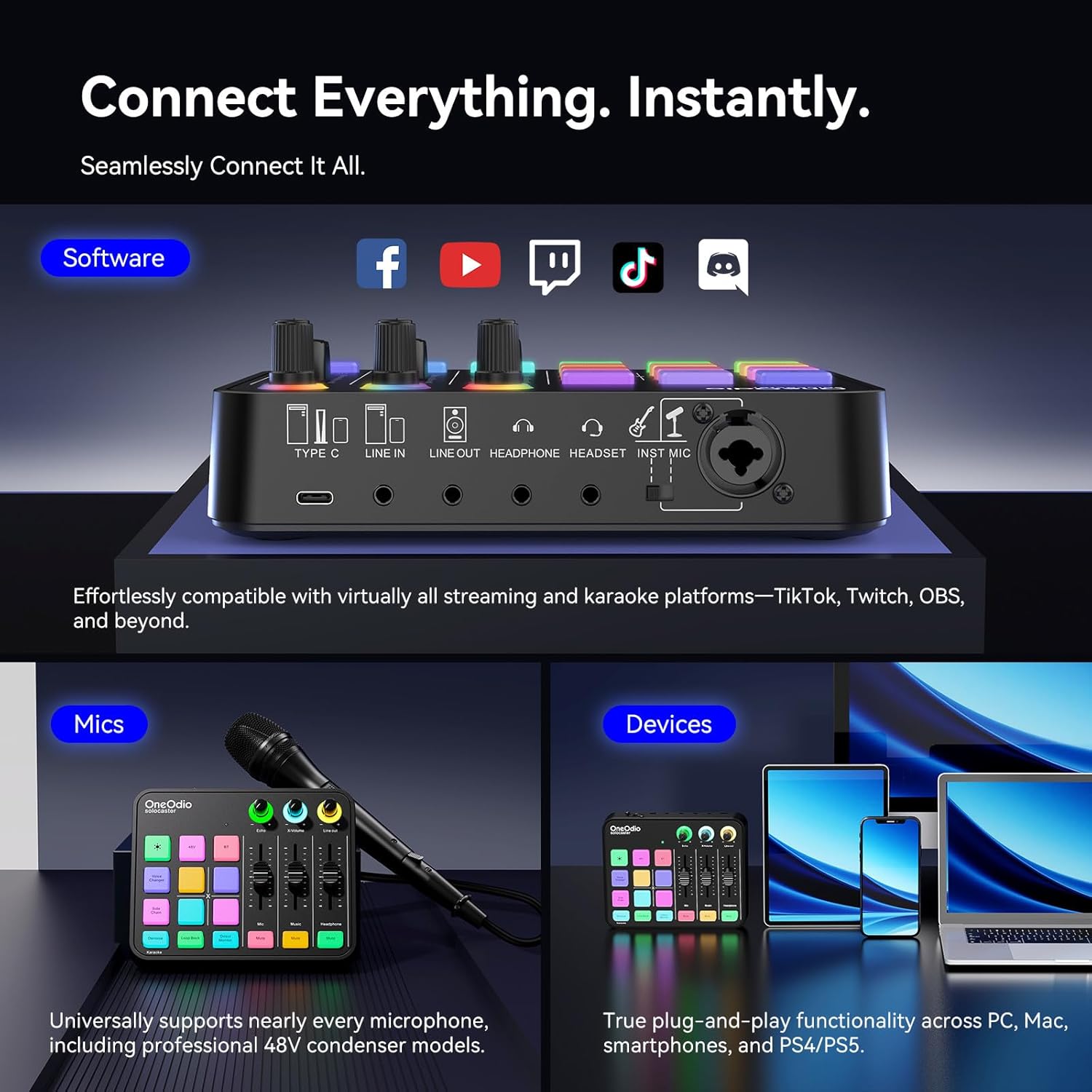
Image: Demonstrates the use of customizable sound effect pads for adding dynamic audio to streams.
3. Noise Reduction and Monitoring
- De soroll: Press the 'Denoise' button to activate one-tap noise reduction, filtering out ambient sounds like fan noise or keyboard clicks.
- Direct Monitor: The 'Direct Monitor' feature allows for zero-latency monitoring of your audio input through headphones, ensuring real-time feedback without delay.
- Auto Ducking: When enabled, this feature automatically lowers background music volume when you speak, ensuring your voice remains clear.

Image: Illustrates the noise reduction and side chain (ducking) features of the Solocaster.

Image: A user demonstrating the zero-latency direct monitoring function for real-time audio control.
4. Il·luminació RGB
The Solocaster features dynamic RGB lighting. Cycle through 11 lighting modes, including solid colors, smooth gradients, and rainbow cycles, to match your setup's aesthetic. The lighting can be adjusted or turned off as desired.

Image: The Solocaster showcasing its customizable RGB lighting modes.
5. Producte oficial acabatview Vídeo
Vídeo: Un funcionari ha acabatview of the OneOdio Solocaster Gaming Audio Mixer, demonstrating its features and functionality.
Manteniment
Proper care ensures the longevity and optimal performance of your Solocaster mixer.
- Neteja: Use a soft, dry cloth to wipe the surface of the mixer. Avoid abrasive cleaners or solvents.
- Protecció contra la pols: Keep the mixer in a clean environment and consider using a dust cover when not in use.
- Emmagatzematge: Guardeu el dispositiu en un lloc fresc i sec, allunyat de la llum solar directa i de temperatures extremes.
- Gestió de cables: Ensure cables are not kinked or strained to prevent damage to ports and connectors.
Resolució de problemes
Consulteu aquesta secció per obtenir solucions a problemes comuns.
| Problema | Causa possible | Solució |
|---|---|---|
| Sense poder | USB-C cable not connected or faulty; power source issue. | Ensure USB-C cable is securely connected to both the mixer and a working power source. Try a different USB port or power adapter. |
| Sense so de micròfon | Microphone not connected; Mic fader down; Mic mute active; 48V phantom power off (for condenser mics). | Check microphone connection. Raise the Mic fader. Deactivate Mic mute. Press the '48V' button if using a condenser mic. |
| Audio distortion or noise | Input gain too high; ambient noise; faulty cable. | Lower input gain. Activate 'Denoise' feature. Try different cables. Ensure proper grounding. |
| Bluetooth no connectat | Bluetooth not activated on mixer; device not in pairing mode; interference. | Press the 'BT' button on the mixer. Ensure your device's Bluetooth is on and in pairing mode. Move closer to the mixer. |
| No hi ha so dels auriculars | Headphones not connected; Headphone fader down; Headphone mute active. | Check headphone connection. Raise the Headphone fader. Deactivate Headphone mute. |
| Sound pads not working | Sound pads not programmed or incorrectly programmed. | Refer to the programming instructions for the sound pads. Ensure audio files estan carregats correctament. |
Especificacions
| Característica | Detall |
|---|---|
| Marca | OneOdio |
| Número de model | solocaster |
| Nombre de canals | 5 |
| Tecnologia de connectivitat | 3.5mm, Auxiliary, Bluetooth, USB-C, XLR |
| Font d'alimentació | Corded Electric (5 volts) |
| Entrada d'àudio | XLR, 3.5 mm, AUX, Bluetooth |
| Tipus de connector de sortida | 3.5mm, XLR |
| Pes de l'article | 450 g |
| Nivell de soroll | 0.1 db |
Informació de la garantia
The OneOdio Solocaster Gaming Audio Mixer comes with a 2 any de garantia des de la data de compra. Aquesta garantia cobreix els defectes de fabricació i garanteix que el producte funcioni tal com està previst en condicions d'ús normal. Si us plau, conserveu el comprovant de compra per a reclamacions de garantia.
For detailed warranty terms and conditions, please refer to the official OneOdio weblloc o contacteu amb el servei d'atenció al client.
Suport
For further assistance, technical support, or inquiries regarding your OneOdio Solocaster, please visit the official OneOdio website or contact their customer service department. You can often find FAQs, driver downloads, and contact information on the manufacturer's support pages.
Recursos en línia: OneOdio Official Weblloc