
1. Introducció
Thank you for choosing the ErGear Dual Monitor Arm. This manual provides detailed instructions for the safe and efficient installation, operation, and maintenance of your new monitor arm. Please read this manual thoroughly before installation and keep it for future reference.
This heavy-duty dual monitor arm is designed to fit most 17-34 inch flat or curved monitors, supporting up to 19.8 lbs per arm. It is compatible with VESA mounting patterns of 75x75mm or 100x100mm. The arm offers dynamic angle adjustments, including height adjustments up to 17.5 inches, extension up to 18.1 inches, +80°/-50° tilt, ±90° swivel, and 360° rotation. It also features upgraded cable clips for tidy cable management.
2. Informació de seguretat
- Ensure your monitor's VESA pattern, size, and weight are within the specified limits before installation.
- No supereu la capacitat de càrrega màxima de 9 kg per braç.
- Install the monitor arm on a sturdy desk surface. For C-clamp mounting, the desk thickness should be 0.39 to 2.56 inches (10-65mm). For grommet mounting, the desk thickness should be 0.39 to 2.95 inches (10-75mm).
- Only install on a wooden desk, preferably without a crossbeam blocking the underside.
- Always use appropriate tools and follow the installation steps carefully.
- Mantingueu els nens i les mascotes allunyats durant la instal·lació.
- Reviseu periòdicament tots els cargols i connexions per assegurar-vos que estiguin ben ajustats i segurs.
3. Contingut del paquet
Please verify that all components are present and undamaged. If any parts are missing or defective, contact customer support.
- Monitor Arm Assembly (2 arms)
- Base de muntatge d'escriptori (C-cl)amp i opcions de Grommet)
- Plaques VESA (2 unitats)
- Hardware Kit (various screws, washers, spacers for VESA mounting)
- Allen Keys (for adjustments)
- Clips de cable
4. Especificacions
| Característica | Detall |
|---|---|
| Marca | ErGear |
| Número de model | EGDMA70G-DS-US |
| Tipus de muntatge | Tabletop Mount (C-Clamp o Ullera) |
| Material | Acer d'aliatge |
| Color | Gris |
| Mida de pantalla compatible | 17-34 polzades |
| Capacitat de càrrega màxima | 19.8 lliures (9 kg) per braç |
| Compatibilitat VESA | 75x75mm, 100x100mm |
| Ajust d'alçada | Fins a 17.5 polzades |
| Extensió del braç | Fins a 18.1 polzades |
| Angle d'inclinació | +80°/-50° |
| Angle de gir | ±90° |
| Rotació | 360° |
| C-Clamp Gruix de l'escriptori | 0.39" a 2.56" (10-65 mm) |
| Gruix de l'escriptori Grommet | 0.39" a 2.95" (10-75 mm) |
5. Configuració i instal·lació
The ErGear Dual Monitor Arm offers a fast and tool-free VESA mounting system. Follow these steps for a secure installation.
5.1 Trieu la vostra opció de muntatge
You can choose between C-clamp mounting or grommet mounting based on your desk type and preference. Ensure your desk meets the thickness requirements.

Figure 1: Two Mounting Options. C-Clamp for desks 0.39" to 2.56" thick, Grommet for desks 0.39" to 2.95" thick.

Figure 2: C-Clamp and Grommet Hole Mounting Details.
5.2 Check Desk Compatibility
Verify your desk surface is suitable for mounting. It is recommended to install on a wooden desk. Ensure sufficient space and a flat surface underneath for the clamp.

Figure 3: Desk Compatibility Check for Clamp Dimensions.
5.3 Col·loqueu la placa VESA al monitor
Attach the VESA plate to the back of your monitor using the provided screws. Ensure the VESA pattern (75x75mm or 100x100mm) matches your monitor.
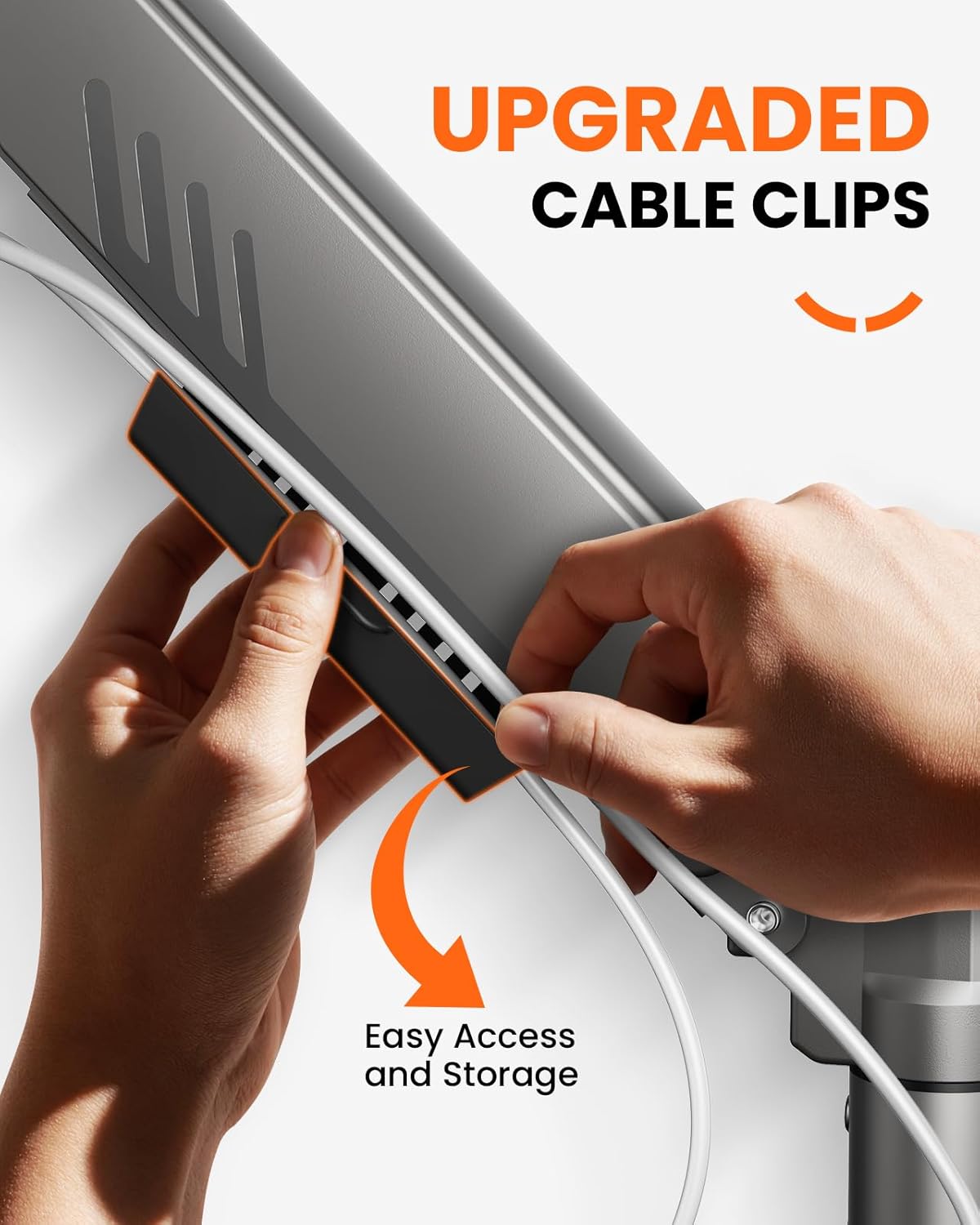
Figure 4: Attaching the VESA Plate to the Monitor.
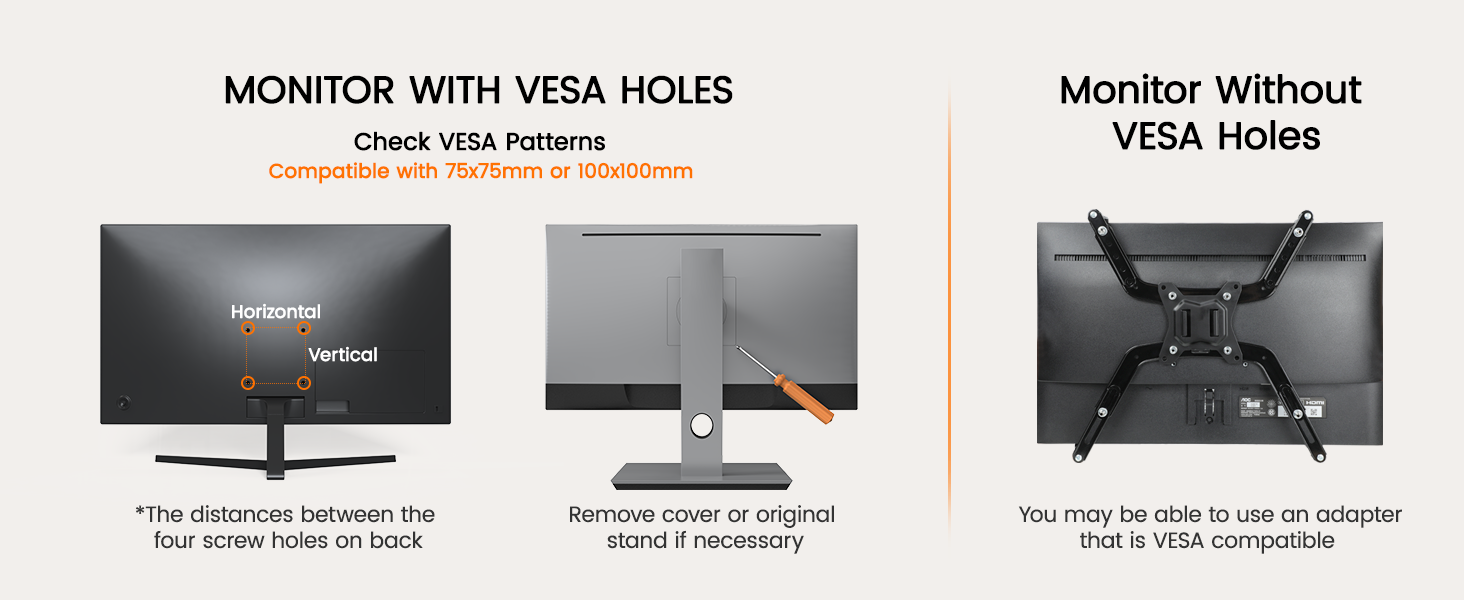
Figure 5: VESA Standard Compatibility.
5.4 Assemble and Mount the Arm
Assemble the arm sections and mount the base to your desk using either the C-clamp or grommet method. Then, slide the monitor (with attached VESA plate) onto the arm's VESA head and secure it.
Video 1: Monitor Stand Installation Introduction. This video demonstrates the general steps for installing the monitor arm, including attaching the base to the desk and mounting the monitor.
5.5 Gestió de cables
Utilize the integrated cable clips to route and organize your monitor cables along the arm, creating a clean and clutter-free workspace.

Figure 6: Upgraded Cable Clips for Tidy Management.
6. Instruccions de funcionament
The ErGear Dual Monitor Arm offers extensive adjustability for optimal viewcomoditat.
6.1 Ajust de la tensió de la molla de gas
After mounting your monitor, adjust the gas spring tension to ensure the arm holds the monitor's weight securely. If the monitor falls, increase tension by turning the bolt counter-clockwise. If it rises, decrease tension by turning the bolt clockwise. Hold the upper arm horizontally during adjustment.
Video 2: Adjusting Gas Spring Tension. This video demonstrates how to adjust the tension of the monitor arm to properly support your monitor's weight.
6.2 Inclinació, gir i rotació
The arm allows for +80°/-50° tilt, ±90° swivel, and 360° rotation. Adjust your monitors to the desired position for enhanced comfort and productivity.

Figure 7: Dynamic Angle Adjustments.

Figure 8: Raise to Eye Level for Comfortable Viewing.
7. Manteniment
- Regularly inspect all connections and screws to ensure they are tight.
- Netegeu el braç del monitor amb un drap suau iamp tela. Eviteu els netejadors abrasius.
- No intenteu desmuntar el mecanisme de la molla de gas.
8. Solució De Problemes
- Monitor is sagging or falling: Increase the gas spring tension by turning the adjustment bolt counter-clockwise.
- Monitor rises too easily: Decrease the gas spring tension by turning the adjustment bolt clockwise.
- Arm is wobbly: Assegureu-vos de tots els cargols de muntatge (eines d'escriptori)amp/grommet and VESA plate) are securely tightened. Check desk stability.
- Dificultat per ajustar la inclinació: Tighten or loosen the tilt head bolt as needed to achieve desired resistance.
9. Garantia i Suport
The ErGear Dual Monitor Arm comes with a 5-year warranty. For technical support, warranty claims, or any questions regarding your product, please visit the official ErGear Store or contact customer service.
Visit the ErGear Store: Botiga ErGear a Amazon